
الإشارات المرجعية
| المطوّر: | Gus Catalano (7) | ||
| السعر: | مجاني | ||
| الدرجة: | 1,020 فضة | ||
| الترتيب: | 0 | ||
| تعليقات: | 0 انشر تعليقًا | ||
| قوائم: | 0 0 | ||
| النقاط: | 0 | ||
| +1 نقطة | |||
ملخص
تعرّف على DriveVisualizer، تطبيق من Gus Catalano ضمن فئة «أدوات المطور».
يعمل حتى على HoloLens، Windows في الواقع المختلط.
يوجد حتى إصدار لـWindows Mobile. تحية من الماضي.
بلا مقابل، لا إعلانات ولا مشتريات داخلية. فقط أنت والتطبيق.
صدر ، وما زال حديثًا نسبيًا.
يتوفر إصدار حتى لـSurface Hub، لقاعات الاجتماعات الكبيرة.
درجة AppAgg هي 1,020. فضة، وهذا ليس سيئًا أبدًا.
28 ميغابايت فقط، حجم يناسب حتى القرص الممتلئ.
التصنيف العمري «EVERYONE»، أي أنه مناسب للأطفال أيضًا.
يتحدث لغة واحدة فقط، وليست العربية.
لم يقيّمه أحد على AppAgg بعد. فرصتك لتكون الأول الآن.
لدى هذا المطوّر 6 تطبيقات أخرى على AppAgg. ألقِ نظرة.
تريد أن تعرف بالتحديثات والتطبيقات الجديدة أولًا؟ تابع المطور أو اشترك في موجز RSS. تصلك الإشعارات عبر تطبيق AppAgg Alerts لنظامي Android وiOS.
منصات أخرى 0
سجل الأسعار 0
- السعر الحالي: مجاني
- الحد الأدنى: مجاني
- الحد الأقصى: مجاني
خلاصتك الخاصة في الصفحة الرئيسية
لقطات الشاشة 7
الوصف

unlike every other space analyzer, it keeps watching, so next time you'll know
exactly what grew, when, and by how much.
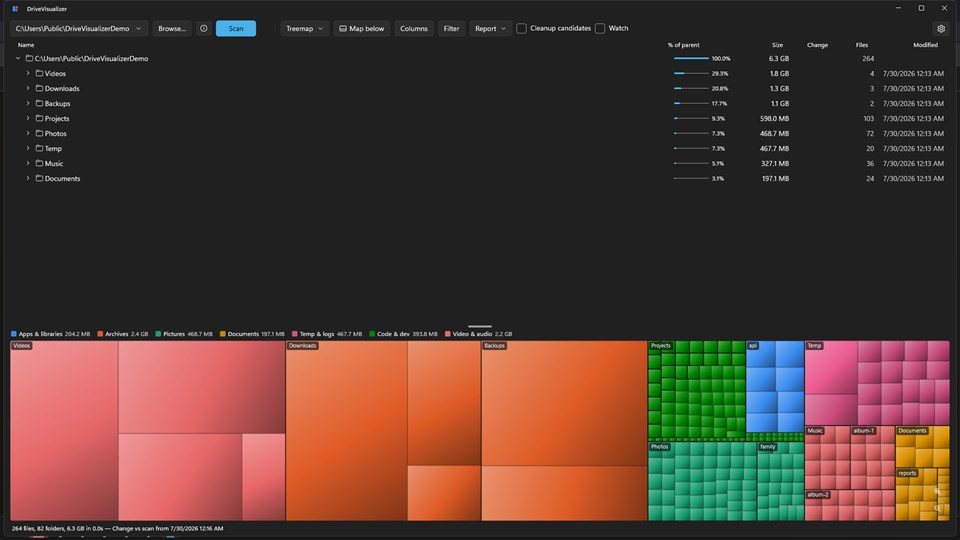
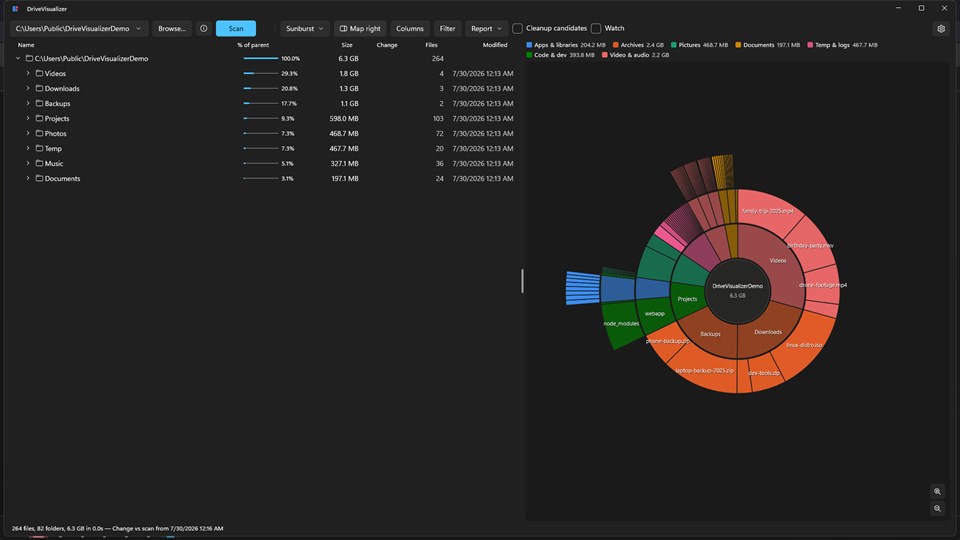
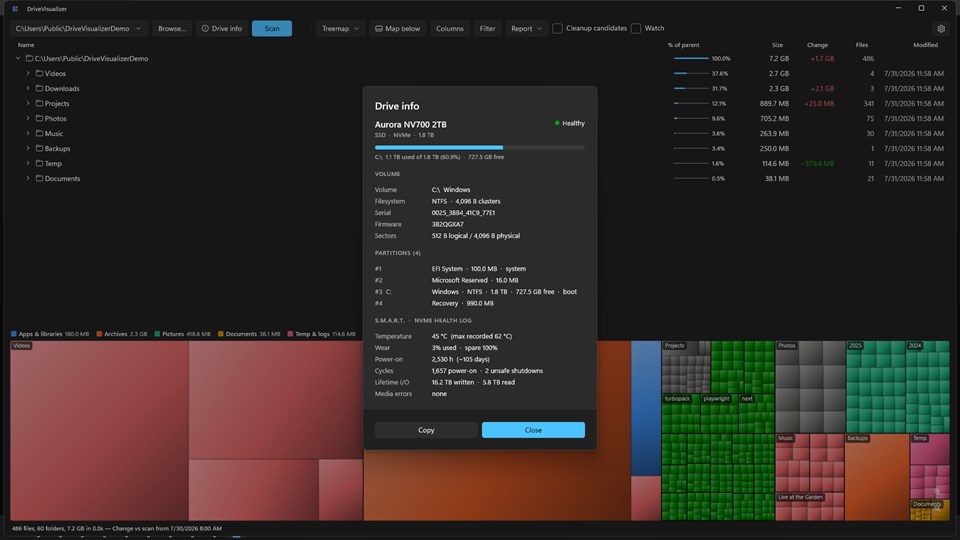
See your whole drive at once
A parallel scanner tears through a million files in seconds while the map builds
live in front of you. Explore the result as a classic cushion-shaded treemap,
a sunburst of rings, or a flame-style icicle view — every shape sized by what it
actually costs you on disk. Hover for details, click to jump to the folder tree,
double-click to dive deeper.
Colors that actually mean something
Video, pictures, code, archives, documents, temp & logs, apps, disk images — nine
categories, one legend, one-click filtering, and a colorblind-validated palette.
One glance tells you whether that mystery folder is your vacation footage or a
node_modules graveyard.
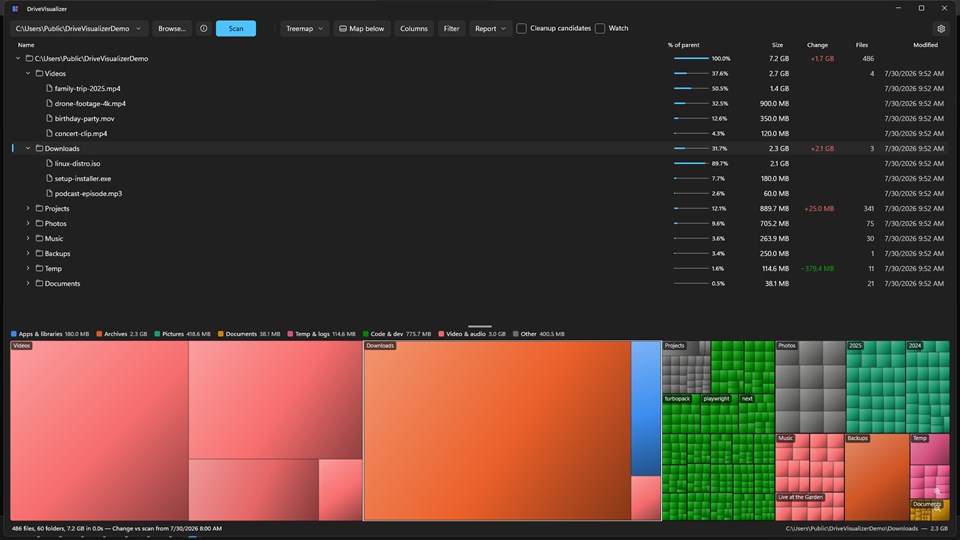
Catch what changed — the feature nobody else has
Every scan saves a snapshot. From then on:
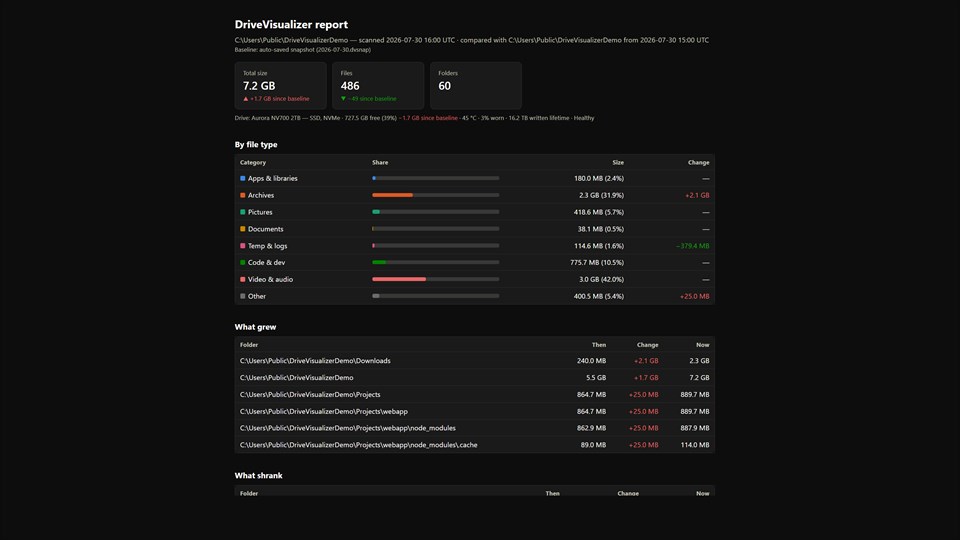
• A red/green Change column shows what grew and what shrank, folder by folder.
• One click opens a then/change/now report naming the exact folders and files
that moved.
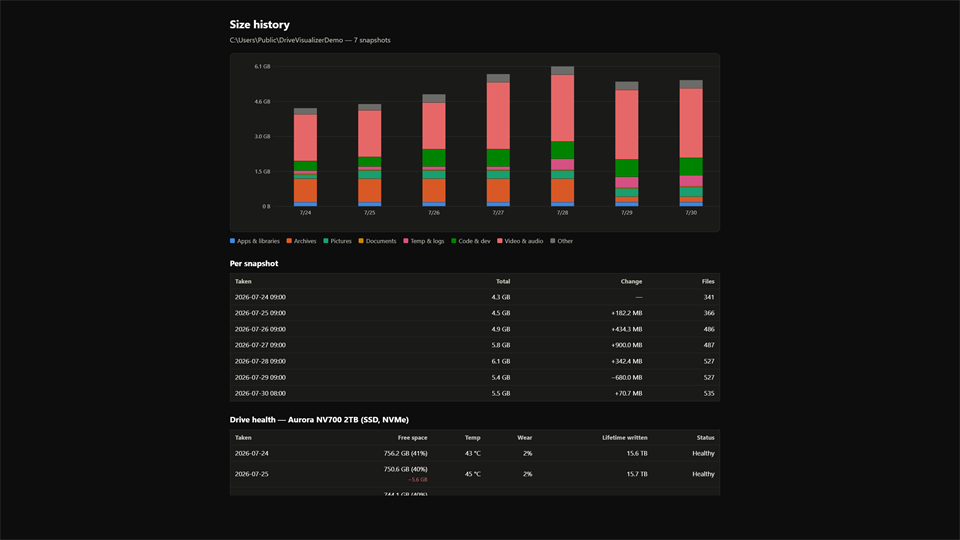
• Size history charts weeks of growth, stacked by category, snapshot by snapshot.
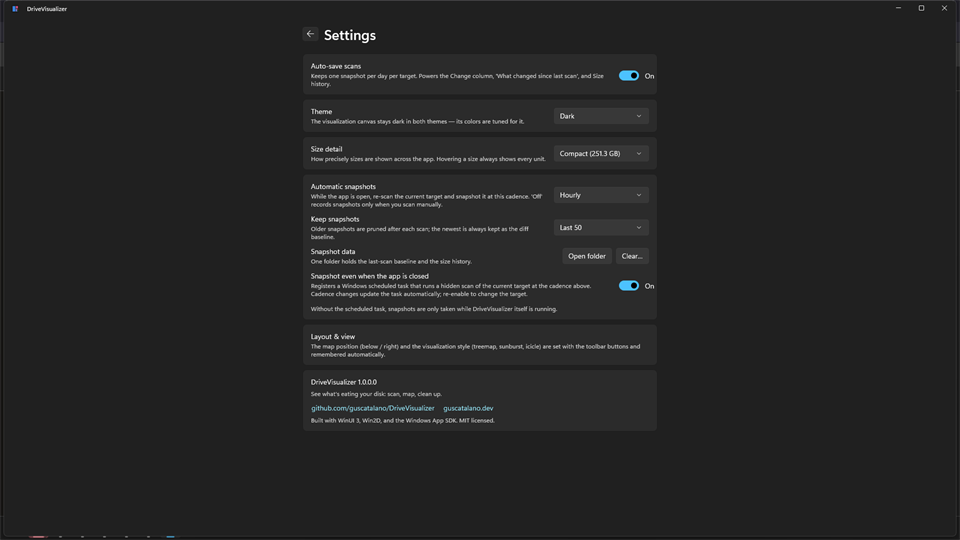
• Snapshots take themselves — hourly, daily, or weekly, even while the app is
closed — with retention limits you control. Come back from vacation and see
precisely what your PC did without you.
Clean up with confidence
Flip on "Cleanup candidates" to highlight only the safe wins: temp folders,
caches, logs, recycle bin, node_modules. Right-click anything to send it to the
Recycle Bin, delete it permanently, or compress it to a zip and drop the
original. Sizes update instantly as you go.
Know your drive's health
Full S.M.A.R.T. detail without running as administrator: temperature, wear,
power-on hours, lifetime data written, unsafe shutdowns, media errors — plus
model, bus (NVMe/SATA/USB), and SSD vs HDD. Health is stamped into every
snapshot, so you can watch wear and free space trend over months, not just
read today's numbers.
Accurate where it counts
Junctions and symlinks are never double-counted. 260+ character paths just work.
Compressed, sparse, and cloud-placeholder files report their true size on disk,
so the numbers add up to what Windows really uses.
Yours, privately
No accounts, no ads, no telemetry, no network access — your file names never
leave your machine. Free and open source (MIT) at
github.com/guscatalano/DriveVisualizer.
من المطوّر
قوائم 0
-
 DriveVisualizer
النقاط 0
-

- +1 نقطة

الترتيب 0
-
- تقييمك
المطوّر 7
- Gus Catalano
- المتابعون: 0
- المنصات: Windows تطبيقات (7)
- العروض: 0
- قوائم: 0 0
- النقاط: 0
- الترتيب: 0
- تعليقات: 0
- الفيديوهات: 0
- RSS: اشتراك
ما الجديد
- الإصدار: PC
- آخر تحديث:
معلومات إضافية
- تاريخ الإصدار:
- الفئة:
تطبيقات Windows›أدوات المطور - نظام التشغيل:
HoloLensMobilePCSurface Hub - الحجم:
28 Mb - اللغات المدعومة:
الإنجليزية - تقييم المحتوى:
EVERYONE - Windows Store تقييم: ¡
0 - الموقع الإلكتروني:
 http://guscatalano.dev
درجة AppAgg
درجة AppAgg التقديرية لـ
DriveVisualizer
المطوّر: Gus Catalano
تشير الدرجة الأعلى عادةً إلى أداء أفضل في مؤشرات AppAgg.
استنادًا إلى: الشعبية · تقييمات المستخدمين · الحداثة · العروض · بيانات المتاجر · نشاط المجتمع
يُعاد حسابها يوميًا بناءً على أحدث بيانات AppAgg.
تعليقات 0 ¡
مشاركة
DriveVisualizer عنوان URL مختصر: تم النسخ!- Windows Store

