
Salvos
Escolha o nome que será mostrado no seu menu Salvos.
Feito!
| Desenvolvedor: | Candy Bear Workstation (1) | ||
| Preço: | $5.33 | ||
| Avaliação: | 500 | ||
| Classificações: | 0 | ||
| Comentários: | 0 Postar comentário | ||
| Listas: | 0 + 0 | ||
| Pontos: | 0 + 0 ¡ | ||
| +1 Pontos | |||
Descrição

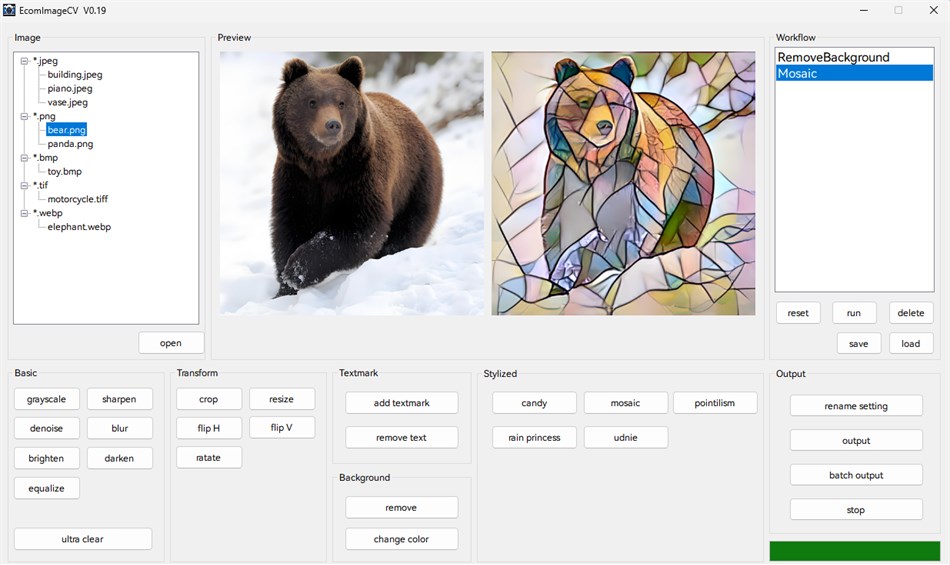
EcomImageCV is a powerful image processing software designed specifically for
e-commerce image processing. The software integrates multiple image processing
functions, including basic image processing, background removal, text removal,
image stylization, super resolution enhancement, and more. It supports batch
processing and workflow automation to help users efficiently complete image
processing tasks.
Key Features:
- Support for multiple image formats: JPEG, PNG, BMP, GIF, TIFF, WebP, TGA
- Intuitive graphical user interface
- Real-time preview functionality
- Batch processing support
- Workflow save and load
- AI-driven processing features such as super-resolution, text or object removal, background removal, Image style transformation.
2. Quick Start
2.1 Opening an Image
--------------------
- Click the "open" button to open an image file
- Supports drag-and-drop operation - drag image files directly into the software window
- Click a filename in the file list on the left to quickly switch images
2.2 Processing an Image
-----------------------
- Select the desired processing function from the function panel on the bottom, such as remove background, add textmark and so on.
- The processing result will be displayed in the preview area on the top
2.3 Saving an Processed Image
-------------------
- Click the "output" button to save a single processed image
- Select the output format (JPEG/PNG/BMP/TIFF/WebP)
- Output files will be saved in the "output" subfolder within the source file directory
2.4 Batch Image Processing
-------------------
- Click the "batch output" button to process all the image files in the source file directory, the processing will be based on the workflow on the right.
- Output files will be saved in the "output" subfolder within the source file directory
2.5 Example: Process images in batch: remove the background, add text watermarks, resize to 256x256, and change their format to png.
-------------------
- Click the "open" button to open an image file, all images that need to be processed should be placed in the same folder as this file.
- Click the "remove background" button to remove the image background.
- Click the "add textmark" button to add text watermark on image.
- Click the "resize" button to resize the image.
- Click the "batch output", choose the output format (PNG). Then all image files within the folder will be processed.
- Output files will be saved in the "output" subfolder within the source file directory.
For questions or suggestions, please contact the development team ( candybearws@163.com).
Thank you for using EcomImageCV!
Capturas de ecrã
Ad
Histórico de preços
- Preço atual: $5.33
- Mínimo: $5.33
- Máximo: $5.33
Monitorizar preços
Avaliação AppAgg
500
Avaliação AppAgg estimada de
EcomImageCV
500 Bronze
Avaliações mais altas geralmente indicam sinais mais fortes no AppAgg.
Com base em: popularidade · avaliações dos usuários · atualidade · ofertas · dados das lojas · atividade da comunidade
Recalculado diariamente com dados AppAgg atualizados.
URL abreviado: Copiado!
Novidades
- Versão: PC
- Última atualização:
Informações adicionais
- Data de lançamento:
- Categoria:
Windows Apps›Ferramentas de desenvolvedor - Sistemas operacionais:
PC - Tamanho:
511 Mb - Idioma compatível:
English - Classificação do conteúdo:
EVERYONE - Windows Store Avaliação:
0
Desenvolvedor
- Candy Bear Workstation
- Plataformas: Windows Apps (1)
- Listas: 0 + 0
- Pontos: 0 + 0 ¡
- Classificações: 0
- Comentários: 0
- Descontos: 0
- Vídeos: 0
- RSS: Subscrever
Listas (0)
0
- EcomImageCV
Pontos (0)
0
Classificações (0)
0
Comentários (0)
Seja o primeiro a comentar
Resumo
EcomImageCV URL abreviado: Copiado!- Compartilhar
- Windows Store
«EcomImageCV». Plataforma: Windows. Categoria: Ferramentas de desenvolvedor. Desenvolvedor: «Candy Bear Workstation». Primeiro lançamento: . Última atualização: . Preço atual: $5.33. Preço mais baixo registrado: $5.33. Preço mais alto registrado: $5.33. Este título ainda não recebeu classificações ou comentários no AppAgg. Idiomas disponíveis: English. AppAgg rastreia histórico de preços, classificações e feedback de usuários para «EcomImageCV». AppAgg não hospeda aplicativos nem distribui software. Todas as marcas registradas, logotipos e capturas de tela pertencem aos seus respectivos proprietários. Acompanhe futuros descontos e atualizações via RSS
Semelhantes
-
- Windows Terminal
- Windows Apps: Ferramentas de desenvolvedor Por: Microsoft Corporation
- Grátis
- Listas: 7 + 3 0 0
- Pontos: 5 + 9,022 10K Versão: PC The Windows Terminal is a modern, fast, efficient, powerful, and productive terminal application for users of command-line tools and shells like Command Prompt, PowerShell, and WSL. ... ⥯
-
- App Installer for Mobile - WinUI 3
- Windows Apps: Ferramentas de desenvolvedor Por: wherewhere
- Grátis
- Listas: 3 + 2 0 0
- Pontos: 20 + 4,115 8K Versão: PC Android™ App Installer for Windows 10/11 makes sideloading Android applications easy for WSA, Anbox, etc.: Just double-click the app package, and you won't have to run Android Debug ... ⥯
-
- Ubuntu on Windows
- Windows Apps: Ferramentas de desenvolvedor Por: Canonical Group Limited
- Grátis
- Listas: 2 0 0
- Pontos: 11 + 912 5K Versão: PC Ubuntu on Windows allows you to use Ubuntu Terminal and run Ubuntu command line utilities including bash, ssh, git, apt and many more. Please note that Windows 10 S does not support ... ⥯
-
- Arduino IDE
- Windows Apps: Ferramentas de desenvolvedor Por: Arduino LLC
- Grátis
- Listas: 0 + 2 0 0
- Pontos: 2 + 753 4K Versão: PC Arduino is an open-source electronics platform based on easy-to-use hardware and software. It's intended for anyone making interactive projects. IMPORTANT: This app performs with core ... ⥯
-
- DevToys
- Windows Apps: Ferramentas de desenvolvedor Por: etiennebaudoux
- Grátis
- Listas: 3 + 1 0 0
- Pontos: 5 + 677 7K Versão: PC An Open-Source Swiss Army knife for developers. DevToys helps in everyday tasks like formatting JSON, comparing text, testing RegExp. No need to use many untruthful websites to do ... ⥯
-
- Termius - Modern SSH Client
- Windows Apps: Ferramentas de desenvolvedor Por: Termius Corporation
- * Grátis
- Listas: 0 + 4 0 0
- Pontos: 8 + 540 38K Versão: PC Termius is a modern SSH client designed for productivity and collaboration. Connect with one click from desktop and mobile no re-entering IP addresses, ports, and passwords. With a ... ⥯
-
- TurboWarp
- Windows Apps: Ferramentas de desenvolvedor Por: Thomas Weber
- Grátis
- Listas: 0 0 0
- Pontos: 1 + 539 6K Versão: PC TurboWarp is a mod of the Scratch programming language with a compiler to run projects faster, dark mode, new extensions, a bunch of addons, and more. - Runs projects up to 100x faster ⥯
-
- Python 3.12
- Windows Apps: Ferramentas de desenvolvedor Por: Python Software Foundation
- Grátis
- Listas: 0 0 0
- Pontos: 1 + 466 4K Versão: PC Python is an easy to learn, powerful programming language. It has efficient high-level data structures and a simple but effective approach to object-oriented programming. Python s ... ⥯