
북마크
이 북마크의 제목을 입력하세요.
북마크가 저장되었습니다
| 개발자: | Rever Chan (1) | ||
| 가격: | $4.99 | ||
| 종합 점수: | 630 실버 | ||
| 순위: | 0 | ||
| 댓글: | 0 댓글 게시 | ||
| 목록: | 0 0 | ||
| 포인트: | 0 | ||
| +1 포인트 | |||
요약
소개합니다. Rever Chan에서 만든 ‘개발자 도구’ 카테고리 앱, Ex-Snap.
에 출시됐어요. 아직 꽤 따끈따끈해요.
$4.99, 그리고 AppAgg에서 지금까지 할인이 단 한 번도 없었어요. 만만치 않은 상대네요.
Microsoft Store는 Windows에 기본으로 들어 있어서 클릭 몇 번이면 설치돼요.
AppAgg 점수는 630. 실버 등급, 이 정도면 꽤 괜찮아요.
연령 등급은 ‘EVERYONE’, 아이들에게도 괜찮아요.
3개 언어를 지원하지만, 한국어는 아직 없어요.
AppAgg에서는 아직 아무도 평가하지 않았어요. 첫 번째가 될 기회는 바로 지금이에요.
AppAgg에 있는 이 개발자의 유일한 앱이에요. 아직까지는요.
할인, 업데이트, 새 앱 소식을 가장 먼저 받고 싶나요? 가격 알림을 설정하거나 개발자를 팔로우하거나 RSS 피드를 구독하세요. 푸시 알림은 Android와 iOS용 AppAgg Alerts 앱으로 받을 수 있어요.
광고
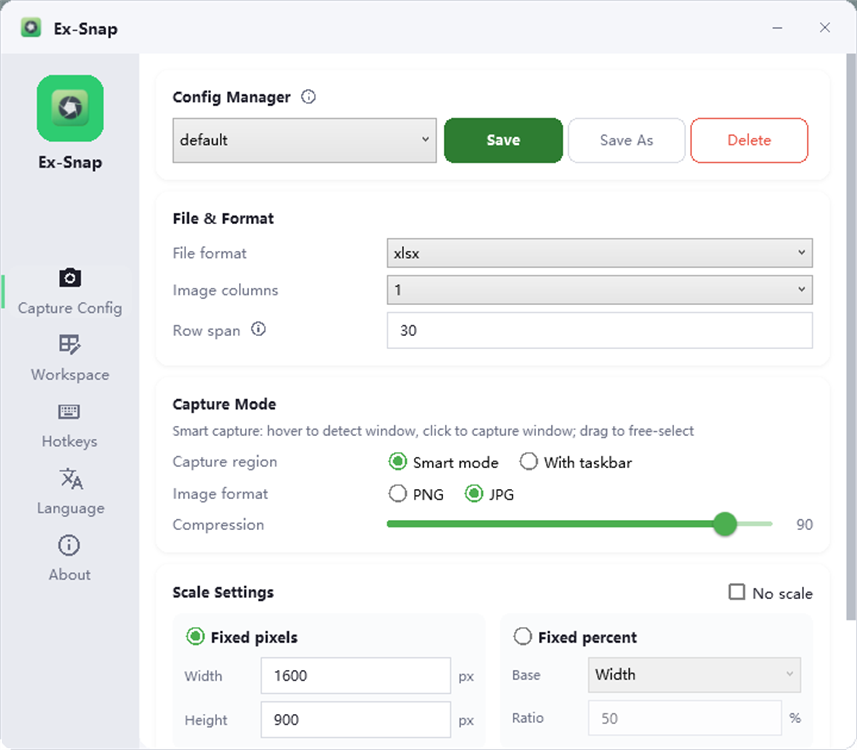
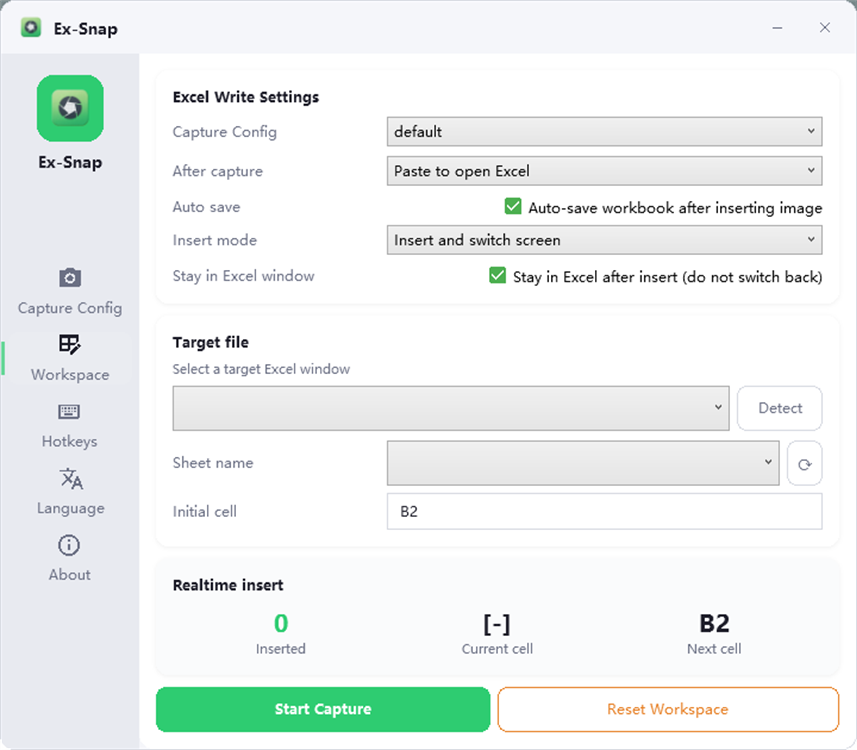
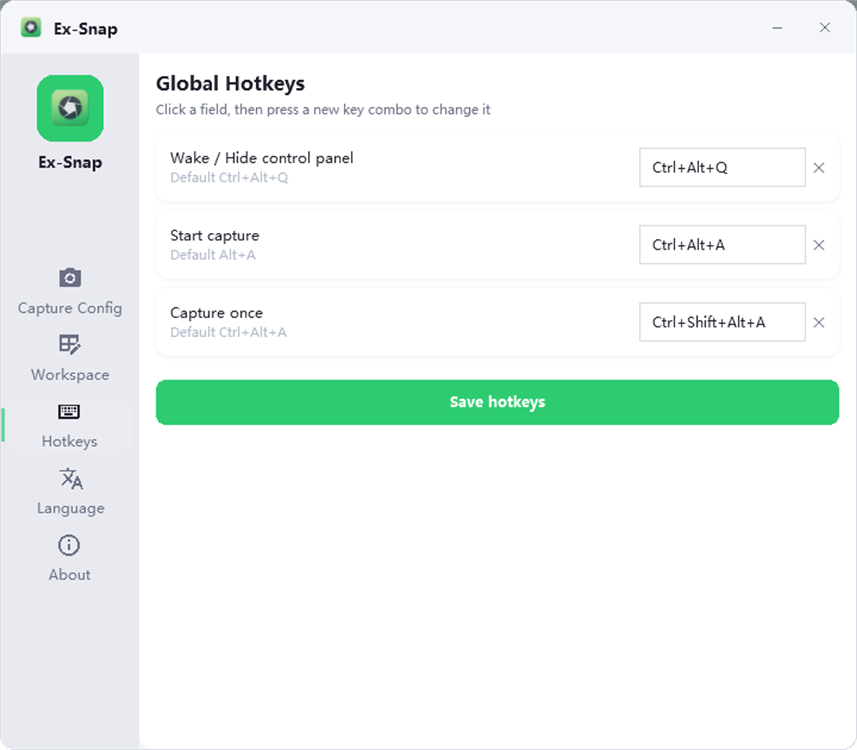
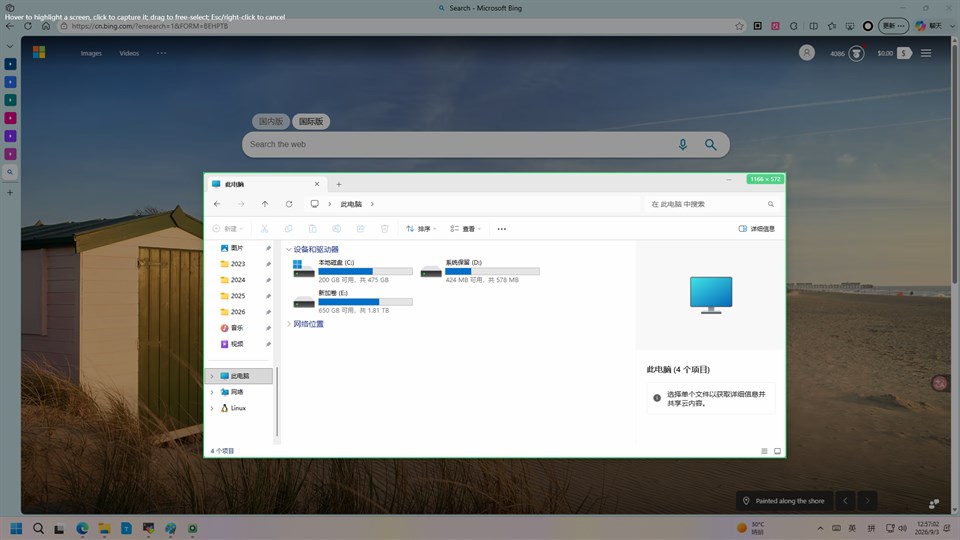
스크린샷 4
다른 플랫폼 0
가격 기록 0
- 현재 가격: $4.99
- 최소: $4.99
- 최대: $4.99
홈 화면의 나만의 피드
“신규 및 업데이트” 피드의 플랫폼을 선택하면 홈 화면에 필요한 앱과 게임만 표시됩니다.
설명

Do you often need to organize lots of screenshots into Excel? Doing it manually - capture, open Excel, paste, adjust row height, align - is tedious and time-consuming. Ex-Snap compresses all of this into a single action.
【Key Features】
■ Screenshot & auto-insert into Excel
- Two writing modes:
· Paste into open Excel: silent COM insertion, no extra steps
· Write to a closed file: edit .xlsx directly, no Excel installation needed
- Images are anchored to the target cell and arranged automatically by row spacing - one screenshot, one insertion
■ Smart capture
- Window capture: hover to highlight any window, click to capture
- Free-form capture: drag to select any screen region
- Multi-monitor support with DPI-aware scaling
■ Batch continuous capture
- Enter "armed" mode, press one hotkey per screenshot - each one is inserted into the next cell automatically
- Multi-column layout with adjustable row offsets, ideal for long capture sessions
■ Flexible customization
- Image format (PNG/JPG), size, compression quality, fixed-percentage scaling
- File size threshold reminder
- Multiple named capture profiles for different projects
■ Efficiency details
- Always available from the system tray
- Customizable global hotkeys (wake / start capture / quick snap)
- Auto-selects the target cell; optionally stays on the Excel window briefly for confirmation
■ Multilingual
- Chinese / English / Japanese, auto-detected from system language
【Typical Use Cases】
- Build software manuals / QA reports by arranging screenshots row by row in Excel
- Inventory checklists, data verification, screenshot-based logging
- Any repetitive task of turning screen content into Excel rows
【Privacy】Runs fully offline; screenshots stay on your device. No network, no upload.
Windows 10/11 (64-bit)
개발자 소식
개발자이신가요?
페이지 맨 위에 소식을 올리면 팔로워에게 이메일로 전달됩니다. YouTube 동영상을 추가하면 “동영상” 블록 맨 앞에 표시됩니다.
목록 0
-
 Ex-Snap
포인트 0
-

- +1 포인트

순위 0
-
- 내 평점
개발자 1
- Rever Chan
- 팔로워: 0
- 플랫폼: Windows 앱 (1)
- 할인: 0
- 목록: 0 0
- 포인트: 0
- 순위: 0
- 댓글: 0
- 동영상: 0
- RSS: 구독
새로운 기능
- 버전: PC
- 마지막 업데이트:
추가 정보
AppAgg 점수
630
AppAgg 예상 점수:
Ex-Snap
개발자: Rever Chan
630 실버
점수가 높을수록 대체로 AppAgg의 여러 지표에서 좋은 결과를 보인다는 뜻입니다.
기준: 인기 · 사용자 평점 · 최신성 · 할인 · 스토어 데이터 · 커뮤니티 활동
최신 AppAgg 데이터를 바탕으로 매일 다시 계산됩니다.
웹사이트용 배지:  복사됨!
댓글 0 ¡
가장 먼저 댓글을 남겨주세요
공유하기
Ex-Snap 단축 URL: 복사됨!- Windows Store


