
북마크
이 북마크의 제목을 입력하세요.
북마크가 저장되었습니다
| 개발자: | Keenan Cornelius Inc. (3) | ||
| 가격: | 무료 새로운 | ||
| 종합 점수: | 690 실버 | ||
| 순위: | 0 | ||
| 댓글: | 0 댓글 게시 | ||
| 목록: | 0 + 0 | ||
| 포인트: | 0 + 0 ¡ | ||
| +1 포인트 | |||
스크린샷
광고
설명

Setting up takes a few clicks and no terminal:
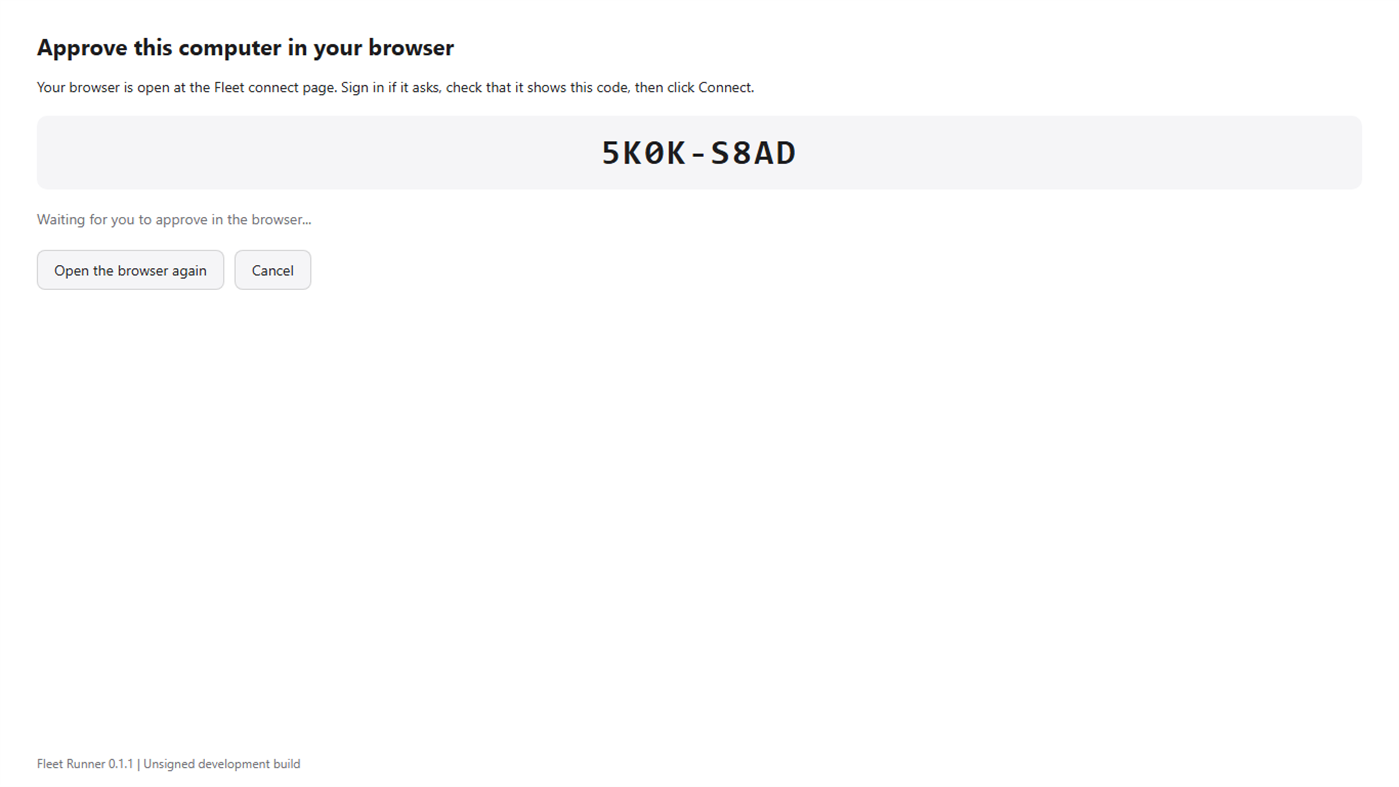
1. Connect. Fleet Runner shows a short code and opens the Fleet connect page in your browser. You sign in to your board, check that the code matches and approve this computer. No keys are copied or pasted.
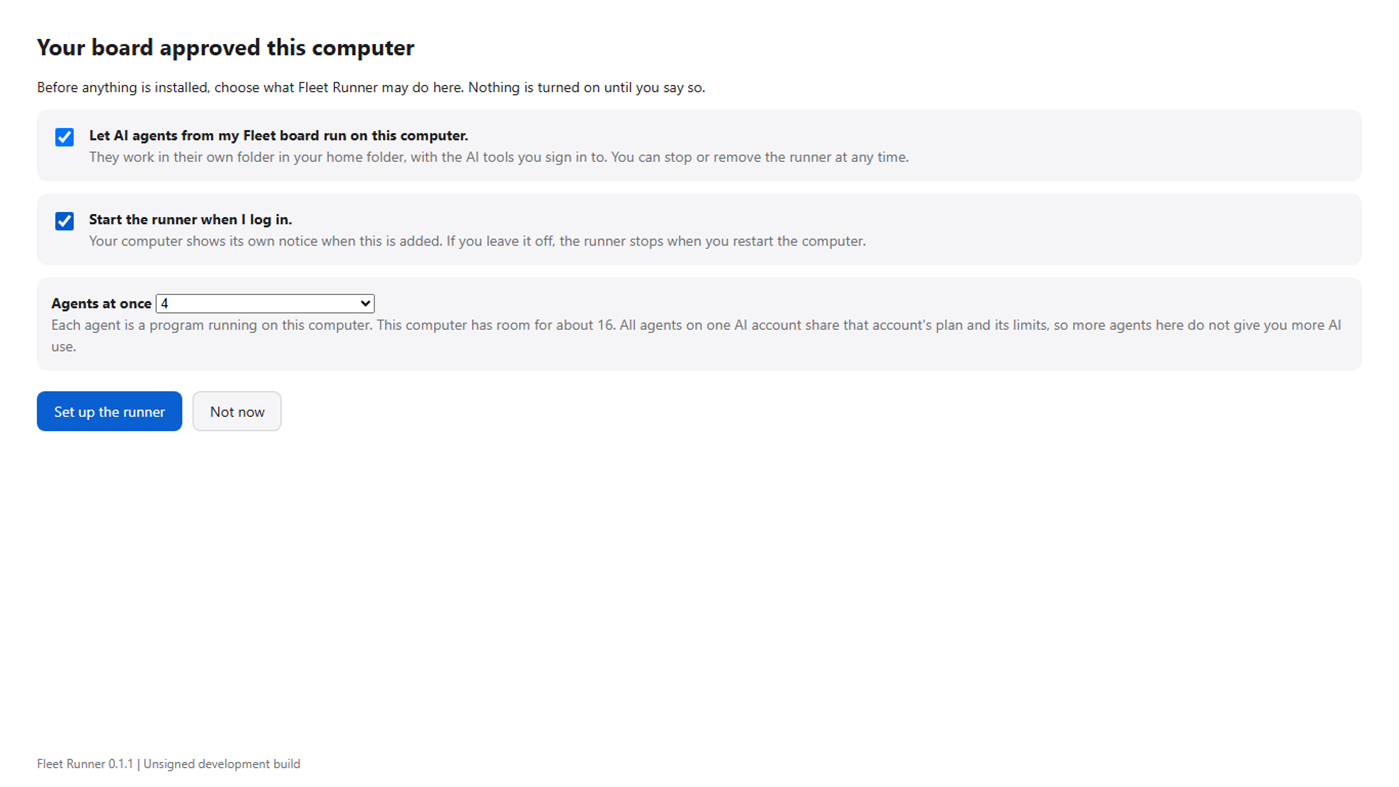
2. Choose. Before anything is installed you decide what Fleet Runner may do: let agents from your board run on this computer, and whether the runner starts when you log in. Both start switched off. You also choose how many agents may work at once, up to what this computer's memory allows.
3. Set up. Fleet Runner installs the runner in your own user folder, with no administrator rights, and shows each step as it happens.
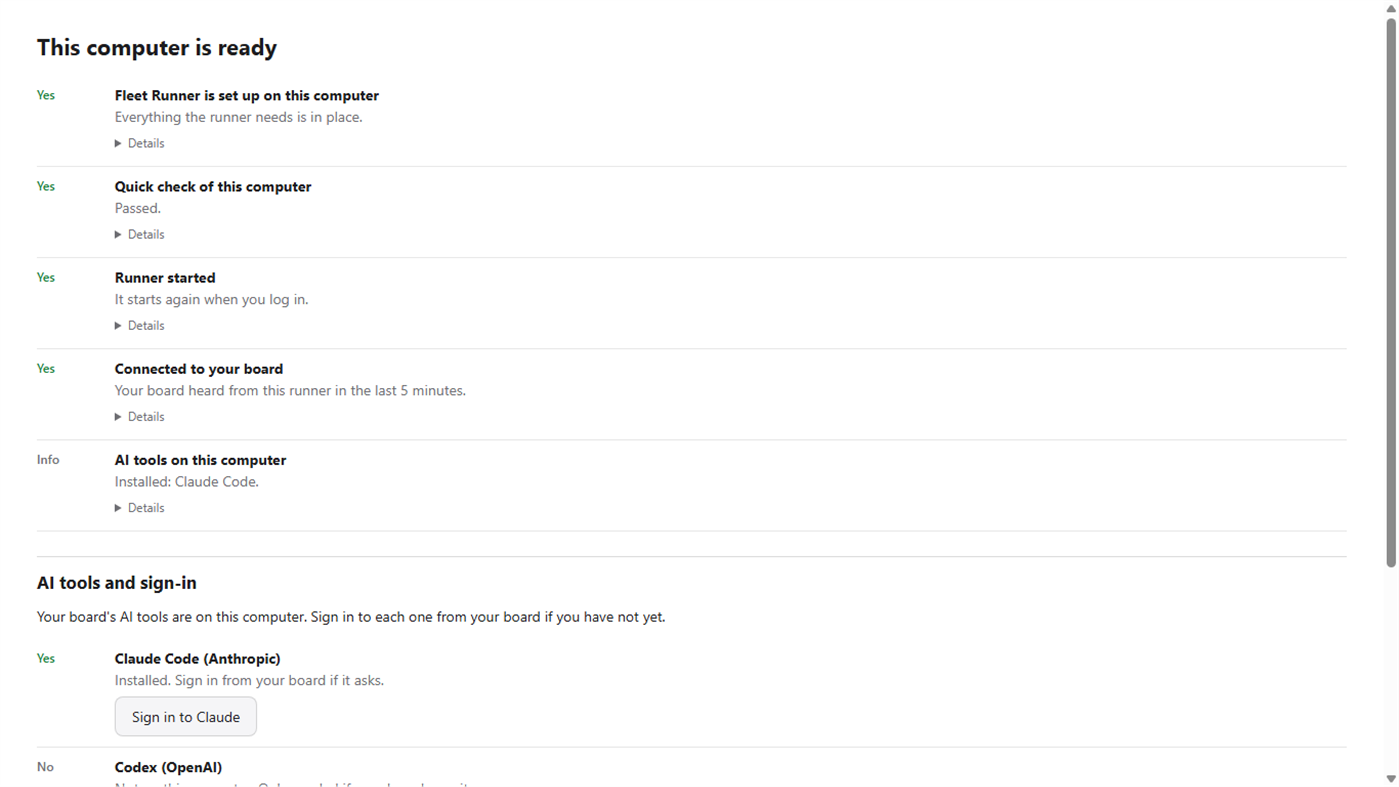
4. Check. A setup check says in plain words whether the runner is installed, passed its own quick check, started and was heard from by your board. If something is wrong it says what, with one button to fix or retry it.
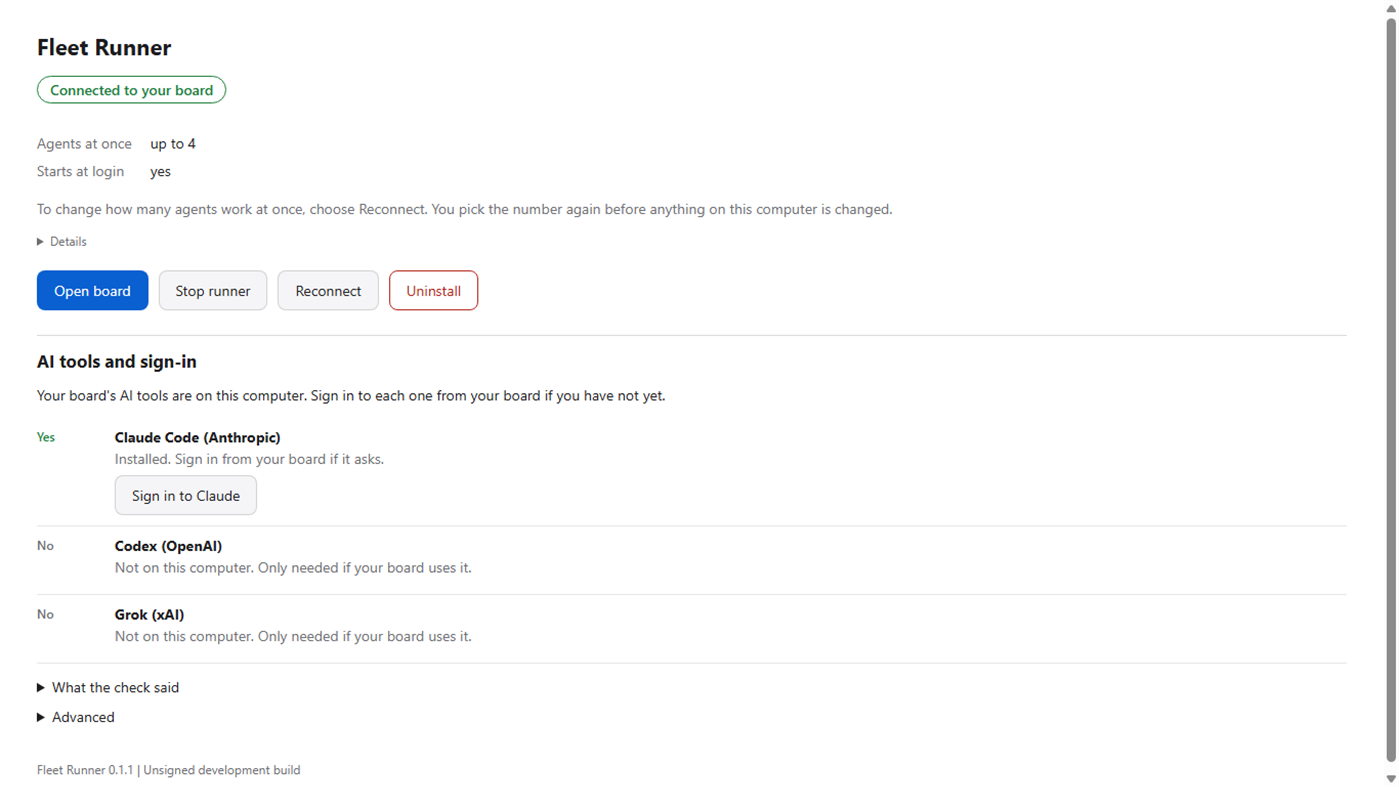
After that, the status screen shows whether the runner is connected, how many agents may work at once and whether it starts at login. From there you can open your board, stop and start the runner, reconnect this computer, or uninstall the runner, which stops it and deletes what Fleet Runner installed, including the saved runner key.
AI tools. Your board decides which AI coding tools its agents use. Fleet Runner shows which of them are on this computer. It installs a tool only when you click Install for that one tool, and only from that vendor's own official installer. Signing in to a tool happens on your board's own sign-in page and in the vendor's tool; Fleet Runner never reads or stores those credentials.
A Fleet board account is required. Fleet Runner does nothing until you approve this computer from your board.
Requirements: Windows 10 version 1809 (build 17763) or later, 64-bit (x64), and an internet connection.
Support: keenan@legionajj.com
Website: https://fleetharness.ai
다른 플랫폼
| Fleet RunnerWindows Store690 실버현재 페이지 | 무료 |
현재 이 스토어에서만 이용할 수 있습니다.
가격 내역
- 현재 가격: 무료
- 최소: 무료
- 최대: 무료
목록 (0)
0
- Fleet Runner
포인트 (0)
0
순위 (0)
-

- 내 평점

댓글 (0) ¡
가장 먼저 댓글을 남겨주세요
개발자
- Keenan Cornelius Inc.
- 팔로워: 0
- 플랫폼: iOS 앱 (2) Windows 앱 (1)
- 할인: 0
- 목록: 0 + 0
- 포인트: 0 + 70 ¡
- 순위: 0
- 댓글: 0
- 동영상: 0
- RSS: 구독
새로운 기능
- 버전: PC
- 마지막 업데이트:
추가 정보
 https://fleetharness.ai
AppAgg 점수
690
AppAgg 예상 점수:
Fleet Runner
개발자: Keenan Cornelius Inc.
690 실버
점수가 높을수록 대체로 AppAgg의 여러 지표에서 좋은 결과를 보인다는 뜻입니다.
기준: 인기 · 사용자 평점 · 최신성 · 할인 · 스토어 데이터 · 커뮤니티 활동
최신 AppAgg 데이터를 바탕으로 매일 다시 계산됩니다.
웹사이트용 배지:  복사됨!
복사됨!
요약
Fleet Runner 단축 URL: 복사됨!- Windows Store
AppAgg에서 앱 ‘Fleet Runner’의 정보를 확인할 수 있습니다. 개발자: Keenan Cornelius Inc.. 플랫폼: Windows. 카테고리: 개발자 도구. AppAgg 점수: 690 (실버). 이 앱의 AppAgg 포인트: 확인된 포인트 0, 간접 포인트 0. 이 앱이 포함된 공개 목록: 0개. 비공개 목록에 저장한 사용자: 0명. AppAgg 사용자가 아직 이 앱에 별점을 남기지 않았습니다. 확인된 포인트는 로그인한 AppAgg 사용자가 스토어로 이동한 기록을 반영합니다. 간접 포인트는 스토어 데이터를 바탕으로 합니다. 두 숫자는 공개 목록 수와 비공개 목록에 저장한 사용자 수를 나타냅니다. 이 앱의 최초 출시일은 입니다. 이 앱의 마지막 업데이트 날짜는 입니다. 이 앱은 현재 무료로 이용할 수 있습니다. 이 앱은 다음 언어를 지원합니다: English. 가격 기록을 확인하거나 앱을 목록에 추가하고 개발자를 팔로우할 수 있습니다. 이 앱의 향후 할인과 업데이트는 RSS 피드에서 확인할 수 있습니다. AppAgg는 이 앱을 호스팅하거나 배포하지 않습니다. 이 앱과 관련된 모든 상표, 로고 및 스크린샷은 각 소유자에게 귀속됩니다.
이런 앱은 어떠세요?
최근 대화
 앱LocalDub – Real-Time Game Dubbing Hello Kırtay Interactive, I am using LocalDub - Real-Time Game Dubbing. I would like to know if Hind...
  rashid game5
  앱NauticPlayer This app is absolute cinema. Honestly, it’s one of the best media players I’ve ever tried, and I’m s...
  Manuel16
  앱Screen Beings - Desktop Pet & Study Companion This is my app so I’m a little bias but as someone from the ADHD community that teaches ADHD and neu...
  Tarelle Irwin6
  앱Aadi vault good it ia a encrypter and good you my work on office
  Aditya Rai5
  앱Typing 365 | Daily Typing Trainer The best typing app ever. With Typing 365 you don’t have to force yourself for couple minutes traini...
  Ahmad Mozaffar5
  앱Zefir Calendar — Calendar in the Taskbar excelente app! Superando todas as espectativas!
  Diógenes Magnus5
  앱LockinRa LockinRa 리뷰 LockinRa는 작업 관리, 집중력 도구, AI 코칭을 하나의 데스크톱 앱으로 통합한 무료 Windows 생산성 프로그램입니다. 클라우드 동기화 없이 로컬 ...
  abhilok reddy6
  앱CN Vault I Love this app CN Vault is a user-friendly app that helps keep your passwords safe and secure. If y...
  Marjuk Amin5
