
ブックマーク
このブックマークのタイトルを入力してください。
ブックマークを保存しました
| 開発者: | KimchiCoder (1) | ||
| 価格: | 無料 新着 | ||
| スコア: | 720 シルバー | ||
| ランキング: | 0 | ||
| コメント: | 0 コメントを投稿する | ||
| リスト: | 0 0 | ||
| ポイント: | 0 | ||
| +1 ポイント | |||
概要
こちらはH.WorkBox。KimchiCoderが贈る「開発者ツール」カテゴリのアプリです。
にリリース。冷蔵庫の牛乳よりも若いんです。
無料。広告なし、アプリ内課金なし。あなたとアプリだけです。
Microsoft StoreはWindowsに組み込まれているので、数クリックでインストールできます。
AppAggスコアは720。「シルバー」なら、なかなかのものです。
年齢区分は「EVERYONE」なので、子どもでも安心です。
4言語に対応していて、日本語もあります。
ここはまだ静まり返っています。評価もコメントもなし。沈黙を破ってみませんか?
AppAggにあるこの開発者のアプリはこれだけ。今のところは。
アップデートや新しいアプリを誰よりも早く知りたい?開発者をフォローするか、RSS フィードを購読しましょう。プッシュ通知は Android と iOS 向けの AppAgg Alerts アプリで届きます。
広告
スクリーンショット 4
他のプラットフォーム 0
価格履歴 0
- 現在の価格: 無料
- 最小値: 無料
- 最大値: 無料
ホームに自分だけのフィード
「新着・アップデート」のプラットフォームを選ぶと、ホームには必要なアプリとゲームだけが表示されます。
説明

EVERYDAY TOOLS
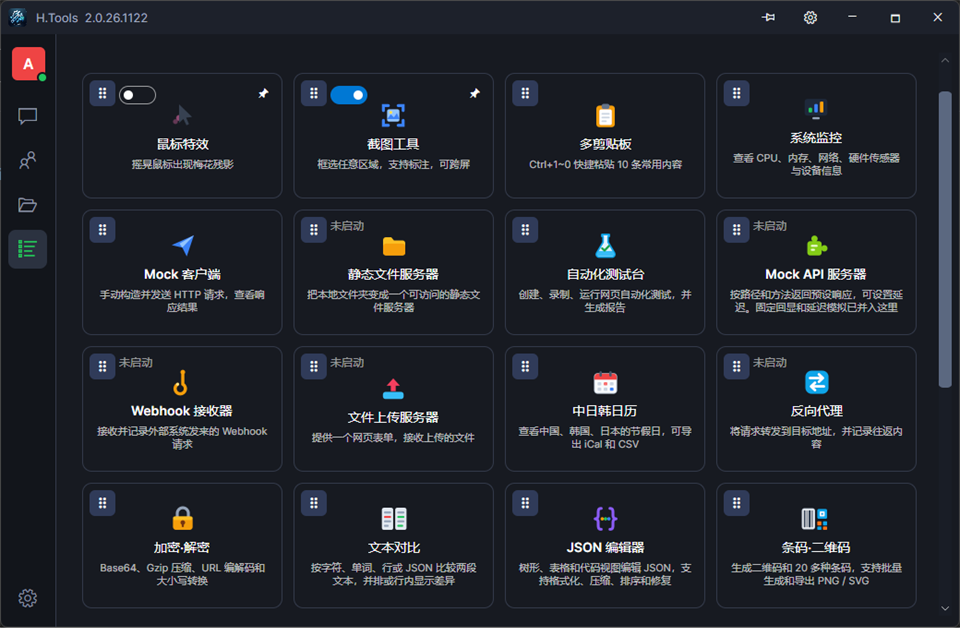
• Screenshots: drag to select any region or hover over a window and click it; works across multiple monitors and DPI scales. Annotate with rectangles, ellipses (outlined or filled), lines, arrows, a pen, text and mosaic; copy to the clipboard, save as PNG, or pin to the screen.
• Multi-clipboard: keep 10 text or image snippets and paste them with Ctrl+1 to Ctrl+0.
• Mouse effect: shake the mouse quickly to leave a plum-blossom trail; shape, color, size and duration are adjustable.
• System monitor: live CPU, memory and network charts, CPU/GPU temperatures, and details about the processor, motherboard, graphics card, memory, disks and network adapters.
• Port viewer: see which program is using a local port, search, and end the process.
DEVELOPER TOOLS
• Mock client: build and send HTTP requests by hand and inspect the responses, with recent request history.
• Mock server / Mock API server: return preset status codes, headers and bodies by method and path, optionally with delay, and log every request received.
• Static file server, upload server, webhook receiver, reverse proxy and latency simulator (for testing slow networks).
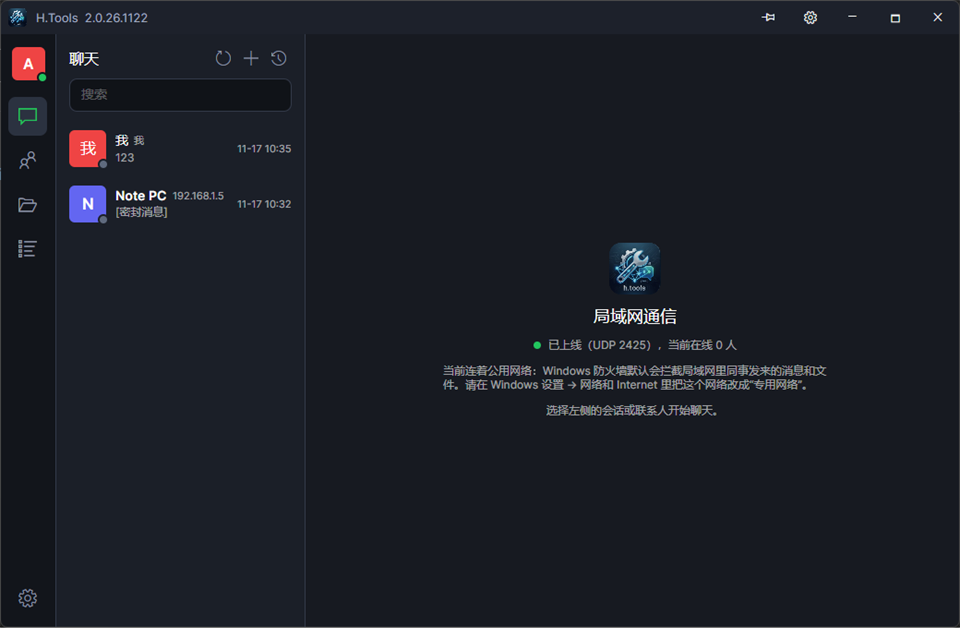
LAN CHAT (IM MODE)
• Speaks the original IP Messenger protocol, so colleagues on the same network appear in your contacts automatically. No account, no cloud server; chat history stays on your PC.
• One-to-one chat, group send, file and folder transfer, sending screenshots directly, auto-reply when away; encryption and signing; reply right from the system notification.
• Tested against IP Messenger 5.9.1 and iptux 0.8.3. Choose "Private networks" in the Windows Firewall prompt the first time you go online.
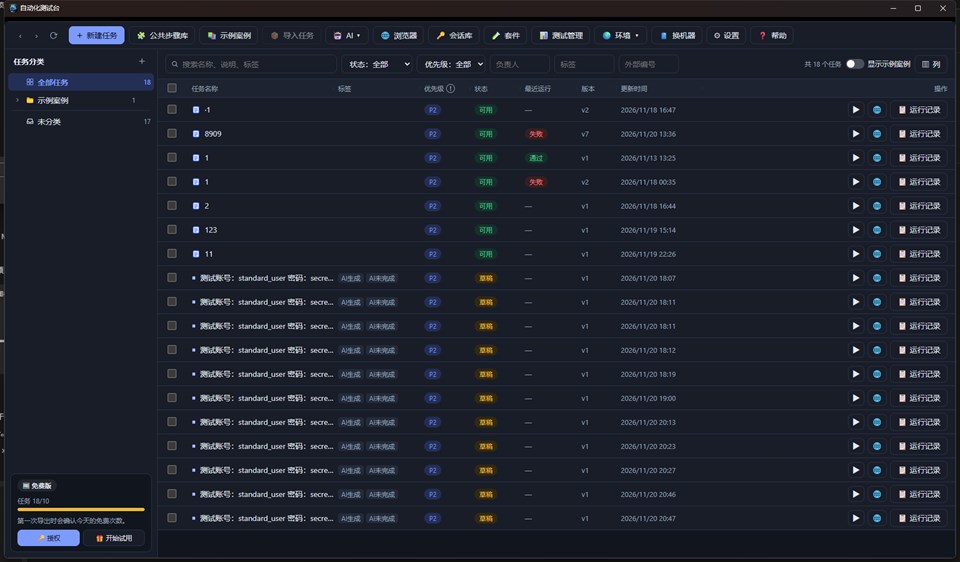
TEST DESK
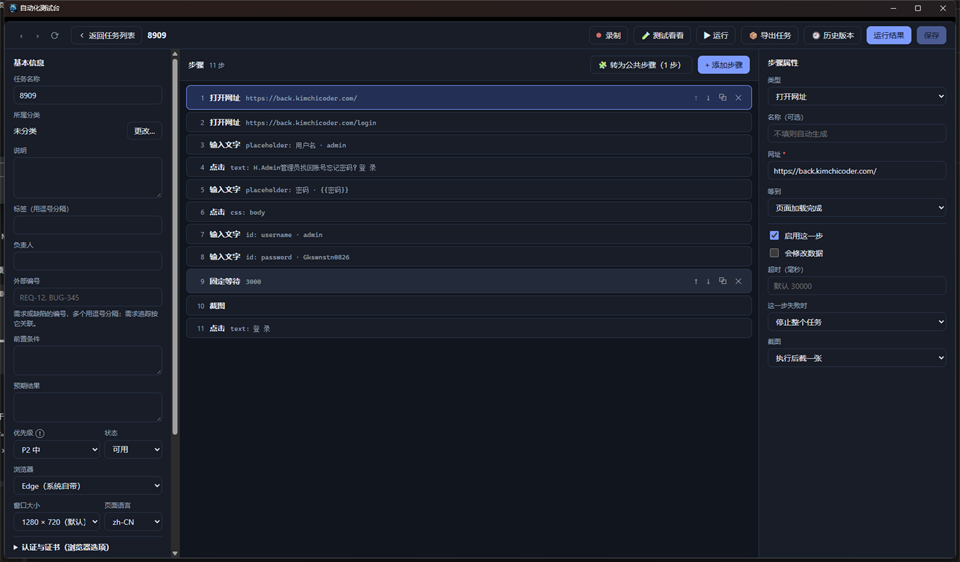
• Web test automation: record your actions or edit steps by hand; every step is captured as a screenshot, and failures save a full-page image.
• Each recorded element keeps several locators, so tasks survive small page changes; trial runs, debugging and post-run replay; network control and visual comparison.
• HTML and Excel reports; command-line runs and continuous-integration support.
• Free and licensed editions: in the free edition, recording, editing, running and replay are unlimited and need no internet — the limits are on scale, such as the number of tasks. The licensed edition (trial / monthly / yearly / lifetime) removes the limits and adds parallel runs, schedules, data-driven tests and AI-assisted task creation. AI is off by default and experimental.
MORE ONLINE TOOLS
Built-in KimchiCoder online tools (internet required): JSON editor, text diff, regular expressions, JWT decoder, barcodes and QR codes, Mermaid diagrams, ERD editor, code formatter, CJK holiday calendar and more.
APP FEATURES
• App center: all tools as cards with search, pinning and drag-to-reorder; add your own local programs or web addresses.
• Interface in 简体中文, English, 日本語 and 한국어, with dark and light themes.
• Always-on-top window, start with Windows, minimize to the tray.
• One-click "new machine" transfer: export all settings to a file and import them on another PC; secrets are left out unless you set a password; a backup is made before importing and a failure rolls everything back.
PRIVACY
No account, no cloud server, no analytics. Settings, chat history, clipboard content and screenshots stay on your PC. The app goes online only for features you use (online tools, addresses you enter, license activation) and sends your data to neither the author nor any third party otherwise.
SYSTEM REQUIREMENTS
Windows 10 (1809 or later) or Windows 11, 64-bit. The .NET runtime is included. Some hardware temperature sensors need administrator rights or motherboard/graphics drivers to be readable. Web content uses the Microsoft Edge WebView2 runtime that ships with Windows.
デベロッパーから
デベロッパーの方ですか?
ページの一番上にニュースを投稿すると、フォロワーにメールで届きます。YouTube 動画を追加すると、「動画」の一番上に表示されます。
開発者
- KimchiCoder
- フォロワー: 0
- プラットフォーム: Windows アプリ (1)
- セール: 0
- リスト: 0 0
- ポイント: 0
- ランキング: 0
- コメント: 0
- 動画: 0
- RSS: 購読する
リスト 0
-
 H.WorkBox
ポイント 0
-

- +1 ポイント

ランキング 0
-
- あなたの評価
新機能
- バージョン: PC
- 最終更新:
- • The app is now called H.WorkBox (formerly H.Tools).
• New Test Desk: record or hand-edit web automation tests, screenshot every step, generate HTML / Excel reports, run from the command line and in CI; free and licensed editions.
• New LAN chat (IM mode): IP Messenger compatible; one-to-one chat, group send, file and folder transfer, direct screenshots, encryption and signing, no account or server needed.
• New "new machine" transfer: export all settings to a file and import them on another PC, with preview, automatic backup and one-click undo.
• New port viewer and more online tools (JSON, regex, JWT, Mermaid, ERD and more).
• Screenshots: after selecting, drag the box to move it and double-click inside it to copy and finish; the Screenshot settings page gains a how-to-use guide.
• The Mouse Effect and Screenshot settings pages have a new layout and now fill the whole window.
• You can now install and update through the Microsoft Store.
情報
 https://www.kimchicoder.com/
コメント 0 ¡
最初のコメントを書きましょう
AppAggスコア
720
AppAgg推定スコア:
H.WorkBox
開発者: KimchiCoder
720 シルバー
スコアが高いほど、AppAgg上の各指標が良好な傾向にあります。
基準: 人気 · ユーザー評価 · 新しさ · セール · ストアデータ · コミュニティ活動
最新のAppAggデータに基づいて毎日再計算されます。
ウェブサイト用バッジ:  コピーしました!
H.WorkBox 短縮 URL: コピーしました!- Windows Store

