
북마크
이 북마크의 제목을 입력하세요.
북마크가 저장되었습니다
스크린샷
광고
설명

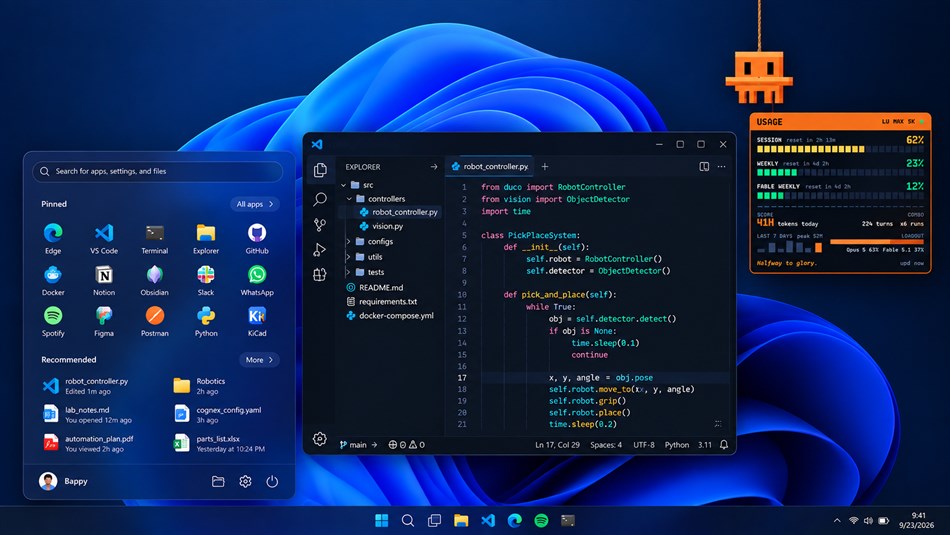
Move the cursor up near the top edge and a blocky orange fellow swings down into view on a rope, blinks at you, and follows the pointer with his eyes. Move away and he scrambles back up out of sight. He never takes a click, never steals focus and never appears in the taskbar — the overlay is click-through, so whatever you are working on carries on as if he were not there.
THE USAGE HUD
When a rate-limit window moves by ten percent, or every half hour, or the moment you ask, he drops in holding up a translucent game-style HUD:
• Health bars for your 5-hour session window, your 7-day window and any model-scoped window your account draws from, turning green to amber to orange to red as they fill
• Today's tokens as your score, today's turns and sessions as your combo, and the week as a tiny bar chart
• A loadout bar showing which models did the work
• Floating damage numbers — "+12%", or "-31% RESET" — for whatever changed since he last told you
• A one-liner about how it is going, and a face to match: he squints when a window gets warm, goes wide-eyed and sweats past ninety percent, and gives a happy squint after a reset
You decide when he turns up: on hover, on a schedule, when a window moves by a set amount, at launch, or only when you press the hotkey. If nobody has touched the machine for a few minutes he waits until you are back rather than performing to an empty chair.
WHERE THE NUMBERS COME FROM
The live limits come from one request to Anthropic's usage endpoint, authorised with the access token Claude Code already saved on this machine. The daily and weekly stats are read from Claude Code's own transcript files on your disk. Nothing is uploaded, there is no account to make, no telemetry and no analytics. The token is read, sent as the authorisation header of that one request, and never written down, logged or copied anywhere.
The live limits need Claude Code installed and signed in. The local score works without it, and when a sign-in lapses he keeps showing the last live numbers while their windows are still open and says so plainly.
MAKE HIM YOURS
Press Ctrl+Alt+M and setup mode opens: drag the trigger region anywhere on any monitor, set how big he is and how far down he hangs, pick one of three colours — orange, red or amber — and choose how often he should drop in. Everything is saved and waiting next time.
HOTKEYS
• Ctrl+Alt+M — setup mode
• Ctrl+Alt+U — show the usage HUD now
• Ctrl+Alt+Q — quit
They are global, so they work from whatever app has focus.
BUILT TO STAY OUT OF THE WAY
Once he is parked off-screen the animation stops entirely and the app drops to a slow cursor poll, so he costs nothing while you are elsewhere on the screen. He is drawn from a pixel grid and a couple of springs — no game engine, no browser, no background service.
Hangabout is free. There is no account to make and nothing to subscribe to. What it reads on your PC, the one request it makes, and everything it does not collect are set out in full at https://www.ohidur.com/hangabout/privacy
다른 플랫폼 (0)
| HangaboutWindows Store현재 페이지 | 무료 |
현재 이 스토어에서만 이용할 수 있습니다.
가격 내역
- 현재 가격: 무료
- 최소: 무료
- 최대: 무료
목록 (0)
0
- Hangabout
포인트 (0)
0
순위 (0)
0
댓글 (0) ¡
가장 먼저 댓글을 남겨주세요
새로운 기능
- 버전: PC
- 마지막 업데이트:
- 1.0.0 - First Microsoft Store release.
What you get:
- A desk mascot who hangs from the top of the screen and comes down when the
cursor gets close
- A usage HUD with health bars for the 5-hour, weekly and model-scoped Claude
Code rate limits, today's tokens and turns, and a seven-day chart
- Visits on hover, on a schedule, when a limit moves, or on Ctrl+Alt+U
- Setup mode (Ctrl+Alt+M) for the trigger region, his size, how far he hangs,
the colour and how often he drops in
- Install from the Store and he appears in the Start menu, with a "hangabout"
command in Windows Terminal and an off-by-default switch under
Settings > Apps > Startup for starting him with Windows
- Settings and state live in the app's own folder and go away cleanly when you
uninstall
추가 정보
AppAgg 점수
570
AppAgg 예상 점수:
Hangabout
개발자: ORB Apps
570 브론즈
점수가 높을수록 대체로 AppAgg의 여러 지표에서 좋은 결과를 보인다는 뜻입니다.
기준: 인기 · 사용자 평점 · 최신성 · 할인 · 스토어 데이터 · 커뮤니티 활동
최신 AppAgg 데이터를 바탕으로 매일 다시 계산됩니다.
웹사이트용 배지:  복사됨!
복사됨!
요약
Hangabout 단축 URL: 복사됨!- Windows Store
AppAgg에서 앱 ‘Hangabout’의 정보를 확인할 수 있습니다. 개발자: ORB Apps. 플랫폼: Windows. 카테고리: 개발자 도구. AppAgg 점수: 570 (브론즈). 이 앱의 AppAgg 포인트: 확인된 포인트 0, 간접 포인트 0. 이 앱이 포함된 공개 목록: 0개. 비공개 목록에 저장한 사용자: 0명. AppAgg 사용자가 아직 이 앱에 별점을 남기지 않았습니다. 확인된 포인트는 로그인한 AppAgg 사용자가 스토어로 이동한 기록을 반영합니다. 간접 포인트는 스토어 데이터를 바탕으로 합니다. 두 숫자는 공개 목록 수와 비공개 목록에 저장한 사용자 수를 나타냅니다. 이 앱의 최초 출시일은 입니다. 이 앱의 마지막 업데이트 날짜는 입니다. 이 앱은 현재 무료로 이용할 수 있습니다. 이 앱은 다음 언어를 지원합니다: English. 가격 기록을 확인하거나 앱을 목록에 추가하고 개발자를 팔로우할 수 있습니다. 이 앱의 향후 할인과 업데이트는 RSS 피드에서 확인할 수 있습니다. AppAgg는 이 앱을 호스팅하거나 배포하지 않습니다. 이 앱과 관련된 모든 상표, 로고 및 스크린샷은 각 소유자에게 귀속됩니다.
이런 앱은 어떠세요?
최근 대화
 앱NauticPlayer This app is absolute cinema. Honestly, it’s one of the best media players I’ve ever tried, and I’m s...
  Manuel16
  앱Screen Beings - Desktop Pet & Study Companion This is my app so I’m a little bias but as someone from the ADHD community that teaches ADHD and neu...
  Tarelle Irwin6
  앱Aadi vault good it ia a encrypter and good you my work on office
  Aditya Rai5
  앱Typing 365 | Daily Typing Trainer The best typing app ever. With Typing 365 you don’t have to force yourself for couple minutes traini...
  Ahmad Mozaffar5
  앱Zefir Calendar — Calendar in the Taskbar excelente app! Superando todas as espectativas!
  Diógenes Magnus5
  앱LockinRa LockinRa 리뷰 LockinRa는 작업 관리, 집중력 도구, AI 코칭을 하나의 데스크톱 앱으로 통합한 무료 Windows 생산성 프로그램입니다. 클라우드 동기화 없이 로컬 ...
  abhilok reddy6
  앱CN Vault I Love this app CN Vault is a user-friendly app that helps keep your passwords safe and secure. If y...
  Marjuk Amin5
