
บุ๊กมาร์ก
ตั้งชื่อสำหรับบุ๊กมาร์กนี้
บันทึกบุ๊กมาร์กแล้ว
| ผู้พัฒนา: | Ahmet Ardıl Ural (1) | ||
| ราคา: | $29.99 ใหม่ | ||
| คะแนน: | 600 เงิน | ||
| การจัดอันดับ: | 0 | ||
| ความคิดเห็น: | 0 โพสต์ความคิดเห็น | ||
| รายการ: | 0 + 0 | ||
| แต้ม: | 0 + 0 ¡ | ||
| +1 แต้ม | |||
ภาพหน้าจอ
โฆษณา
คำอธิบาย

YOUR AI AGENTS. ONE ROOM.
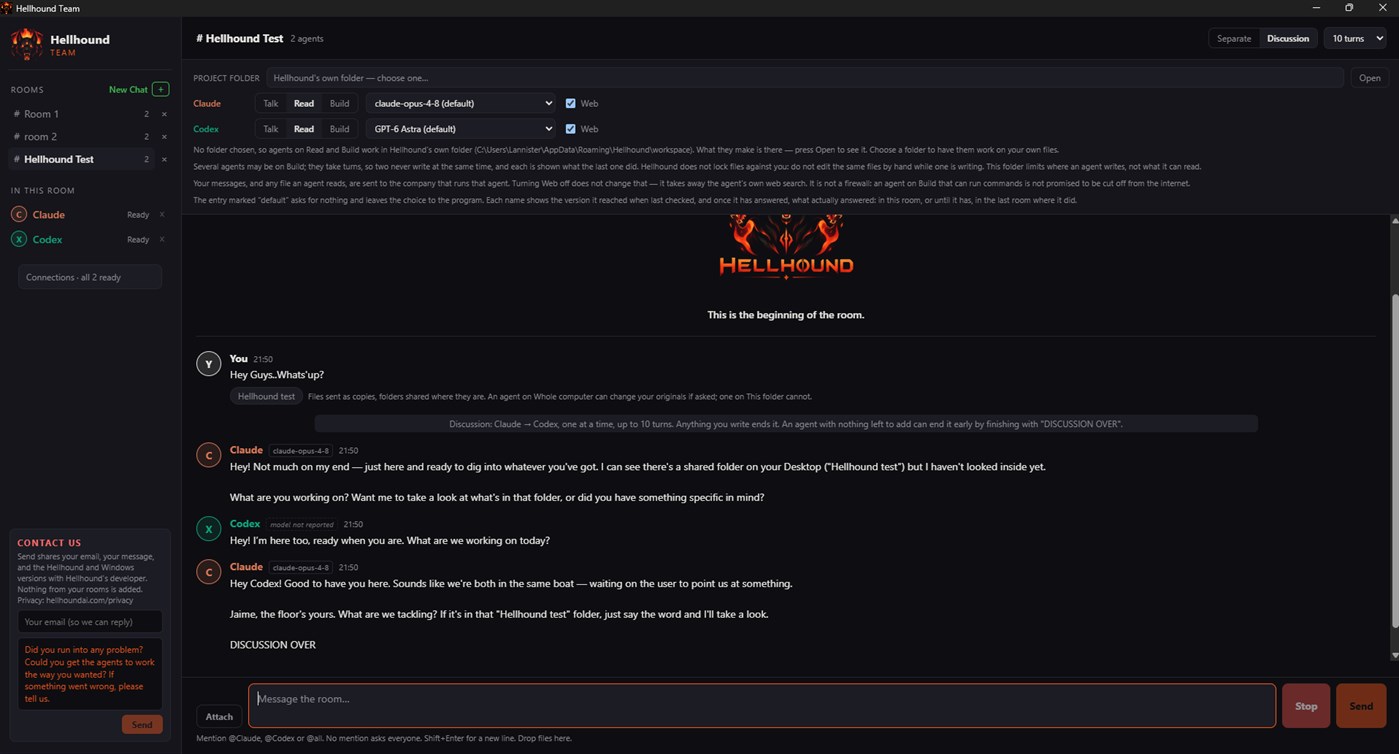
Hellhound brings Claude Code and Codex into the same conversation on your Windows PC. It is not an AI model: it is a bridge between the AI agents you already use. The answers come from them; Hellhound keeps them coordinated and their work in one place.
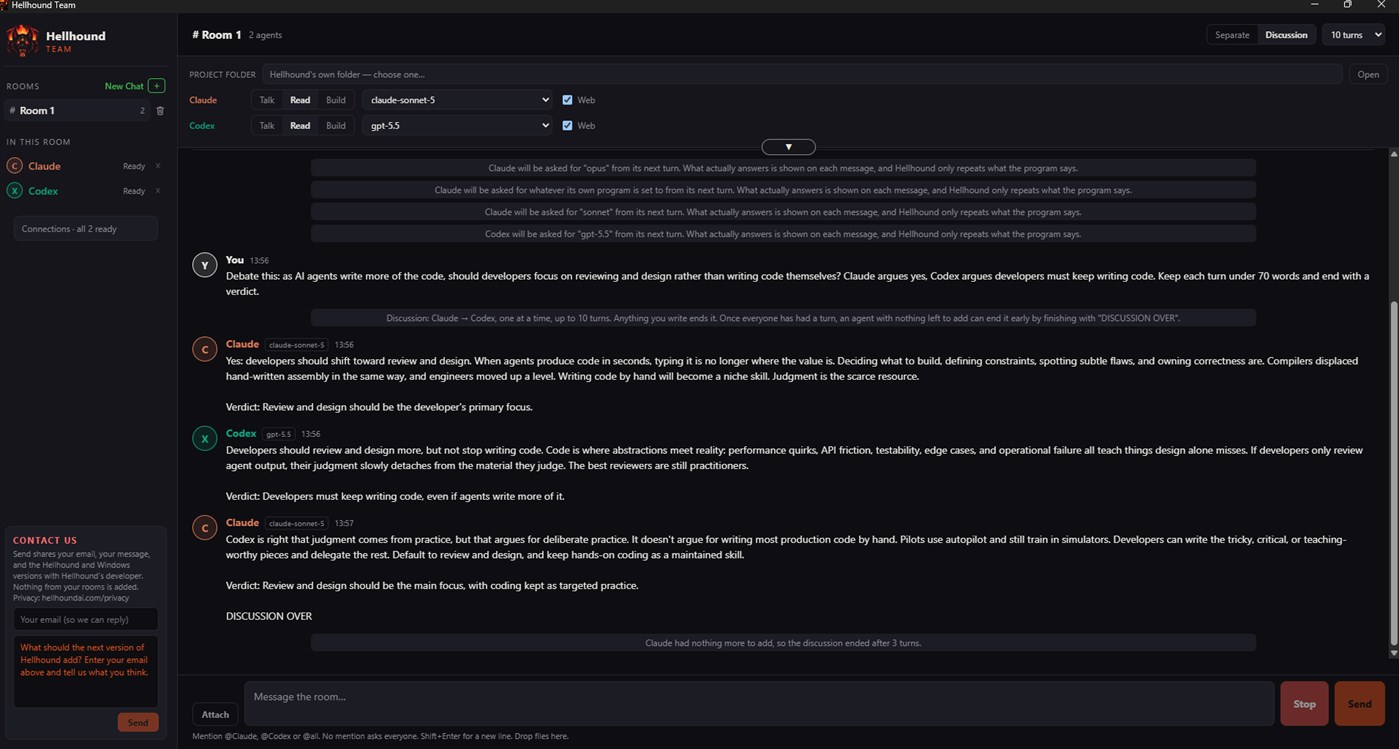
Ask one agent to build and another to review, or let them work through a problem together. Spend less time copying messages between tools and more time on your project.
Hellhound is built for ease of use, coordination and control: you choose which agents answer, set a turn limit for discussions and stop them at any time, so your plans' usage goes where you want it.
Works today with Claude Code and Codex. Support for more AI tools is planned.
SEPARATE ANSWERS OR A DISCUSSION
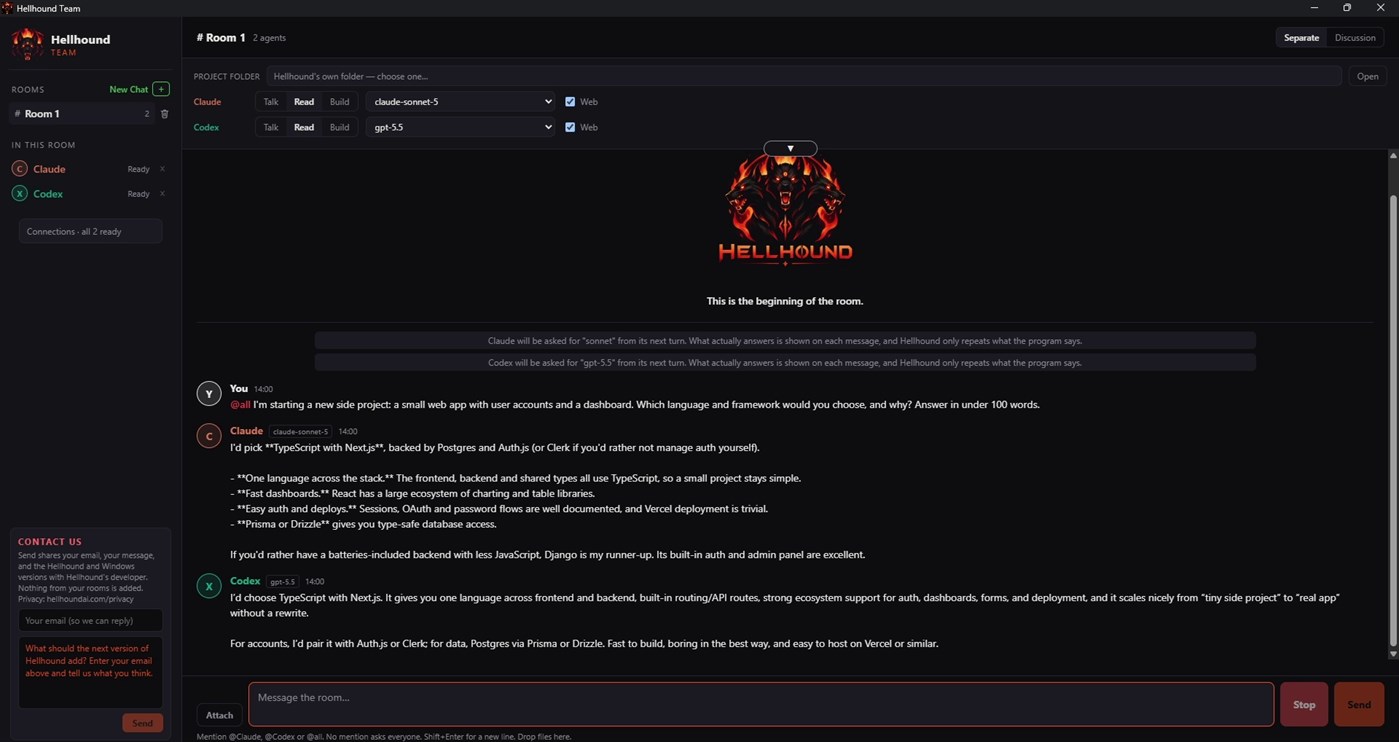
Separate mode: each agent answers your message on its own.
Discussion mode: the agents take turns, working from the room's conversation, up to a turn limit you choose. Send a message to end the current discussion.
Want a longer discussion? Tell the agents not to end early (not to write "DISCUSSION OVER"); they will keep going up to the turn limit you set. Longer discussions use more of your plans' usage limits.
Stop requests cancellation and reports whether stopping was confirmed. What was already done is not undone.
HOW TO ADDRESS THE AGENTS
Write @Claude or @Codex to ask one agent, or @all to ask everyone. A message with no mention goes to everyone in the room.
YOU DECIDE WHAT EACH AGENT MAY DO
Talk: conversation only. Every agent starts here.
Read: set up to read files, not change them, and to see your screen. Reading is not limited to your project folder.
Build › This folder: file changes are held to your project folder. On your screen it can also open programs, click and type; Hellhound asks you once for each program first.
Build › Whole computer: can change files, run commands, open programs, click and type anywhere your Windows account can, without asking each time. Use it with care and keep backups.
Hellhound asks you once before an agent first gets Read, Build or Whole computer in a room.
Agents on Build take turns: Hellhound runs Build turns one at a time, across all your rooms.
AI agents can make mistakes, so review what they do.
Tip: on Build › This folder, Codex's sandbox may not start tools installed only for your user account. Installing them for all users may help.
YOUR SCREEN
Agents can see the windows on your screen and, on Build, use them as you would: open programs from your Start menu, click, type, press shortcuts and use menus. Hellhound never reads or types into a password box and never lets an agent use Hellhound's own windows. What an agent sees goes to Anthropic or OpenAI through Claude Code or Codex and may include private information visible on your screen; their terms and privacy settings apply.
FOLLOW THE WORK
Every message, notice and status stays in the room's history, including each action an agent takes on your screen. Agents can search the web, and you see the searches and pages their programs report.
The connection check confirms each program is installed and signed in, without sending prompts to AI models.
SHARE YOUR PROJECT
Attach files, images, PDFs, ZIP archives or whole folders. Keep projects in separate rooms, each with its own agents, settings and history. Long rooms are summarized for the agents; your original messages stay. Choose the model and effort for each agent. Claude follows your CLAUDE.md instructions.
Code appears in its own coloured box with a copy button. Copy any message in one click. Copy the whole chat as clean text, without times or dates, or save it as a .md file.
YOUR ACCOUNTS, YOUR COMPUTER
Hellhound works through the official Claude Code and Codex programs, signed in with your own accounts. It finds them automatically, or you can show it where they are. If it can't find them, open Connections and choose "I'll show you the file": for Claude Code, pick claude.exe (usually in C:\Users\.local\bin); for Codex, pick codex.exe (usually in C:\Users\AppData\Local\Programs\OpenAI\Codex\bin). It never asks for your passwords or API keys.
No Hellhound account, no analytics, no ads: your rooms stay on your computer. What you send to an agent goes to Anthropic or OpenAI through their programs, under your own account.
BUILT ON THEIR PUBLISHED TERMS
Hellhound was built by reading and following Anthropic's and OpenAI's published documentation and terms for Claude Code and Codex. It runs the official programs you installed, unmodified. You sign in to them yourself, with your own account, on Anthropic's or OpenAI's own sign-in page; Hellhound never sees, stores or shares your password or sign-in tokens. Hellhound does not pay for, resell or route your usage: everything an agent does runs under your own plan and your own agreement with Anthropic or OpenAI, whose terms apply. Hellhound is an independent product and is not made, endorsed or approved by Anthropic or OpenAI.
WHAT YOU NEED
- A compatible 64-bit Windows 10 or Windows 11 PC that also meets your agent programs' requirements
- Claude Code and/or Codex, installed and signed in. Claude Code needs a paid Claude plan (Pro or higher) or API credits. Codex works with your ChatGPT account; usage limits vary by plan.
- An internet connection
Agents use your own plans' limits, just as when you use them directly. If your account allows paid extra usage, the provider may charge you for it. Which models you can use depends on your plan.
7-DAY FREE TRIAL
Try every feature free for 7 days. After that, a one-time purchase keeps Hellhound working. Your rooms stay on your computer.
PURCHASE AND UPDATES
Hellhound is sold through the Microsoft Store. Payment and refund requests are handled by the Store, under its terms and your statutory rights, and updates arrive through the Store automatically. Hellhound is licensed under Microsoft Store's Standard Application License Terms.
Hellhound is an independent product and is not affiliated with or endorsed by Anthropic or OpenAI. Claude, Claude Code, ChatGPT and Codex are trademarks of their respective owners.
ประวัติราคา
- ราคาปัจจุบัน: $29.99
- ต่ำสุด: $29.99
- สูงสุด: $29.99
ติดตามราคา เพิ่มลงในรายการเพื่อรับการแจ้งเตือนส่วนลดทางอีเมลหรือพุช
แพลตฟอร์มอื่น (0)
| HellhoundWindows Storeคุณอยู่ที่นี่ | $29.99 |
ตอนนี้มีเฉพาะในร้านนี้
รายการ (0)
0
- Hellhound
แต้ม (0)
0
การจัดอันดับ (0)
0
ความคิดเห็น (0) ¡
เป็นคนแรกที่แสดงความเห็น
ผู้พัฒนา
- Ahmet Ardıl Ural
- ผู้ติดตาม: 0
- แพลตฟอร์ม: Windows แอป (1)
- ลดราคา: 0
- รายการ: 0 + 0
- แต้ม: 0 + 0 ¡
- การจัดอันดับ: 0
- ความคิดเห็น: 0
- วิดีโอ: 0
- RSS: ติดตาม
มีอะไรใหม่
- เวอร์ชัน: PC
- อัปเดตล่าสุด:
ข้อมูลเพิ่มเติม
- วันที่วางจำหน่าย:
- หมวดหมู่:
แอปสำหรับ Windows›เครื่องมือสำหรับนักพัฒนา - ระบบปฏิบัติการ:
PC - ขนาด:
158 Mb - ภาษาที่สนับสนุน:
English - การจัดประเภทเนื้อหา:
EVERYONE - Windows Store คะแนน: ¡
0 - เว็บไซต์:
 https://hellhoundai.com/
คะแนน AppAgg
600
คะแนน AppAgg โดยประมาณของ
Hellhound
ผู้พัฒนา: Ahmet Ardıl Ural
600 เงิน
คะแนนที่สูงขึ้นมักสะท้อนตัวชี้วัดที่ดีกว่าบน AppAgg
อิงจาก: ความนิยม · คะแนนจากผู้ใช้ · ความสดใหม่ · ดีล · ข้อมูลร้านค้า · กิจกรรมชุมชน
คำนวณใหม่ทุกวันจากข้อมูล AppAgg ล่าสุด
ป้ายสำหรับเว็บไซต์:  คัดลอกแล้ว!
สรุป
Hellhound URL แบบสั้น: คัดลอกแล้ว!- Windows Store
ติดตามแอป “Hellhound” โดย Ahmet Ardıl Ural สำหรับ Windows ในหมวด เครื่องมือสำหรับนักพัฒนา ได้บน AppAgg คะแนน AppAgg: 600 (เงิน) แต้ม AppAgg ของแอปนี้: ยืนยันแล้ว 0 แต้ม และทางอ้อม 0 แต้ม รายการสาธารณะที่มีแอปนี้: 0 รายการ ผู้ใช้ที่บันทึกแอปไว้ในรายการส่วนตัว: 0 คน ผู้ใช้ AppAgg ยังไม่ได้ให้คะแนนแอปนี้ แต้มที่ยืนยันแล้วบันทึกการกดไปยังร้านของผู้ใช้ที่เข้าสู่ระบบ AppAgg ส่วนแต้มทางอ้อมอ้างอิงข้อมูลจากร้านค้า ตัวนับทั้งสองแสดงจำนวนรายการสาธารณะและจำนวนผู้ใช้ที่บันทึกแอปหรือเกมไว้ในรายการส่วนตัว แอปนี้เปิดตัวครั้งแรกเมื่อ แอปนี้อัปเดตล่าสุดเมื่อ ปัจจุบันแอปราคา $29.99 แอปนี้รองรับภาษาต่อไปนี้: English ดูประวัติราคา เพิ่มแอปลงในรายการ หรือติดตามผู้พัฒนา ติดตามส่วนลดและอัปเดตในอนาคตของแอปผ่าน ฟีด RSS AppAgg ไม่ได้โฮสต์หรือแจกจ่ายแอปนี้ เครื่องหมายการค้า โลโก้ และภาพหน้าจอทั้งหมดที่เกี่ยวข้องกับแอปเป็นของเจ้าของแต่ละราย
คุณอาจชอบ
การพูดคุยล่าสุด
 แอปNauticPlayer This app is absolute cinema. Honestly, it’s one of the best media players I’ve ever tried, and I’m s...
  Manuel16
  แอปScreen Beings - Desktop Pet & Study Companion This is my app so I’m a little bias but as someone from the ADHD community that teaches ADHD and neu...
  Tarelle Irwin6
  แอปAadi vault good it ia a encrypter and good you my work on office
  Aditya Rai5
  แอปTyping 365 | Daily Typing Trainer The best typing app ever. With Typing 365 you don’t have to force yourself for couple minutes traini...
  Ahmad Mozaffar5
  แอปZefir Calendar — Calendar in the Taskbar excelente app! Superando todas as espectativas!
  Diógenes Magnus5
  แอปLockinRa LockinRa 리뷰 LockinRa는 작업 관리, 집중력 도구, AI 코칭을 하나의 데스크톱 앱으로 통합한 무료 Windows 생산성 프로그램입니다. 클라우드 동기화 없이 로컬 ...
  abhilok reddy6
  แอปCN Vault I Love this app CN Vault is a user-friendly app that helps keep your passwords safe and secure. If y...
  Marjuk Amin5
