
الإشارات المرجعية
| المطوّر: | Henry Yau (1) | ||
| السعر: | مجاني جديد | ||
| الدرجة: | 1,140 فضة | ||
| الترتيب: | 0 | ||
| تعليقات: | 0 انشر تعليقًا | ||
| قوائم: | 0 0 | ||
| النقاط: | 0 | ||
| +1 نقطة | |||
ملخص
HKAI تطبيق من Henry Yau ضمن فئة «أدوات المطور».
إصدار جديد: صدر ، فأنت من الأوائل.
بلا مقابل، لا إعلانات ولا مشتريات داخلية. فقط أنت والتطبيق.
متجر Microsoft مدمج في Windows، فالتثبيت يتم بنقرتين.
درجة AppAgg هي 1,140. فضة، وهذا ليس سيئًا أبدًا.
التصنيف العمري «EVERYONE»، أي أنه مناسب للأطفال أيضًا.
يعرف 2 لغتين، لكنه لم يتعلم العربية بعد.
هل استخدمته؟ سيكون تعليقك الأول هنا.
إنه التطبيق الوحيد لهذا المطوّر على AppAgg. حتى الآن.
تريد أن تعرف بالتحديثات والتطبيقات الجديدة أولًا؟ تابع المطور أو اشترك في موجز RSS. تصلك الإشعارات عبر تطبيق AppAgg Alerts لنظامي Android وiOS.
منصات أخرى 0
سجل الأسعار 0
- السعر الحالي: مجاني
- الحد الأدنى: مجاني
- الحد الأقصى: مجاني
خلاصتك الخاصة في الصفحة الرئيسية
لقطات الشاشة 4
الفيديوهات 2
الوصف

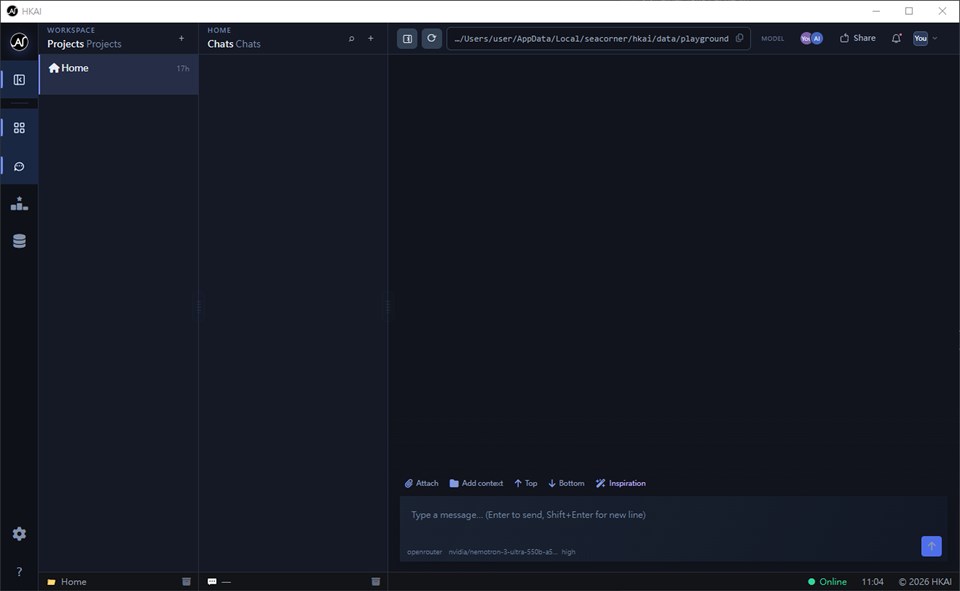
HKAI is an AI assistant that lives on your Windows PC — no browser to open, no website to sign in to.
Type a question and it answers; ask it to edit a file and it will — but it always asks for your approval first.
1. Talk to the AI
- Type your question; the answer appears section by section instead of arriving all at once.
- Keep asking in the same chat and it remembers the context.
- Replies are split into thinking, answer and tool actions, with timing shown.
2. It edits files for you (asking first)
- Ask the AI to change a file or write content; it shows what it is about to do and waits for your approval.
- Nothing changes without your approval — if you decline, it leaves the file untouched.
- Every change is recorded, so you can review what was modified.
3. Attach images to a message
- Up to 13 images per message.
- It reads the text inside the images and works with it (screenshots, scans, photos).
4. Hand over several jobs at once
- Queue up to 3 tasks; it finishes them one by one and starts the next automatically.
- No need to watch the screen — leave it working and do something else.
5. Every project kept separate
- Each project has its own chats, history and working folder.
- Projects never mix, so earlier conversations are easy to find.
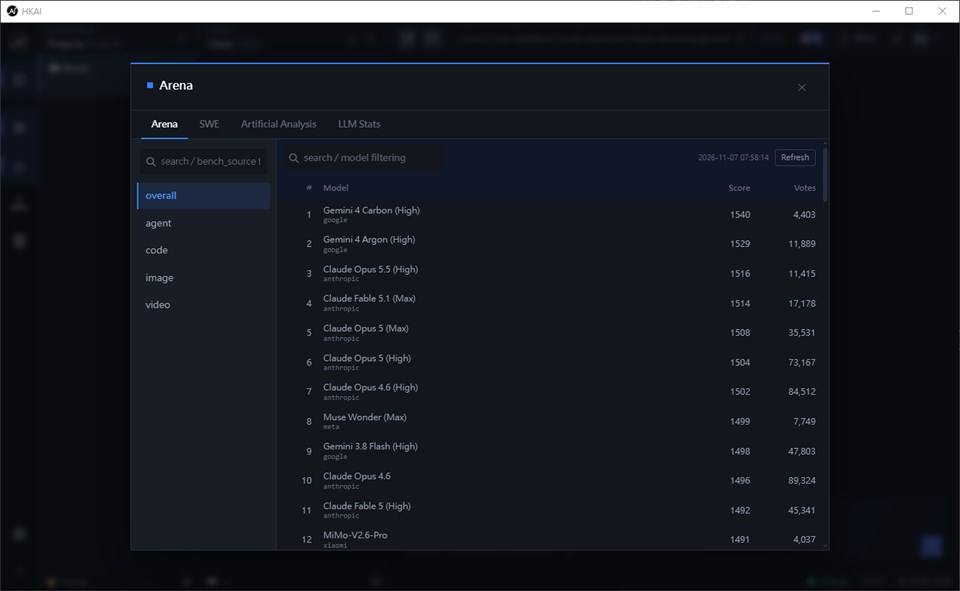
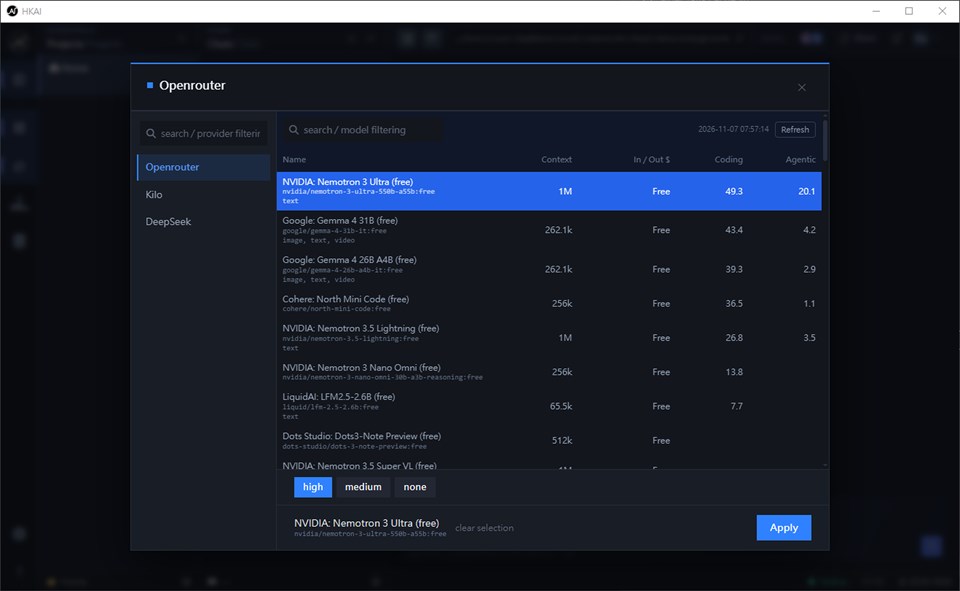
6. Choose which AI to use
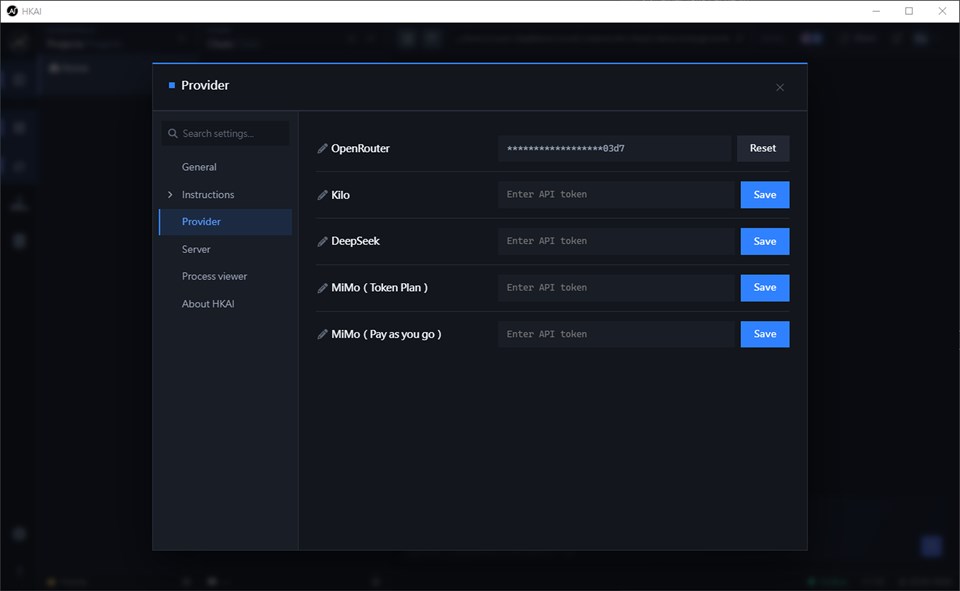
- Built-in model list across several AI providers, switchable at any time.
- Real performance data included (SWE-bench, LMArena, AA, LLM Stats) so you are not choosing blind.
- Your AI key is stored only in local settings; the screen shows a masked value, never the full key.
7. See what the AI is doing
- Process viewer shows which jobs are running.
- Activity log lets you look back at every step.
- Git status and commit actions show changes at a glance.
8. Runs locally, content stays with you
- All chats, history and files are stored on your computer.
- Content is sent to the AI service you configured only when you ask a question.
9. Ready out of the box
- One program to open — no server to install, no environment to set up.
- A guided screen on first launch walks you through setup.
- Interface available in English and Traditional Chinese.
AI answers can be wrong — please check anything important yourself.
من المطوّر
قوائم 0
-
 HKAI
النقاط 0
-

- +1 نقطة

الترتيب 0
-
- تقييمك
المطوّر 1
- Henry Yau
- المتابعون: 0
- المنصات: Windows تطبيقات (1)
- العروض: 0
- قوائم: 0 0
- النقاط: 0
- الترتيب: 0
- تعليقات: 0
- الفيديوهات: 1
- RSS: اشتراك
ما الجديد
- الإصدار: PC
- آخر تحديث:
- 0.3.3 adds twelve model providers, lets the assistant read PDF/Word/plain-text attachments directly, adds Japanese, Korean and Simplified Chinese to the interface, and fixes provider switching and streaming display issues:
• Twelve new providers are selectable out of the box: OpenAI, Anthropic, Gemini, Groq, Cohere, Mistral, DeepInfra, Moonshot, Z.ai, GitHub Models, OpenCode, Hermes Agent (each with its own icon).
• Provider model lists are refreshed and normalised automatically: price, context length and reasoning flags are visible at a glance, sorted by tier.
• Attachments are no longer images only: PDF, Word and plain-text files can be handed to the assistant, which reads the content and answers from it.
• The interface adds Japanese, Korean and Simplified Chinese.
• Switching to a custom provider (Kilo, DeepSeek, Hermes Agent) now actually applies instead of quietly reporting "Unknown provider".
• During a streaming answer each segment carries its own start time, state and length, so running and finished segments are distinguishable at a glance.
• Tool activity lines keep the tool name; later progress updates no longer show an unnamed state.
• HTML/JavaScript you type is shown as text only and is never executed.
• Outgoing requests now carry the app version, which makes troubleshooting easier.
誇.
معلومات إضافية
- تاريخ الإصدار:
- الفئة:
تطبيقات Windows›أدوات المطور - نظام التشغيل:
PC - الحجم:
594 Mb - اللغات المدعومة:
الإنجليزية,الصينية - تقييم المحتوى:
EVERYONE - Windows Store تقييم: ¡
0 - الموقع الإلكتروني:
 https://github.com/henry-wiki/hkai/issues
درجة AppAgg
درجة AppAgg التقديرية لـ
HKAI
المطوّر: Henry Yau
تشير الدرجة الأعلى عادةً إلى أداء أفضل في مؤشرات AppAgg.
استنادًا إلى: الشعبية · تقييمات المستخدمين · الحداثة · العروض · بيانات المتاجر · نشاط المجتمع
يُعاد حسابها يوميًا بناءً على أحدث بيانات AppAgg.
تعليقات 0 ¡
مشاركة
HKAI عنوان URL مختصر: تم النسخ!- Windows Store

