
Marcadores
| Desarrollador: | Henry Yau (1) | ||
| Precio: | Gratis Nuevo | ||
| Puntuación: | 1140 Plata | ||
| Clasificaciones: | 0 | ||
| Comentarios: | 0 Publicar comentario | ||
| Listas: | 0 0 | ||
| Puntos: | 0 | ||
| +1 Punto | |||
Resumen
HKAI es una app de Henry Yau de la categoría «Herramientas de desarrollo».
Novedad: salió , así que estás entre los primeros.
Gratis: sin anuncios ni compras integradas. Solo tú y la app.
La Microsoft Store viene integrada en Windows, así que se instala en un par de clics.
Su Puntuación de AppAgg es 1140. Nivel Plata, y eso no está nada mal.
Clasificación «EVERYONE»: sirve también para los más pequeños.
Sabe 2 idiomas, pero el español todavía no.
¿Ya la has usado? Tu reseña sería la primera aquí.
Es la única app del desarrollador en AppAgg. Por ahora.
¿Quieres enterarte antes que nadie de actualizaciones y apps nuevas? Sigue al desarrollador o suscríbete al canal RSS. Las notificaciones push llegan con la app AppAgg Alerts para Android y iOS.
Otras plataformas 0
Historial de precios 0
- Precio actual: Gratis
- Mínimo: Gratis
- Máximo: Gratis
Tu propio feed en la página de inicio
Capturas de pantalla 4

Vídeos 2
Descripción

HKAI is an AI assistant that lives on your Windows PC — no browser to open, no website to sign in to.
Type a question and it answers; ask it to edit a file and it will — but it always asks for your approval first.
1. Talk to the AI
- Type your question; the answer appears section by section instead of arriving all at once.
- Keep asking in the same chat and it remembers the context.
- Replies are split into thinking, answer and tool actions, with timing shown.
2. It edits files for you (asking first)
- Ask the AI to change a file or write content; it shows what it is about to do and waits for your approval.
- Nothing changes without your approval — if you decline, it leaves the file untouched.
- Every change is recorded, so you can review what was modified.
3. Attach images to a message
- Up to 13 images per message.
- It reads the text inside the images and works with it (screenshots, scans, photos).
4. Hand over several jobs at once
- Queue up to 3 tasks; it finishes them one by one and starts the next automatically.
- No need to watch the screen — leave it working and do something else.
5. Every project kept separate
- Each project has its own chats, history and working folder.
- Projects never mix, so earlier conversations are easy to find.
6. Choose which AI to use
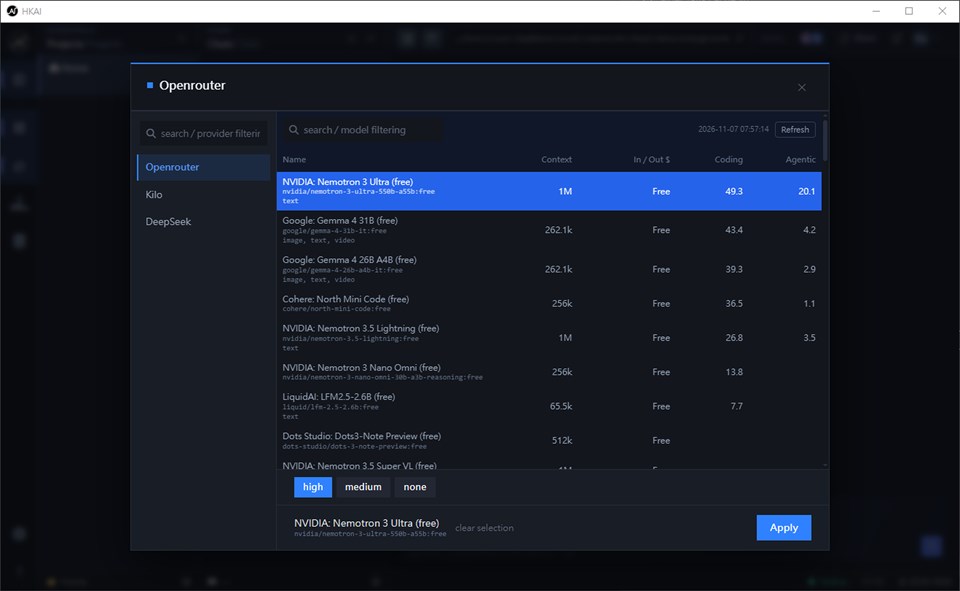
- Built-in model list across several AI providers, switchable at any time.
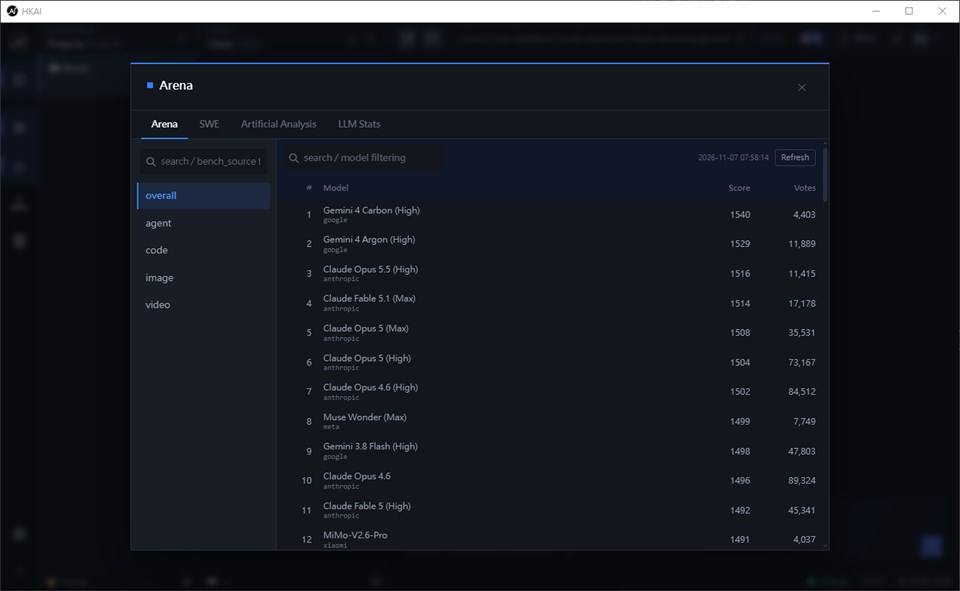
- Real performance data included (SWE-bench, LMArena, AA, LLM Stats) so you are not choosing blind.
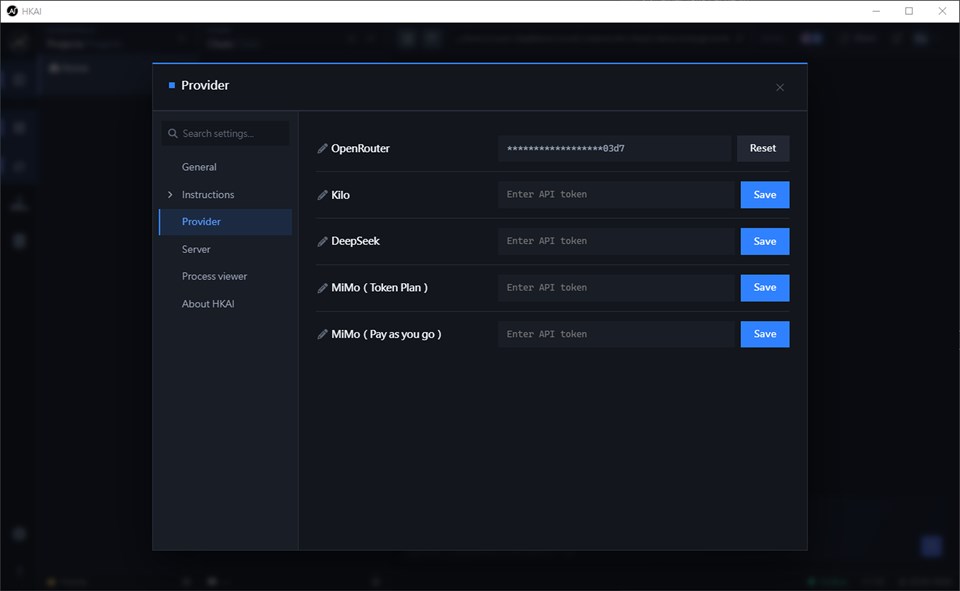
- Your AI key is stored only in local settings; the screen shows a masked value, never the full key.
7. See what the AI is doing
- Process viewer shows which jobs are running.
- Activity log lets you look back at every step.
- Git status and commit actions show changes at a glance.
8. Runs locally, content stays with you
- All chats, history and files are stored on your computer.
- Content is sent to the AI service you configured only when you ask a question.
9. Ready out of the box
- One program to open — no server to install, no environment to set up.
- A guided screen on first launch walks you through setup.
- Interface available in English and Traditional Chinese.
AI answers can be wrong — please check anything important yourself.
Del desarrollador
Listas 0
-
 HKAI
Puntos 0
-

- +1 Punto

Clasificaciones 0
-
- Tu valoración
Desarrollador 1
- Henry Yau
- Seguidores: 0
- Plataformas: Windows Aplicaciones (1)
- Ofertas: 0
- Listas: 0 0
- Puntos: 0
- Clasificaciones: 0
- Comentarios: 0
- Vídeos: 1
- RSS: Suscribirse
Novedades
- Versión: PC
- Última actualización:
- 0.3.3 adds twelve model providers, lets the assistant read PDF/Word/plain-text attachments directly, adds Japanese, Korean and Simplified Chinese to the interface, and fixes provider switching and streaming display issues:
• Twelve new providers are selectable out of the box: OpenAI, Anthropic, Gemini, Groq, Cohere, Mistral, DeepInfra, Moonshot, Z.ai, GitHub Models, OpenCode, Hermes Agent (each with its own icon).
• Provider model lists are refreshed and normalised automatically: price, context length and reasoning flags are visible at a glance, sorted by tier.
• Attachments are no longer images only: PDF, Word and plain-text files can be handed to the assistant, which reads the content and answers from it.
• The interface adds Japanese, Korean and Simplified Chinese.
• Switching to a custom provider (Kilo, DeepSeek, Hermes Agent) now actually applies instead of quietly reporting "Unknown provider".
• During a streaming answer each segment carries its own start time, state and length, so running and finished segments are distinguishable at a glance.
• Tool activity lines keep the tool name; later progress updates no longer show an unnamed state.
• HTML/JavaScript you type is shown as text only and is never executed.
• Outgoing requests now carry the app version, which makes troubleshooting easier.
誇.
Información adicional
- Fecha de lanzamiento:
- Categoría:
Aplicaciones para Windows›Herramientas de desarrollo - Sistemas operativos:
PC - Tamaño:
594 Mb - Idiomas admitidos:
Chino,Inglés - Clasificación de contenido:
EVERYONE - Windows Store Valoración: ¡
0 - Sitio web:
 https://github.com/henry-wiki/hkai/issues
Puntuación de AppAgg
Puntuación estimada de AppAgg para
HKAI
Desarrollador: Henry Yau
Una puntuación más alta suele reflejar mejores resultados en los indicadores de AppAgg.
Basado en: popularidad · valoraciones de usuarios · actualidad · ofertas · datos de tiendas · actividad de la comunidad
Se recalcula a diario con datos actualizados de AppAgg.
Comentarios 0 ¡
Compartir
HKAI URL corta: Copiado!- Windows Store

