
북마크
이 북마크의 제목을 입력하세요.
북마크가 저장되었습니다
요약
HKAI: Henry Yau에서 만든 ‘개발자 도구’ 카테고리의 앱이에요.
새로 나온 앱이에요. 에 나왔으니 지금 써 보면 얼리어답터예요.
무료. 광고도 인앱 구매도 없어요. 앱에만 집중하면 돼요.
Microsoft Store는 Windows에 기본으로 들어 있어서 클릭 몇 번이면 설치돼요.
AppAgg 점수는 1,140. 실버 등급, 이 정도면 꽤 괜찮아요.
연령 등급은 ‘EVERYONE’, 아이들에게도 괜찮아요.
2개 언어를 지원하지만, 한국어는 아직 없어요.
사용해 보셨나요? 여기서 첫 리뷰의 주인공이 되어 주세요.
AppAgg에 있는 이 개발자의 유일한 앱이에요. 아직까지는요.
업데이트와 새 앱 소식을 가장 먼저 받고 싶나요? 개발자를 팔로우하거나 RSS 피드를 구독하세요. 푸시 알림은 Android와 iOS용 AppAgg Alerts 앱으로 받을 수 있어요.
광고
다른 플랫폼 0
가격 기록 0
- 현재 가격: 무료
- 최소: 무료
- 최대: 무료
홈 화면의 나만의 피드
“신규 및 업데이트” 피드의 플랫폼을 선택하면 홈 화면에 필요한 앱과 게임만 표시됩니다.
스크린샷 4
동영상 2
설명

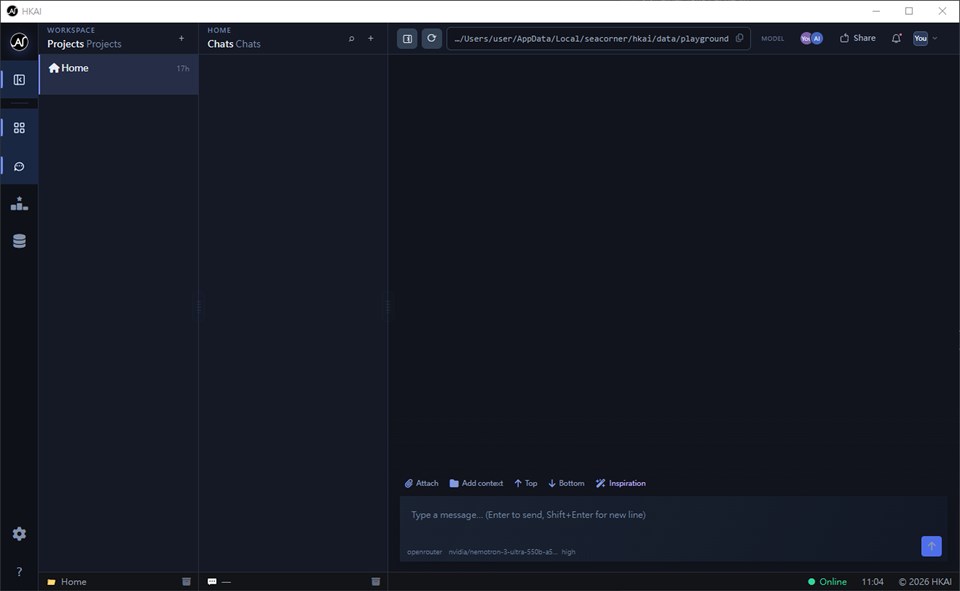
HKAI is an AI assistant that lives on your Windows PC — no browser to open, no website to sign in to.
Type a question and it answers; ask it to edit a file and it will — but it always asks for your approval first.
1. Talk to the AI
- Type your question; the answer appears section by section instead of arriving all at once.
- Keep asking in the same chat and it remembers the context.
- Replies are split into thinking, answer and tool actions, with timing shown.
2. It edits files for you (asking first)
- Ask the AI to change a file or write content; it shows what it is about to do and waits for your approval.
- Nothing changes without your approval — if you decline, it leaves the file untouched.
- Every change is recorded, so you can review what was modified.
3. Attach images to a message
- Up to 13 images per message.
- It reads the text inside the images and works with it (screenshots, scans, photos).
4. Hand over several jobs at once
- Queue up to 3 tasks; it finishes them one by one and starts the next automatically.
- No need to watch the screen — leave it working and do something else.
5. Every project kept separate
- Each project has its own chats, history and working folder.
- Projects never mix, so earlier conversations are easy to find.
6. Choose which AI to use
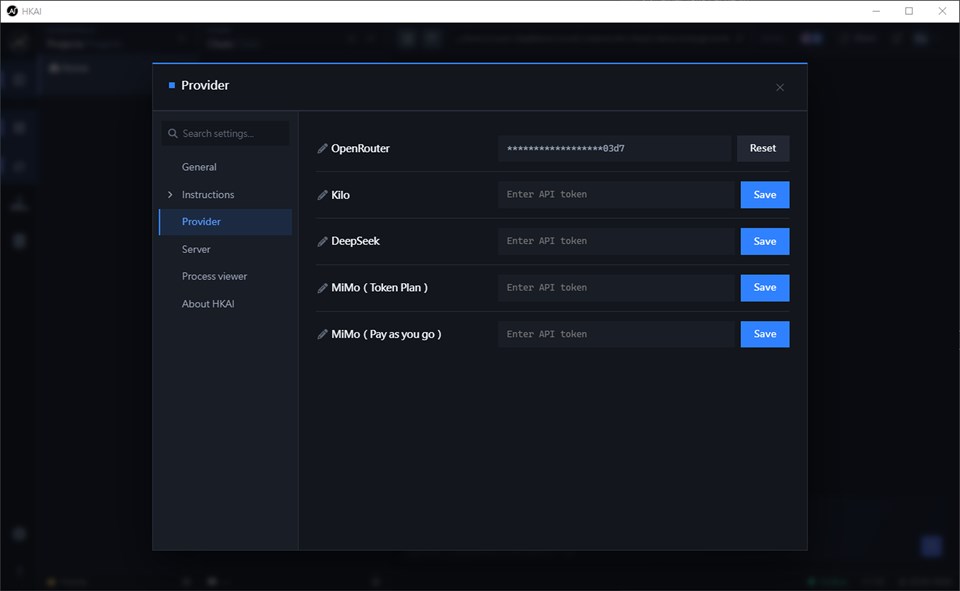
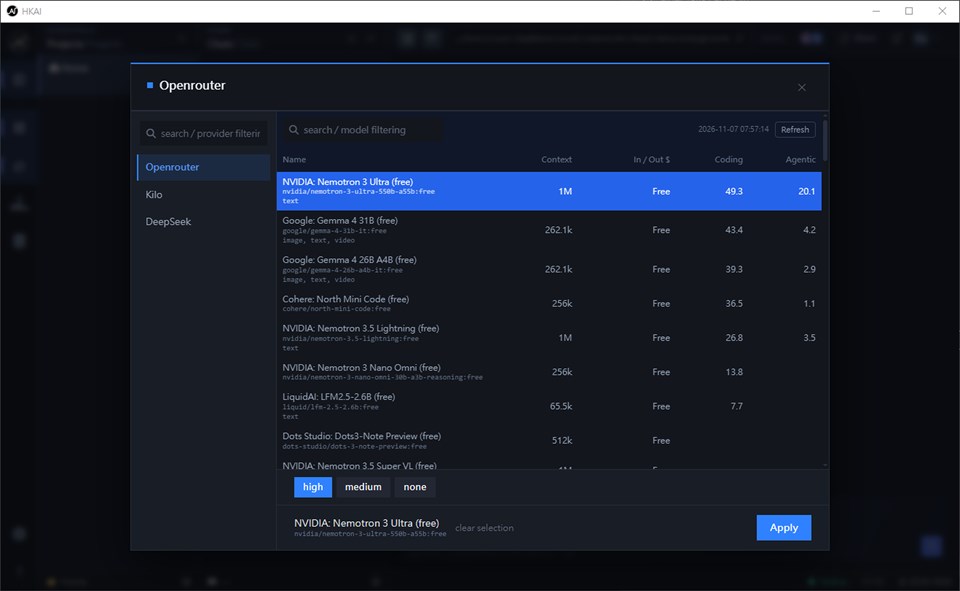
- Built-in model list across several AI providers, switchable at any time.
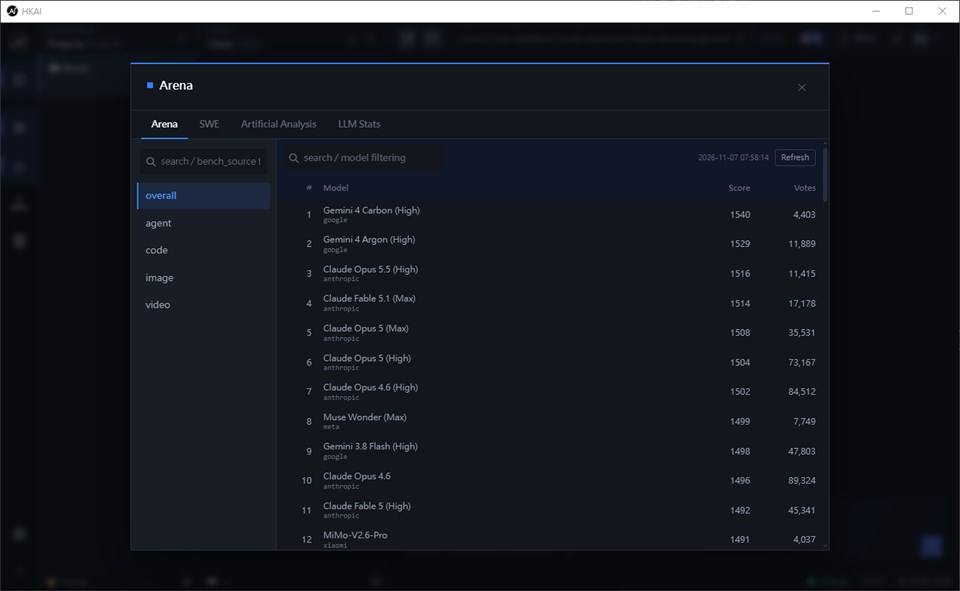
- Real performance data included (SWE-bench, LMArena, AA, LLM Stats) so you are not choosing blind.
- Your AI key is stored only in local settings; the screen shows a masked value, never the full key.
7. See what the AI is doing
- Process viewer shows which jobs are running.
- Activity log lets you look back at every step.
- Git status and commit actions show changes at a glance.
8. Runs locally, content stays with you
- All chats, history and files are stored on your computer.
- Content is sent to the AI service you configured only when you ask a question.
9. Ready out of the box
- One program to open — no server to install, no environment to set up.
- A guided screen on first launch walks you through setup.
- Interface available in English and Traditional Chinese.
AI answers can be wrong — please check anything important yourself.
개발자 소식
개발자이신가요?
페이지 맨 위에 소식을 올리면 팔로워에게 이메일로 전달됩니다. YouTube 동영상을 추가하면 “동영상” 블록 맨 앞에 표시됩니다.
목록 0
-
 HKAI
포인트 0
-

- +1 포인트

순위 0
-
- 내 평점
새로운 기능
- 버전: PC
- 마지막 업데이트:
- 0.3.3 adds twelve model providers, lets the assistant read PDF/Word/plain-text attachments directly, adds Japanese, Korean and Simplified Chinese to the interface, and fixes provider switching and streaming display issues:
• Twelve new providers are selectable out of the box: OpenAI, Anthropic, Gemini, Groq, Cohere, Mistral, DeepInfra, Moonshot, Z.ai, GitHub Models, OpenCode, Hermes Agent (each with its own icon).
• Provider model lists are refreshed and normalised automatically: price, context length and reasoning flags are visible at a glance, sorted by tier.
• Attachments are no longer images only: PDF, Word and plain-text files can be handed to the assistant, which reads the content and answers from it.
• The interface adds Japanese, Korean and Simplified Chinese.
• Switching to a custom provider (Kilo, DeepSeek, Hermes Agent) now actually applies instead of quietly reporting "Unknown provider".
• During a streaming answer each segment carries its own start time, state and length, so running and finished segments are distinguishable at a glance.
• Tool activity lines keep the tool name; later progress updates no longer show an unnamed state.
• HTML/JavaScript you type is shown as text only and is never executed.
• Outgoing requests now carry the app version, which makes troubleshooting easier.
誇.
추가 정보
 https://github.com/henry-wiki/hkai/issues
AppAgg 점수
1,140
AppAgg 예상 점수:
HKAI
개발자: Henry Yau
1,140 실버
점수가 높을수록 대체로 AppAgg의 여러 지표에서 좋은 결과를 보인다는 뜻입니다.
기준: 인기 · 사용자 평점 · 최신성 · 할인 · 스토어 데이터 · 커뮤니티 활동
최신 AppAgg 데이터를 바탕으로 매일 다시 계산됩니다.
웹사이트용 배지:  복사됨!
댓글 0 ¡
가장 먼저 댓글을 남겨주세요
공유하기
HKAI 단축 URL: 복사됨!- Windows Store


