
บุ๊กมาร์ก
| ผู้พัฒนา: | Henry Yau (1) | ||
| ราคา: | ฟรี ใหม่ | ||
| คะแนน: | 1,140 เงิน | ||
| การจัดอันดับ: | 0 | ||
| ความคิดเห็น: | 0 โพสต์ความคิดเห็น | ||
| รายการ: | 0 0 | ||
| แต้ม: | 0 | ||
| +1 แต้ม | |||
สรุป
HKAI เป็นแอปในหมวด “เครื่องมือสำหรับนักพัฒนา” จาก Henry Yau
มาใหม่ ออกเมื่อ คุณได้เป็นหนึ่งในคนกลุ่มแรก
ฟรี ไม่มีโฆษณา ไม่มีการซื้อภายในแอป มีแค่คุณกับแอป
Microsoft Store มีมาในตัว Windows อยู่แล้ว ติดตั้งได้ในไม่กี่คลิก
คะแนน AppAgg คือ 1,140 ระดับ “เงิน” ถือว่าไม่เลวเลย
จัดเรต “EVERYONE” เหมาะกับเด็ก ๆ ด้วย
รองรับ 2 ภาษา แต่ยังไม่มีภาษาไทย
เคยใช้แล้วเหรอ? รีวิวของคุณจะเป็นรีวิวแรกที่นี่
เป็นแอปเดียวของผู้พัฒนารายนี้บน AppAgg อย่างน้อยก็ตอนนี้
อยากรู้เรื่องอัปเดตและแอปใหม่ก่อนใครไหม? ติดตาม ผู้พัฒนา หรือกดติดตาม ฟีด RSS ได้เลย การแจ้งเตือนแบบพุชส่งผ่านแอป AppAgg Alerts สำหรับ Android และ iOS
แพลตฟอร์มอื่น 0
ประวัติราคา 0
- ราคาปัจจุบัน: ฟรี
- ต่ำสุด: ฟรี
- สูงสุด: ฟรี
ฟีดของคุณเองบนหน้าแรก
ภาพหน้าจอ 4
วิดีโอ 2
คำอธิบาย

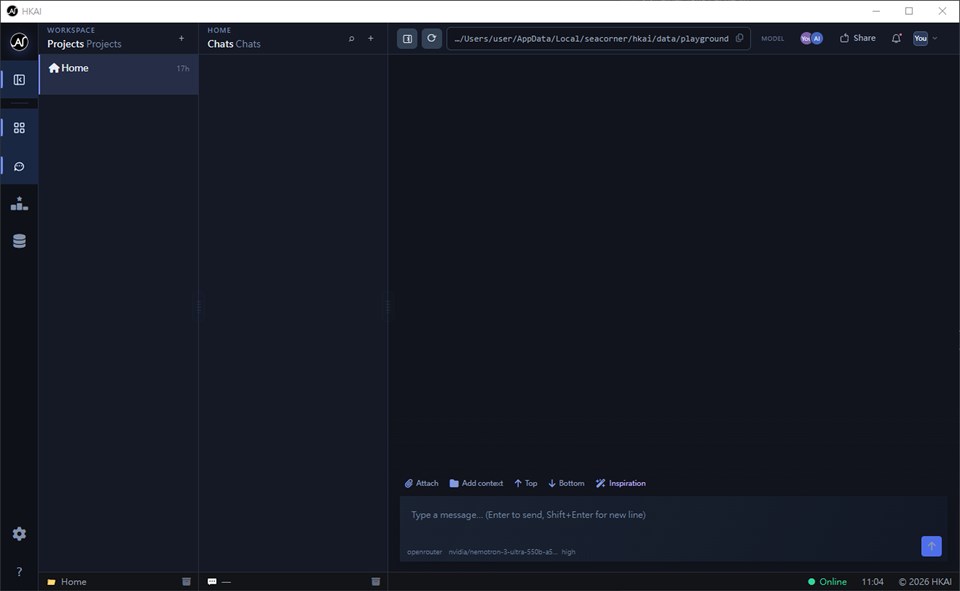
HKAI is an AI assistant that lives on your Windows PC — no browser to open, no website to sign in to.
Type a question and it answers; ask it to edit a file and it will — but it always asks for your approval first.
1. Talk to the AI
- Type your question; the answer appears section by section instead of arriving all at once.
- Keep asking in the same chat and it remembers the context.
- Replies are split into thinking, answer and tool actions, with timing shown.
2. It edits files for you (asking first)
- Ask the AI to change a file or write content; it shows what it is about to do and waits for your approval.
- Nothing changes without your approval — if you decline, it leaves the file untouched.
- Every change is recorded, so you can review what was modified.
3. Attach images to a message
- Up to 13 images per message.
- It reads the text inside the images and works with it (screenshots, scans, photos).
4. Hand over several jobs at once
- Queue up to 3 tasks; it finishes them one by one and starts the next automatically.
- No need to watch the screen — leave it working and do something else.
5. Every project kept separate
- Each project has its own chats, history and working folder.
- Projects never mix, so earlier conversations are easy to find.
6. Choose which AI to use
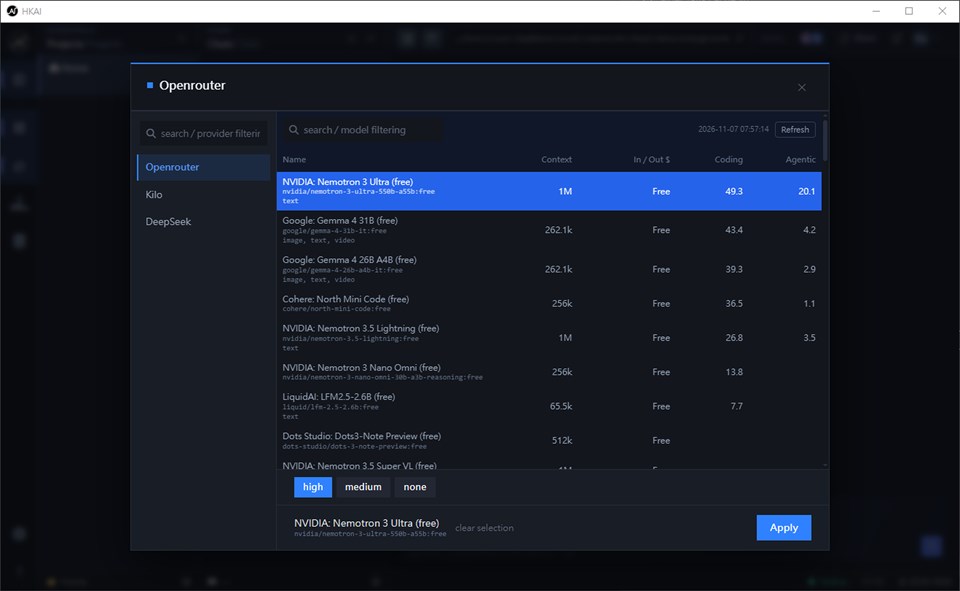
- Built-in model list across several AI providers, switchable at any time.
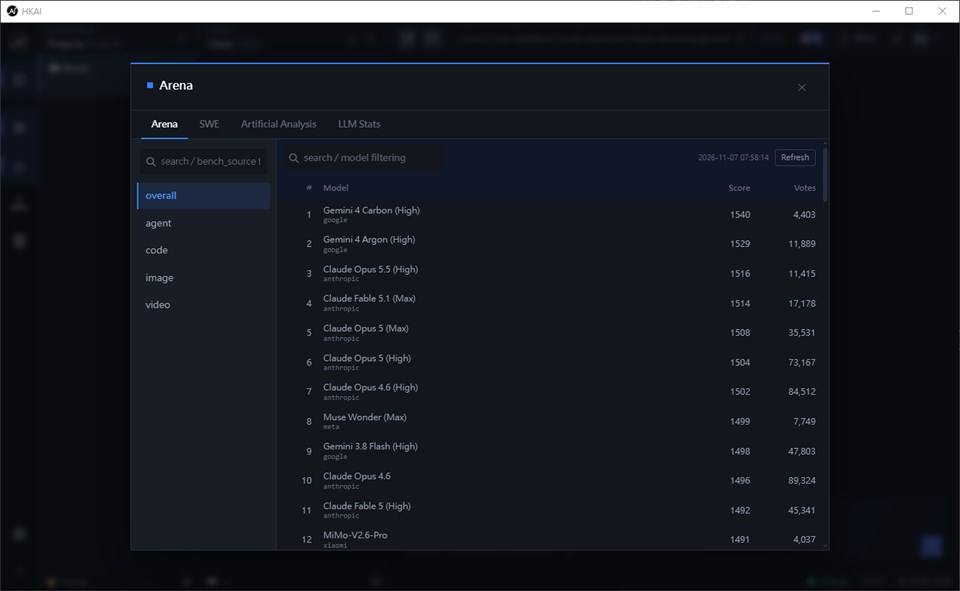
- Real performance data included (SWE-bench, LMArena, AA, LLM Stats) so you are not choosing blind.
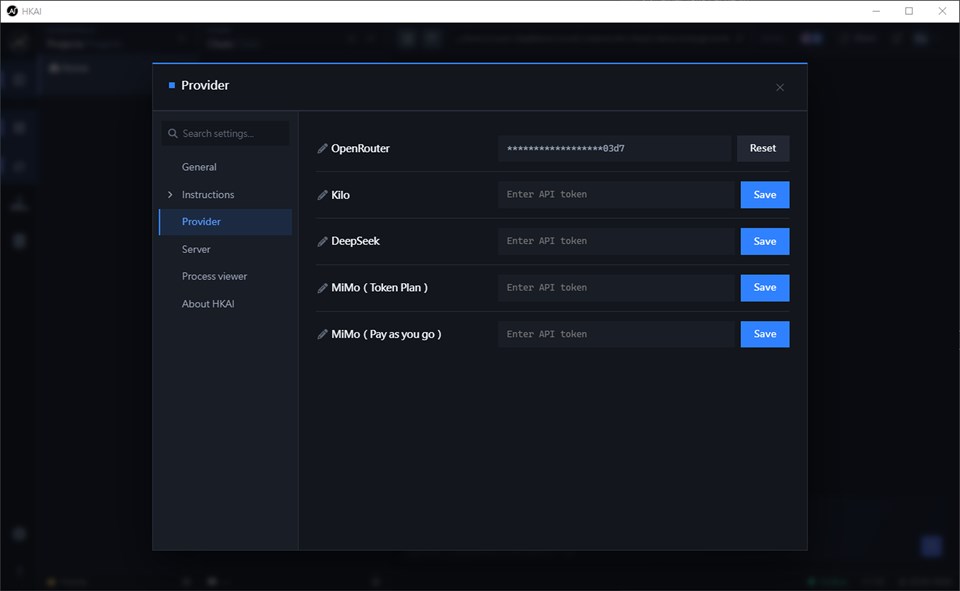
- Your AI key is stored only in local settings; the screen shows a masked value, never the full key.
7. See what the AI is doing
- Process viewer shows which jobs are running.
- Activity log lets you look back at every step.
- Git status and commit actions show changes at a glance.
8. Runs locally, content stays with you
- All chats, history and files are stored on your computer.
- Content is sent to the AI service you configured only when you ask a question.
9. Ready out of the box
- One program to open — no server to install, no environment to set up.
- A guided screen on first launch walks you through setup.
- Interface available in English and Traditional Chinese.
AI answers can be wrong — please check anything important yourself.
จากนักพัฒนา
รายการ 0
-
 HKAI
แต้ม 0
-

- +1 แต้ม

การจัดอันดับ 0
-
- คะแนนของคุณ
ผู้พัฒนา 1
- Henry Yau
- ผู้ติดตาม: 0
- แพลตฟอร์ม: Windows แอป (1)
- ลดราคา: 0
- รายการ: 0 0
- แต้ม: 0
- การจัดอันดับ: 0
- ความคิดเห็น: 0
- วิดีโอ: 1
- RSS: ติดตาม
มีอะไรใหม่
- เวอร์ชัน: PC
- อัปเดตล่าสุด:
- 0.3.3 adds twelve model providers, lets the assistant read PDF/Word/plain-text attachments directly, adds Japanese, Korean and Simplified Chinese to the interface, and fixes provider switching and streaming display issues:
• Twelve new providers are selectable out of the box: OpenAI, Anthropic, Gemini, Groq, Cohere, Mistral, DeepInfra, Moonshot, Z.ai, GitHub Models, OpenCode, Hermes Agent (each with its own icon).
• Provider model lists are refreshed and normalised automatically: price, context length and reasoning flags are visible at a glance, sorted by tier.
• Attachments are no longer images only: PDF, Word and plain-text files can be handed to the assistant, which reads the content and answers from it.
• The interface adds Japanese, Korean and Simplified Chinese.
• Switching to a custom provider (Kilo, DeepSeek, Hermes Agent) now actually applies instead of quietly reporting "Unknown provider".
• During a streaming answer each segment carries its own start time, state and length, so running and finished segments are distinguishable at a glance.
• Tool activity lines keep the tool name; later progress updates no longer show an unnamed state.
• HTML/JavaScript you type is shown as text only and is never executed.
• Outgoing requests now carry the app version, which makes troubleshooting easier.
誇.
ข้อมูลเพิ่มเติม
- วันที่วางจำหน่าย:
- หมวดหมู่:
แอปสำหรับ Windows›เครื่องมือสำหรับนักพัฒนา - ระบบปฏิบัติการ:
PC - ขนาด:
594 Mb - ภาษาที่รองรับ:
จีน,อังกฤษ - การจัดประเภทเนื้อหา:
EVERYONE - Windows Store คะแนน: ¡
0
 https://github.com/henry-wiki/hkai/issues
คะแนน AppAgg
คะแนน AppAgg โดยประมาณของ
HKAI
ผู้พัฒนา: Henry Yau
คะแนนที่สูงขึ้นมักสะท้อนตัวชี้วัดที่ดีกว่าบน AppAgg
อิงจาก: ความนิยม · คะแนนจากผู้ใช้ · ความสดใหม่ · ดีล · ข้อมูลร้านค้า · กิจกรรมชุมชน
คำนวณใหม่ทุกวันจากข้อมูล AppAgg ล่าสุด
ความคิดเห็น 0 ¡
แชร์
HKAI URL แบบสั้น: คัดลอกแล้ว!- Windows Store

