
Yer imleri
| Geliştirici: | Henry Yau (1) | ||
| Fiyat: | Ücretsiz Yeni | ||
| Skor: | 1.140 Gümüş | ||
| Sıralamalar: | 0 | ||
| Yorumlar: | 0 Yorum gönder | ||
| Listeler: | 0 0 | ||
| Puanlar: | 0 | ||
| +1 Puan | |||
Özet
HKAI, Henry Yau imzalı, Geliştirici araçları kategorisinde bir uygulama.
Yeni çıktı. yayınlandı, yani ilk deneyenlerden birisin.
Ücretsiz, reklam yok, uygulama içi satın alma yok. Sadece sen ve uygulama.
Microsoft Store, Windows’a yerleşik. Birkaç tıkla kuruluyor.
AppAgg skoru 1.140. Gümüş, hiç de fena değil.
Yaş sınırı “EVERYONE”, yani çocuklar için de uygun.
2 dil biliyor ama Türkçe henüz aralarında yok.
Kullandın mı? Buradaki ilk değerlendirme senden gelebilir.
Bu, geliştiricinin AppAgg’deki tek uygulaması. Şimdilik.
Güncellemeleri ve yeni uygulamaları ilk sen mi duymak istiyorsun? Hemen geliştiriciyi takip et ya da RSS akışı ile haberdar ol. Push bildirimleri Android ve iOS için AppAgg Alerts uygulamasıyla gelir.
Diğer platformlar 0
Fiyat Geçmişi 0
- Güncel fiyat: Ücretsiz
- En az: Ücretsiz
- En fazla: Ücretsiz
Ana sayfada kendi akışınız
Ekran görüntüleri 4

Video 2
Açıklama

HKAI is an AI assistant that lives on your Windows PC — no browser to open, no website to sign in to.
Type a question and it answers; ask it to edit a file and it will — but it always asks for your approval first.
1. Talk to the AI
- Type your question; the answer appears section by section instead of arriving all at once.
- Keep asking in the same chat and it remembers the context.
- Replies are split into thinking, answer and tool actions, with timing shown.
2. It edits files for you (asking first)
- Ask the AI to change a file or write content; it shows what it is about to do and waits for your approval.
- Nothing changes without your approval — if you decline, it leaves the file untouched.
- Every change is recorded, so you can review what was modified.
3. Attach images to a message
- Up to 13 images per message.
- It reads the text inside the images and works with it (screenshots, scans, photos).
4. Hand over several jobs at once
- Queue up to 3 tasks; it finishes them one by one and starts the next automatically.
- No need to watch the screen — leave it working and do something else.
5. Every project kept separate
- Each project has its own chats, history and working folder.
- Projects never mix, so earlier conversations are easy to find.
6. Choose which AI to use
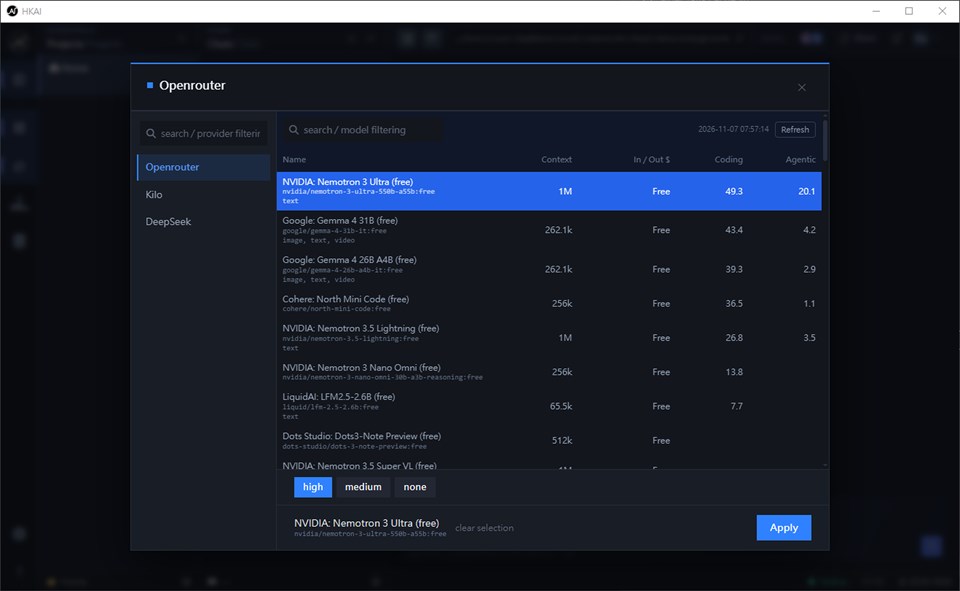
- Built-in model list across several AI providers, switchable at any time.
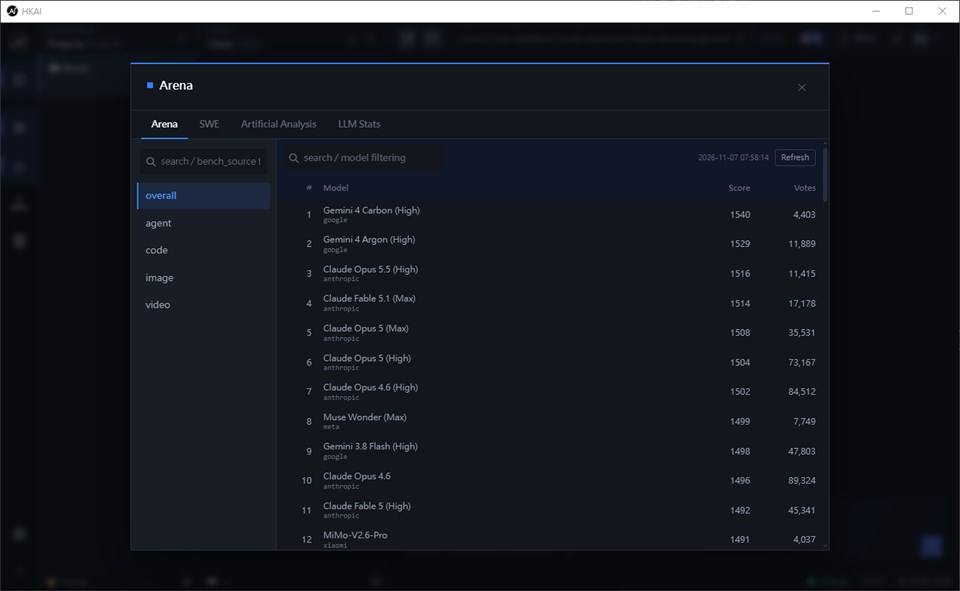
- Real performance data included (SWE-bench, LMArena, AA, LLM Stats) so you are not choosing blind.
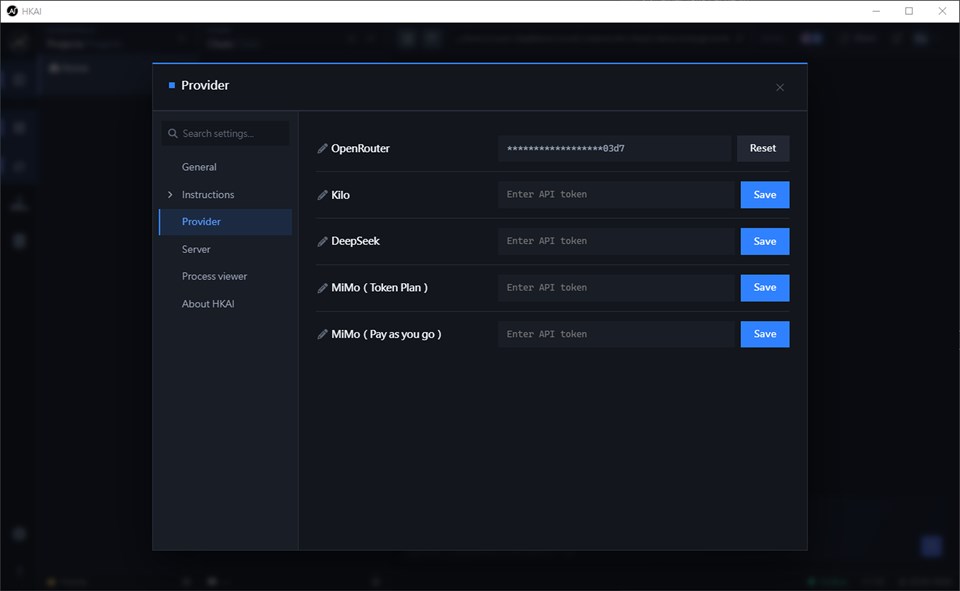
- Your AI key is stored only in local settings; the screen shows a masked value, never the full key.
7. See what the AI is doing
- Process viewer shows which jobs are running.
- Activity log lets you look back at every step.
- Git status and commit actions show changes at a glance.
8. Runs locally, content stays with you
- All chats, history and files are stored on your computer.
- Content is sent to the AI service you configured only when you ask a question.
9. Ready out of the box
- One program to open — no server to install, no environment to set up.
- A guided screen on first launch walks you through setup.
- Interface available in English and Traditional Chinese.
AI answers can be wrong — please check anything important yourself.
Geliştiriciden
Listeler 0
-
 HKAI
Puanlar 0
-

- +1 Puan

Sıralamalar 0
-
- Puanınız
Geliştirici 1
- Henry Yau
- Takipçiler: 0
- Platformlar: Windows Uygulamalar (1)
- İndirimler: 0
- Listeler: 0 0
- Puanlar: 0
- Sıralamalar: 0
- Yorumlar: 0
- Video: 1
- RSS: Abone ol
Yenilikler
- Sürüm: PC
- Son güncelleme:
- 0.3.3 adds twelve model providers, lets the assistant read PDF/Word/plain-text attachments directly, adds Japanese, Korean and Simplified Chinese to the interface, and fixes provider switching and streaming display issues:
• Twelve new providers are selectable out of the box: OpenAI, Anthropic, Gemini, Groq, Cohere, Mistral, DeepInfra, Moonshot, Z.ai, GitHub Models, OpenCode, Hermes Agent (each with its own icon).
• Provider model lists are refreshed and normalised automatically: price, context length and reasoning flags are visible at a glance, sorted by tier.
• Attachments are no longer images only: PDF, Word and plain-text files can be handed to the assistant, which reads the content and answers from it.
• The interface adds Japanese, Korean and Simplified Chinese.
• Switching to a custom provider (Kilo, DeepSeek, Hermes Agent) now actually applies instead of quietly reporting "Unknown provider".
• During a streaming answer each segment carries its own start time, state and length, so running and finished segments are distinguishable at a glance.
• Tool activity lines keep the tool name; later progress updates no longer show an unnamed state.
• HTML/JavaScript you type is shown as text only and is never executed.
• Outgoing requests now carry the app version, which makes troubleshooting easier.
誇.
Ek Bilgi
- Çıkış tarihi:
- Kategori:
Windows uygulamaları›Geliştirici araçları - İşletim Sistemleri:
PC - Boyut:
594 Mb - Desteklenen diller:
Çince,İngilizce - İçerik Derecelendirmesi:
EVERYONE - Windows Store Puan: ¡
0 - Web sitesi:
 https://github.com/henry-wiki/hkai/issues
AppAgg Skoru
Tahmini AppAgg skoru:
HKAI
Geliştirici: Henry Yau
Daha yüksek skorlar genellikle AppAgg’deki göstergelerin daha güçlü olduğunu belirtir.
Şunlara göre: popülerlik · kullanıcı puanları · güncellik · fırsatlar · mağaza verileri · topluluk etkinliği
Güncel AppAgg verileriyle her gün yeniden hesaplanır.
Yorumlar 0 ¡
Paylaş
HKAI Kısa URL: Kopyalandı!- Windows Store

