
Dấu trang
Chọn tiêu đề cho dấu trang này.
Đã lưu dấu trang
| Nhà phát triển: | Webspace IN (14) | ||
| Giá: | * $6.99 Mới | ||
| Điểm tổng hợp: | 1.450 Vàng | ||
| Bảng xếp hạng: | 0 | ||
| Bình luận: | 0 Đăng bình luận | ||
| Danh sách: | 0 + 0 | ||
| Điểm: | 0 + 0 ¡ | ||
| +1 Điểm | |||
Bảng tin riêng của bạn trên trang chủ ¡
Chọn nền tảng cho mục “Ứng dụng mới và cập nhật”, trang chủ sẽ chỉ hiện những ứng dụng và trò chơi bạn cần.
Ảnh chụp màn hình 10
Quảng cáo
Mô tả

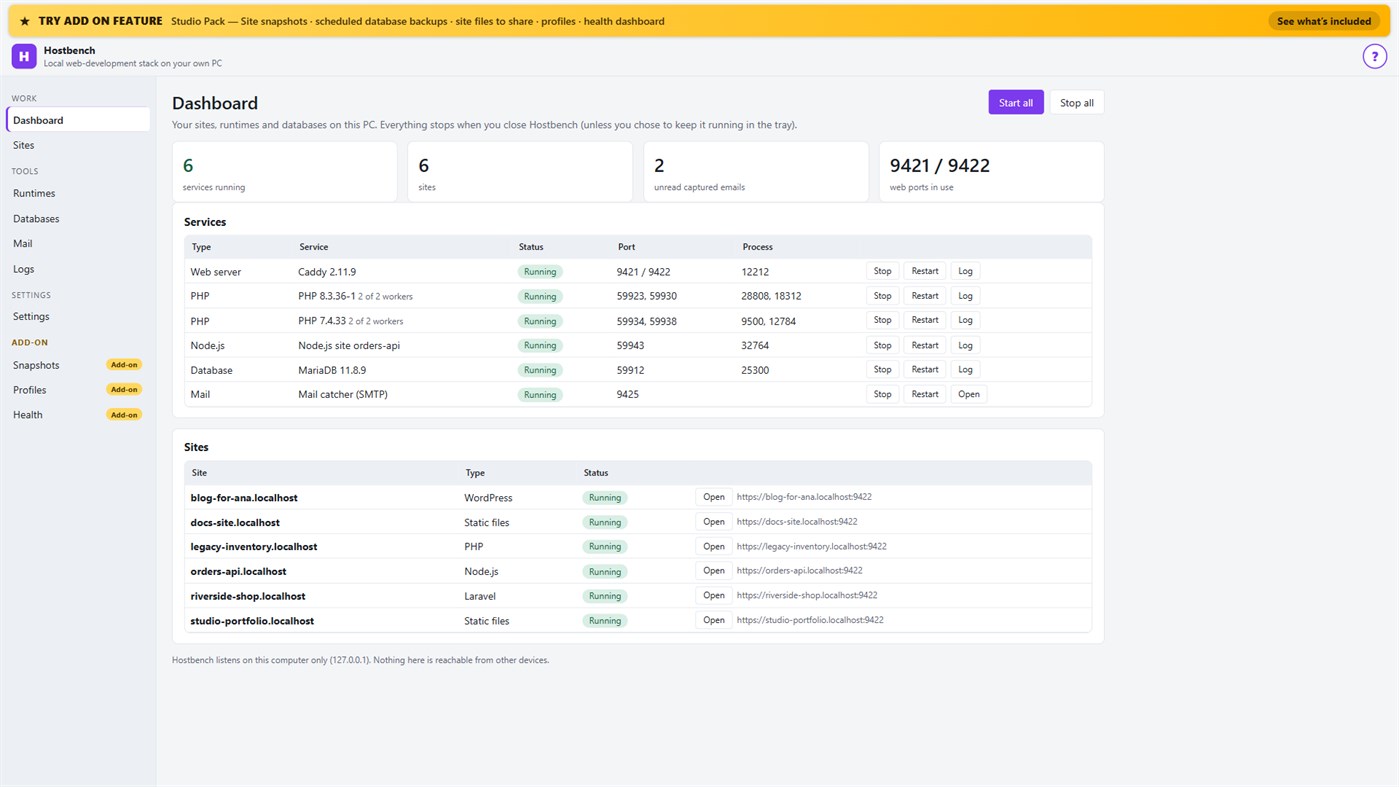
Hostbench is for PHP, Laravel and WordPress developers, Node.js developers, freelancers and agencies with many client sites, and students learning web development. It serves your own projects on your own PC (127.0.0.1) only. It does not host sites for other people and does not deploy anywhere.
HOW IT WORKS
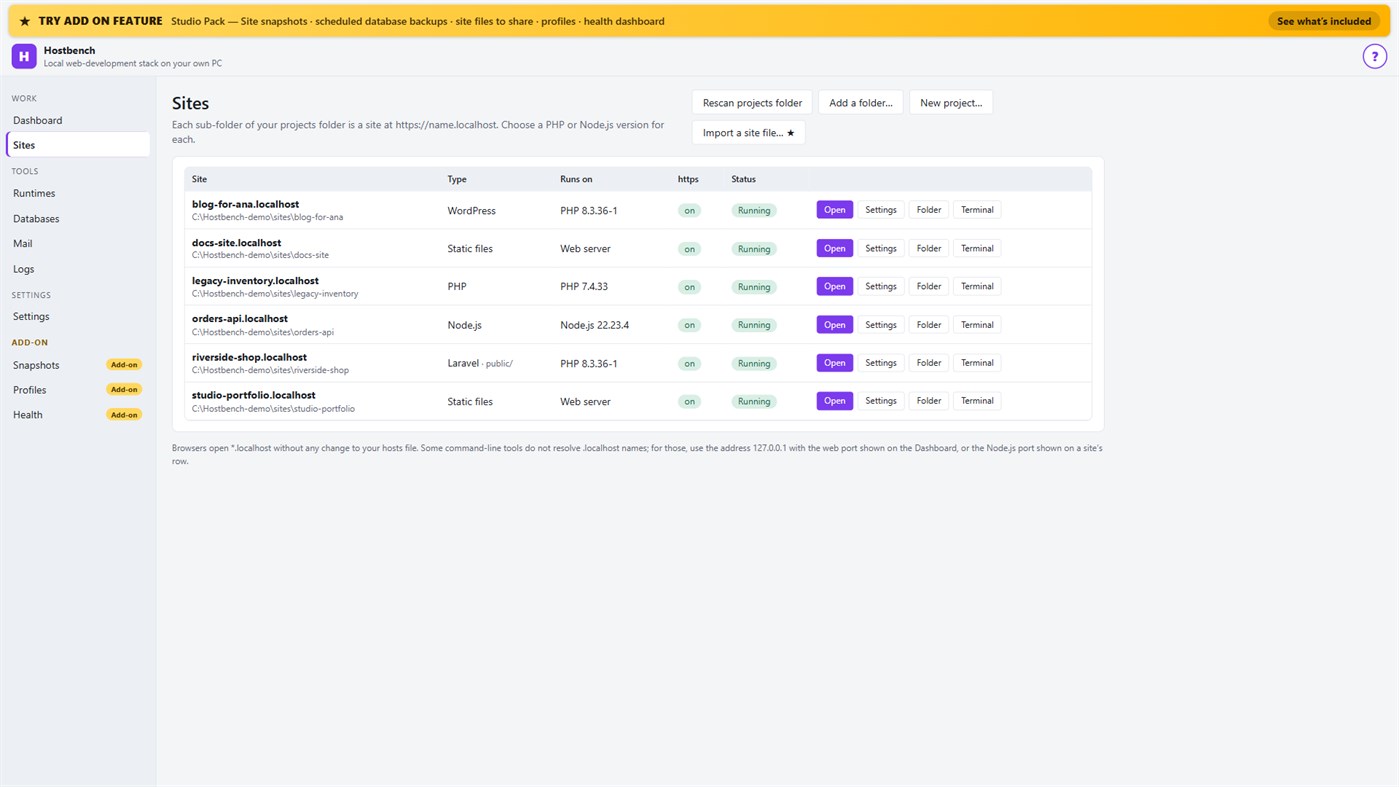
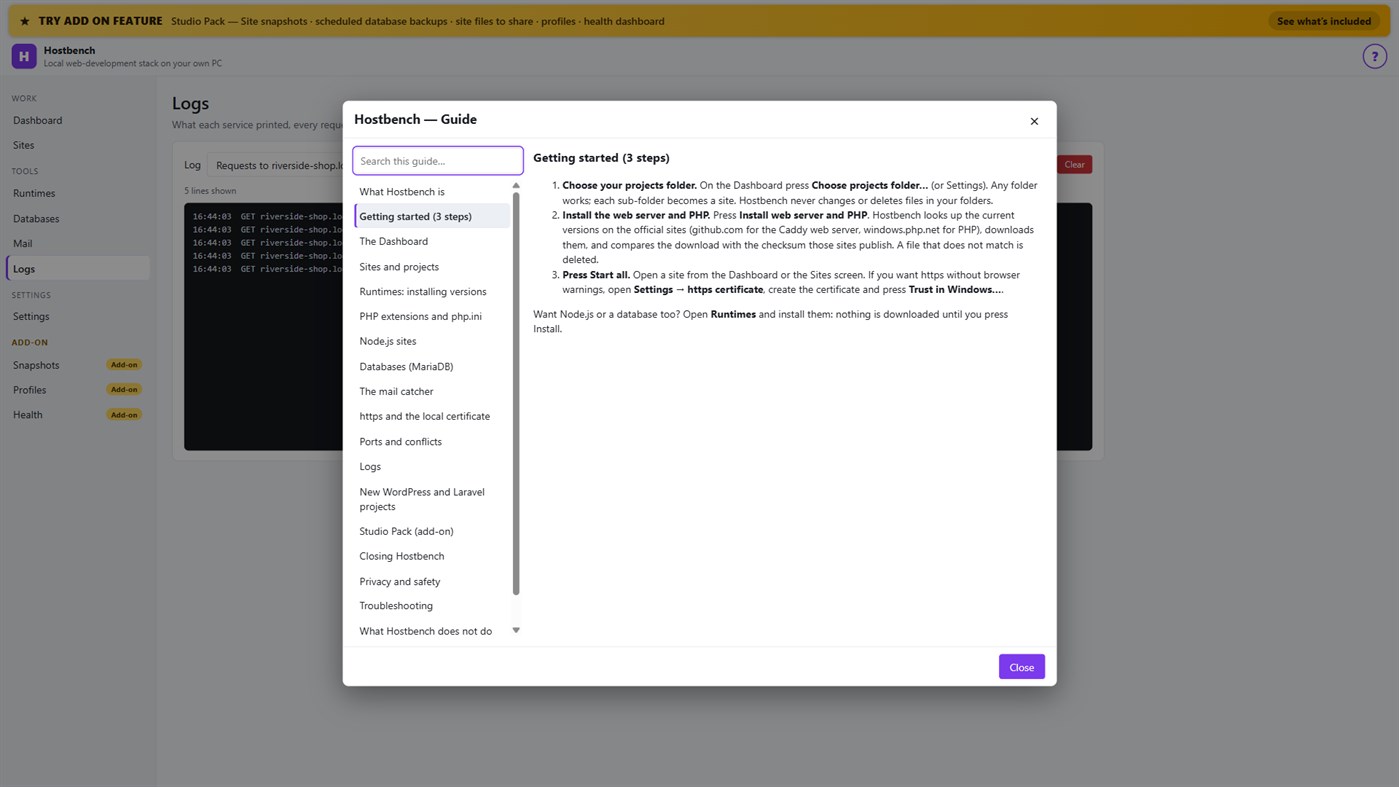
1. Choose your projects folder. Every sub-folder becomes a site: the folder "shop" is https://shop.localhost.
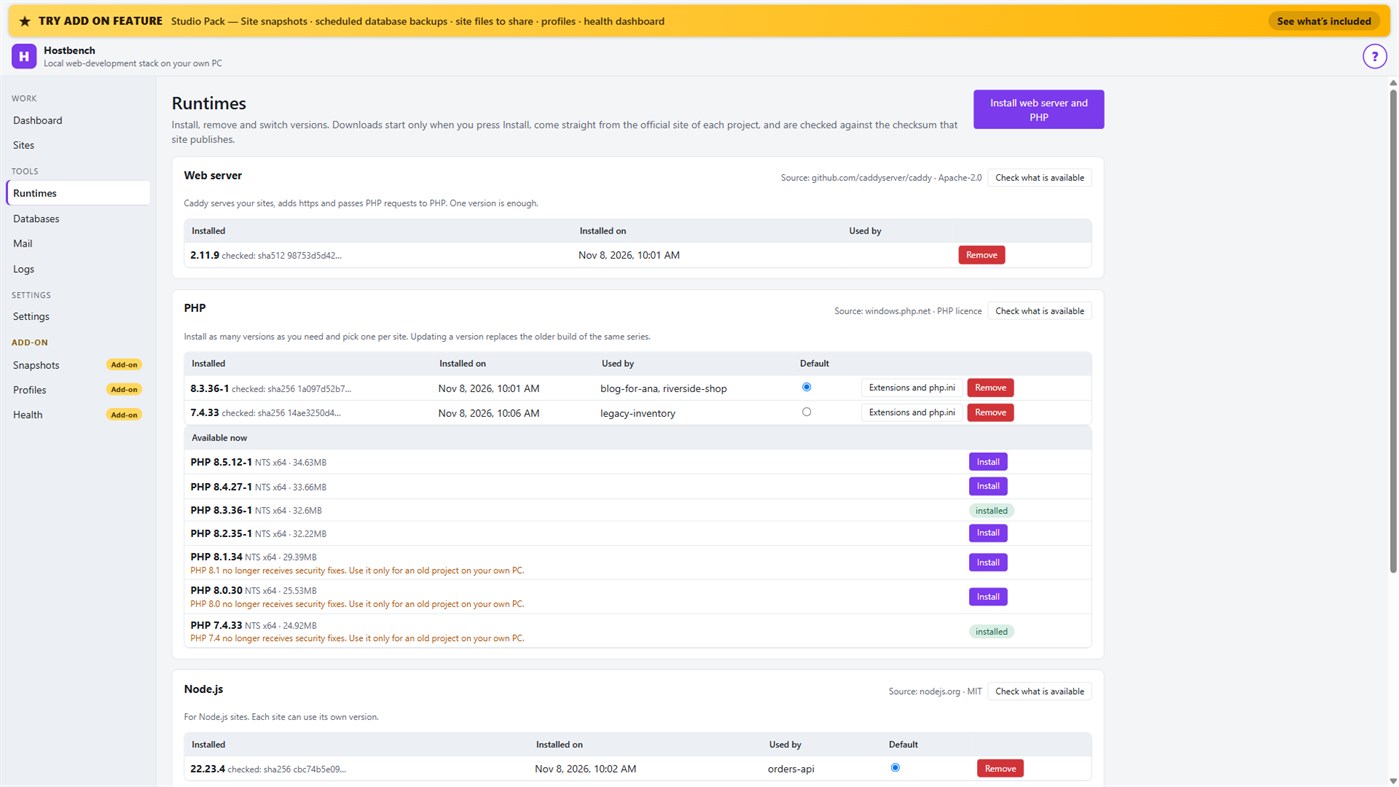
2. Install what you need. Hostbench downloads the web server, PHP, Node.js and MariaDB from their official sites when you press Install, and checks every file against the checksum the site publishes. The publisher of Hostbench hosts nothing.
3. Pick a version per site: PHP 8.3 for one client, PHP 7.4 for an old client site, Node.js 22 for an API.
4. Press Start all. Open the site. Close Hostbench and everything stops.
EVERYTHING IN THE ONE-TIME PURCHASE
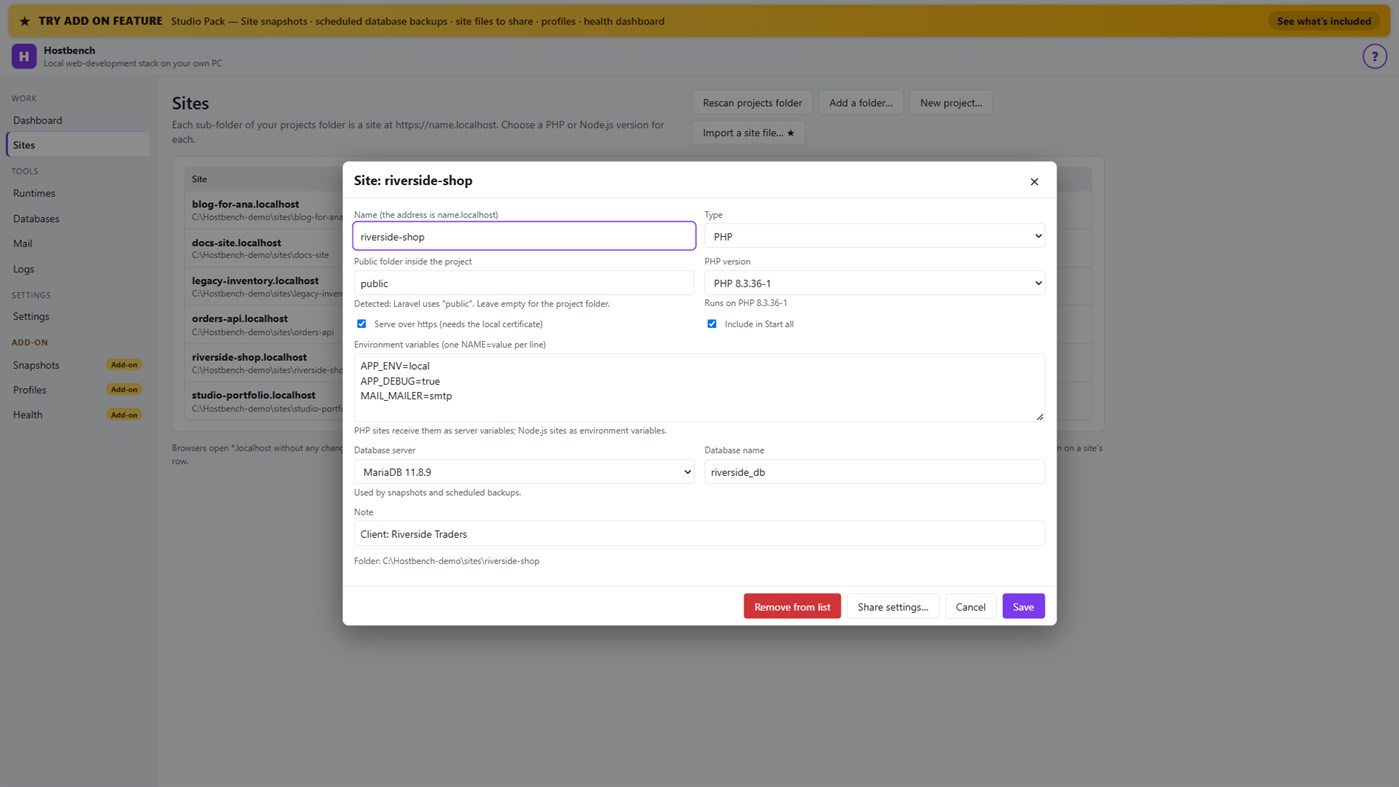
• Sites from folders with *.localhost addresses (no hosts-file editing for browsers); Laravel, Symfony, WordPress, plain PHP, static and Node.js projects are recognised, including the public folder
• Several PHP versions and Node.js versions installed side by side, chosen per site; each install is checksum-verified; versions without security support are marked
• https that works: Hostbench creates its own certificate authority for this PC, limited to .localhost names, and — only after your confirmation in Windows — trusts it for your account. Remove it again in one click
• A web server (Caddy) with PHP running through FastCGI worker pools, and Node.js sites proxied behind the same https address
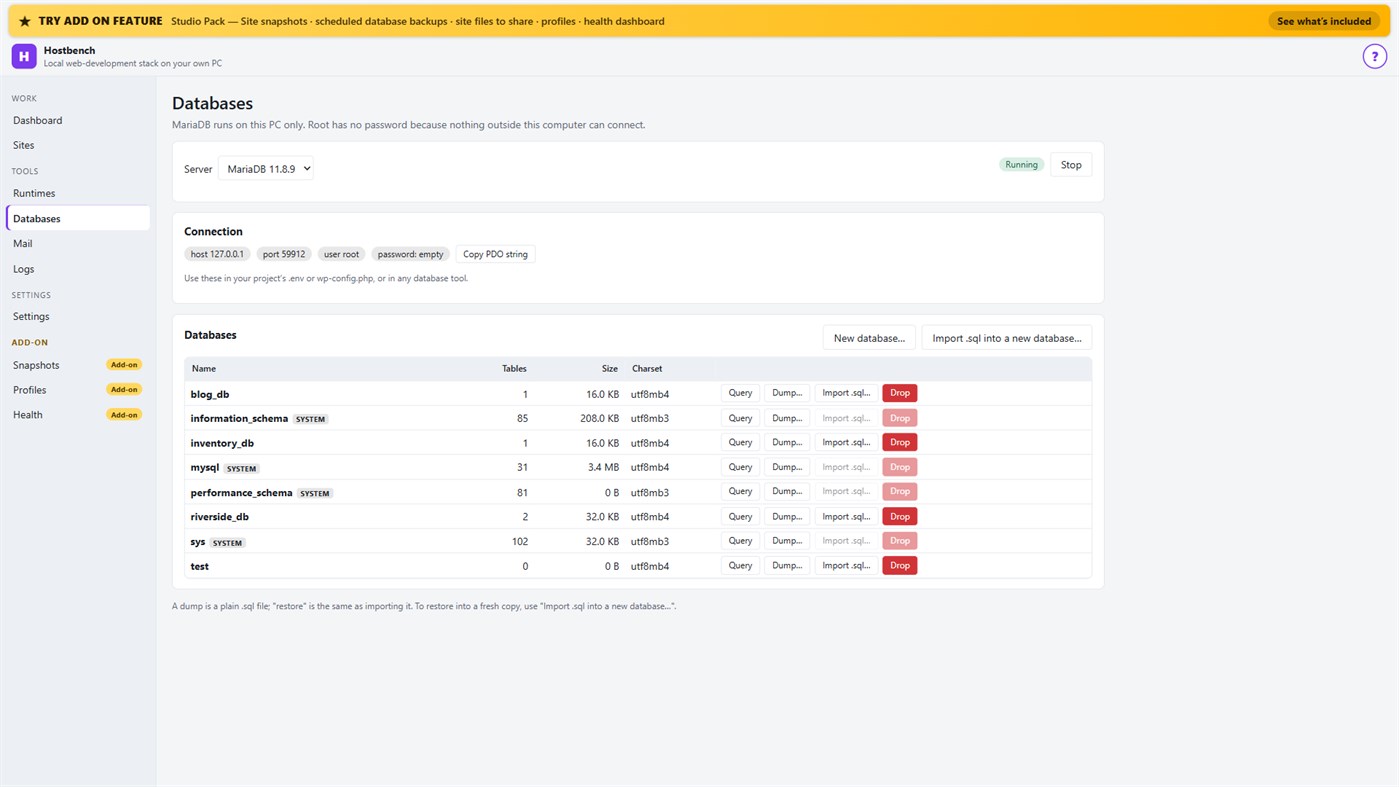
• MariaDB server with a database screen: create, drop, dump, import a .sql file, restore into a copy, run a quick query
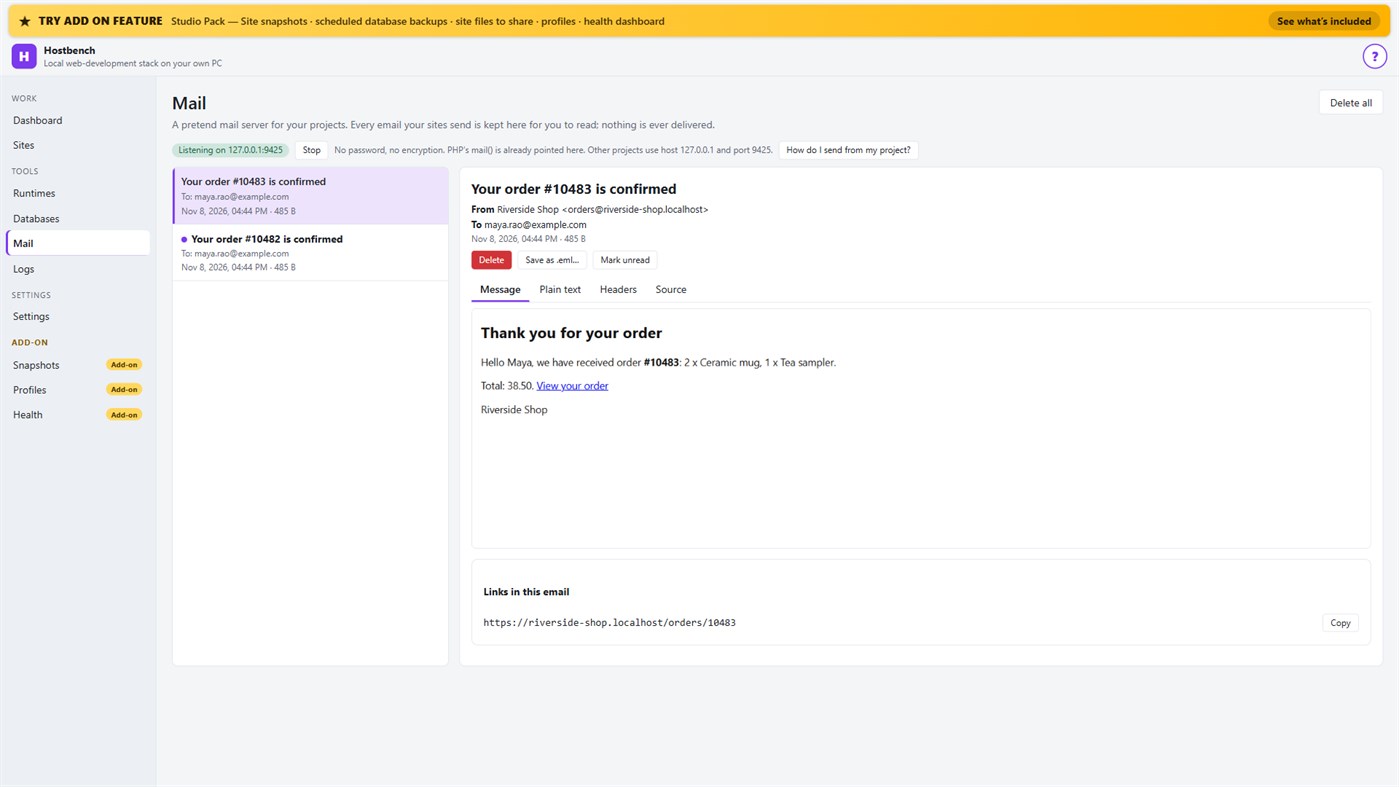
• Mail catcher: everything your sites send arrives in the Mail screen, with the message, text, headers, source, links and attachments. PHP's mail() is already connected. Nothing is ever delivered to anyone
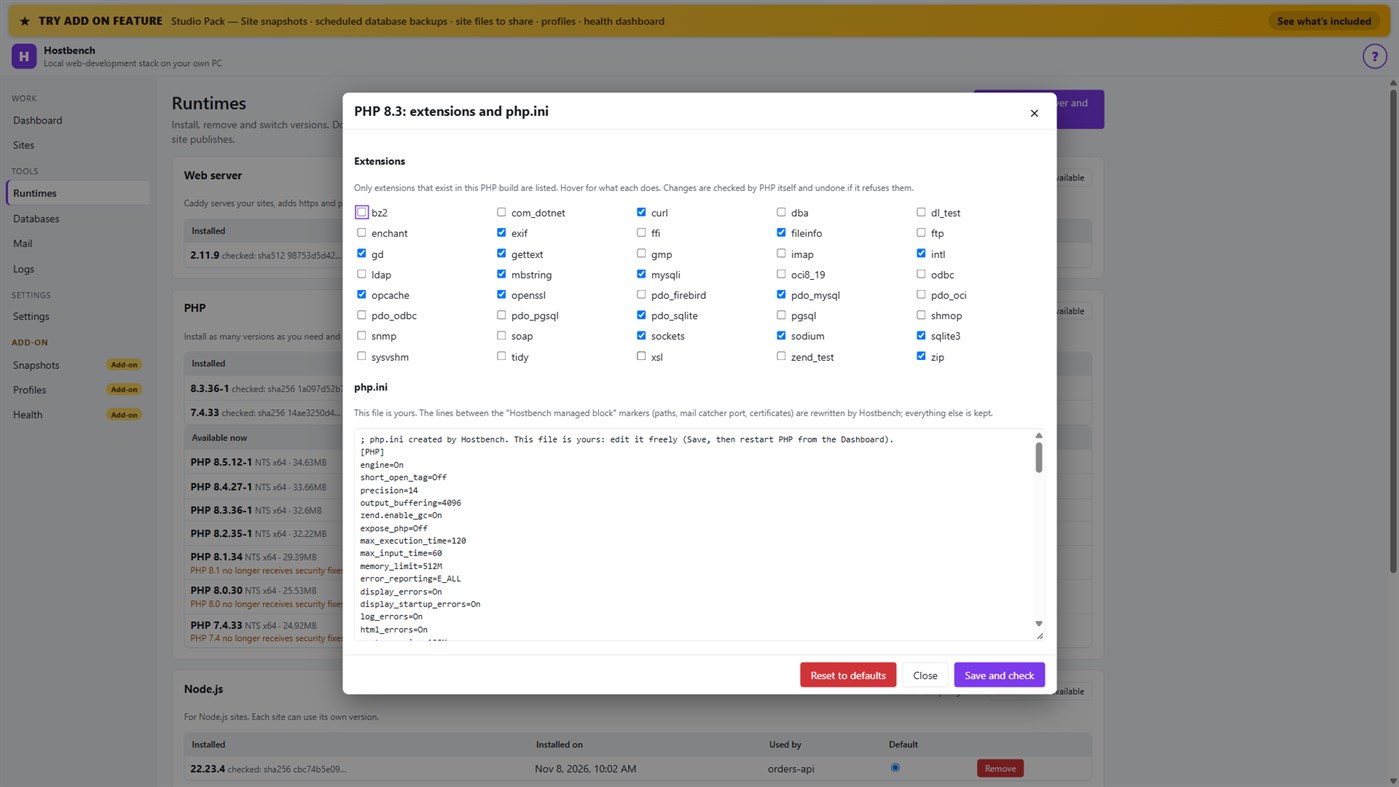
• PHP extension switches and a PHP settings file editor for every PHP version, checked by PHP itself before a change is kept
• Per-site environment variables, a Terminal button with the site's PHP, Node.js and Composer on the PATH
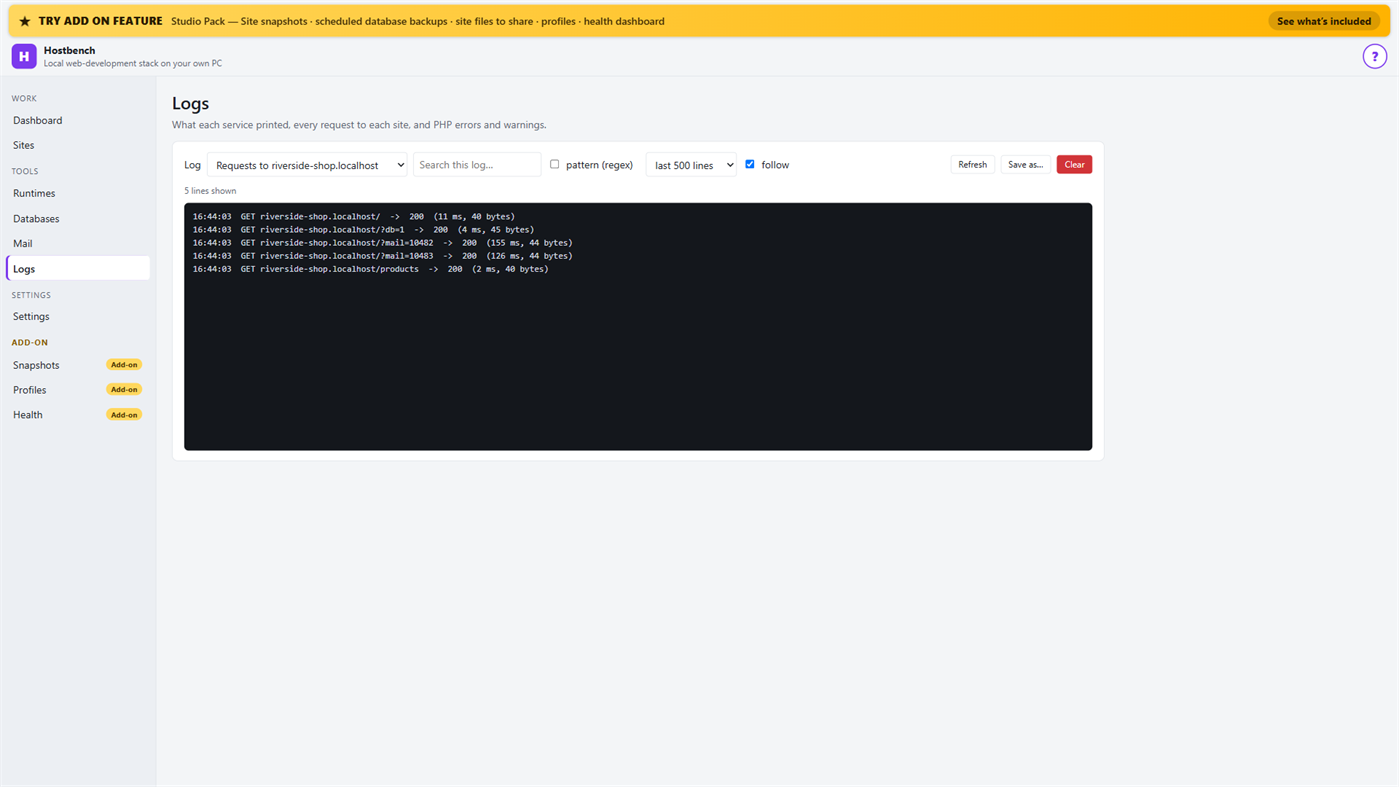
• Logs for every service, every request to every site and PHP errors, with search and regular expressions
• Port conflict detection: when ports 80 and 443 are busy (for example IIS), Hostbench switches to fallback ports (8080 and 8443), shows the addresses with the port and names the program holding the port when Windows reports it
• New WordPress and Laravel projects in one step (WordPress from wordpress.org, Laravel through Composer)
• Everything stops when you close the window (or keep it running in the tray if you choose); no process is left behind
• One "?" guide explains every screen
ADD-ON: STUDIO PACK (optional monthly subscription)
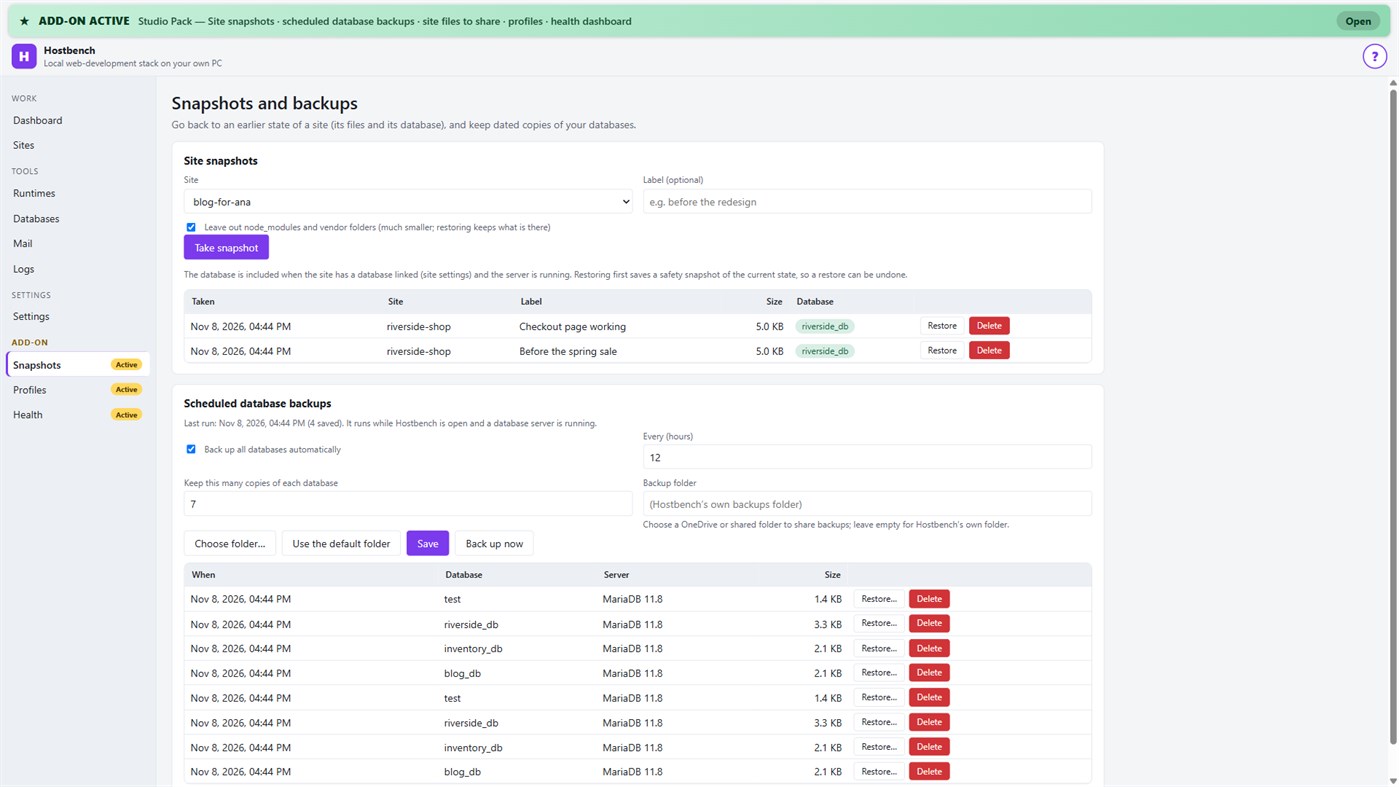
• Site snapshots and restore — a site's files and its database in one snapshot; a safety copy is taken before every restore
• Scheduled database backups — dated dumps every N hours to a folder you choose, newest copies kept
• Site files to share — export a site's settings (type, public folder, versions, PHP extensions, start command) as one small file; a colleague imports it and picks their own folder; secrets stay out unless you include them
• Profiles — name a set of sites, databases and the mail catcher and switch to it with one click
• Health dashboard — every site is checked through the real web server, with the answer code, the time and what to look at
PRIVACY
No telemetry, no advertising, no account. Your projects, databases and captured emails stay on your PC. The only network use is the downloads you start from the Runtimes screen or a new project, and the Microsoft Store licence check. Every Hostbench service listens on 127.0.0.1 only.
GOOD TO KNOW
Hostbench downloads runtimes on request, so the first set-up needs an internet connection. PHP 8 builds need the Microsoft Visual C++ Redistributable 2015–2022 (x64); Hostbench tells you if it is missing. Firefox keeps its own certificate list, so the saved certificate file must be imported there. This version includes MariaDB as its database server; PostgreSQL, MySQL, Redis-compatible caches and Xdebug setup are not included. Hostbench is tested with the programs from the official sites listed above; it is not affiliated with their projects.
Từ nhà phát triển ¡
Bạn là nhà phát triển?
Tin tức của bạn ở đầu trang, người theo dõi nhận qua email
Nền tảng khác 0
| HostbenchWindows Store1K VàngWindowsMua hàng trong ứng dụng | $6.99 |
Hiện chỉ có ở cửa hàng này.
Lịch sử giá 0
- Giá hiện tại: $6.99
- Tối thiểu: $6.99
- Tối đa: $6.99
Theo dõi giá Nhận thông báo qua email hoặc thông báo đẩy khi giá giảm
Danh sách 0
-
 Hostbench
Điểm 0
-

- +1 Điểm

Bảng xếp hạng 0
-
- Điểm bạn chấm
Bình luận 0 ¡
Hãy là người đầu tiên bình luận
Nhà phát triển 14
- Webspace IN
- Người theo dõi: 0
- Nền tảng: Windows Ứng dụng (14)
- Giảm giá: 0
- Danh sách: 0 + 0
- Điểm: 0 + 0 ¡
- Bảng xếp hạng: 0
- Bình luận: 0
- Video: 0
- RSS: Đăng ký
Tính năng mới
- Phiên bản: PC
- Cập nhật lần cuối:
- Initial release — introducing Hostbench to the Microsoft Store.
Thông tin bổ sung
- Ngày phát hành:
- Danh mục:
Ứng dụng cho Windows›Công cụ cho nhà phát triển - HĐH:
PC - Kích thước:
158 Mb - Ngôn ngữ được hỗ trợ:
Tiếng Anh - Xếp hạng nội dung:
EVERYONE - Windows Store Điểm đánh giá: ¡
0 - Trang web:
 https://webspacein.com/contact
Điểm tổng hợp AppAgg
1.450
Điểm tổng hợp AppAgg ước tính cho
Hostbench
Nhà phát triển: Webspace IN
1.450 Vàng
Điểm cao hơn thường cho thấy các chỉ số trên AppAgg tốt hơn.
Dựa trên: độ phổ biến · đánh giá của người dùng · độ mới · ưu đãi · dữ liệu cửa hàng · hoạt động cộng đồng
Được tính lại hằng ngày từ dữ liệu AppAgg mới nhất.
Huy hiệu cho trang web:  Đã sao chép!
Tóm tắt
Hostbench URL ngắn: Đã sao chép!- Windows Store
Trên AppAgg, bạn có thể theo dõi “Hostbench”, ứng dụng của Webspace IN dành cho Windows, thuộc danh mục Công cụ cho nhà phát triển. Điểm tổng hợp AppAgg: 1.450 (Vàng). Điểm AppAgg của ứng dụng — đã xác nhận: 0; gián tiếp: 0. Số danh sách công khai có ứng dụng này: 0. Số người dùng đã lưu ứng dụng vào danh sách riêng tư: 0. Người dùng AppAgg chưa chấm điểm ứng dụng này. Điểm đã xác nhận ghi nhận việc người dùng đã đăng nhập AppAgg truy cập cửa hàng. Điểm gián tiếp dựa trên dữ liệu của cửa hàng. Hai bộ đếm cho biết số danh sách công khai và số người dùng đã lưu ứng dụng hoặc trò chơi vào danh sách riêng tư. Ứng dụng được phát hành lần đầu vào . Ứng dụng được cập nhật gần nhất vào . Ứng dụng hiện có giá $6.99. Ứng dụng hỗ trợ các ngôn ngữ sau: Tiếng Anh. Xem lịch sử giá, thêm ứng dụng vào danh sách hoặc theo dõi nhà phát triển. Theo dõi ưu đãi và bản cập nhật sắp tới của ứng dụng qua nguồn RSS. AppAgg không lưu trữ hoặc phân phối ứng dụng này. Mọi nhãn hiệu, biểu trưng và ảnh chụp màn hình liên quan đến ứng dụng đều thuộc về chủ sở hữu tương ứng.
Bạn cũng có thể thích
Đã xem gần đây
Người dùng AppAgg ¡Thêm →
Nhiệm vụ tuầnĐăng nhập để nhận 3 nhiệm vụ mỗi tuần và XP cho chúng.

