
ブックマーク
このブックマークのタイトルを入力してください。
ブックマークを保存しました
| 開発者: | Rainbowfactory (8) | ||
| 価格: | 無料 | ||
| スコア: | 680 シルバー | ||
| ランキング: | 0 | ||
| コメント: | 0 コメントを投稿する | ||
| リスト: | 0 0 | ||
| ポイント: | 0 | ||
| +1 ポイント | |||
概要
こちらはHTML Designer Pro: Web Page Editor - HTML, CSS & JavaScript。Rainbowfactoryが贈る「開発者ツール」カテゴリのアプリです。
にリリース。まだまだフレッシュです。
App Storeにもあります。使いやすいところでどうぞ。
無料。広告なし、アプリ内課金なし。あなたとアプリだけです。
Microsoft StoreはWindowsに組み込まれているので、数クリックでインストールできます。
AppAggスコアは680。「シルバー」なら、なかなかのものです。
たった5メガバイト。空きの少ないドライブにも収まります。
年齢区分は「EVERYONE」なので、子どもでも安心です。
11言語に対応していて、日本語もあります。
AppAggではまだ誰も評価していません。一番乗りのチャンスは今です。
この開発者のアプリは、AppAggにほかに7個あります。のぞいてみては?
アップデートや新しいアプリを誰よりも早く知りたい?開発者をフォローするか、RSS フィードを購読しましょう。プッシュ通知は Android と iOS 向けの AppAgg Alerts アプリで届きます。
広告
他のプラットフォーム 1

価格履歴 0
- 現在の価格: 無料
- 最小値: 無料
- 最大値: 無料
ホームに自分だけのフィード
「新着・アップデート」のプラットフォームを選ぶと、ホームには必要なアプリとゲームだけが表示されます。
スクリーンショット 5
説明

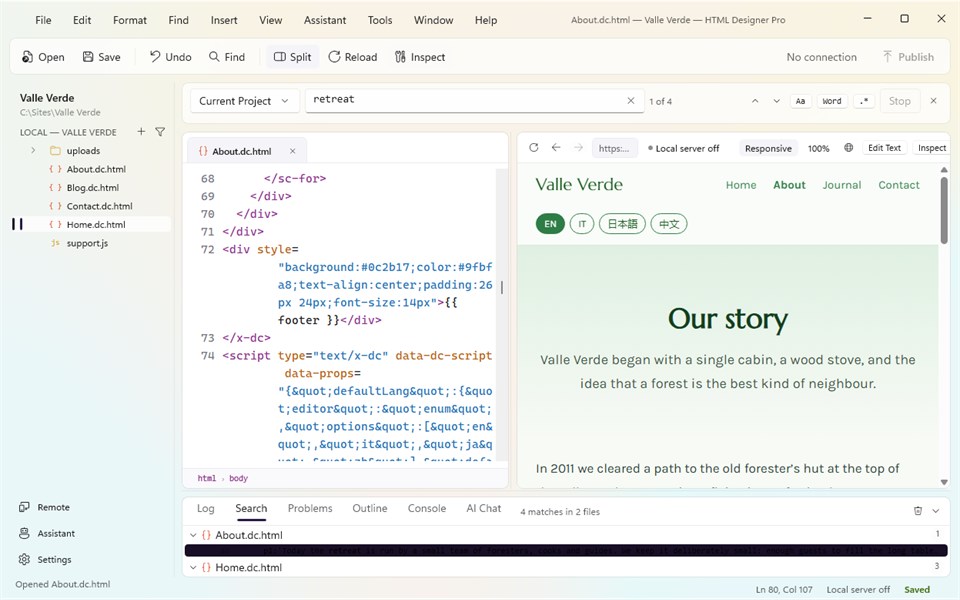
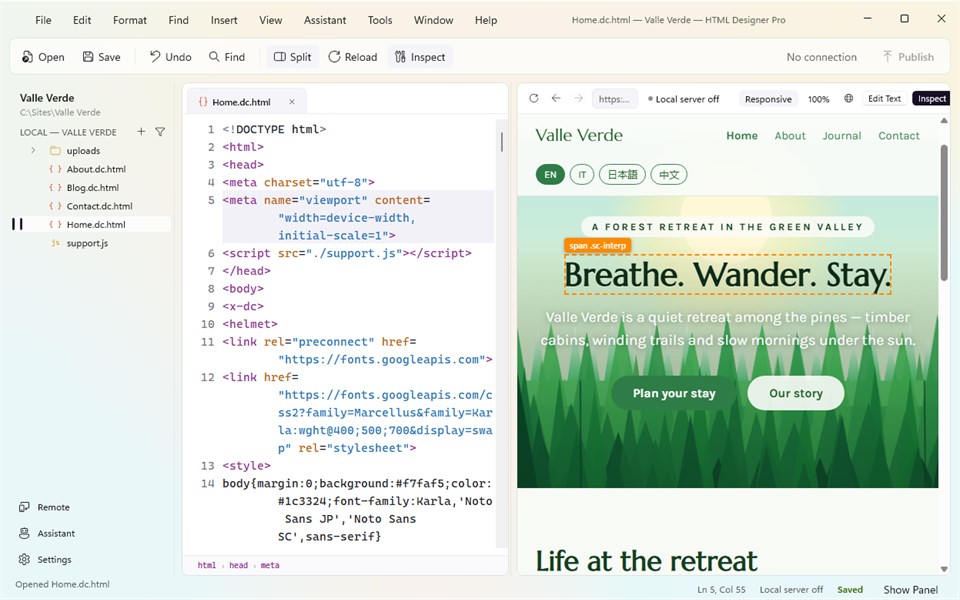
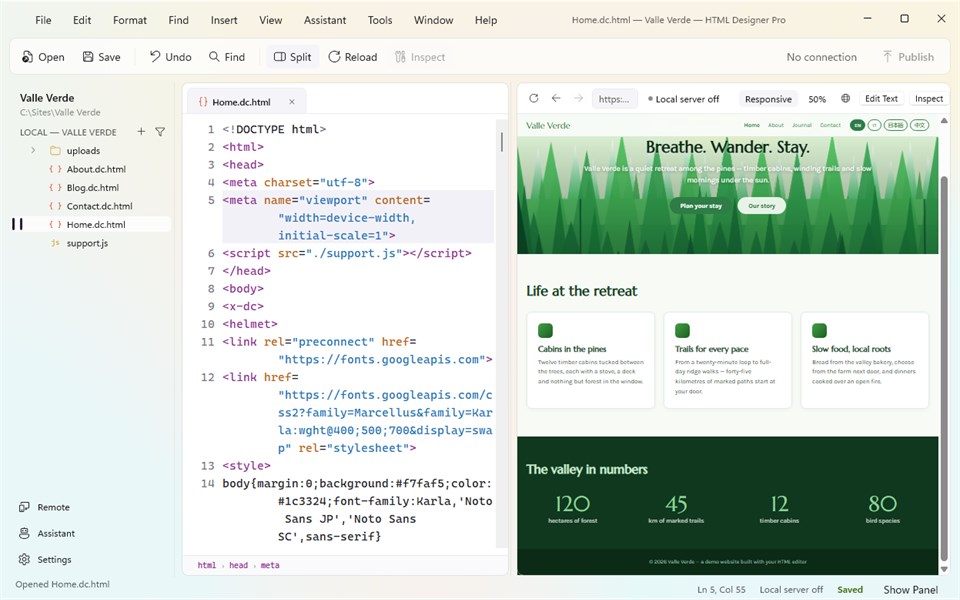
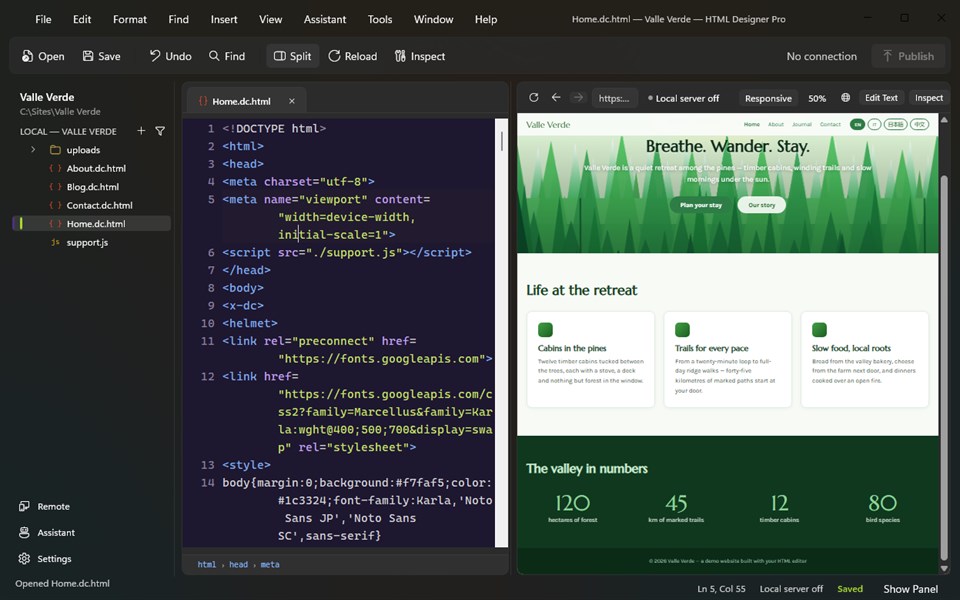
HTML Designer Pro is a complete editor for the web: your files on the left, the code in the middle, the page itself on the right. Work in code, in the preview, or in both at once — and when you are ready, send the site to your server without leaving the window.
WRITE THE CODE
• Colouring for HTML, CSS, JavaScript, PHP and Markdown, with the brackets you are inside lit up and the indent guides drawn
• Type an opening tag and the closing one appears; type a letter and the tags, attributes and CSS properties that fit are offered — both can be switched off
• A breadcrumb above the code says exactly where the cursor is, from down to the element you are in
• One key per job on a line: comment it out, move it up or down, duplicate it, change its case
• Tidy up the indentation of a whole file, or only what you selected
• Find and replace across the file, and across every file in the project, plainly or with a pattern — and "Undo Replace in Files" puts them all back in one step
• Multiple documents in tabs, multiple project windows, and the session you left open comes back when you return
SEE THE PAGE
• The preview sits beside the code and keeps up as you type. Side by side or one above the other, and you can hide either half
• Point at anything in the preview and "Inspect" jumps to the exact line that draws it
• "Edit Text" lets you change the words in the preview and writes the smallest possible change back into the code
• Check the page at a phone, tablet or desktop size, and zoom in and out
• A console that shows what the page itself is saying, so a script that fails says so
• Open the page in any browser installed on your computer, in one click
• Pages that need a server get one: the preview is served over a real local address, so links, fonts and scripts behave as they will online. Pages that run on your own server are previewed there
BUILD THE MARKUP
• A library of every HTML element, grouped and described, that writes the tag for you with its usual attributes
• Snippets you can keep, edit and drop in
• A table builder: pick the rows, the columns, the header and the caption, and get the markup
• A CSS panel that lists the styles the page really uses, rule by rule, and lets you change a value and see it land
• A DOM tree of the document, and an inspector for the element under the cursor
• Pull every inline SVG out of a page into files of their own, all in one undo step
• Check the document against the rules of HTML, or against the rules of XML, and get a list of problems you can click through
PUBLISH
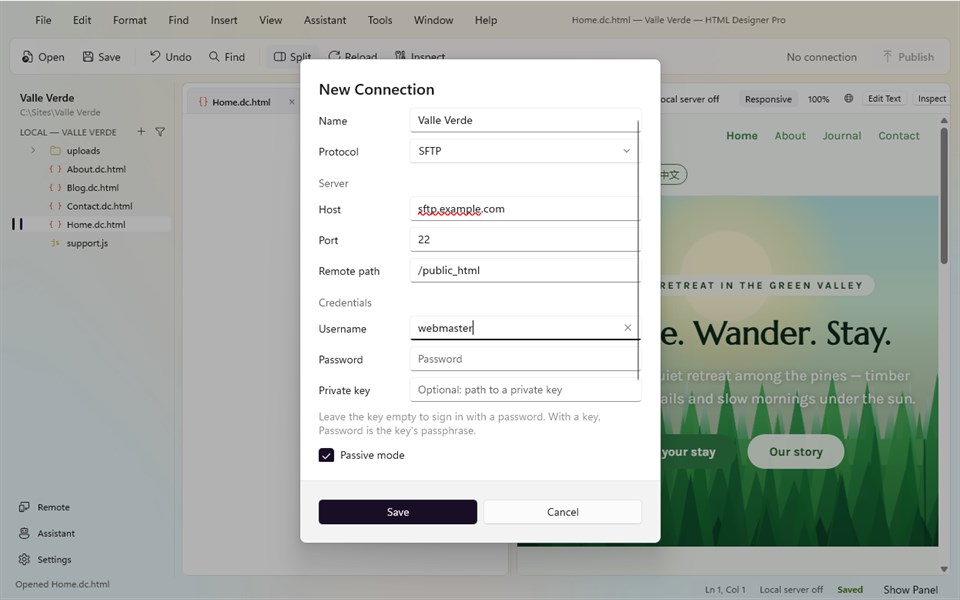
• Connect over FTP, FTPS or SFTP and see your server next to your files
• Every file and folder carries a badge: the same on both sides, newer here, newer there, or only on one
• Upload, download and pull whole folders, or send everything that changed with "Publish All"
• Drag files between the two trees in either direction
• Resume an interrupted transfer, watch the progress, and stop it if you change your mind
• A transfer log that keeps every success and every failure, with the reason
• Your passwords are kept by Windows, in the same place it keeps the rest of your credentials, and are never written into a project file
• The first time you meet a server its key is remembered, and you are told if it ever changes
AN ASSISTANT THAT KNOWS THE PROJECT
• Ask for markup, for a style, for a fix, or for an explanation — in the panel or in a palette, whichever you prefer
• It reads the files you are working on, so "make this table responsive" means this table
• Bring your own key if you have one, or use the channel that comes with the app and start straight away — free, no account
• When it writes files for you, a copy of every file it replaces is put aside first, and one step undoes the lot. A file whose copy could not be written is left alone, and it tells you
WORK WITH YOUR AI ASSISTANT
• Switch on external control and an assistant such as Claude, Codex or VS Code can work in the project with you: open and save documents, search and replace, insert elements, read and edit the tree, connect to your server and publish
• It goes through the same machinery the menus use, so everything it does can be undone the same way
THE WORKSPACE
• Ten floating palettes that remember where you put them
• A panel under the code with four views: the log, your search results, the problems found in the document, and an outline of it
• A dark theme that follows the system setting, and a light syntax palette
• A command bar for the eight things you reach for most, and every one of them is also a menu item with a shortcut
• A searchable list of every keyboard shortcut
• Send feedback straight from the app, with a screenshot if you like; if you are offline the message waits and goes out later
Everything included, nothing to unlock. HTML Designer Pro is built by Rainbowfactory. Updates arrive through the Microsoft Store.
デベロッパーから
デベロッパーの方ですか?
ページの一番上にニュースを投稿すると、フォロワーにメールで届きます。YouTube 動画を追加すると、「動画」の一番上に表示されます。
リスト 0
-
 HTML Designer Pro: Web Page Editor - HTML, CSS & JavaScript
ポイント 0
-

- +1 ポイント

ランキング 0
-
- あなたの評価
開発者 8
- Rainbowfactory
- フォロワー: 0
- プラットフォーム: Windows アプリ (8)
- セール: 0
- リスト: 0 0
- ポイント: 0
- ランキング: 0
- コメント: 0
- 動画: 0
- RSS: 購読する
新機能
- バージョン: PC
- 最終更新:
- • Pinch to zoom in the code editor on touch screens.
• A new Text Color command colors the selected text.
• Upload your project to the server straight from the File menu.
• Connect AI assistants over MCP from the Automation settings, with new tools for editing, find and replace, and views.
• Inline text edits are kept when you save, publish or close; larger app icon.
バージョン履歴2
- Version 26.3 fixes two crashes. • Fixed a crash when creating files in a new folder • Fixed a crash with word wrap on empty lines
- Version 26.2 makes closing HTML Designer Pro more reliable. • Fixed a crash that could happen when closing the app • Closing a window or quitting the app is steadier
情報
 https://www.rainbowfactory.uk/
AppAggスコア
680
AppAgg推定スコア:
HTML Designer Pro: Web Page Editor - HTML, CSS & JavaScript
開発者: Rainbowfactory
680 シルバー
スコアが高いほど、AppAgg上の各指標が良好な傾向にあります。
基準: 人気 · ユーザー評価 · 新しさ · セール · ストアデータ · コミュニティ活動
最新のAppAggデータに基づいて毎日再計算されます。
ウェブサイト用バッジ:  コピーしました!
コメント 0 ¡
最初のコメントを書きましょう
シェア
HTML Designer Pro: Web Page Editor - HTML, CSS & JavaScript 短縮 URL: コピーしました!- Windows Store

