
บุ๊กมาร์ก
| ผู้พัฒนา: | Rainbowfactory (8) | ||
| ราคา: | ฟรี | ||
| คะแนน: | 680 เงิน | ||
| การจัดอันดับ: | 0 | ||
| ความคิดเห็น: | 0 โพสต์ความคิดเห็น | ||
| รายการ: | 0 0 | ||
| แต้ม: | 0 | ||
| +1 แต้ม | |||
สรุป
มาทำความรู้จัก HTML Designer Pro: Web Page Editor - HTML, CSS & JavaScript แอปในหมวด “เครื่องมือสำหรับนักพัฒนา” จาก Rainbowfactory
ออกเมื่อ ยังสดใหม่อยู่เลย
มีบน App Store ด้วย เลือกที่ที่สะดวกได้เลย
ฟรี ไม่มีโฆษณา ไม่มีการซื้อภายในแอป มีแค่คุณกับแอป
Microsoft Store มีมาในตัว Windows อยู่แล้ว ติดตั้งได้ในไม่กี่คลิก
คะแนน AppAgg คือ 680 ระดับ “เงิน” ถือว่าไม่เลวเลย
แค่ 5 เมกะไบต์ ต่อให้ไดรฟ์เต็มก็ยังลงได้
จัดเรต “EVERYONE” เหมาะกับเด็ก ๆ ด้วย
รองรับ 11 ภาษา แต่ยังไม่มีภาษาไทย
ยังไม่มีใครบน AppAgg ให้คะแนนเลย โอกาสเป็นคนแรกอยู่ตรงนี้แล้ว
ผู้พัฒนารายนี้มีแอปอื่นบน AppAgg อีก 7 แอป ลองไปดูกัน
อยากรู้เรื่องอัปเดตและแอปใหม่ก่อนใครไหม? ติดตาม ผู้พัฒนา หรือกดติดตาม ฟีด RSS ได้เลย การแจ้งเตือนแบบพุชส่งผ่านแอป AppAgg Alerts สำหรับ Android และ iOS
แพลตฟอร์มอื่น 1

ประวัติราคา 0
- ราคาปัจจุบัน: ฟรี
- ต่ำสุด: ฟรี
- สูงสุด: ฟรี
ฟีดของคุณเองบนหน้าแรก
ภาพหน้าจอ 5
คำอธิบาย

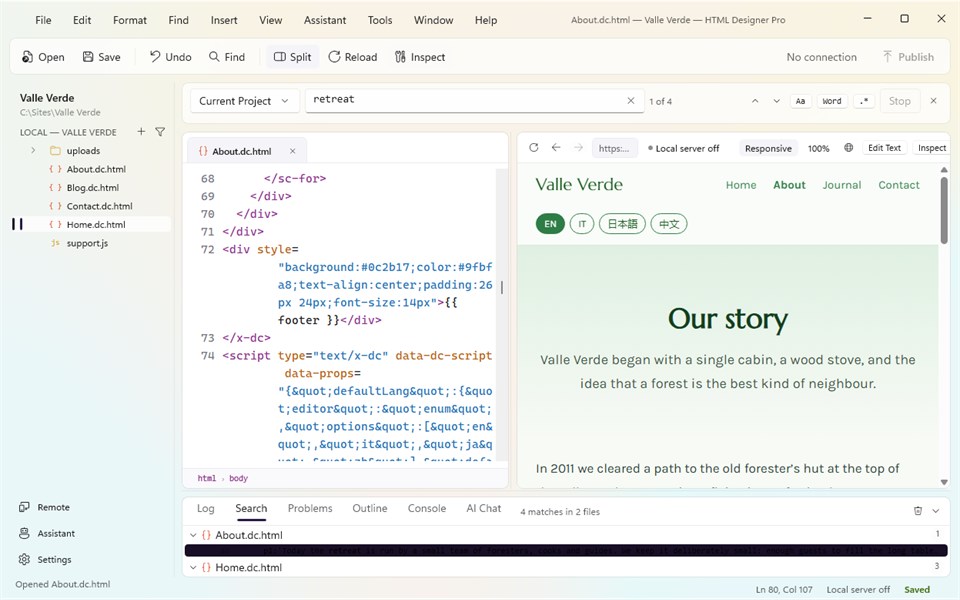
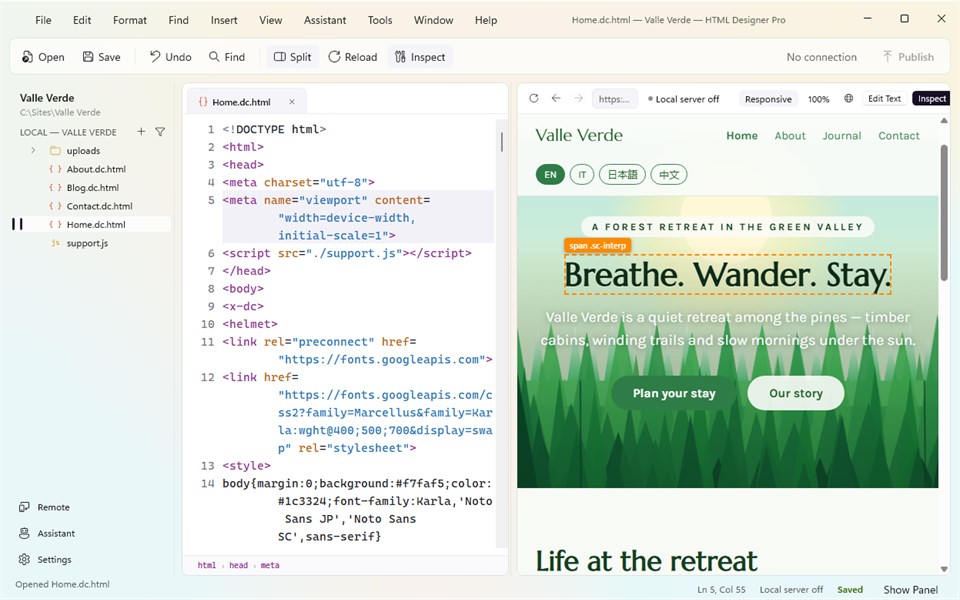
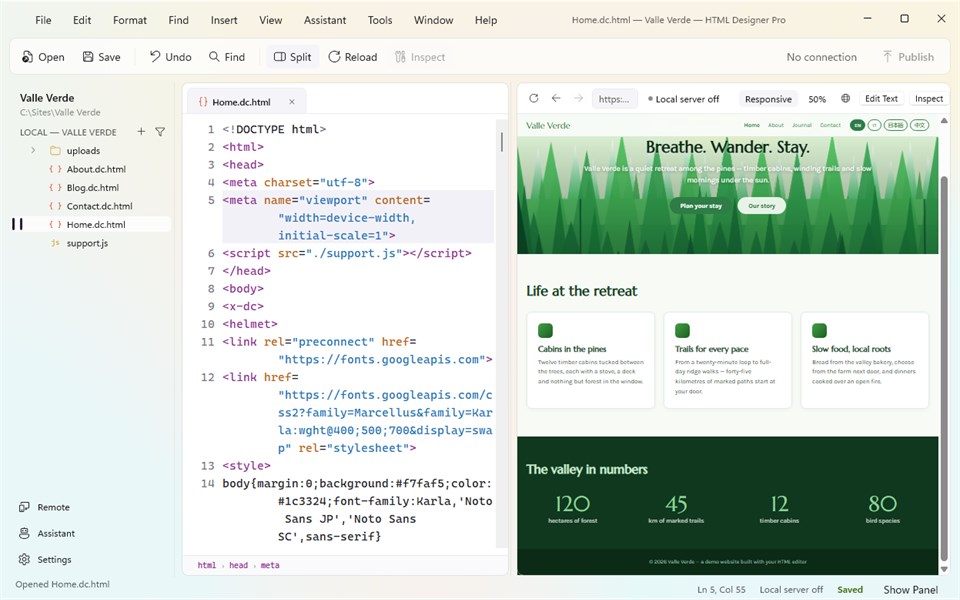
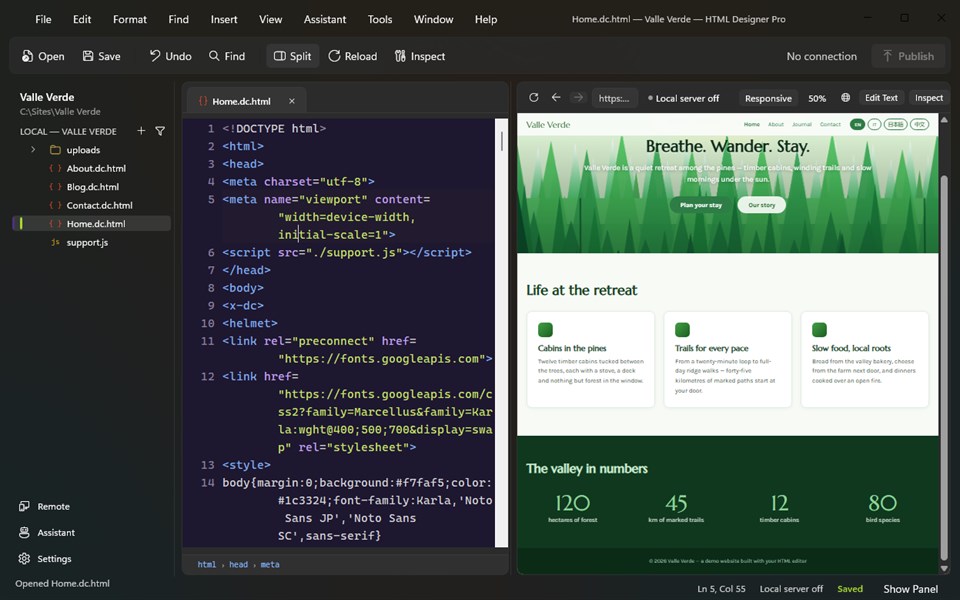
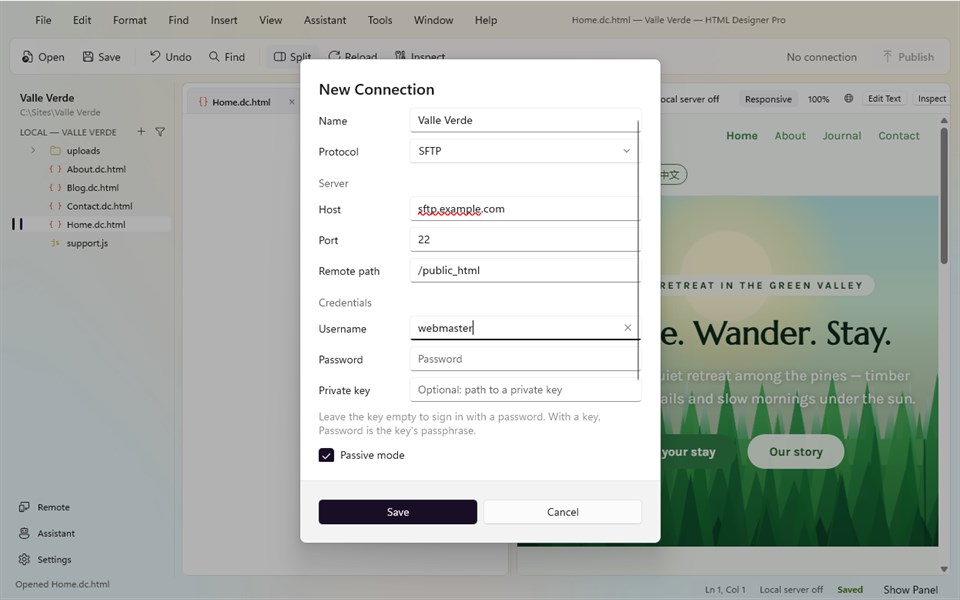
HTML Designer Pro is a complete editor for the web: your files on the left, the code in the middle, the page itself on the right. Work in code, in the preview, or in both at once — and when you are ready, send the site to your server without leaving the window.
WRITE THE CODE
• Colouring for HTML, CSS, JavaScript, PHP and Markdown, with the brackets you are inside lit up and the indent guides drawn
• Type an opening tag and the closing one appears; type a letter and the tags, attributes and CSS properties that fit are offered — both can be switched off
• A breadcrumb above the code says exactly where the cursor is, from down to the element you are in
• One key per job on a line: comment it out, move it up or down, duplicate it, change its case
• Tidy up the indentation of a whole file, or only what you selected
• Find and replace across the file, and across every file in the project, plainly or with a pattern — and "Undo Replace in Files" puts them all back in one step
• Multiple documents in tabs, multiple project windows, and the session you left open comes back when you return
SEE THE PAGE
• The preview sits beside the code and keeps up as you type. Side by side or one above the other, and you can hide either half
• Point at anything in the preview and "Inspect" jumps to the exact line that draws it
• "Edit Text" lets you change the words in the preview and writes the smallest possible change back into the code
• Check the page at a phone, tablet or desktop size, and zoom in and out
• A console that shows what the page itself is saying, so a script that fails says so
• Open the page in any browser installed on your computer, in one click
• Pages that need a server get one: the preview is served over a real local address, so links, fonts and scripts behave as they will online. Pages that run on your own server are previewed there
BUILD THE MARKUP
• A library of every HTML element, grouped and described, that writes the tag for you with its usual attributes
• Snippets you can keep, edit and drop in
• A table builder: pick the rows, the columns, the header and the caption, and get the markup
• A CSS panel that lists the styles the page really uses, rule by rule, and lets you change a value and see it land
• A DOM tree of the document, and an inspector for the element under the cursor
• Pull every inline SVG out of a page into files of their own, all in one undo step
• Check the document against the rules of HTML, or against the rules of XML, and get a list of problems you can click through
PUBLISH
• Connect over FTP, FTPS or SFTP and see your server next to your files
• Every file and folder carries a badge: the same on both sides, newer here, newer there, or only on one
• Upload, download and pull whole folders, or send everything that changed with "Publish All"
• Drag files between the two trees in either direction
• Resume an interrupted transfer, watch the progress, and stop it if you change your mind
• A transfer log that keeps every success and every failure, with the reason
• Your passwords are kept by Windows, in the same place it keeps the rest of your credentials, and are never written into a project file
• The first time you meet a server its key is remembered, and you are told if it ever changes
AN ASSISTANT THAT KNOWS THE PROJECT
• Ask for markup, for a style, for a fix, or for an explanation — in the panel or in a palette, whichever you prefer
• It reads the files you are working on, so "make this table responsive" means this table
• Bring your own key if you have one, or use the channel that comes with the app and start straight away — free, no account
• When it writes files for you, a copy of every file it replaces is put aside first, and one step undoes the lot. A file whose copy could not be written is left alone, and it tells you
WORK WITH YOUR AI ASSISTANT
• Switch on external control and an assistant such as Claude, Codex or VS Code can work in the project with you: open and save documents, search and replace, insert elements, read and edit the tree, connect to your server and publish
• It goes through the same machinery the menus use, so everything it does can be undone the same way
THE WORKSPACE
• Ten floating palettes that remember where you put them
• A panel under the code with four views: the log, your search results, the problems found in the document, and an outline of it
• A dark theme that follows the system setting, and a light syntax palette
• A command bar for the eight things you reach for most, and every one of them is also a menu item with a shortcut
• A searchable list of every keyboard shortcut
• Send feedback straight from the app, with a screenshot if you like; if you are offline the message waits and goes out later
Everything included, nothing to unlock. HTML Designer Pro is built by Rainbowfactory. Updates arrive through the Microsoft Store.
จากนักพัฒนา
รายการ 0
-
 HTML Designer Pro: Web Page Editor - HTML, CSS & JavaScript
แต้ม 0
-

- +1 แต้ม

การจัดอันดับ 0
-
- คะแนนของคุณ
ผู้พัฒนา 8
- Rainbowfactory
- ผู้ติดตาม: 0
- แพลตฟอร์ม: Windows แอป (8)
- ลดราคา: 0
- รายการ: 0 0
- แต้ม: 0
- การจัดอันดับ: 0
- ความคิดเห็น: 0
- วิดีโอ: 0
- RSS: ติดตาม
มีอะไรใหม่
- เวอร์ชัน: PC
- อัปเดตล่าสุด:
- • Pinch to zoom in the code editor on touch screens.
• A new Text Color command colors the selected text.
• Upload your project to the server straight from the File menu.
• Connect AI assistants over MCP from the Automation settings, with new tools for editing, find and replace, and views.
• Inline text edits are kept when you save, publish or close; larger app icon.
- Version 26.3 fixes two crashes. • Fixed a crash when creating files in a new folder • Fixed a crash with word wrap on empty lines
- Version 26.2 makes closing HTML Designer Pro more reliable. • Fixed a crash that could happen when closing the app • Closing a window or quitting the app is steadier
ข้อมูลเพิ่มเติม
- วันที่วางจำหน่าย:
- หมวดหมู่:
แอปสำหรับ Windows›เครื่องมือสำหรับนักพัฒนา - ระบบปฏิบัติการ:
PC - ขนาด:
5 Mb - ภาษาที่รองรับ:
จีน,ญี่ปุ่น,ดัตช์,ฝรั่งเศส,รัสเซีย,สเปน,อังกฤษ,อิตาลี,เกาหลี,เยอรมัน,โปรตุเกส - การจัดประเภทเนื้อหา:
EVERYONE - Windows Store คะแนน: ¡
0 - เว็บไซต์:
 https://www.rainbowfactory.uk/
คะแนน AppAgg
คะแนน AppAgg โดยประมาณของ
HTML Designer Pro: Web Page Editor - HTML, CSS & JavaScript
ผู้พัฒนา: Rainbowfactory
คะแนนที่สูงขึ้นมักสะท้อนตัวชี้วัดที่ดีกว่าบน AppAgg
อิงจาก: ความนิยม · คะแนนจากผู้ใช้ · ความสดใหม่ · ดีล · ข้อมูลร้านค้า · กิจกรรมชุมชน
คำนวณใหม่ทุกวันจากข้อมูล AppAgg ล่าสุด
ความคิดเห็น 0 ¡
แชร์
HTML Designer Pro: Web Page Editor - HTML, CSS & JavaScript URL แบบสั้น: คัดลอกแล้ว!- Windows Store

