
ブックマーク
このブックマークのタイトルを入力してください。
ブックマークを保存しました
概要
こちらはHUPI Code。HUPI Codeが贈る「開発者ツール」カテゴリのアプリです。
にリリース。まだまだフレッシュです。
無料。広告なし、アプリ内課金なし。あなたとアプリだけです。
Microsoft StoreはWindowsに組み込まれているので、数クリックでインストールできます。
AppAggスコアは580。今は「ブロンズ」ですが、伸びしろはたっぷり。
年齢区分は「EVERYONE」なので、子どもでも安心です。
対応言語はひとつだけ、しかも日本語ではありません。
使ってみましたか?あなたのレビューがここで最初の一件になります。
AppAggにあるこの開発者のアプリはこれだけ。今のところは。
アップデートや新しいアプリを誰よりも早く知りたい?開発者をフォローするか、RSS フィードを購読しましょう。プッシュ通知は Android と iOS 向けの AppAgg Alerts アプリで届きます。
広告
スクリーンショット 1
他のプラットフォーム 0
価格履歴 0
- 現在の価格: 無料
- 最小値: 無料
- 最大値: 無料
ホームに自分だけのフィード
「新着・アップデート」のプラットフォームを選ぶと、ホームには必要なアプリとゲームだけが表示されます。
説明

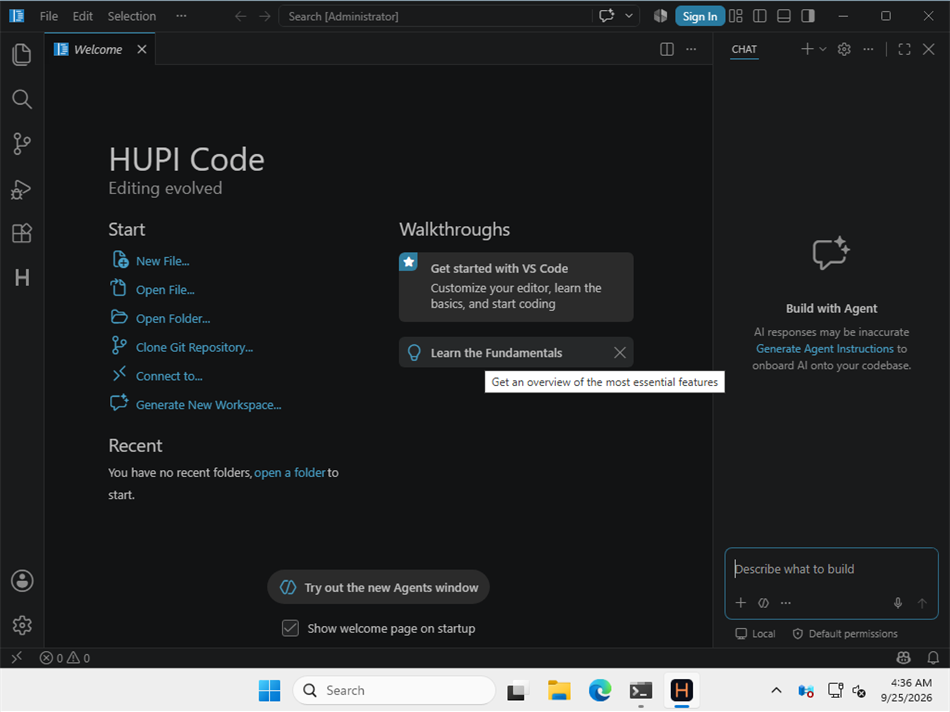
Everything you'd expect from Cursor-style AI coding tools — a chat sidebar, inline edit, ghost-text completions, multi-file review — built directly into the editor instead of installed as an extension. The difference: it's backed by HUPI, a self-hosted, provider-independent memory gateway you run yourself, not a vendor's cloud service.
Why HUPI Code, not another AI editor
Every other AI coding assistant ties you to one vendor's model, one vendor's servers, and one vendor's idea of what happens to your code and conversations. HUPI Code doesn't. Point it at your own HUPI gateway — self-hosted, your database, your encryption key — and it works the same way with any model you choose: OpenAI, Anthropic, Azure, or a local model running on your own machine.
HUPI also remembers. Every conversation, decision, and piece of context you've given it is captured, grounded, and retrievable — not just within one chat session, but across every tool that talks to your HUPI gateway. Ask it about something you discussed last week; it actually knows.
What's included
Chat sidebar — ask questions about your codebase with your active file or selection automatically included as context.
@hupi in VS Code's native Chat view — works alongside Copilot Chat or any other participant already there.
Inline edit (Ctrl+K / Cmd+K) — select code, describe a change, review a real diff before anything touches your file.
Inline completions — Copilot-style ghost text as you type, powered by your own gateway (off by default, since it fires on every typing pause).
Multi-file edit — describe a change across several open files, review a diff for each, apply only what you want.
Built for people who want AI coding tools without giving up control. No telemetry beyond what you explicitly configure, no proprietary lock-in, no data leaving your own infrastructure unless you choose a hosted model provider yourself.
Requirements: a running HUPI gateway (self-hosted — see hupi.dev for setup) and an API key or SSO sign-in for your deployment. Extensions install from open-vsx.org rather than the Microsoft Marketplace.
Learn more and get started: hupi.dev
デベロッパーから
デベロッパーの方ですか?
ページの一番上にニュースを投稿すると、フォロワーにメールで届きます。YouTube 動画を追加すると、「動画」の一番上に表示されます。
開発者
- HUPI Code
- フォロワー: 0
- プラットフォーム: Windows アプリ (1)
- セール: 0
- リスト: 0 0
- ポイント: 0
- ランキング: 0
- コメント: 0
- 動画: 0
- RSS: 購読する
リスト 0
-
 HUPI Code
ポイント 0
-

- +1 ポイント

ランキング 0
-
- あなたの評価
新機能
- バージョン: PC
- 最終更新:
- Chat sidebar — ask questions about your codebase with your active file or selection automatically included as context.
@hupi in VS Code's native Chat view — works alongside Copilot Chat or any other participant already there.
Inline edit (Ctrl+K / Cmd+K) — select code, describe a change, review a real diff before anything touches your file.
Inline completions — Copilot-style ghost text as you type, powered by your own gateway (off by default, since it fires on every typing pause).
Multi-file edit — describe a change across several open files, review a diff for each, apply only what you want.
情報
- リリース日:
- カテゴリ:
Windows向けアプリ›開発者ツール - オペレーティング システム:
PC - サイズ:
280 Mb - サポートされる言語:
英語 - コンテンツのレーティング:
EVERYONE - Windows Store 評価: ¡
0 - ウェブサイト:
 https://hupi.dev
コメント 0 ¡
最初のコメントを書きましょう
AppAggスコア
580
AppAgg推定スコア:
HUPI Code
開発者: HUPI Code
580 ブロンズ
スコアが高いほど、AppAgg上の各指標が良好な傾向にあります。
基準: 人気 · ユーザー評価 · 新しさ · セール · ストアデータ · コミュニティ活動
最新のAppAggデータに基づいて毎日再計算されます。
ウェブサイト用バッジ:  コピーしました!
HUPI Code 短縮 URL: コピーしました!- Windows Store

