
북마크
이 북마크의 제목을 입력하세요.
북마크가 저장되었습니다
요약
소개합니다. HUPI Code에서 만든 ‘개발자 도구’ 카테고리 앱, HUPI Code.
에 출시됐어요. 아직 꽤 따끈따끈해요.
무료. 광고도 인앱 구매도 없어요. 앱에만 집중하면 돼요.
Microsoft Store는 Windows에 기본으로 들어 있어서 클릭 몇 번이면 설치돼요.
AppAgg 점수는 580. 지금은 브론즈 등급이지만, 성장할 여지가 충분해요.
연령 등급은 ‘EVERYONE’, 아이들에게도 괜찮아요.
지원 언어는 딱 하나, 그런데 한국어는 아니에요.
사용해 보셨나요? 여기서 첫 리뷰의 주인공이 되어 주세요.
AppAgg에 있는 이 개발자의 유일한 앱이에요. 아직까지는요.
업데이트와 새 앱 소식을 가장 먼저 받고 싶나요? 개발자를 팔로우하거나 RSS 피드를 구독하세요. 푸시 알림은 Android와 iOS용 AppAgg Alerts 앱으로 받을 수 있어요.
광고
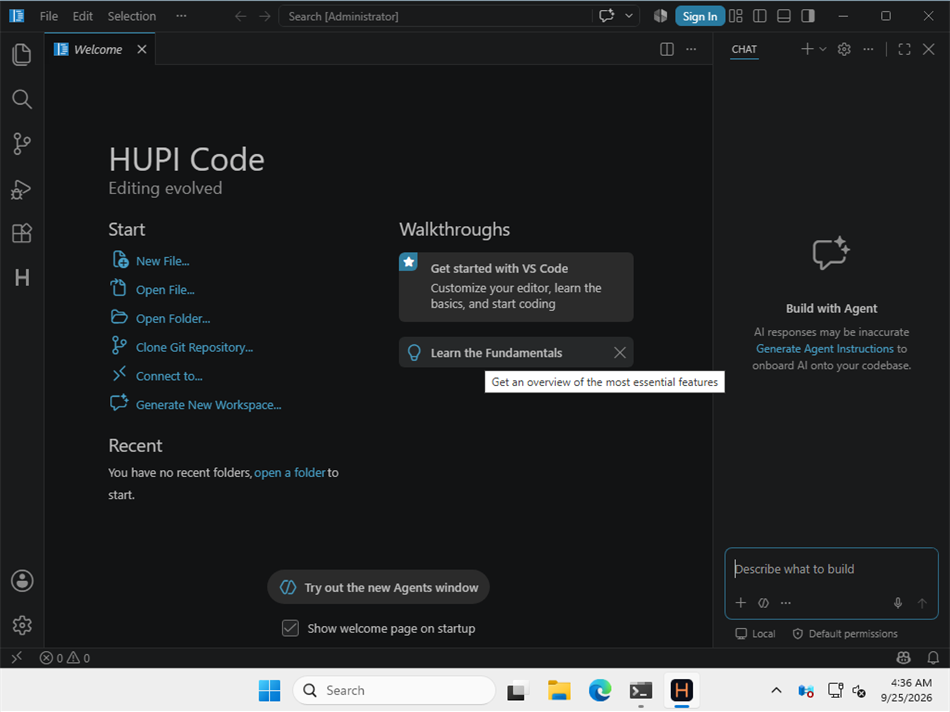
스크린샷 1
다른 플랫폼 0
가격 기록 0
- 현재 가격: 무료
- 최소: 무료
- 최대: 무료
홈 화면의 나만의 피드
“신규 및 업데이트” 피드의 플랫폼을 선택하면 홈 화면에 필요한 앱과 게임만 표시됩니다.
설명

Everything you'd expect from Cursor-style AI coding tools — a chat sidebar, inline edit, ghost-text completions, multi-file review — built directly into the editor instead of installed as an extension. The difference: it's backed by HUPI, a self-hosted, provider-independent memory gateway you run yourself, not a vendor's cloud service.
Why HUPI Code, not another AI editor
Every other AI coding assistant ties you to one vendor's model, one vendor's servers, and one vendor's idea of what happens to your code and conversations. HUPI Code doesn't. Point it at your own HUPI gateway — self-hosted, your database, your encryption key — and it works the same way with any model you choose: OpenAI, Anthropic, Azure, or a local model running on your own machine.
HUPI also remembers. Every conversation, decision, and piece of context you've given it is captured, grounded, and retrievable — not just within one chat session, but across every tool that talks to your HUPI gateway. Ask it about something you discussed last week; it actually knows.
What's included
Chat sidebar — ask questions about your codebase with your active file or selection automatically included as context.
@hupi in VS Code's native Chat view — works alongside Copilot Chat or any other participant already there.
Inline edit (Ctrl+K / Cmd+K) — select code, describe a change, review a real diff before anything touches your file.
Inline completions — Copilot-style ghost text as you type, powered by your own gateway (off by default, since it fires on every typing pause).
Multi-file edit — describe a change across several open files, review a diff for each, apply only what you want.
Built for people who want AI coding tools without giving up control. No telemetry beyond what you explicitly configure, no proprietary lock-in, no data leaving your own infrastructure unless you choose a hosted model provider yourself.
Requirements: a running HUPI gateway (self-hosted — see hupi.dev for setup) and an API key or SSO sign-in for your deployment. Extensions install from open-vsx.org rather than the Microsoft Marketplace.
Learn more and get started: hupi.dev
개발자 소식
개발자이신가요?
페이지 맨 위에 소식을 올리면 팔로워에게 이메일로 전달됩니다. YouTube 동영상을 추가하면 “동영상” 블록 맨 앞에 표시됩니다.
목록 0
-
 HUPI Code
포인트 0
-

- +1 포인트

순위 0
-
- 내 평점
새로운 기능
- 버전: PC
- 마지막 업데이트:
- Chat sidebar — ask questions about your codebase with your active file or selection automatically included as context.
@hupi in VS Code's native Chat view — works alongside Copilot Chat or any other participant already there.
Inline edit (Ctrl+K / Cmd+K) — select code, describe a change, review a real diff before anything touches your file.
Inline completions — Copilot-style ghost text as you type, powered by your own gateway (off by default, since it fires on every typing pause).
Multi-file edit — describe a change across several open files, review a diff for each, apply only what you want.
추가 정보
 https://hupi.dev
댓글 0 ¡
가장 먼저 댓글을 남겨주세요
AppAgg 점수
580
AppAgg 예상 점수:
HUPI Code
개발자: HUPI Code
580 브론즈
점수가 높을수록 대체로 AppAgg의 여러 지표에서 좋은 결과를 보인다는 뜻입니다.
기준: 인기 · 사용자 평점 · 최신성 · 할인 · 스토어 데이터 · 커뮤니티 활동
최신 AppAgg 데이터를 바탕으로 매일 다시 계산됩니다.
웹사이트용 배지:  복사됨!
HUPI Code 단축 URL: 복사됨!- Windows Store


