
บุ๊กมาร์ก
| ผู้พัฒนา: | HUPI Code (1) | ||
| ราคา: | ฟรี | ||
| คะแนน: | 580 บรอนซ์ | ||
| การจัดอันดับ: | 0 | ||
| ความคิดเห็น: | 0 โพสต์ความคิดเห็น | ||
| รายการ: | 0 0 | ||
| แต้ม: | 0 | ||
| +1 แต้ม | |||
สรุป
มาทำความรู้จัก HUPI Code แอปในหมวด “เครื่องมือสำหรับนักพัฒนา” จาก HUPI Code
ออกเมื่อ ยังสดใหม่อยู่เลย
ฟรี ไม่มีโฆษณา ไม่มีการซื้อภายในแอป มีแค่คุณกับแอป
Microsoft Store มีมาในตัว Windows อยู่แล้ว ติดตั้งได้ในไม่กี่คลิก
คะแนน AppAgg คือ 580 ตอนนี้อยู่ระดับ “บรอนซ์” ยังไปได้อีกไกล
จัดเรต “EVERYONE” เหมาะกับเด็ก ๆ ด้วย
รองรับแค่ภาษาเดียว และไม่ใช่ภาษาไทย
เคยใช้แล้วเหรอ? รีวิวของคุณจะเป็นรีวิวแรกที่นี่
เป็นแอปเดียวของผู้พัฒนารายนี้บน AppAgg อย่างน้อยก็ตอนนี้
อยากรู้เรื่องอัปเดตและแอปใหม่ก่อนใครไหม? ติดตาม ผู้พัฒนา หรือกดติดตาม ฟีด RSS ได้เลย การแจ้งเตือนแบบพุชส่งผ่านแอป AppAgg Alerts สำหรับ Android และ iOS
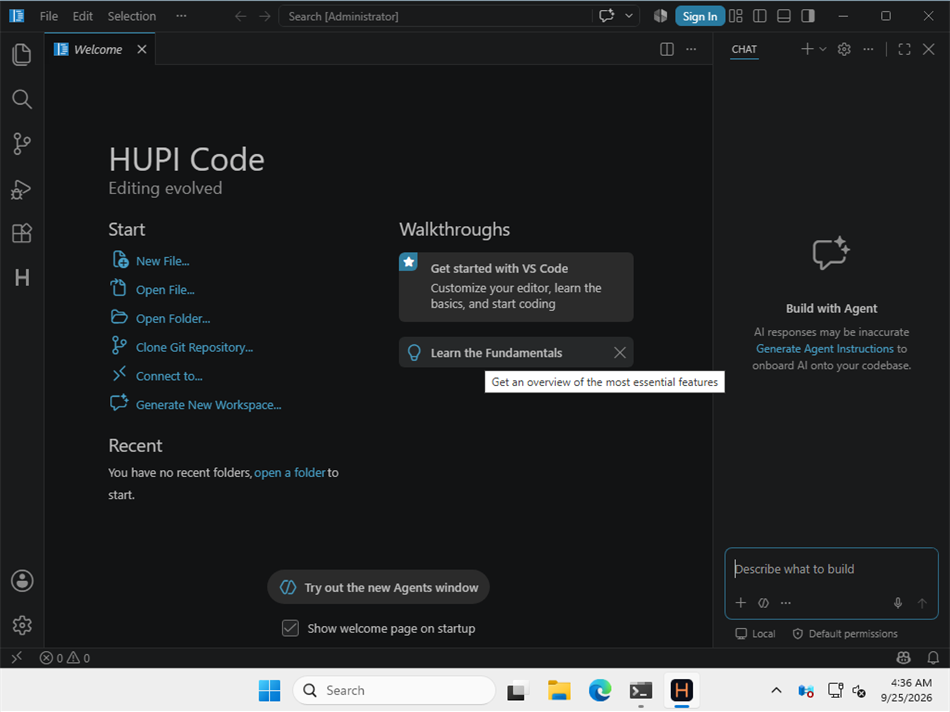
ภาพหน้าจอ 1
แพลตฟอร์มอื่น 0
ประวัติราคา 0
- ราคาปัจจุบัน: ฟรี
- ต่ำสุด: ฟรี
- สูงสุด: ฟรี
ฟีดของคุณเองบนหน้าแรก
คำอธิบาย

Everything you'd expect from Cursor-style AI coding tools — a chat sidebar, inline edit, ghost-text completions, multi-file review — built directly into the editor instead of installed as an extension. The difference: it's backed by HUPI, a self-hosted, provider-independent memory gateway you run yourself, not a vendor's cloud service.
Why HUPI Code, not another AI editor
Every other AI coding assistant ties you to one vendor's model, one vendor's servers, and one vendor's idea of what happens to your code and conversations. HUPI Code doesn't. Point it at your own HUPI gateway — self-hosted, your database, your encryption key — and it works the same way with any model you choose: OpenAI, Anthropic, Azure, or a local model running on your own machine.
HUPI also remembers. Every conversation, decision, and piece of context you've given it is captured, grounded, and retrievable — not just within one chat session, but across every tool that talks to your HUPI gateway. Ask it about something you discussed last week; it actually knows.
What's included
Chat sidebar — ask questions about your codebase with your active file or selection automatically included as context.
@hupi in VS Code's native Chat view — works alongside Copilot Chat or any other participant already there.
Inline edit (Ctrl+K / Cmd+K) — select code, describe a change, review a real diff before anything touches your file.
Inline completions — Copilot-style ghost text as you type, powered by your own gateway (off by default, since it fires on every typing pause).
Multi-file edit — describe a change across several open files, review a diff for each, apply only what you want.
Built for people who want AI coding tools without giving up control. No telemetry beyond what you explicitly configure, no proprietary lock-in, no data leaving your own infrastructure unless you choose a hosted model provider yourself.
Requirements: a running HUPI gateway (self-hosted — see hupi.dev for setup) and an API key or SSO sign-in for your deployment. Extensions install from open-vsx.org rather than the Microsoft Marketplace.
Learn more and get started: hupi.dev
จากนักพัฒนา
ผู้พัฒนา
- HUPI Code
- ผู้ติดตาม: 0
- แพลตฟอร์ม: Windows แอป (1)
- ลดราคา: 0
- รายการ: 0 0
- แต้ม: 0
- การจัดอันดับ: 0
- ความคิดเห็น: 0
- วิดีโอ: 0
- RSS: ติดตาม
รายการ 0
-
 HUPI Code
แต้ม 0
-

- +1 แต้ม

การจัดอันดับ 0
-
- คะแนนของคุณ
มีอะไรใหม่
- เวอร์ชัน: PC
- อัปเดตล่าสุด:
- Chat sidebar — ask questions about your codebase with your active file or selection automatically included as context.
@hupi in VS Code's native Chat view — works alongside Copilot Chat or any other participant already there.
Inline edit (Ctrl+K / Cmd+K) — select code, describe a change, review a real diff before anything touches your file.
Inline completions — Copilot-style ghost text as you type, powered by your own gateway (off by default, since it fires on every typing pause).
Multi-file edit — describe a change across several open files, review a diff for each, apply only what you want.
ข้อมูลเพิ่มเติม
- วันที่วางจำหน่าย:
- หมวดหมู่:
แอปสำหรับ Windows›เครื่องมือสำหรับนักพัฒนา - ระบบปฏิบัติการ:
PC - ขนาด:
280 Mb - ภาษาที่รองรับ:
อังกฤษ - การจัดประเภทเนื้อหา:
EVERYONE - Windows Store คะแนน: ¡
0 - เว็บไซต์:
 https://hupi.dev
ความคิดเห็น 0 ¡
คะแนน AppAgg
คะแนน AppAgg โดยประมาณของ
HUPI Code
ผู้พัฒนา: HUPI Code
คะแนนที่สูงขึ้นมักสะท้อนตัวชี้วัดที่ดีกว่าบน AppAgg
อิงจาก: ความนิยม · คะแนนจากผู้ใช้ · ความสดใหม่ · ดีล · ข้อมูลร้านค้า · กิจกรรมชุมชน
คำนวณใหม่ทุกวันจากข้อมูล AppAgg ล่าสุด
HUPI Code URL แบบสั้น: คัดลอกแล้ว!- Windows Store

