
북마크
이 북마크의 제목을 입력하세요.
북마크가 저장되었습니다
| 개발자: | Gain Publications (25) | ||
| 가격: | 무료 | ||
| 종합 점수: | 580 브론즈 | ||
| 순위: | 0 | ||
| 댓글: | 0 댓글 게시 | ||
| 목록: | 0 0 | ||
| 포인트: | 0 | ||
| +1 포인트 | |||
요약
IconForge: Gain Publications에서 만든 ‘개발자 도구’ 카테고리의 앱이에요.
에 출시됐어요. 아직 꽤 따끈따끈해요.
무료. 광고도 인앱 구매도 없어요. 앱에만 집중하면 돼요.
Microsoft Store는 Windows에 기본으로 들어 있어서 클릭 몇 번이면 설치돼요.
AppAgg 점수는 580. 지금은 브론즈 등급이지만, 성장할 여지가 충분해요.
겨우 48메가바이트. 꽉 찬 드라이브에도 쏙 들어가요.
연령 등급은 ‘EVERYONE’, 아이들에게도 괜찮아요.
지원 언어는 딱 하나, 그런데 한국어는 아니에요.
사용해 보셨나요? 여기서 첫 리뷰의 주인공이 되어 주세요.
이 개발자의 게임 3개와 앱 21개가 AppAgg에 더 있어요. 한번 둘러보세요.
참고로, 이 개발자는 지금 할인 2건 진행 중이에요.
업데이트와 새 앱 소식을 가장 먼저 받고 싶나요? 개발자를 팔로우하거나 RSS 피드를 구독하세요. 푸시 알림은 Android와 iOS용 AppAgg Alerts 앱으로 받을 수 있어요.
광고
스크린샷 1
다른 플랫폼 0
가격 기록 0
- 현재 가격: 무료
- 최소: 무료
- 최대: 무료
홈 화면의 나만의 피드
“신규 및 업데이트” 피드의 플랫폼을 선택하면 홈 화면에 필요한 앱과 게임만 표시됩니다.
설명

Every Windows app that targets the Store needs dozens of correctly sized, correctly named image files before it can be submitted. Tiles at multiple scale factors. Target-size icons at fourteen different pixel dimensions across three theme variants. Splash screen variants. Badge logos. A multi-resolution ICO for the Windows shell. Store listing images for Partner Center. Getting every file right — right size, right name, right qualifier order in the filename — requires either a lot of manual work or knowing exactly what Microsoft expects.
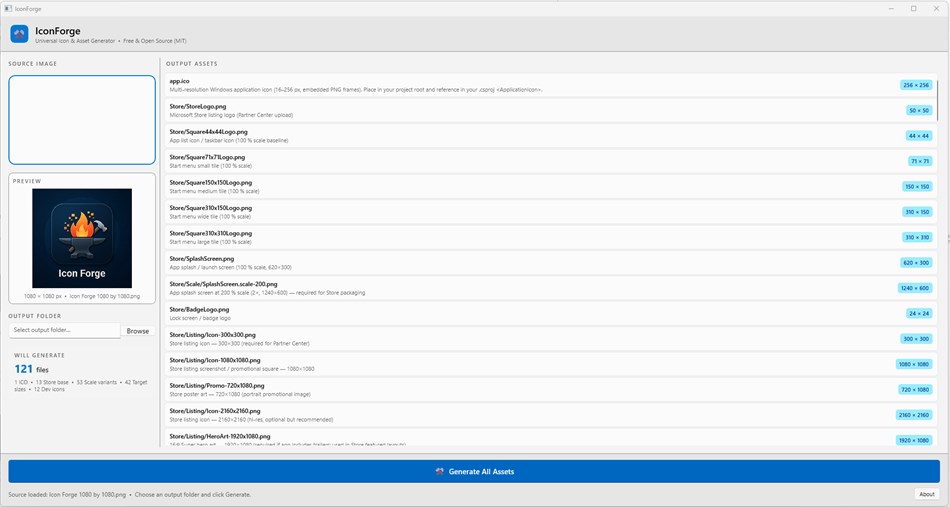
Drop your source image onto IconForge and it takes care of all of it. One image in. 121 files out. Everything organized into named subfolders, ready to copy directly into your MSIX project.
WHAT IT GENERATES
Windows ICO — a multi-resolution ICO file with 17 frame sizes from 16px to 256px, each frame stored as an embedded PNG for maximum compatibility with the Windows shell and legacy applications.
App list icons — the Square44x44Logo asset at all seven scale factors (100% through 400%), plus the complete set of 14 target-size variants in all three required theme variants: default (plated), dark-unplated, and light-unplated. This is the asset Windows uses for your taskbar icon, the Start menu all-apps list, search results, and context menus.
Tile assets — Small tile, Medium tile, Wide tile, and Large tile, each with a full set of scale variants from 100% through 400% including 250% and 300% for high-density displays.
Supporting assets — StoreLogo, SplashScreen, and BadgeLogo at all required scale factors.
Store listing images — the 300×300 app tile for Partner Center, 1080×1080 and 2160×2160 box art, 720×1080 poster art, and the 1920×1080 hero art image used in Store featured layouts and required if your listing includes trailers.
Developer icon pack — general-purpose PNGs at standard toolbar, desktop shortcut, system tray, and notification sizes for use in any Windows application.
IMAGE QUALITY
IconForge uses Lanczos resampling for all resize operations. Non-square source images are letterboxed with transparent padding to maintain aspect ratio, matching Microsoft's Store asset guidelines. All output files use maximum lossless compression — no post-processing or external compression tools needed.
OFFLINE AND FREE
No internet connection required at any point. No account. No upload. Your images never leave your computer. IconForge is free forever, MIT licensed, and open source on GitHub.
Requires Windows 10 (1803) or Windows 11, x64. Windows App SDK 1.5 runtime included with the Store version.
Built by Daniel E. Gain at Gain Publications.
개발자 소식
개발자이신가요?
페이지 맨 위에 소식을 올리면 팔로워에게 이메일로 전달됩니다. YouTube 동영상을 추가하면 “동영상” 블록 맨 앞에 표시됩니다.
개발자
- Gain Publications
- 팔로워: 0
- 플랫폼: Windows 앱 (22) Windows 게임 (3)
- 할인: 2
- 목록: 0 0
- 포인트: 0
- 순위: 0
- 댓글: 0
- 동영상: 0
- RSS: 구독
목록 0
-
 IconForge
포인트 0
-

- +1 포인트

순위 0
-
- 내 평점
새로운 기능
- 버전: PC
- 마지막 업데이트:
- This update corrects two silent bugs from v1.0 and significantly expands the generated asset set.
The first bug involved qualifier ordering in unplated icon filenames. Windows uses a precise naming convention to locate theme-aware assets, and v1.0 had the order reversed — causing Windows to silently fall back to a scaled-down substitute instead of the correct pre-rendered icon. Apps packaged using v1.0 output may have had pixelated taskbar and Start menu icons as a result. Fixed.
The second bug disabled DEFLATE compression on all PNG output, producing files far larger than necessary. Fixed — all files are now properly compressed.
Asset coverage has been expanded to match current Microsoft documentation:
• Target-size icons now cover all 14 required sizes across all 3 theme variants (up from 5 sizes, 2 variants)
• Scale variants at 250% and 300% added for all tile and logo types
• Small tile, large tile, and badge logo now include full scale sets
• Missing splash screen scales added (125%, 150%, 400%)
• 16:9 hero art (1920×1080) added to Store listing output
Total output: 121 files, up from 57.
추가 정보
 https://gainpublications.com
댓글 0 ¡
가장 먼저 댓글을 남겨주세요
AppAgg 점수
580
AppAgg 예상 점수:
IconForge
개발자: Gain Publications
580 브론즈
점수가 높을수록 대체로 AppAgg의 여러 지표에서 좋은 결과를 보인다는 뜻입니다.
기준: 인기 · 사용자 평점 · 최신성 · 할인 · 스토어 데이터 · 커뮤니티 활동
최신 AppAgg 데이터를 바탕으로 매일 다시 계산됩니다.
웹사이트용 배지:  복사됨!
IconForge 단축 URL: 복사됨!- Windows Store


