
บุ๊กมาร์ก
| ผู้พัฒนา: | BEAS - Soon (4) | ||
| ราคา: | ฟรี | ||
| คะแนน: | 570 บรอนซ์ | ||
| การจัดอันดับ: | 0 | ||
| ความคิดเห็น: | 0 โพสต์ความคิดเห็น | ||
| รายการ: | 0 0 | ||
| แต้ม: | 0 | ||
| +1 แต้ม | |||
สรุป
JSON Aggregator Pro เป็นแอปในหมวด “เครื่องมือสำหรับนักพัฒนา” จาก BEAS - Soon
ออกเมื่อ ยังสดใหม่อยู่เลย
ฟรี ไม่มีโฆษณา ไม่มีการซื้อภายในแอป มีแค่คุณกับแอป
Microsoft Store มีมาในตัว Windows อยู่แล้ว ติดตั้งได้ในไม่กี่คลิก
คะแนน AppAgg คือ 570 ตอนนี้อยู่ระดับ “บรอนซ์” ยังไปได้อีกไกล
แค่ 18 เมกะไบต์ ต่อให้ไดรฟ์เต็มก็ยังลงได้
จัดเรต “EVERYONE” เหมาะกับเด็ก ๆ ด้วย
รองรับแค่ภาษาเดียว และไม่ใช่ภาษาไทย
ยังไม่มีใครบน AppAgg ให้คะแนนเลย โอกาสเป็นคนแรกอยู่ตรงนี้แล้ว
ผู้พัฒนารายนี้มีแอปอื่นบน AppAgg อีก 3 แอป ลองไปดูกัน
อยากรู้เรื่องอัปเดตและแอปใหม่ก่อนใครไหม? ติดตาม ผู้พัฒนา หรือกดติดตาม ฟีด RSS ได้เลย การแจ้งเตือนแบบพุชส่งผ่านแอป AppAgg Alerts สำหรับ Android และ iOS
ภาพหน้าจอ 1
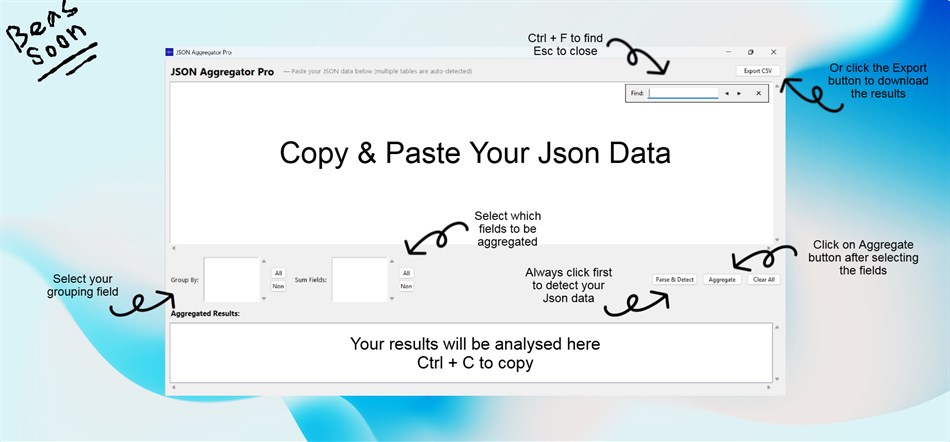
แพลตฟอร์มอื่น 0
ประวัติราคา 0
- ราคาปัจจุบัน: ฟรี
- ต่ำสุด: ฟรี
- สูงสุด: ฟรี
ฟีดของคุณเองบนหน้าแรก
คำอธิบาย

Tired of writing scripts just to summarize JSON data? JSON Aggregator Pro lets you aggregate and analyze any JSON instantly - no coding required.
━━━━━━━━━━━━━━━━━━━━━━━━━━━━━━━━━━━━
✨ KEY FEATURES
- Paste & Parse - Simply paste JSON from any source. The tool automatically detects data arrays and ignores wrapper metadata.
- Smart Field Detection - All fields are auto-detected. Numeric fields are ready for aggregation instantly.
- Flexible Grouping - Group by one field or multiple fields for hierarchical analysis.
- Instant Results - See aggregated totals in a clean, sortable table.
- Export Options - Export to CSV or copy directly to clipboard for Excel, Sheets, or reports.
- Built-in Search - Use Ctrl+F to quickly find text in large JSON datasets.
━━━━━━━━━━━━━━━━━━━━━━━━━━━━━━━━━━━━
📋 PERFECT FOR
- Developers working with API responses
- Data Analysts processing JSON exports
- Anyone who works with JSON regularly
━━━━━━━━━━━━━━━━━━━━━━━━━━━━━━━━━━━━
🔒 PRIVACY FIRST
- 100% offline - no internet required
- No data collection or tracking
- Your data never leaves your device
━━━━━━━━━━━━━━━━━━━━━━━━━━━━━━━━━━━━
💡 HOW IT WORKS
1. Paste your JSON data
2. Click "Parse & Detect"
3. Select grouping field(s) and numeric fields to sum
4. Click "Aggregate"
5. Export or copy your results
Turn 15 minutes of scripting into 30 seconds of clicking!
จากนักพัฒนา
ผู้พัฒนา
- BEAS - Soon
- ผู้ติดตาม: 0
- แพลตฟอร์ม: Windows แอป (4)
- ลดราคา: 0
- รายการ: 0 0
- แต้ม: 1
- การจัดอันดับ: 0
- ความคิดเห็น: 0
- วิดีโอ: 0
- RSS: ติดตาม
รายการ 0
-
 JSON Aggregator Pro
แต้ม 0
-

- +1 แต้ม

การจัดอันดับ 0
-
- คะแนนของคุณ
มีอะไรใหม่
- เวอร์ชัน: PC
- อัปเดตล่าสุด:
- 📥 Data Input:
- Supports multiple JSON formats: objects, arrays, and nested structures
- Handles multiple JSON tables at once (separated by blank lines, ---, or back-to-back)
- Ignores wrapper metadata like status codes and total counts
━━━━━━━━━━━━━━━━━━━━━━━━━━━━━━━━━━━━
📖 How to Use:
Step 1: Paste JSON
- Copy JSON from any source (API, database, log file)
- Paste into the input box
Step 2: Parse
- Click "Parse & Detect"
- Fields appear automatically in the selection boxes
Step 3: Select Fields
- Choose grouping field(s) from "Group By"
- Choose numeric field(s) from "Sum Fields"
- Use "All" or "None" for quick selection
Step 4: Aggregate
- Click "Aggregate"
- Results appear in the table below
Step 5: Export
- Click "Export CSV" to save as file
- Or right-click → Copy All to clipboard
━━━━━━━━━━━━━━━━━━━━━━━━━━━━━━━━━━━━
⌨️ Keyboard Shortcuts:
- Ctrl+F — Open find bar
- Enter — Find next match
- Shift+Enter — Find previous match
- Esc — Close find bar
- Ctrl+C — Copy selected rows
ข้อมูลเพิ่มเติม
- วันที่วางจำหน่าย:
- หมวดหมู่:
แอปสำหรับ Windows›เครื่องมือสำหรับนักพัฒนา - ระบบปฏิบัติการ:
PC - ขนาด:
18 Mb - ภาษาที่รองรับ:
อังกฤษ - การจัดประเภทเนื้อหา:
EVERYONE - Windows Store คะแนน: ¡
0 - เว็บไซต์:
 https://beas-soon.odoo.com/
ความคิดเห็น 0 ¡
คะแนน AppAgg
คะแนน AppAgg โดยประมาณของ
JSON Aggregator Pro
ผู้พัฒนา: BEAS - Soon
คะแนนที่สูงขึ้นมักสะท้อนตัวชี้วัดที่ดีกว่าบน AppAgg
อิงจาก: ความนิยม · คะแนนจากผู้ใช้ · ความสดใหม่ · ดีล · ข้อมูลร้านค้า · กิจกรรมชุมชน
คำนวณใหม่ทุกวันจากข้อมูล AppAgg ล่าสุด
JSON Aggregator Pro URL แบบสั้น: คัดลอกแล้ว!- Windows Store

