
Marcadores
| Desarrollador: | Kaptin (1) | ||
| Precio: | Gratis Nuevo | ||
| Puntuación: | 790 Plata | ||
| Clasificaciones: | 0 | ||
| Comentarios: | 0 Publicar comentario | ||
| Listas: | 0 0 | ||
| Puntos: | 0 | ||
| +1 Punto | |||
Resumen
Te presentamos Kaptin, una app de Kaptin de la categoría «Herramientas de desarrollo».
Novedad: salió , así que estás entre los primeros.
Gratis: sin anuncios ni compras integradas. Solo tú y la app.
La Microsoft Store viene integrada en Windows, así que se instala en un par de clics.
Su Puntuación de AppAgg es 790. Nivel Plata, y eso no está nada mal.
Solo 8 megabytes. Cabe hasta en un disco lleno a reventar.
Clasificación «EVERYONE»: sirve también para los más pequeños.
Habla un solo idioma, y no es el español.
Por aquí, silencio total (ni valoraciones ni comentarios). Rompe el silencio.
Es la única app del desarrollador en AppAgg. Por ahora.
¿Quieres enterarte antes que nadie de actualizaciones y apps nuevas? Sigue al desarrollador o suscríbete al canal RSS. Las notificaciones push llegan con la app AppAgg Alerts para Android y iOS.
Otras plataformas 0
Historial de precios 0
- Precio actual: Gratis
- Mínimo: Gratis
- Máximo: Gratis
Tu propio feed en la página de inicio
Capturas de pantalla 4
Vídeo 1
Descripción

ONE WORKSPACE FOR YOUR AGENTS
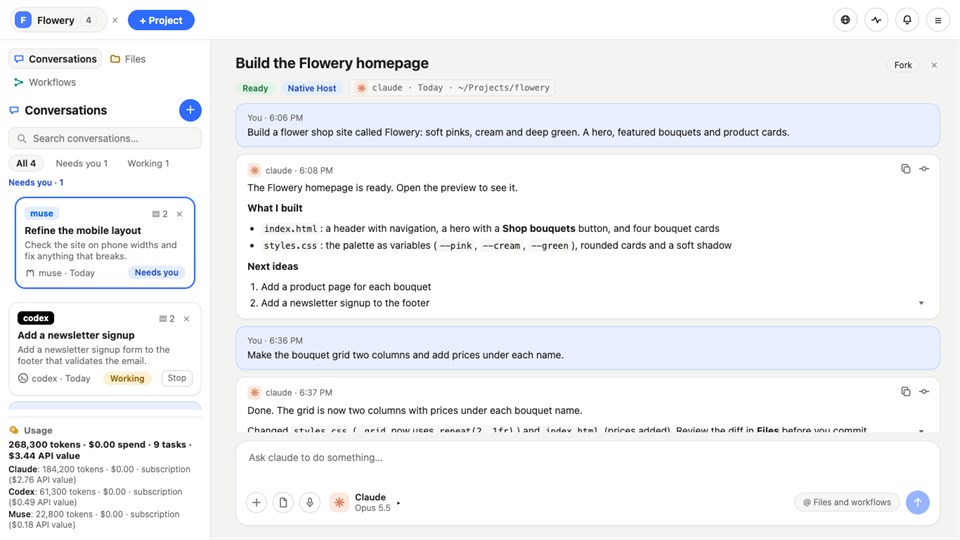
Run Claude, Codex and Muse side by side, using the CLIs and subscriptions you already have. Pick an agent per conversation, or switch agents mid-conversation: each reply keeps the agent that wrote it.
ORGANIZED BY PROJECT AND CONVERSATION
Keep the homepage redesign, the bug fix and the experiment in separate conversations, each with its own history and agent. See at a glance which conversations are working, finished, or need you. Fork a conversation to try a different direction.
SEE IT THE MOMENT IT'S BUILT
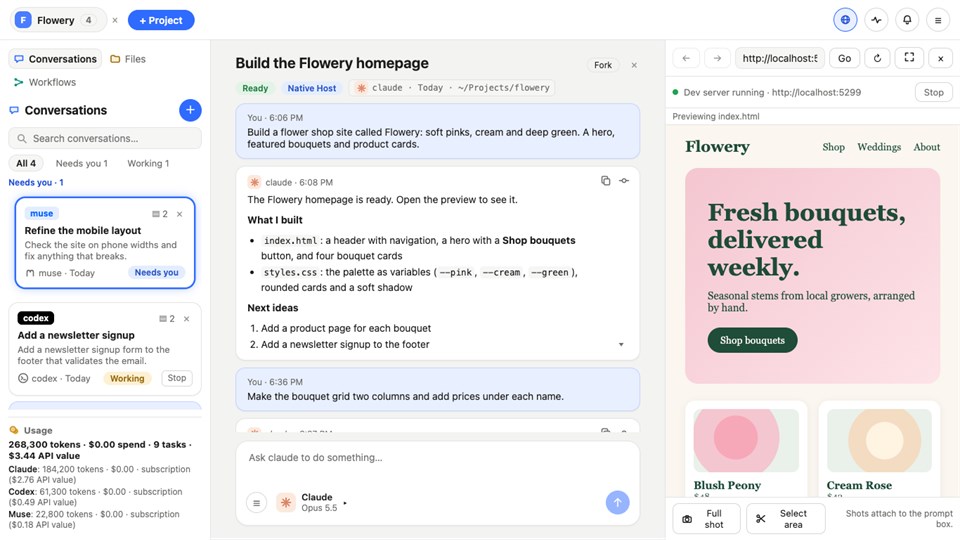
Preview web projects in the built-in browser next to the conversation that made them. Kaptin starts your project's dev server for you, and you can attach a full or partial screenshot of the preview straight back into the chat, so the agent sees what you see.
REVIEW BEFORE ANYTHING GOES FURTHER
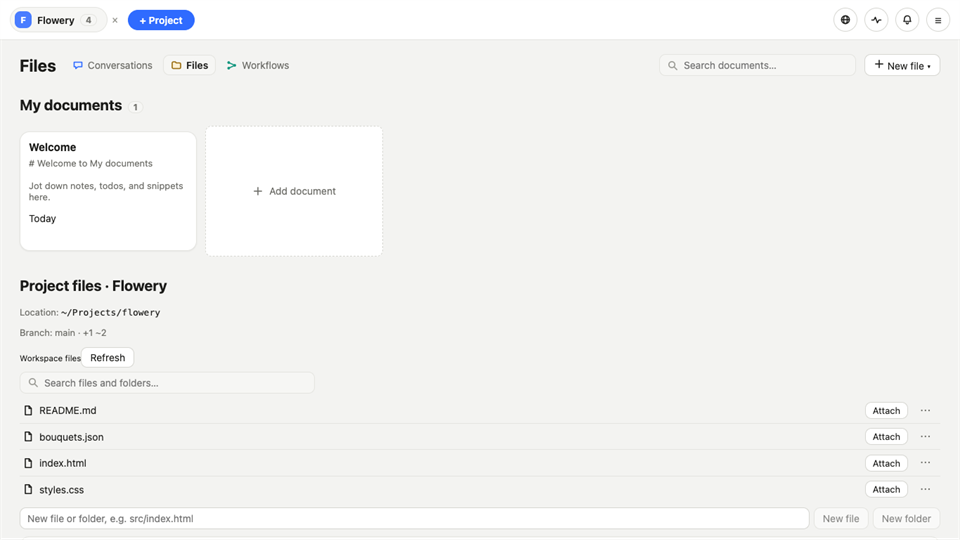
Every change lands in real files on your machine. Browse and edit project files, check what changed, and write your commit message from the agent's replies. Nothing commits until you do.
WORKFLOWS
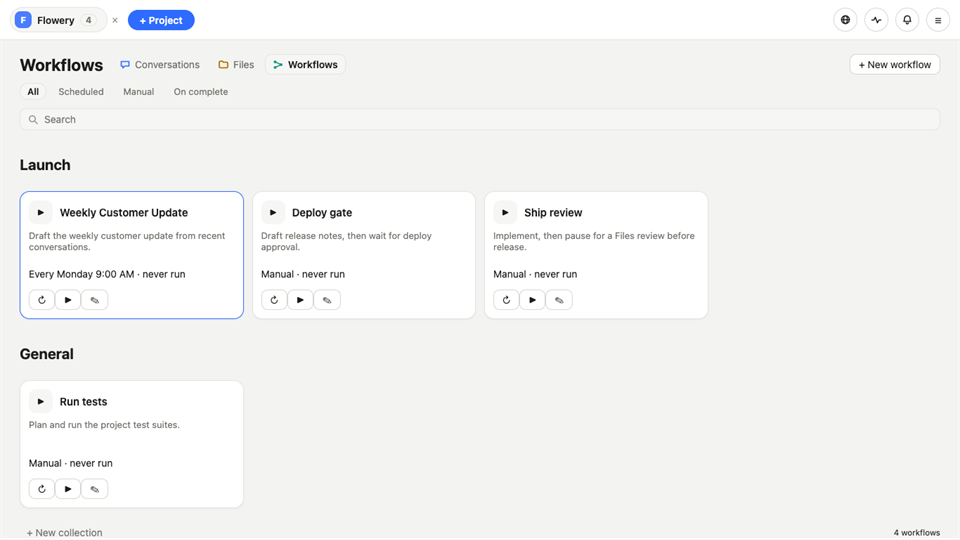
Automate repeated work with workflows that combine agent steps and shell commands. Run them by hand or on a schedule, answer prompts from running commands, and pause for your approval before a step continues.
SAFE BY DEFAULT
Kaptin uses each agent's own safety and approval controls. Routine actions are approved by the agent's built-in review, and risky ones ask you. Prefer to approve everything yourself? Choose "Ask me every time".
YOUR CODE AND KEYS STAY ON YOUR MACHINE
Projects stay in folders you control. Kaptin doesn't upload your code; your prompts go to the agent provider you choose, under that provider's terms.
PRICING
7-day free trial, then USD 5.99 per month. Cancel anytime. AI usage is not included: agents run on your own Claude, Codex or Muse subscription or API key, so you never pay for models twice.
REQUIREMENTS
An account with at least one supported AI agent (Claude, Codex or Muse). Kaptin can install the agent's CLI for you and walk you through signing in.
Del desarrollador
Listas 0
-
 Kaptin
Puntos 0
-

- +1 Punto

Clasificaciones 0
-
- Tu valoración
Desarrollador 1
- Kaptin
- Seguidores: 0
- Plataformas: Windows Aplicaciones (1)
- Ofertas: 0
- Listas: 0 0
- Puntos: 0
- Clasificaciones: 0
- Comentarios: 0
- Vídeos: 1
- RSS: Suscribirse
Novedades
- Versión: PC
- Última actualización:
- New in 1.0.6:
Added
Workflow cards now have a Delete button with confirmation, so you can permanently delete a workflow and its run history directly from the Workflows tab.
Settings → Archive now has Delete all beside each category title for archived projects, archived conversations, workflows in the selected project, and cleared notifications. Each action permanently deletes the listed Kaptin records, asks for confirmation, offers Cancel, and reports failures. Deleting projects leaves their folders and files on disk.
Fixed
Deleting an individual workflow in Settings → Archive now asks for confirmation.
The bulk deletion confirmation shows its message first, followed by Confirm delete all and Cancel.
- New in 1.0.5:
### Added
- **Plan usage** for Claude, Codex and Muse: Settings → Models → each agent now has **General** and **Usage** tabs. Usage shows how much of your plan's limits you've used and when each resets, the way each vendor shows it: Claude's current session and weekly limit, with whether you're on track for the week; Codex's 5-hour and weekly limits; Muse's plan and its current and weekly usage. Kaptin reads these from each agent's own CLI without using any of your quota, and refreshes them every few minutes.
- The sidebar **Usage** section now starts with a color-coded bar for each limit (green, then amber from 50%, red from 80%).
### Changed
- Workflow shell steps: the answer box now appears only when the command is actually asking something (its output stops on an unfinished line, like `version: `), focused and labeled "The command is waiting for your answer". While output is flowing you see just **Stop**, plus a small **Send input…** for the rare program that reads input without printing a prompt first.
### Known issues
- Muse shows usage only after its server has reported some for your plan; until then, Usage shows the plan name only.
### Fixed
- Approving a workflow command that needs your approval (like a deploy script) no longer freezes Kaptin until the command finishes. The command now runs in the background: its output streams to the run view, and you can answer its prompts or stop it while it runs.
- Kaptin no longer stops responding while it push - New in 1.0.4:
• Links to the Terms of Service and Privacy Policy on the sign-in screen and in About Kaptin.
• Deleting your account now also cancels your subscription.
Información adicional
- Fecha de lanzamiento:
- Categoría:
Aplicaciones para Windows›Herramientas de desarrollo - Sistemas operativos:
PC - Tamaño:
8 Mb - Funciones disponibles:
Mixed reality - Idiomas admitidos:
Inglés - Clasificación de contenido:
EVERYONE - Windows Store Valoración: ¡
0 - Sitio web:
 https://kaptin.dev/contact.html
Puntuación de AppAgg
Puntuación estimada de AppAgg para
Kaptin
Desarrollador: Kaptin
Una puntuación más alta suele reflejar mejores resultados en los indicadores de AppAgg.
Basado en: popularidad · valoraciones de usuarios · actualidad · ofertas · datos de tiendas · actividad de la comunidad
Se recalcula a diario con datos actualizados de AppAgg.
Comentarios 0 ¡
Compartir
Kaptin URL corta: Copiado!- Windows Store

