
Bookmark
| Pengembang: | NGLCZR (1) | ||
| Harga: | ▼ Gratis | ||
| Skor: | 1.340 Emas | ||
| Peringkat: | 0 | ||
| Komentar: | 0 Kirimkan komentar | ||
| Daftar: | 0 0 | ||
| Poin: | 0 | ||
| +1 Poin | |||
Ringkasan
Kenalan dulu dengan LightNote, aplikasi buatan NGLCZR di kategori Alat pengembang.
Lagi gratis sekarang, padahal biasanya $39.99. Ambil sebelum mereka berubah pikiran.
Rilis , masih cukup segar.
Microsoft Store sudah jadi bawaan Windows, jadi bisa dipasang dalam beberapa klik.
Skor AppAgg-nya 1.340. Itu level Emas.
Rating usia “EVERYONE”, jadi aman juga untuk anak-anak.
Menguasai 10 bahasa, tapi bahasa Indonesia belum termasuk.
Belum ada yang menilainya di AppAgg. Kesempatanmu jadi yang pertama ada sekarang.
Ini satu-satunya aplikasi dari pengembang ini di AppAgg. Untuk sekarang.
Mau jadi yang pertama tahu soal pembaruan dan aplikasi baru? Ikuti pengembang atau berlangganan lewat Umpan RSS. Notifikasi push dikirim lewat aplikasi AppAgg Alerts untuk Android dan iOS.
Platform lain 0
Riwayat harga 2
- Harga saat ini: Gratis
$39.99-100% - Minimum: ▼ Gratis
- Maksimum: $50.99
Feed Anda sendiri di beranda
Jepretan layar 10
Deskripsi

LightNote is a lightweight Windows editor where your second brain in Markdown becomes the context for your AI agents. Built in native C++/Qt — no Electron, no browser tabs and no mandatory cloud. It opens instantly, uses little memory and renders on the CPU only, so it fits in the palm of your hand even on modest machines.
Two pillars, and a bridge between them.
PILLAR 1 — A COCKPIT FOR YOUR AI AGENTS
LightNote embeds no model: it orchestrates the AI you already use — local CLIs, API providers (OpenAI, Google Gemini, Anthropic Claude) or local models through Ollama and LM Studio.
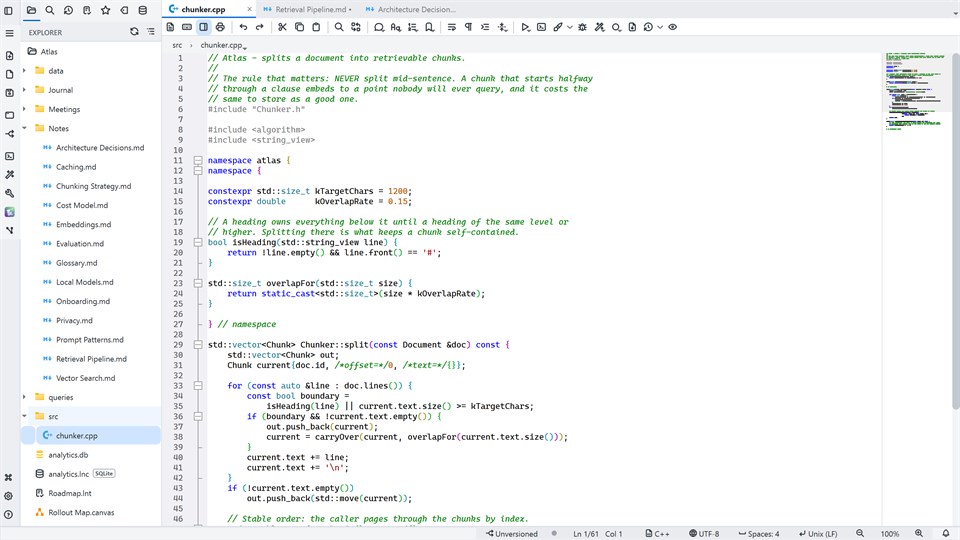
• A real code editor: a Scintilla core with syntax highlighting for about 70 languages, script running with a single shortcut (F5), an integrated terminal, global search with ripgrep and file comparison.
• Vibe code: chat with the AI in the terminal and ask for inline edits (Ctrl+K) — the suggestion arrives as a diff you accept or reject hunk by hunk.
• AI sessions: a panel to follow each session, review everything it changed and, if you want, let it work in an isolated copy of the repository.
• Simplified Git: a per-line change gutter and checkpoints to audit what happened while you were not watching.
PILLAR 2 — A SECOND BRAIN IN MARKDOWN
Your ideas in open .md files, on your machine, yours forever.
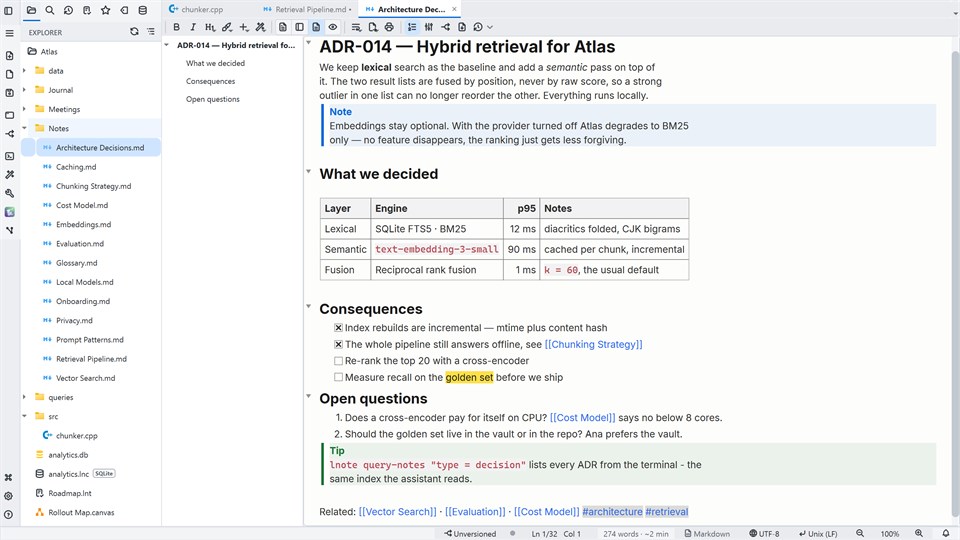
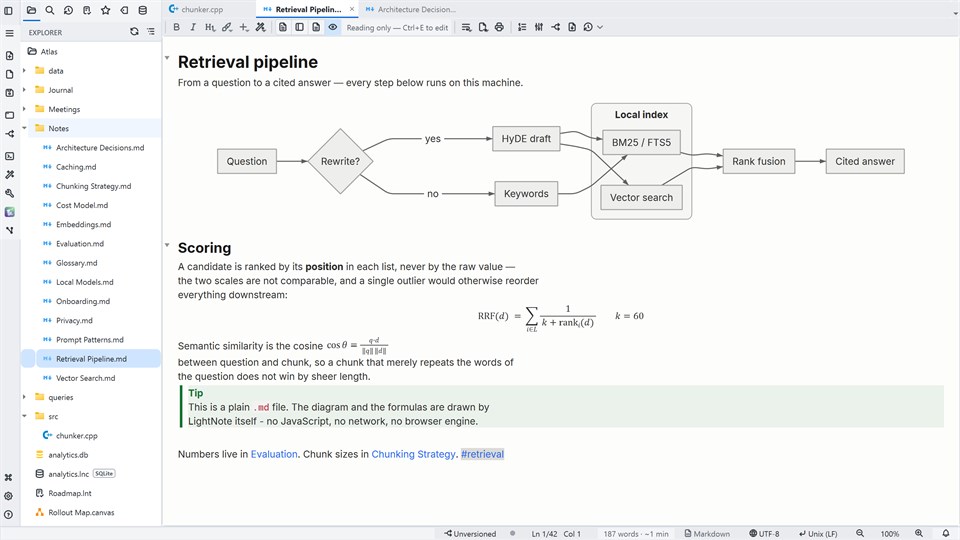
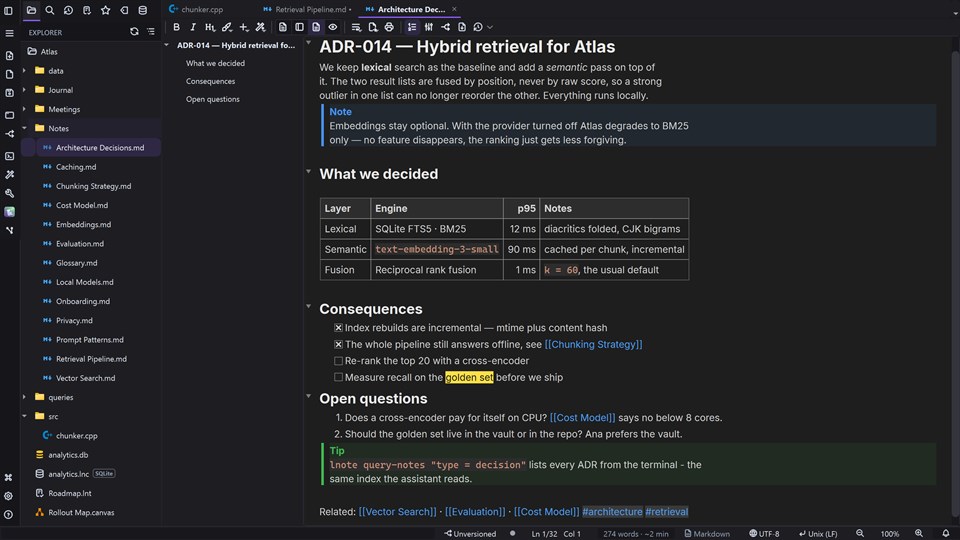
• Formatted editing: headings, lists, tables and images shown as they are — while the file stays plain Markdown. Mermaid diagrams and LaTeX math drawn inside the note.
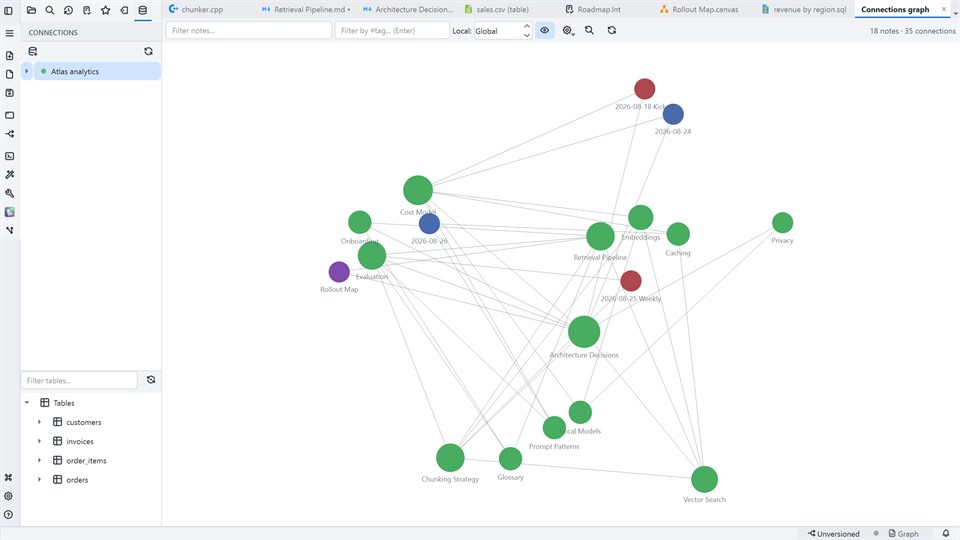
• Obsidian-style [[ ]] wikilinks, backlinks, note templates and an interactive connections graph to see how your ideas link together.
• Automatic daily notes and quick capture from the tray, with a global shortcut — it works even with everything closed.
• Colorful sticky notes on your desktop, always at hand.
• Audio recording (microphone and system sound) with AI transcription and summary.
THE BRIDGE: YOUR NOTES BECOME THE AGENTS' CONTEXT
This is where the two pillars meet.
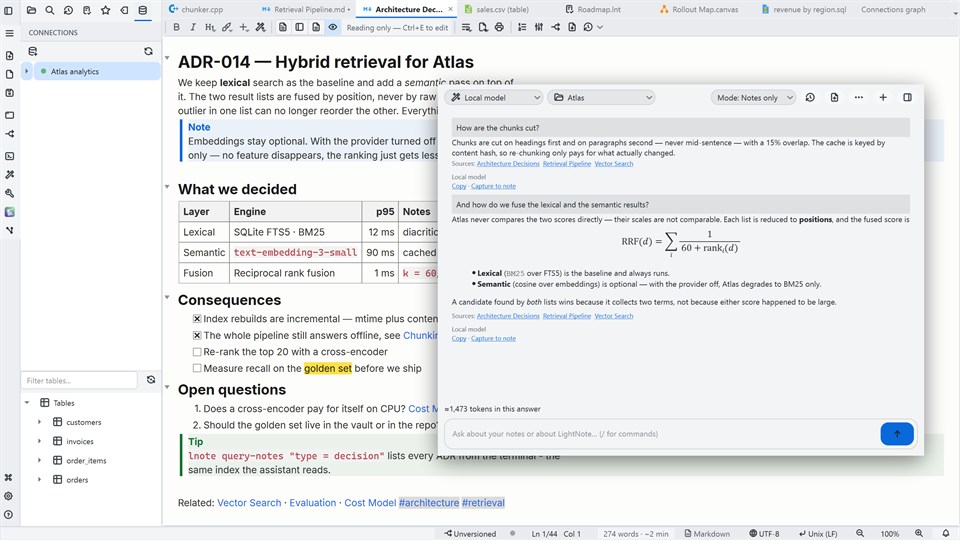
• Assistant: knows what you have open and acts on it, with a local or remote model. It answers from your notes with clickable citations, edits what is on screen, creates the structure of a long work, proposes SQL in the script and reads web pages — always with your approval and an Undo.
• MCP server and the lnote CLI: expose the workspace to your agents — read and write notes and tasks, search, query data and use Git.
AND EVERYTHING ELSE A WORKING DAY ASKS FOR
The developer tools are all here, serving those two pillars — in tabs of the same workspace.
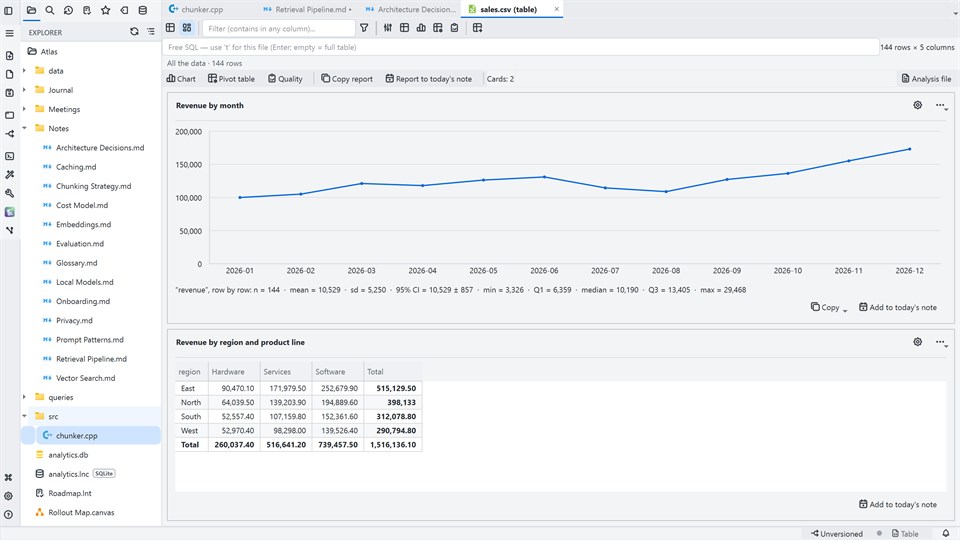
• Data as tables: open Parquet, CSV, JSON and Excel via DuckDB — filter, sort, query with free SQL and export without writing code.
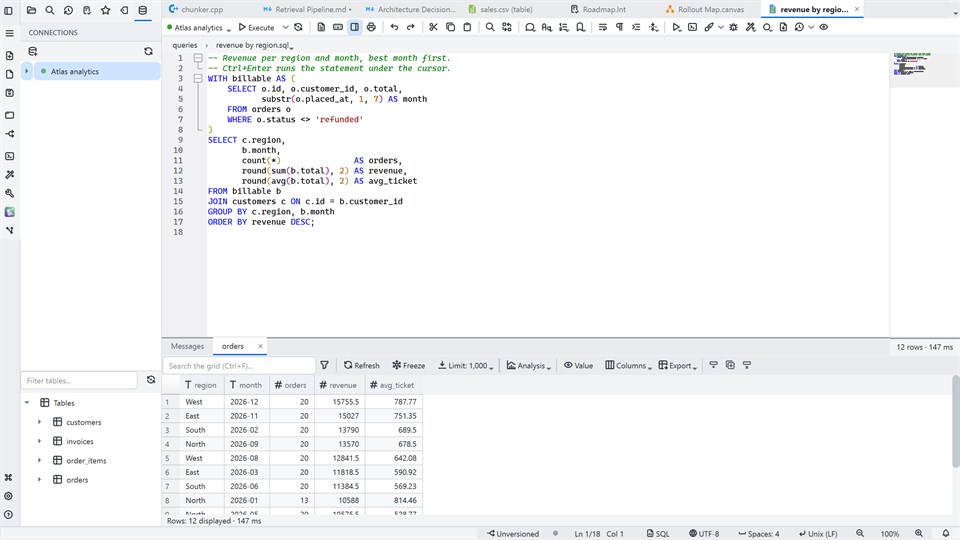
• A full SQL client for SQLite, DuckDB, PostgreSQL, MySQL, SQL Server and Oracle: schema browsing, history, variables, SQL generation and export.
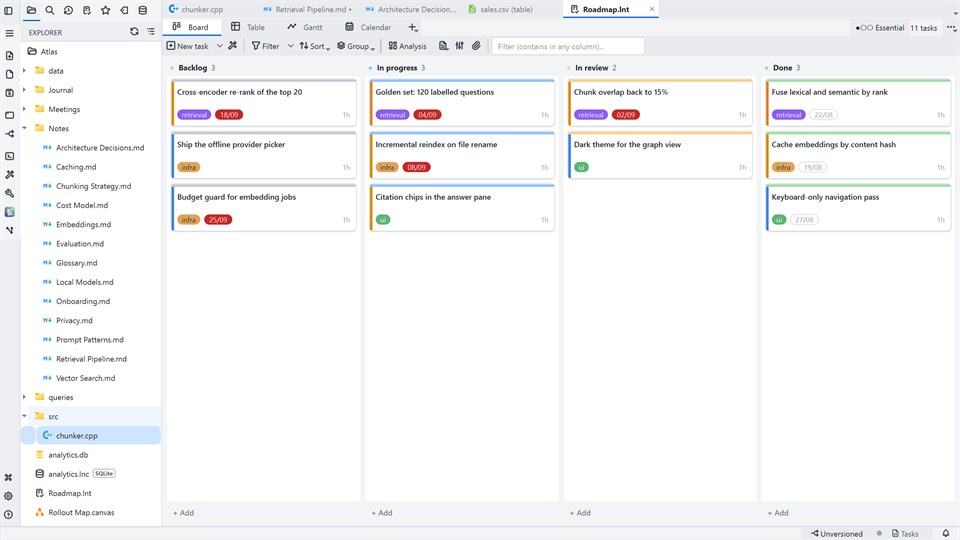
• Task boards in table, Kanban or timeline (Gantt) view, with a working-day calendar — and versionable in Git without merge conflicts.
• An integrated SSH terminal and SFTP file transfer, straight from a connection file inside your project.
• PDF, image and ZIP file viewing, executable code blocks and a spell checker.
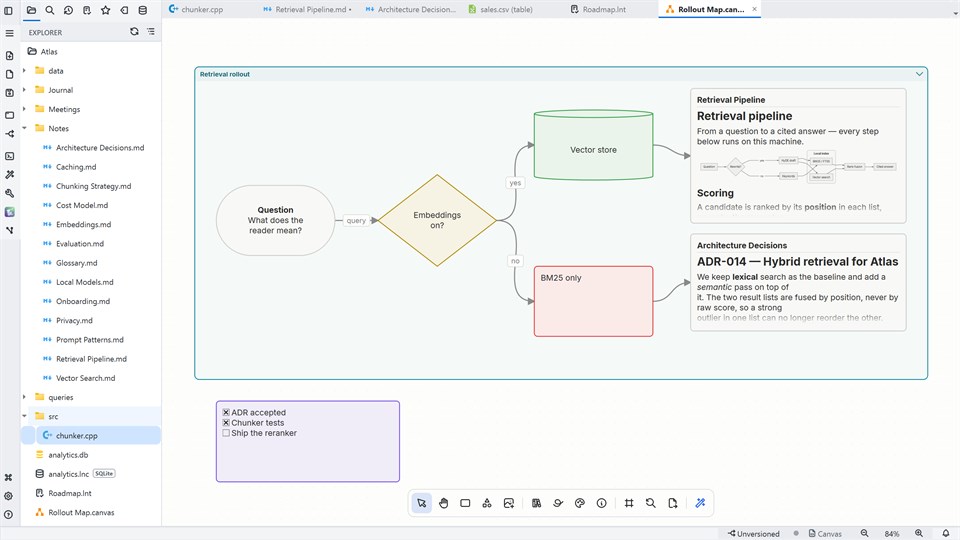
• Canvas (.canvas): cards, notes, images and shapes joined by arrows, in an open format compatible with Obsidian.
SEARCH BY MEANING, WITH YOUR DOCUMENTS INSIDE IT
Not just notes: PDF, Word, Excel, PowerPoint, OpenDocument, EPUB, RTF, saved web pages, e-mail, Jupyter notebooks, subtitles and CSV join the search alongside your Markdown.
• Search for the meaning, not the exact word — and a hit opens the original file on the right page, never a cache.
• A scanned PDF says it has no text, and you can run OCR on it whenever you want.
• Similar notes: the semantic neighbour of every note, without asking.
FOR PEOPLE WHO WRITE AND DO RESEARCH
An Academic section in Settings, with one switch per feature and everything off by default — anyone who just wants a simple editor still has one.
• Citations and a bibliography from .bib, .ris or CSL-JSON in your own folder, in ABNT, APA 7 and Vancouver styles, with Zotero import and DOI lookup.
• Automatic numbering for figures, tables and equations, with cross-references in the text.
• PDF highlighting anchored to the text, spaced-repetition flashcards (FSRS-5) and a calculator with units inside the note.
WHERE YOU COME FROM, WHERE YOUR TEXT GOES
• Import your archive from Notion, Evernote, Obsidian, Logseq, Roam or Joplin — and documents from Word, OpenDocument, RTF and HTML — as Markdown notes, with the links between them rebuilt.
• Export a note or a whole folder to Word, OpenDocument, LaTeX, Typst, EPUB, HTML and six Markdown flavours, without pandoc: formulas become editable equations and, in LaTeX and Typst, citations stay live.
• Binder: a folder becomes a book, a thesis or a course, with chapter order, navigation between chapters and the whole work compiled into one document. Plus a template gallery with fields to fill in, a calendar inside the note and printing with preview.
GENUINELY LIGHTWEIGHT
Truly lightweight: CPU-only rendering, no embedded browser and instant startup. Native C++/Qt, no Electron.
PRIVACY AND SECURITY
Everything is local: your files stay on your computer and nothing is sent to servers of ours. You decide if and when you sync — through Git, for example. A per-workspace Secure Phrase and Secure Markdown with portable encryption that opens on any machine.
FREE, FOR PERSONAL AND COMMERCIAL USE
LightNote is free and has a single license, the same on every distribution channel: it covers personal and commercial use — by individuals, companies, governments and educational institutions. Here on the Microsoft Store it receives automatic updates.
Requirements: Windows 10 or 11 (64-bit).
Dari developer
Daftar 0
-
 LightNote
Poin 0
-

- +1 Poin

Peringkat 0
-
- Rating Anda
Pengembang 1
- NGLCZR
- Pengikut: 0
- Platform: Windows Aplikasi (1)
- Diskon: 1
- Daftar: 0 0
- Poin: 0
- Peringkat: 0
- Komentar: 0
- Video: 0
- RSS: Berlangganan
Yang Baru
- Versi: PC
- Terakhir diperbarui:
- Version 0.10.1
• 0.10.1 fixes a bug in 0.10: approving an Assistant edit on a note in formatted mode repeated the whole note inside it.
• LightNote is now free for personal and commercial use, with a single license for every distribution, and on the Store it is simply called LightNote.
• Canvas (.canvas): cards, notes, images and shapes joined by arrows on a free space, in an open format compatible with Obsidian.
• An Assistant that acts: it sees the open tab, edits with one approval per batch and Undo, queries the open database and reads web pages.
• Complete PDF: copy with the page citation, highlights saved into the copy, compress, add a password, organize and merge pages.
• HTML preview with a web engine on Windows, for pages with JavaScript, without leaving the tab.
• HTTP tester: variables and secrets in the .lnh itself, run a whole folder, and exchange collections with Postman, Insomnia and Bruno.
• Sturdier connections: SQL and SSH notice a suspend and reconnect, and the production environment is marked on SSH too.
• Portable mode: when the USB drive letter changes, the app asks and repoints the paths.
• Sturdier overall: a full review fixed hundreds of defects, and crash reports stay on your computer until you decide to send them.
- Version 0.9
• AI on your own computer, no cloud: the Set up AI wizard configures a cloud provider, a local model or a CLI; LightNote downloads the model and runs llama-server by itself, or uses Ollama and LM Studio. Compare answers puts two assistants side by side.
• AI chat as a window tab, with a Mode, approval per conversation and /help answered from the app's own Help. Edit with AI now reaches Bases, task boards and Custom Tables.
• Panes in a grid: as many editing rows and columns as fit the screen.
• A code editor closer to an IDE: .editorconfig, an optional LSP client, tasks.json tasks, line authorship and branch switching.
• Jupyter-style .lnb notebooks, large spreadsheets through DuckDB without freezing, and files handled like in a file manager, with whole folders over SFTP.
• An Activities panel, with a bell in the status bar, for indexing, downloads and OCR.
• Lighter and sturdier: 34 MB of RAM at idle, startup three times faster, built-in fonts and 95 robustness fixes. - Version 0.8
• Import and export without pandoc: archives from Notion, Evernote, Obsidian, Logseq, Roam and Joplin come in as Markdown notes; a note or a whole folder goes out to Word, OpenDocument, LaTeX, Typst, EPUB and HTML, with editable equations and live citations. Pasting from Word and the web keeps lists and code.
• Binder: a folder becomes a book, a thesis or a course — chapter order, navigation between chapters and the whole work compiled into one document.
• Templates: a gallery with preview, fields to fill in (Tab between them) and a catalogue of ready-made templates.
• Printing, with preview, margins and colour theme chosen on the spot; a calendar inside the note.
• Mermaid went from 23 to 33 diagram types; LaTeX draws almost the whole KaTeX table, mhchem chemistry, \chemfig and commutative diagrams. AI edits the diagram and the formula from the block bar.
• More resilient AI: automatic retry on transient failures and an optional switch away from a model that went offline — never to a pricier one.
• Clone a Git repository with sign-in, and moving a file takes its tab along.
Info tambahan
 http://lightnote.com.br
Skor AppAgg
Perkiraan Skor AppAgg untuk
LightNote
Pengembang: NGLCZR
Skor yang lebih tinggi biasanya menunjukkan indikator yang lebih kuat di AppAgg.
Berdasarkan: popularitas · rating pengguna · kebaruan · promo · data toko · aktivitas komunitas
Dihitung ulang setiap hari dari data AppAgg terbaru.
Komentar 0 ¡
Bagikan
LightNote URL singkat: Disalin!- Windows Store

