
書籤
為此書籤設定標題。
書籤已儲存
| 開發者: | NGLCZR (1) | ||
| 價格: | ▼ 免費 | ||
| 評分: | 1,340 黃金 | ||
| 排名: | 0 | ||
| 留言: | 0 發表留言 | ||
| 清單: | 0 0 | ||
| 點數: | 0 | ||
| +1 點 | |||
摘要
來認識一下 LightNote,NGLCZR 打造的應用程式,歸在「開發人員工具」分類。
現在限時免費,平常要 $39.99。趁他們還沒改變心意,手刀快領。
推出,還相當新鮮。
Microsoft Store 內建在 Windows 裡,點幾下就裝好了。
AppAgg 評分 1,340,達到黃金級。
年齡分級為「EVERYONE」,小朋友也適合。
支援 10 種語言,中文也在其中。
AppAgg 上還沒有人給它評分。現在就來搶頭香吧。
這是這位開發者在 AppAgg 上唯一的 App。至少目前是。
想搶先知道更新和新應用程式?追蹤開發者或訂閱RSS 訂閱來源。推播通知會透過 AppAgg Alerts App 傳送,支援 Android 和 iOS。
廣告
其他平台 0
價格紀錄 2
- 目前價格: 免費
$39.99-100% - 最小值: ▼ 免費
- 最大值: $50.99
首頁專屬動態
為「最新與更新」選擇平台,首頁就只會顯示你需要的 App 和遊戲。
螢幕擷取畫面 10
描述

LightNote is a lightweight Windows editor where your second brain in Markdown becomes the context for your AI agents. Built in native C++/Qt — no Electron, no browser tabs and no mandatory cloud. It opens instantly, uses little memory and renders on the CPU only, so it fits in the palm of your hand even on modest machines.
Two pillars, and a bridge between them.
PILLAR 1 — A COCKPIT FOR YOUR AI AGENTS
LightNote embeds no model: it orchestrates the AI you already use — local CLIs, API providers (OpenAI, Google Gemini, Anthropic Claude) or local models through Ollama and LM Studio.
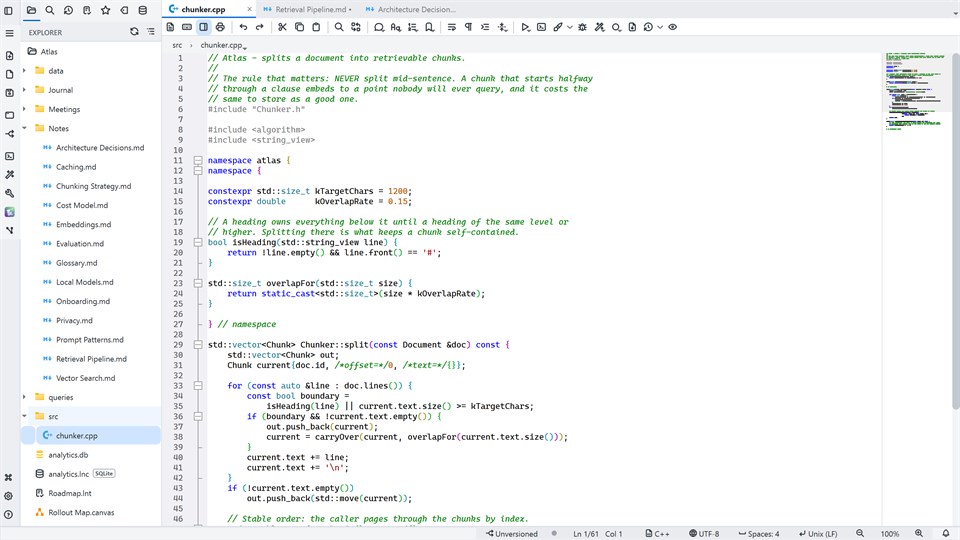
• A real code editor: a Scintilla core with syntax highlighting for about 70 languages, script running with a single shortcut (F5), an integrated terminal, global search with ripgrep and file comparison.
• Vibe code: chat with the AI in the terminal and ask for inline edits (Ctrl+K) — the suggestion arrives as a diff you accept or reject hunk by hunk.
• AI sessions: a panel to follow each session, review everything it changed and, if you want, let it work in an isolated copy of the repository.
• Simplified Git: a per-line change gutter and checkpoints to audit what happened while you were not watching.
PILLAR 2 — A SECOND BRAIN IN MARKDOWN
Your ideas in open .md files, on your machine, yours forever.
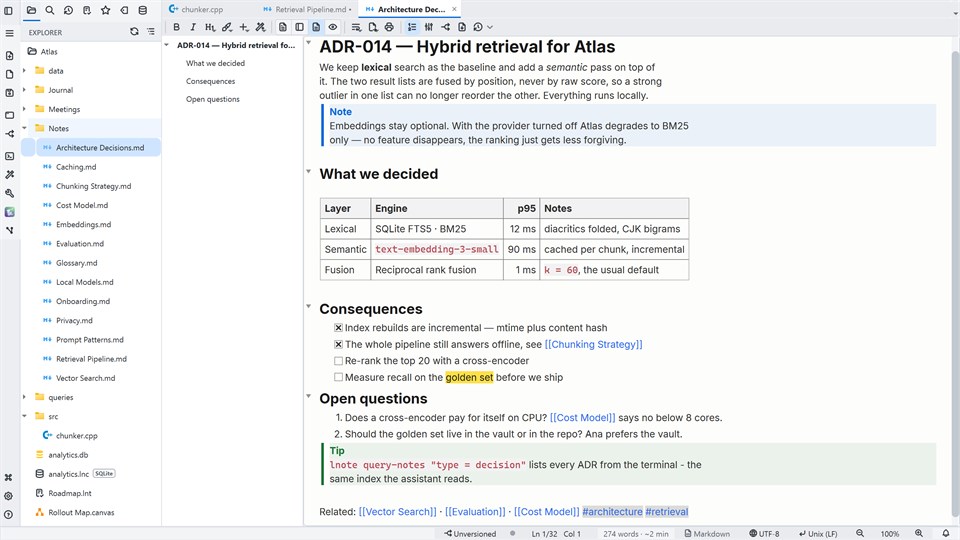
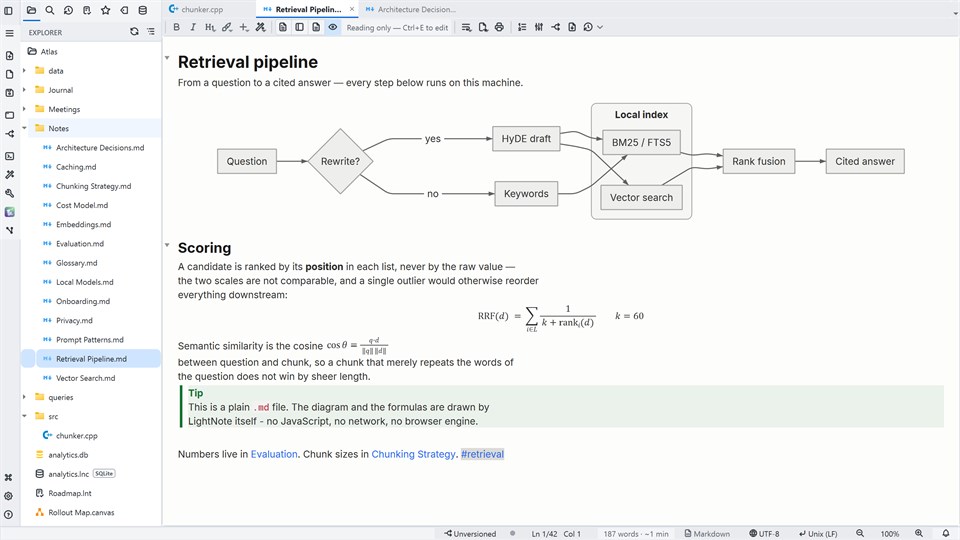
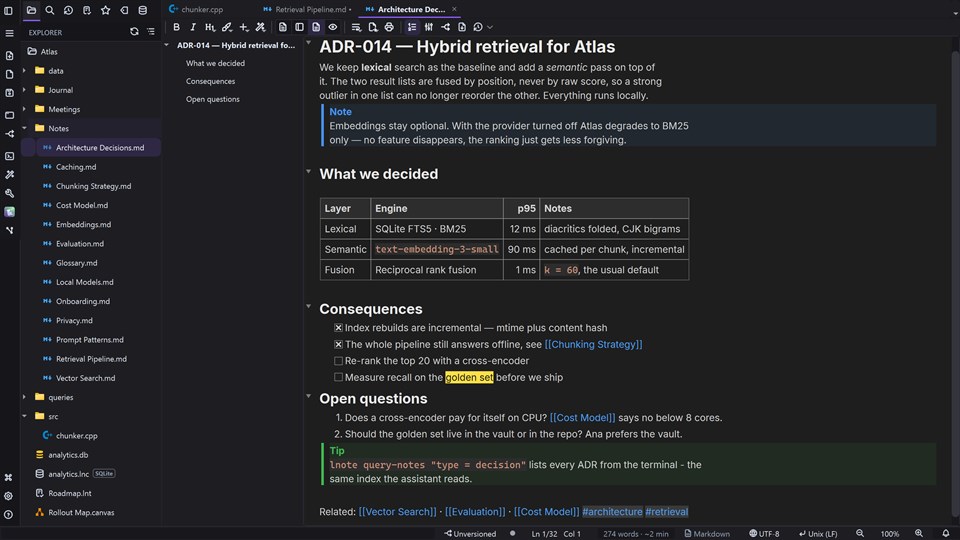
• Formatted editing: headings, lists, tables and images shown as they are — while the file stays plain Markdown. Mermaid diagrams and LaTeX math drawn inside the note.
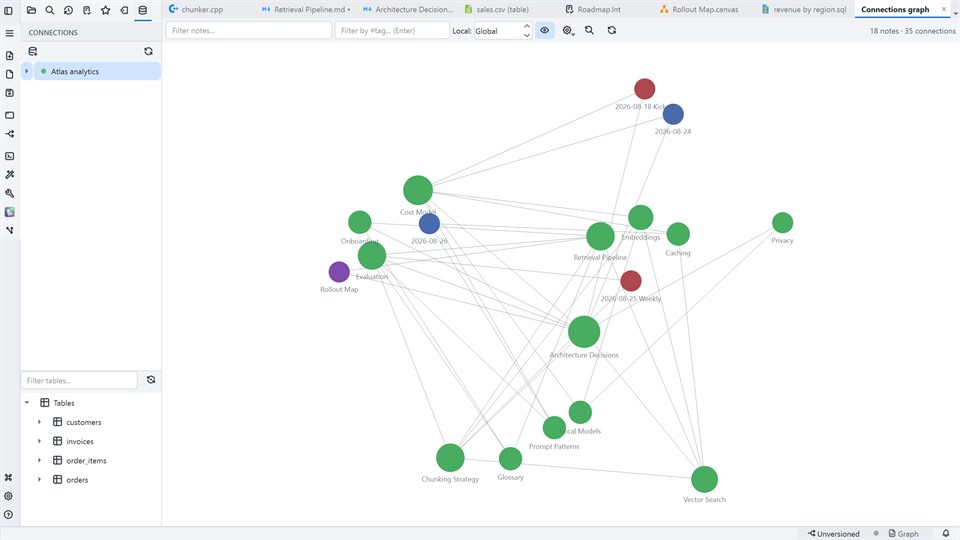
• Obsidian-style [[ ]] wikilinks, backlinks, note templates and an interactive connections graph to see how your ideas link together.
• Automatic daily notes and quick capture from the tray, with a global shortcut — it works even with everything closed.
• Colorful sticky notes on your desktop, always at hand.
• Audio recording (microphone and system sound) with AI transcription and summary.
THE BRIDGE: YOUR NOTES BECOME THE AGENTS' CONTEXT
This is where the two pillars meet.
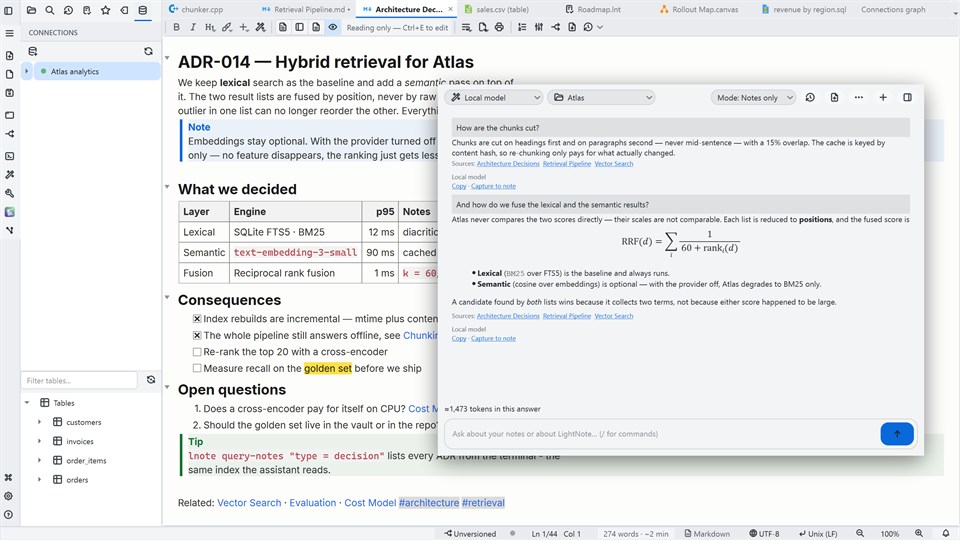
• Assistant: knows what you have open and acts on it, with a local or remote model. It answers from your notes with clickable citations, edits what is on screen, creates the structure of a long work, proposes SQL in the script and reads web pages — always with your approval and an Undo.
• MCP server and the lnote CLI: expose the workspace to your agents — read and write notes and tasks, search, query data and use Git.
AND EVERYTHING ELSE A WORKING DAY ASKS FOR
The developer tools are all here, serving those two pillars — in tabs of the same workspace.
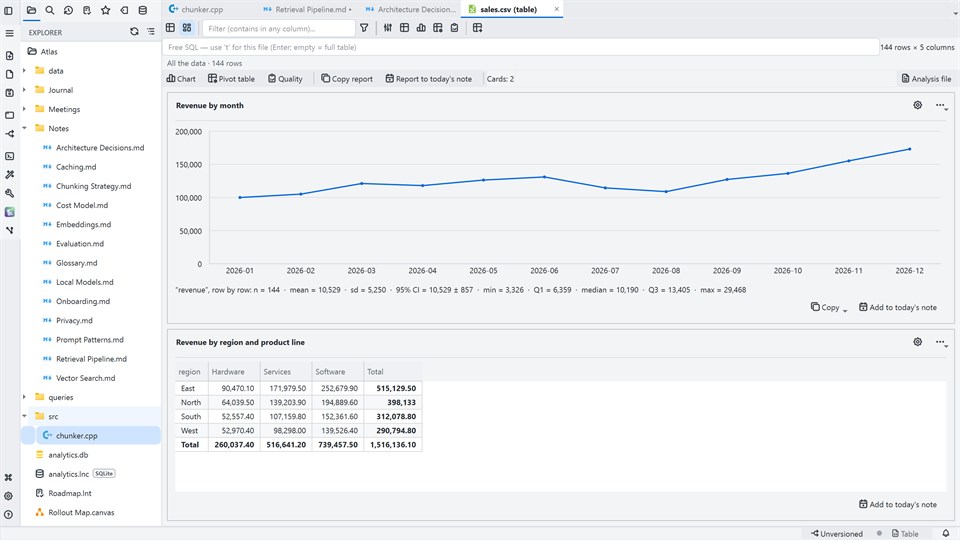
• Data as tables: open Parquet, CSV, JSON and Excel via DuckDB — filter, sort, query with free SQL and export without writing code.
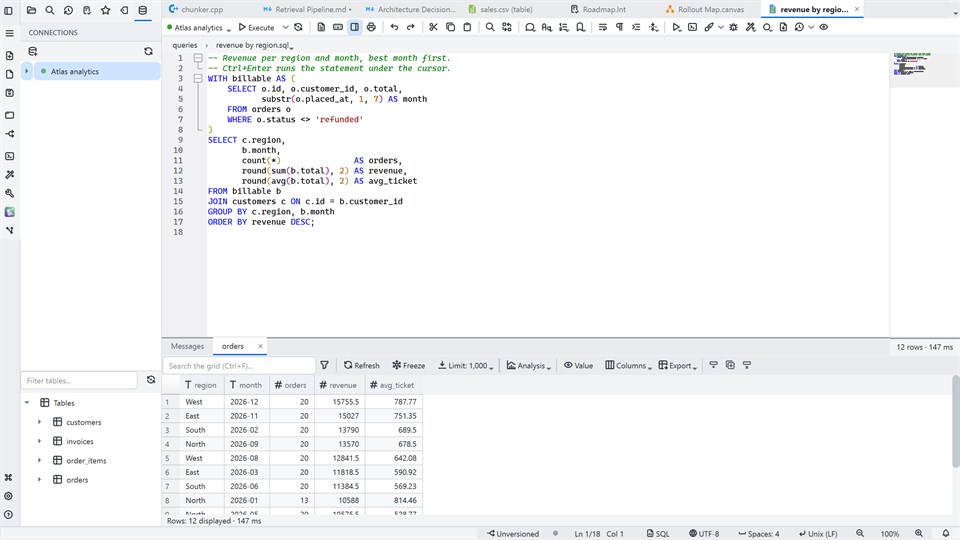
• A full SQL client for SQLite, DuckDB, PostgreSQL, MySQL, SQL Server and Oracle: schema browsing, history, variables, SQL generation and export.
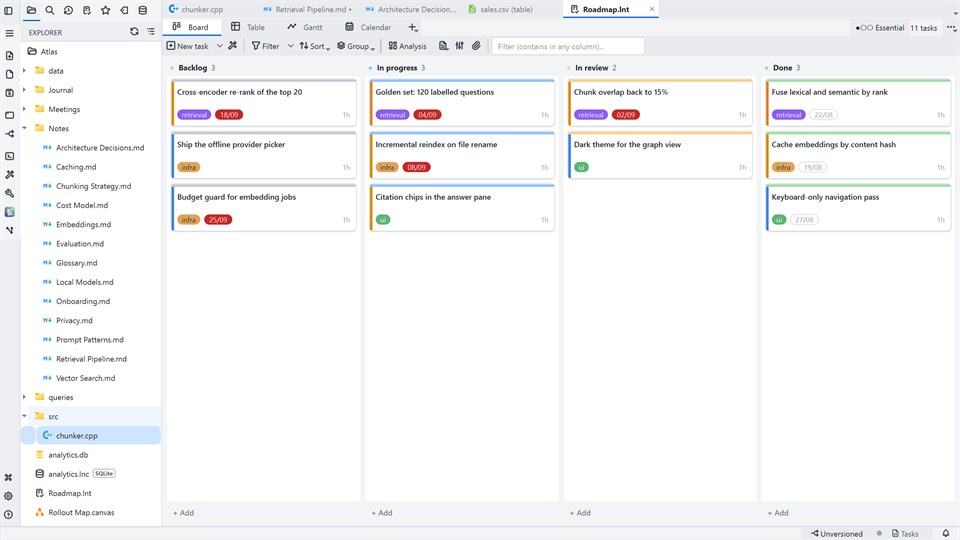
• Task boards in table, Kanban or timeline (Gantt) view, with a working-day calendar — and versionable in Git without merge conflicts.
• An integrated SSH terminal and SFTP file transfer, straight from a connection file inside your project.
• PDF, image and ZIP file viewing, executable code blocks and a spell checker.
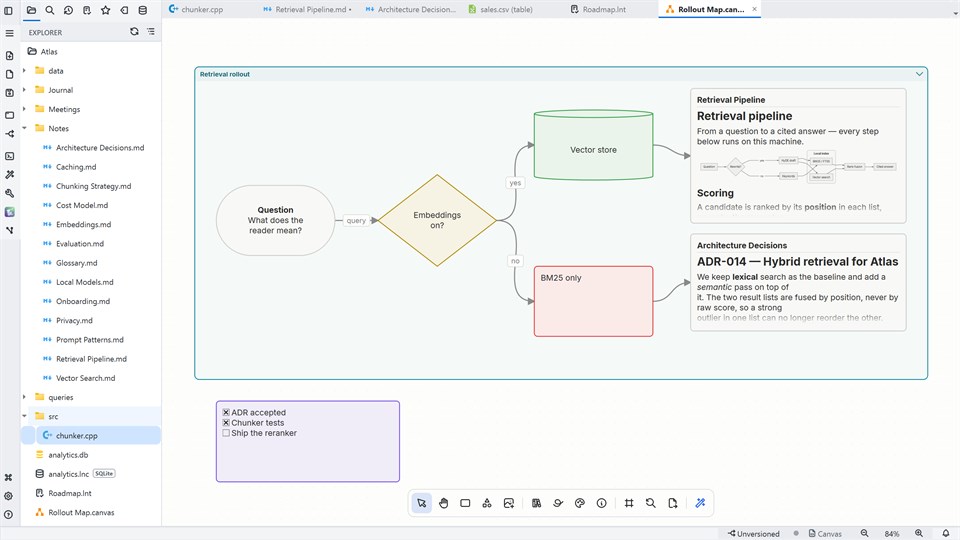
• Canvas (.canvas): cards, notes, images and shapes joined by arrows, in an open format compatible with Obsidian.
SEARCH BY MEANING, WITH YOUR DOCUMENTS INSIDE IT
Not just notes: PDF, Word, Excel, PowerPoint, OpenDocument, EPUB, RTF, saved web pages, e-mail, Jupyter notebooks, subtitles and CSV join the search alongside your Markdown.
• Search for the meaning, not the exact word — and a hit opens the original file on the right page, never a cache.
• A scanned PDF says it has no text, and you can run OCR on it whenever you want.
• Similar notes: the semantic neighbour of every note, without asking.
FOR PEOPLE WHO WRITE AND DO RESEARCH
An Academic section in Settings, with one switch per feature and everything off by default — anyone who just wants a simple editor still has one.
• Citations and a bibliography from .bib, .ris or CSL-JSON in your own folder, in ABNT, APA 7 and Vancouver styles, with Zotero import and DOI lookup.
• Automatic numbering for figures, tables and equations, with cross-references in the text.
• PDF highlighting anchored to the text, spaced-repetition flashcards (FSRS-5) and a calculator with units inside the note.
WHERE YOU COME FROM, WHERE YOUR TEXT GOES
• Import your archive from Notion, Evernote, Obsidian, Logseq, Roam or Joplin — and documents from Word, OpenDocument, RTF and HTML — as Markdown notes, with the links between them rebuilt.
• Export a note or a whole folder to Word, OpenDocument, LaTeX, Typst, EPUB, HTML and six Markdown flavours, without pandoc: formulas become editable equations and, in LaTeX and Typst, citations stay live.
• Binder: a folder becomes a book, a thesis or a course, with chapter order, navigation between chapters and the whole work compiled into one document. Plus a template gallery with fields to fill in, a calendar inside the note and printing with preview.
GENUINELY LIGHTWEIGHT
Truly lightweight: CPU-only rendering, no embedded browser and instant startup. Native C++/Qt, no Electron.
PRIVACY AND SECURITY
Everything is local: your files stay on your computer and nothing is sent to servers of ours. You decide if and when you sync — through Git, for example. A per-workspace Secure Phrase and Secure Markdown with portable encryption that opens on any machine.
FREE, FOR PERSONAL AND COMMERCIAL USE
LightNote is free and has a single license, the same on every distribution channel: it covers personal and commercial use — by individuals, companies, governments and educational institutions. Here on the Microsoft Store it receives automatic updates.
Requirements: Windows 10 or 11 (64-bit).
來自開發者
你是開發者嗎?
在頁面頂部發布消息,追蹤者會透過電子郵件收到。新增你的 YouTube 影片,它們會排在「影片」區塊最前面。
清單 0
-
 LightNote
點數 0
-

- +1 點

排名 0
-
- 您的評分
開發者 1
- NGLCZR
- 追蹤者: 0
- 平台: Windows 應用程式 (1)
- 折扣: 1
- 清單: 0 0
- 點數: 0
- 排名: 0
- 留言: 0
- 影片: 0
- RSS: 訂閱
新功能
- 版本: PC
- 最後更新:
- Version 0.10.1
• 0.10.1 fixes a bug in 0.10: approving an Assistant edit on a note in formatted mode repeated the whole note inside it.
• LightNote is now free for personal and commercial use, with a single license for every distribution, and on the Store it is simply called LightNote.
• Canvas (.canvas): cards, notes, images and shapes joined by arrows on a free space, in an open format compatible with Obsidian.
• An Assistant that acts: it sees the open tab, edits with one approval per batch and Undo, queries the open database and reads web pages.
• Complete PDF: copy with the page citation, highlights saved into the copy, compress, add a password, organize and merge pages.
• HTML preview with a web engine on Windows, for pages with JavaScript, without leaving the tab.
• HTTP tester: variables and secrets in the .lnh itself, run a whole folder, and exchange collections with Postman, Insomnia and Bruno.
• Sturdier connections: SQL and SSH notice a suspend and reconnect, and the production environment is marked on SSH too.
• Portable mode: when the USB drive letter changes, the app asks and repoints the paths.
• Sturdier overall: a full review fixed hundreds of defects, and crash reports stay on your computer until you decide to send them.
版本紀錄2
- Version 0.9
• AI on your own computer, no cloud: the Set up AI wizard configures a cloud provider, a local model or a CLI; LightNote downloads the model and runs llama-server by itself, or uses Ollama and LM Studio. Compare answers puts two assistants side by side.
• AI chat as a window tab, with a Mode, approval per conversation and /help answered from the app's own Help. Edit with AI now reaches Bases, task boards and Custom Tables.
• Panes in a grid: as many editing rows and columns as fit the screen.
• A code editor closer to an IDE: .editorconfig, an optional LSP client, tasks.json tasks, line authorship and branch switching.
• Jupyter-style .lnb notebooks, large spreadsheets through DuckDB without freezing, and files handled like in a file manager, with whole folders over SFTP.
• An Activities panel, with a bell in the status bar, for indexing, downloads and OCR.
• Lighter and sturdier: 34 MB of RAM at idle, startup three times faster, built-in fonts and 95 robustness fixes. - Version 0.8
• Import and export without pandoc: archives from Notion, Evernote, Obsidian, Logseq, Roam and Joplin come in as Markdown notes; a note or a whole folder goes out to Word, OpenDocument, LaTeX, Typst, EPUB and HTML, with editable equations and live citations. Pasting from Word and the web keeps lists and code.
• Binder: a folder becomes a book, a thesis or a course — chapter order, navigation between chapters and the whole work compiled into one document.
• Templates: a gallery with preview, fields to fill in (Tab between them) and a catalogue of ready-made templates.
• Printing, with preview, margins and colour theme chosen on the spot; a calendar inside the note.
• Mermaid went from 23 to 33 diagram types; LaTeX draws almost the whole KaTeX table, mhchem chemistry, \chemfig and commutative diagrams. AI edits the diagram and the formula from the block bar.
• More resilient AI: automatic retry on transient failures and an optional switch away from a model that went offline — never to a pricier one.
• Clone a Git repository with sign-in, and moving a file takes its tab along.
其他資訊
 http://lightnote.com.br
AppAgg 評分
1,340
AppAgg 預估評分:
LightNote
開發者: NGLCZR
1,340 黃金
評分越高,通常代表其在 AppAgg 上的各項指標表現越好。
基於: 人氣 · 使用者評分 · 新鮮度 · 優惠 · 商店資料 · 社群活躍度
根據最新 AppAgg 資料每日重新計算。
網站徽章:  已複製!
留言 0 ¡
搶先留下第一則留言
分享
LightNote 短網址: 已複製!- Windows Store

