
Favoritos
| Desenvolvedor: | Birdycom (1) | ||
| Preço: | Grátis Novo | ||
| Pontuação: | 990 Prata | ||
| Classificações: | 0 | ||
| Comentários: | 0 Postar comentário | ||
| Listas: | 0 0 | ||
| Pontos: | 0 | ||
| +1 Ponto | |||
Resumo
LimitGlance é um app da categoria “Ferramentas de desenvolvedor”, criado por Birdycom.
Novinho em folha, saiu . Ainda tem aquele cheirinho de código novo.
Grátis, sem anúncios, sem compras no app. Só você e o app.
A Microsoft Store já vem integrada ao Windows, então instala em dois cliques.
A Pontuação AppAgg é 990. Prata, e isso não é nada mal.
Classificação indicativa “EVERYONE”: serve para crianças também.
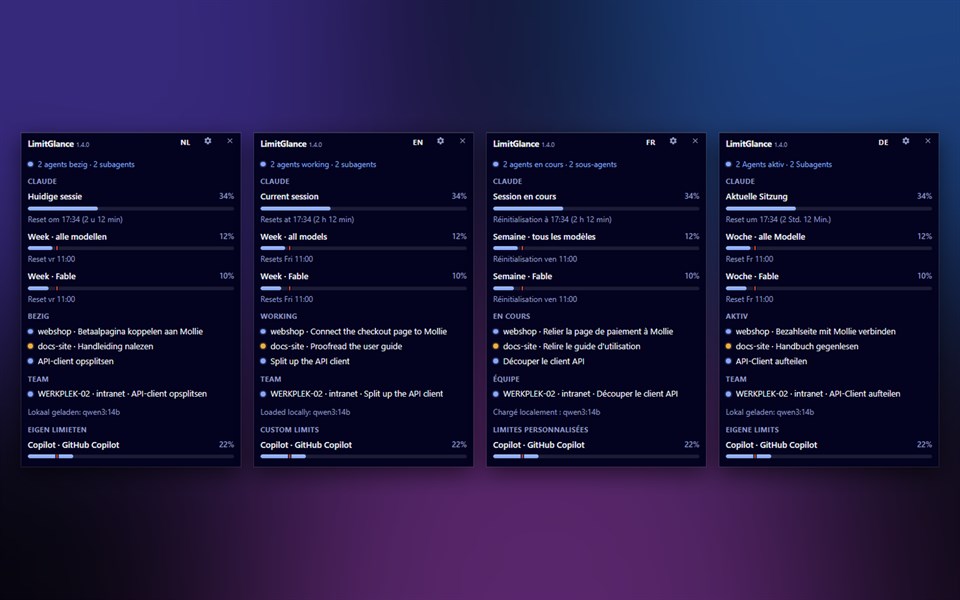
Conhece 4 idiomas, mas ainda não aprendeu português.
Já usou? Sua avaliação seria a primeira aqui.
É o único app do desenvolvedor no AppAgg. Por enquanto.
Quer saber das atualizações e dos apps novos antes de todo mundo? Siga o desenvolvedor ou assine o feed RSS. As notificações push chegam pelo app AppAgg Alerts para Android e iOS.
Capturas de tela 6
Outras plataformas 0
Histórico de preços 0
- Preço atual: Grátis
- Mínimo: Grátis
- Máximo: Grátis
Seu próprio feed na página inicial
Descrição

DETECTS YOUR AI TOOLS
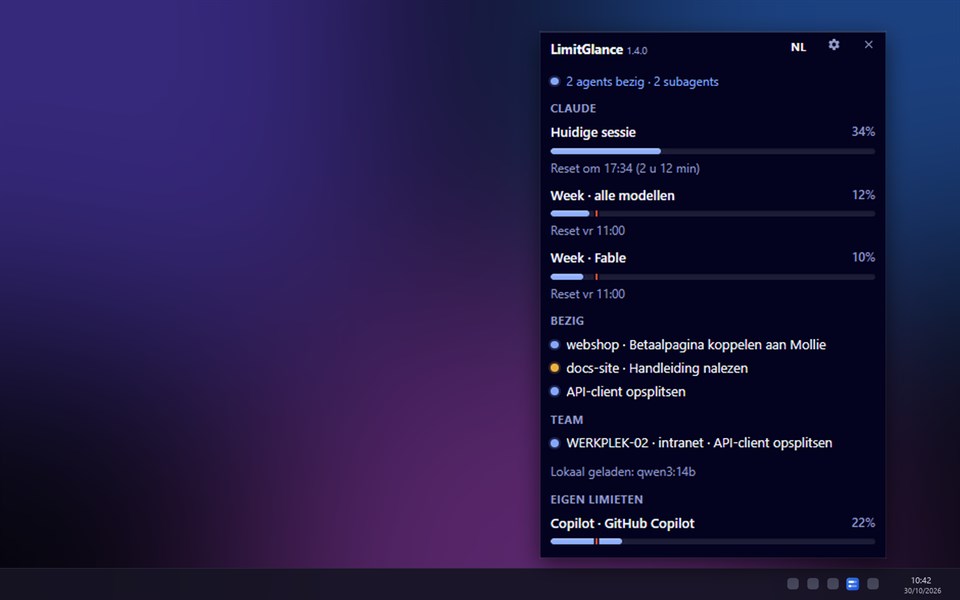
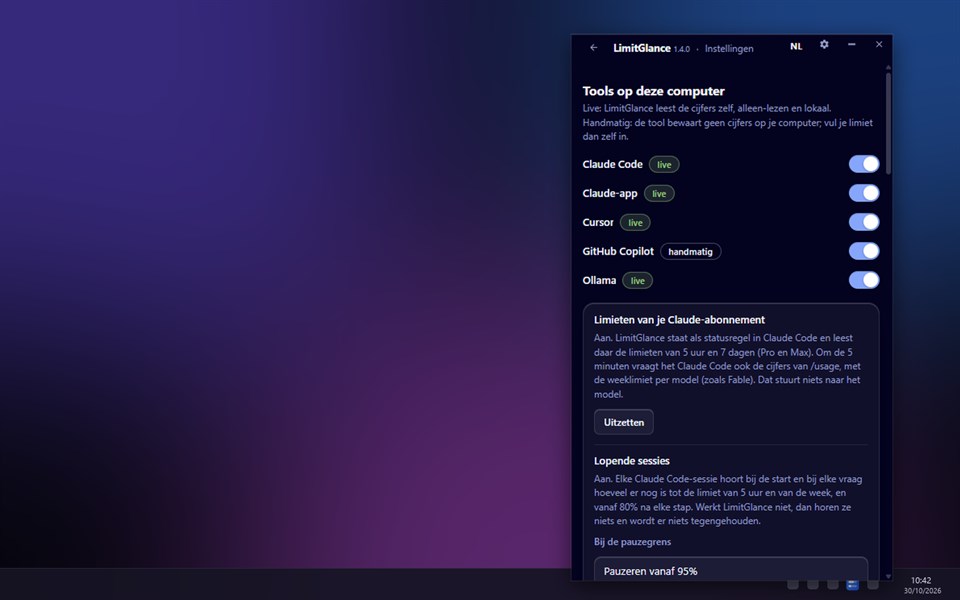
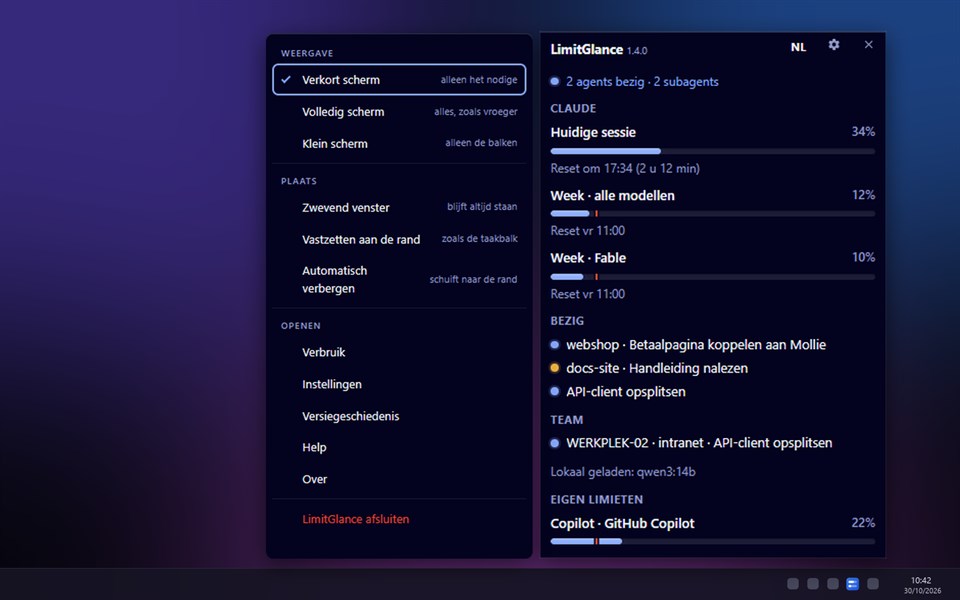
LimitGlance detects which AI tools are on your computer: Claude Code, the Claude app, Cursor, GitHub Copilot, Codex, the ChatGPT app, Gemini CLI, Gemini Code Assist, Antigravity and Windsurf, plus local AI with Ollama and LM Studio. A tool you install later shows up by itself. It refreshes every 5 seconds. Busy agents are at the top, with the number of agents and subagents working right now above them.
WHAT THEY ARE DOING
For Claude Code you see every open session with project, title, last step (e.g. "Bash: npm test"), model and subagents, plus the token usage of the last 5 hours and 7 days. For Cursor, the agent chats of the last 2 hours, with how full the context is.
LIMITS
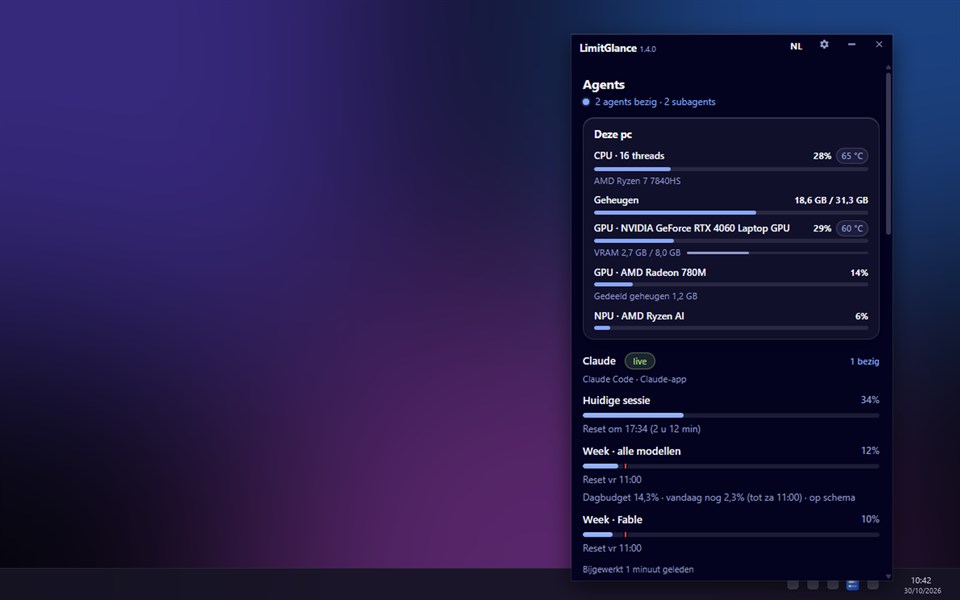
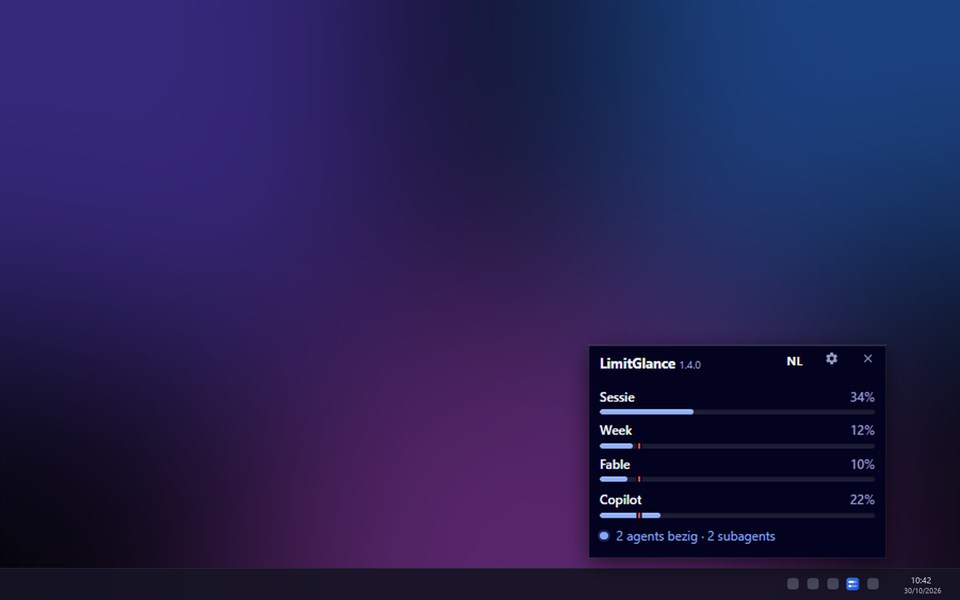
LimitGlance shows the limits of your Claude subscription (5 hours and 7 days, Pro and Max) if you turn that on, with a daily budget and the time of the next reset. For other services you see tokens and activity. Cursor, Copilot, ChatGPT and Gemini do not store their limit on your computer: there you fill it in yourself with "Enter limit".
LOCAL AI AND YOUR PC
For Ollama and LM Studio you see which models are loaded right now, how much video memory they use and which ones are ready. LimitGlance also shows the load of processor, memory and graphics card, and the temperature as Windows reports it. No service, no driver, no extra program.
TEAM
See the agents on your other PCs. Off by default. Encrypted with a team code and only on your own local network, never over the internet.
ALWAYS AT HAND
A small window that stays on top, or docked to the edge of the screen like the taskbar. Choose compact, full or small. With an icon next to the clock and, if you like, it starts with Windows. In English, Dutch, French and German.
PRIVACY: EVERYTHING STAYS LOCAL
- No account and no telemetry. LimitGlance sends nothing to Birdycom or to third parties.
- LimitGlance only reads the local data of your AI tools, read-only. Your login details are never opened.
- You can hide a tool; it is then not read either.
WHAT LIMITGLANCE OPTIONALLY ADDS TO CLAUDE CODE
Only when you turn it on in the settings:
- Limits of your Claude subscription: LimitGlance sets itself as the status line in the Claude Code settings. A status line that was already there stays in place.
- Running sessions: hooks in Claude Code. Each session then hears how much is left until the limit, pauses just before it and continues by itself after the reset.
You turn both off again with one button. Turn them off before you uninstall LimitGlance: that way nothing of LimitGlance is left behind in Claude Code.
SYSTEM REQUIREMENTS
Windows 10 or 11, 64-bit (x64). LimitGlance is free.
LimitGlance is a tool by Birdycom. It is not made by or affiliated with Anthropic, Cursor, GitHub, OpenAI, Google or the other makers mentioned. Trademarks belong to their owners.
Do desenvolvedor
Desenvolvedor
- Birdycom
- Seguidores: 0
- Plataformas: Windows Apps (1)
- Promoções: 0
- Listas: 0 0
- Pontos: 0
- Classificações: 0
- Comentários: 0
- Vídeos: 0
- RSS: Assinar
Listas 0
-
 LimitGlance
Pontos 0
-

- +1 Ponto

Classificações 0
-
- Sua nota
Novidades
- Versão: PC
- Última atualização:
- First release in the Microsoft Store.
- Per session and subagent the model and the role (e.g. reader · Sonnet), the running time and the tokens.
- Code sessions from the Claude app show up too.
- Estimated API value per session and for 5 hours and 7 days, plus extra usage and credit when that is on.
- The session reset with the time and the time left, e.g. "Resets at 2:26 PM (2 h 12 min)".
Informações adicionais
- Data de lançamento:
- Categoria:
Aplicativos para Windows›Ferramentas de desenvolvedor - Sistemas operacionais:
PC - Tamanho:
156 Mb - Idiomas disponíveis:
Alemão,Francês,Holandês,Inglês - Classificação indicativa:
EVERYONE - Windows Store Nota: ¡
0 - Site:
 https://birdycom.be/
Comentários 0 ¡
Pontuação AppAgg
Pontuação AppAgg estimada de
LimitGlance
Desenvolvedor: Birdycom
Uma pontuação mais alta geralmente reflete resultados melhores nos indicadores do AppAgg.
Com base em: popularidade · avaliações dos usuários · atualidade · ofertas · dados das lojas · atividade da comunidade
Recalculado diariamente com dados AppAgg atualizados.
LimitGlance URL curta: Copiado!- Windows Store

