
Könyvjelzők
| Fejlesztő: | Shuhei123 (8) | ||
| Ár: | $3.99 Új | ||
| Pontszám: | 600 Ezüst | ||
| Rangsorok: | 0 | ||
| Hozzászólások: | 0 Hozzászólás közzététele | ||
| Listák: | 0 0 | ||
| Pontok: | 0 | ||
| +1 Pont | |||
Röviden
Íme Markdown Vault, „Fejlesztői eszközök” kategóriájú alkalmazás, fejlesztője: Shuhei123.
Még csak jelent meg, így fiatalabb a hűtődben lévő tejnél.
$3.99, és az AppAggon eddig egyszer sem volt akciós. Kemény dió.
A Microsoft Store a Windows beépített része, így pár kattintással felteheted.
Az AppAgg-pontszáma 600. „Ezüst”, és ez egyáltalán nem rossz.
„EVERYONE” besorolású, vagyis gyerekeknek is megfelel.
9 nyelvet ismer, de magyarul még nem tanult meg.
Egyelőre teljes a csend: se értékelés, se hozzászólás. Törd meg a csendet.
A fejlesztőnek még 7 alkalmazása van az AppAggon. Érdemes megnézni.
Szeretnél elsőként értesülni az akciókról, a frissítésekről és az új alkalmazásokról? Állíts be árfigyelőt, kövesd a fejlesztőt vagy az RSS-hírcsatornát. A push-értesítések az AppAgg Alerts alkalmazásban érkeznek Android és iOS rendszerre.
Képernyőképek 3
Más platformok 0
Ártörténet 0
- Jelenlegi ár: $3.99
- Minimális: $3.99
- Maximális: $3.99
Saját hírfolyam a kezdőlapon
Ismertető

Why Choose Markdown Vault?
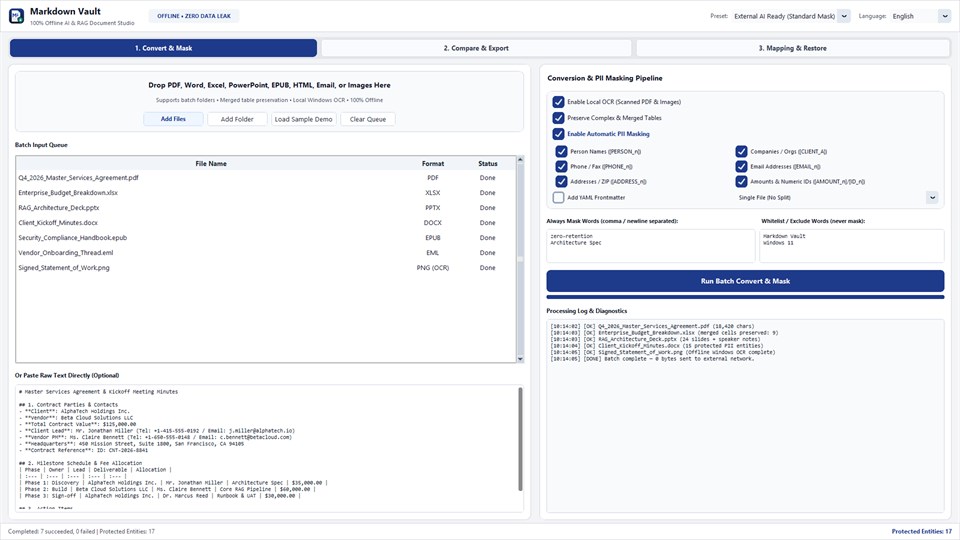
Unlike cloud-based converters or AI wrappers that upload your files to external servers, Markdown Vault performs every conversion, OCR scan, table reconstruction, and PII redaction completely on your local Windows PC. Pay once and own your privacy workflow forever.
Key Features:
- Multi-Format Faithful Conversion: Batch-convert text and scanned PDFs, Word (.docx), Excel (.xlsx), PowerPoint (.pptx), EPUB (.epub), saved web pages (.html/.htm), emails (.eml/.msg), and images (.png/.jpg) into clean Markdown without AI summarization, rewriting, or hallucination.
- Complex Merged Table Preservation: Accurately parses merged cells in Excel, Word, PDF, and HTML tables so financial breakdowns and specification matrices stay aligned in Markdown.
- Built-In Offline Windows OCR: Extract text from scanned PDFs, embedded Word images, and screenshots locally using Windows native OCR with zero external API calls.
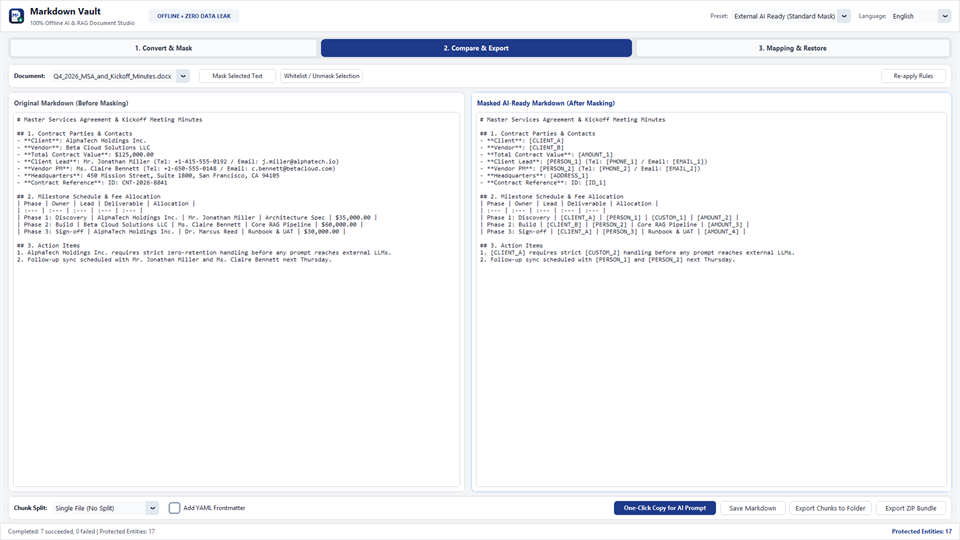
- Smart PII Auto-Detection & Entity Consistency: Automatically detects and masks Person Names, Companies/Clients, Phone Numbers, Email Addresses, Physical Addresses, and Amounts/Numeric IDs. The same entity always maps to the exact same placeholder (such as [CLIENT_A] or [PERSON_1]) across an entire project so ChatGPT, Claude, or Gemini can follow context accurately.
- Side-by-Side Comparison & Manual Control: Inspect original vs. masked Markdown side by side. Right-click any text to cut, copy, paste, manually mask sensitive project names, or whitelist false positives.
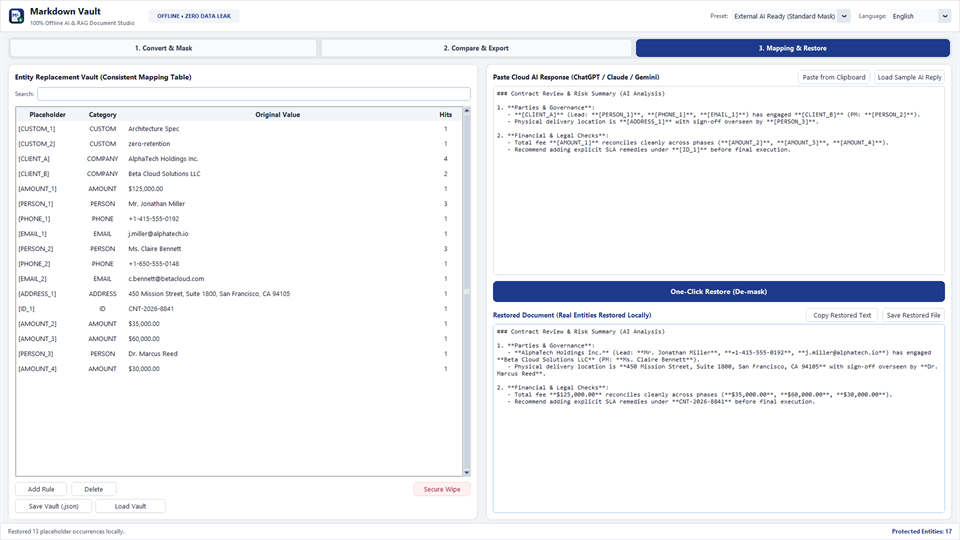
- One-Click AI Response Restoration: Paste any AI response containing placeholders and restore all original names, companies, and numbers locally in a single click. Save and reload mapping vaults per client or project.
- RAG & LLM Chunk Export: Split long documents by headings (# / ## / ###) or character/token limits (2,000 / 4,000 / 8,000), attach YAML frontmatter metadata, copy everything for AI prompts, or export to folders and ZIP archives.
- Multilingual Interface: Fully localized in English, Japanese, Hindi, Spanish, German, French, Portuguese, Korean, and Chinese, with automatic detection of your Windows system language.
How It Works (3-Step Workflow):
1. Convert & Mask:
- Drag and drop files or folders into the drop area, or click "Add Files" / "Add Folder" (or click "Load Sample Demo" to test immediately).
- Select a preset from "Preset:" ("High-Fidelity Convert", "External AI Ready (Standard Mask)", "Strict Anonymization", or "RAG Chunk Export") and customize PII categories, "Always Mask Words (comma / newline separated):", or "Whitelist / Exclude Words (never mask):".
- Click "Run Batch Convert & Mask" to convert and mask locally.
2. Compare & Export:
- Review "Original Markdown (Before Masking)" alongside "Masked AI-Ready Markdown (After Masking)".
- Select any phrase and click "Mask Selected Text" or "Whitelist / Unmask Selection", or right-click to adjust rules interactively.
- Choose "Chunk Split:" and "Add YAML Frontmatter", then click "One-Click Copy for AI Prompt", "Save Markdown", "Export Chunks to Folder", or "Export ZIP Bundle".
3. Mapping & Restore:
- Manage all masked entities in "Entity Replacement Vault (Consistent Mapping Table)" with search, "Add Rule", "Save Vault (.json)", "Load Vault", and "Secure Wipe".
- Paste your AI reply under "Paste Cloud AI Response (ChatGPT / Claude / Gemini)" and click "One-Click Restore (De-mask)" to recover the final document with real names intact, ready for "Copy Restored Text" or "Save Restored File".
Ideal For:
- Business teams, consultants, and legal professionals sharing contracts, specs, or meeting minutes with ChatGPT, Claude, or Gemini safely.
- Developers and knowledge workers building local RAG pipelines, Obsidian vaults, or clean Markdown archives.
Download Markdown Vault today and turn sensitive documents into AI-ready knowledge with complete peace of mind.
A fejlesztőtől
Fejlesztő
- Shuhei123
- Követők: 0
- Platformok: Windows Alkalmazások (8)
- Akciók: 0
- Listák: 0 0
- Pontok: 0
- Rangsorok: 0
- Hozzászólások: 0
- Videók: 0
- RSS: Feliratkozás
Listák 0
-
 Markdown Vault
Pontok 0
-

- +1 Pont

Rangsorok 0
-
- Az értékelésed
Újdonságok
- Verzió: PC
- Utolsó frissítés:
További információk
Hozzászólások 0 ¡
AppAgg-pontszám
Becsült AppAgg-pontszám:
Markdown Vault
Fejlesztő: Shuhei123
A magasabb pontszám általában jobb eredményeket tükröz az AppAgg által figyelt mutatókban.
Alapja: népszerűség · felhasználói értékelések · frissesség · akciók · áruházi adatok · közösségi aktivitás
Naponta újraszámítjuk a friss AppAgg-adatok alapján.
Markdown Vault Rövid URL: Másolva!- Windows Store

