
ブックマーク
このブックマークのタイトルを入力してください。
ブックマークを保存しました
概要
こちらはMarkdown Vault。Shuhei123が贈る「開発者ツール」カテゴリのアプリです。
にリリース。冷蔵庫の牛乳よりも若いんです。
$3.99。AppAggではこれまで一度もセールなし。なかなか手ごわい相手です。
Microsoft StoreはWindowsに組み込まれているので、数クリックでインストールできます。
AppAggスコアは600。「シルバー」なら、なかなかのものです。
年齢区分は「EVERYONE」なので、子どもでも安心です。
9言語に対応していて、日本語もあります。
ここはまだ静まり返っています。評価もコメントもなし。沈黙を破ってみませんか?
この開発者のアプリは、AppAggにほかに7個あります。のぞいてみては?
セールやアップデート、新しいアプリを誰よりも早く知りたい?値下げ通知を設定するか、開発者をフォローするか、RSS フィードを購読しましょう。プッシュ通知は Android と iOS 向けの AppAgg Alerts アプリで届きます。
広告
スクリーンショット 3
他のプラットフォーム 0
価格履歴 0
- 現在の価格: $3.99
- 最小値: $3.99
- 最大値: $3.99
ホームに自分だけのフィード
「新着・アップデート」のプラットフォームを選ぶと、ホームには必要なアプリとゲームだけが表示されます。
説明

Why Choose Markdown Vault?
Unlike cloud-based converters or AI wrappers that upload your files to external servers, Markdown Vault performs every conversion, OCR scan, table reconstruction, and PII redaction completely on your local Windows PC. Pay once and own your privacy workflow forever.
Key Features:
- Multi-Format Faithful Conversion: Batch-convert text and scanned PDFs, Word (.docx), Excel (.xlsx), PowerPoint (.pptx), EPUB (.epub), saved web pages (.html/.htm), emails (.eml/.msg), and images (.png/.jpg) into clean Markdown without AI summarization, rewriting, or hallucination.
- Complex Merged Table Preservation: Accurately parses merged cells in Excel, Word, PDF, and HTML tables so financial breakdowns and specification matrices stay aligned in Markdown.
- Built-In Offline Windows OCR: Extract text from scanned PDFs, embedded Word images, and screenshots locally using Windows native OCR with zero external API calls.
- Smart PII Auto-Detection & Entity Consistency: Automatically detects and masks Person Names, Companies/Clients, Phone Numbers, Email Addresses, Physical Addresses, and Amounts/Numeric IDs. The same entity always maps to the exact same placeholder (such as [CLIENT_A] or [PERSON_1]) across an entire project so ChatGPT, Claude, or Gemini can follow context accurately.
- Side-by-Side Comparison & Manual Control: Inspect original vs. masked Markdown side by side. Right-click any text to cut, copy, paste, manually mask sensitive project names, or whitelist false positives.
- One-Click AI Response Restoration: Paste any AI response containing placeholders and restore all original names, companies, and numbers locally in a single click. Save and reload mapping vaults per client or project.
- RAG & LLM Chunk Export: Split long documents by headings (# / ## / ###) or character/token limits (2,000 / 4,000 / 8,000), attach YAML frontmatter metadata, copy everything for AI prompts, or export to folders and ZIP archives.
- Multilingual Interface: Fully localized in English, Japanese, Hindi, Spanish, German, French, Portuguese, Korean, and Chinese, with automatic detection of your Windows system language.
How It Works (3-Step Workflow):
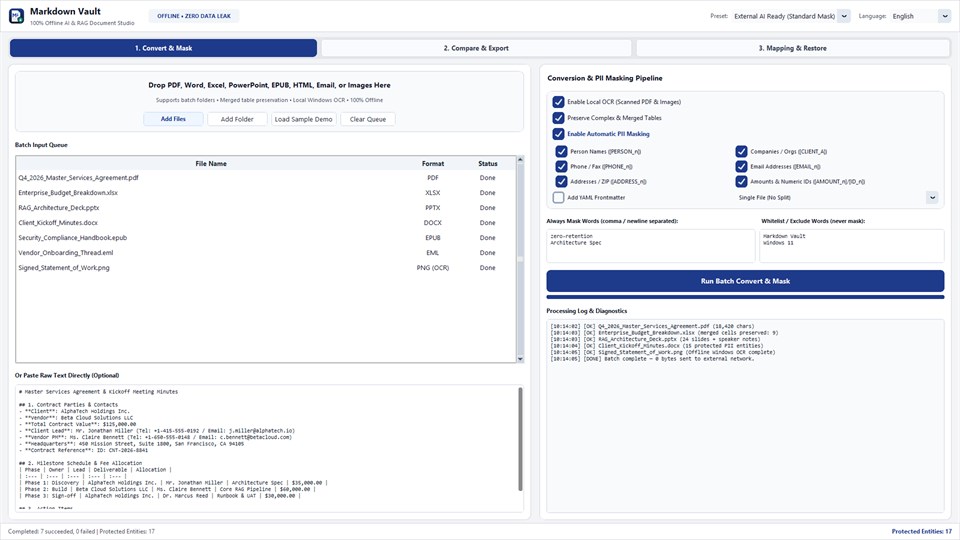
1. Convert & Mask:
- Drag and drop files or folders into the drop area, or click "Add Files" / "Add Folder" (or click "Load Sample Demo" to test immediately).
- Select a preset from "Preset:" ("High-Fidelity Convert", "External AI Ready (Standard Mask)", "Strict Anonymization", or "RAG Chunk Export") and customize PII categories, "Always Mask Words (comma / newline separated):", or "Whitelist / Exclude Words (never mask):".
- Click "Run Batch Convert & Mask" to convert and mask locally.
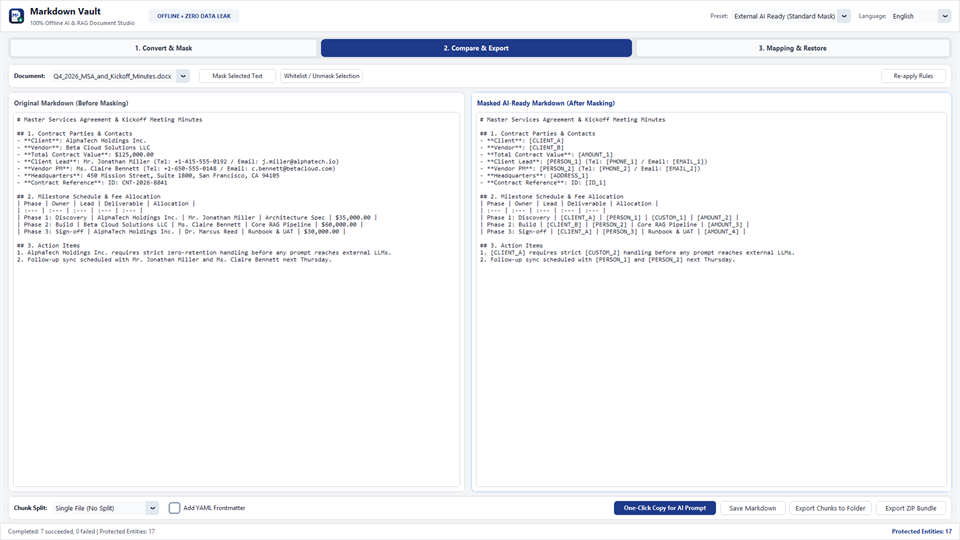
2. Compare & Export:
- Review "Original Markdown (Before Masking)" alongside "Masked AI-Ready Markdown (After Masking)".
- Select any phrase and click "Mask Selected Text" or "Whitelist / Unmask Selection", or right-click to adjust rules interactively.
- Choose "Chunk Split:" and "Add YAML Frontmatter", then click "One-Click Copy for AI Prompt", "Save Markdown", "Export Chunks to Folder", or "Export ZIP Bundle".
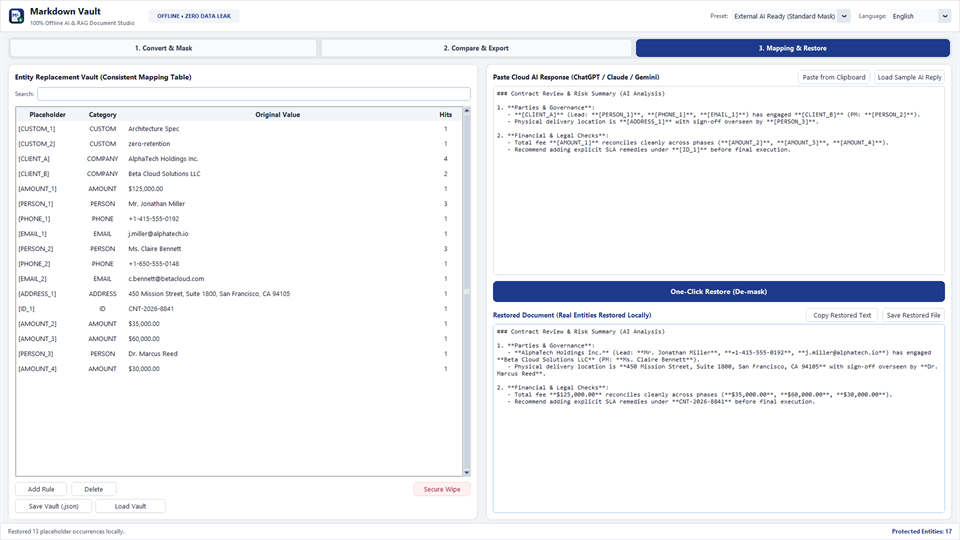
3. Mapping & Restore:
- Manage all masked entities in "Entity Replacement Vault (Consistent Mapping Table)" with search, "Add Rule", "Save Vault (.json)", "Load Vault", and "Secure Wipe".
- Paste your AI reply under "Paste Cloud AI Response (ChatGPT / Claude / Gemini)" and click "One-Click Restore (De-mask)" to recover the final document with real names intact, ready for "Copy Restored Text" or "Save Restored File".
Ideal For:
- Business teams, consultants, and legal professionals sharing contracts, specs, or meeting minutes with ChatGPT, Claude, or Gemini safely.
- Developers and knowledge workers building local RAG pipelines, Obsidian vaults, or clean Markdown archives.
Download Markdown Vault today and turn sensitive documents into AI-ready knowledge with complete peace of mind.
デベロッパーから
デベロッパーの方ですか?
ページの一番上にニュースを投稿すると、フォロワーにメールで届きます。YouTube 動画を追加すると、「動画」の一番上に表示されます。
開発者
- Shuhei123
- フォロワー: 0
- プラットフォーム: Windows アプリ (8)
- セール: 0
- リスト: 0 0
- ポイント: 0
- ランキング: 0
- コメント: 0
- 動画: 0
- RSS: 購読する
リスト 0
-
 Markdown Vault
ポイント 0
-

- +1 ポイント

ランキング 0
-
- あなたの評価
新機能
- バージョン: PC
- 最終更新:
情報
コメント 0 ¡
最初のコメントを書きましょう
AppAggスコア
600
AppAgg推定スコア:
Markdown Vault
開発者: Shuhei123
600 シルバー
スコアが高いほど、AppAgg上の各指標が良好な傾向にあります。
基準: 人気 · ユーザー評価 · 新しさ · セール · ストアデータ · コミュニティ活動
最新のAppAggデータに基づいて毎日再計算されます。
ウェブサイト用バッジ:  コピーしました!
Markdown Vault 短縮 URL: コピーしました!- Windows Store

