
북마크
이 북마크의 제목을 입력하세요.
북마크가 저장되었습니다
요약
소개합니다. Shuhei123에서 만든 ‘개발자 도구’ 카테고리 앱, Markdown Vault.
에 나왔으니, 냉장고 속 우유보다 어려요.
$3.99, 그리고 AppAgg에서 지금까지 할인이 단 한 번도 없었어요. 만만치 않은 상대네요.
Microsoft Store는 Windows에 기본으로 들어 있어서 클릭 몇 번이면 설치돼요.
AppAgg 점수는 600. 실버 등급, 이 정도면 꽤 괜찮아요.
연령 등급은 ‘EVERYONE’, 아이들에게도 괜찮아요.
9개 언어를 지원하고, 한국어도 있어요.
아직 여기는 조용해요. 평점도, 댓글도 없어요. 침묵을 깨 주세요.
이 개발자의 앱이 AppAgg에 7개 더 있어요. 한번 둘러보세요.
할인, 업데이트, 새 앱 소식을 가장 먼저 받고 싶나요? 가격 알림을 설정하거나 개발자를 팔로우하거나 RSS 피드를 구독하세요. 푸시 알림은 Android와 iOS용 AppAgg Alerts 앱으로 받을 수 있어요.
광고
스크린샷 3
다른 플랫폼 0
가격 기록 0
- 현재 가격: $3.99
- 최소: $3.99
- 최대: $3.99
홈 화면의 나만의 피드
“신규 및 업데이트” 피드의 플랫폼을 선택하면 홈 화면에 필요한 앱과 게임만 표시됩니다.
설명

Why Choose Markdown Vault?
Unlike cloud-based converters or AI wrappers that upload your files to external servers, Markdown Vault performs every conversion, OCR scan, table reconstruction, and PII redaction completely on your local Windows PC. Pay once and own your privacy workflow forever.
Key Features:
- Multi-Format Faithful Conversion: Batch-convert text and scanned PDFs, Word (.docx), Excel (.xlsx), PowerPoint (.pptx), EPUB (.epub), saved web pages (.html/.htm), emails (.eml/.msg), and images (.png/.jpg) into clean Markdown without AI summarization, rewriting, or hallucination.
- Complex Merged Table Preservation: Accurately parses merged cells in Excel, Word, PDF, and HTML tables so financial breakdowns and specification matrices stay aligned in Markdown.
- Built-In Offline Windows OCR: Extract text from scanned PDFs, embedded Word images, and screenshots locally using Windows native OCR with zero external API calls.
- Smart PII Auto-Detection & Entity Consistency: Automatically detects and masks Person Names, Companies/Clients, Phone Numbers, Email Addresses, Physical Addresses, and Amounts/Numeric IDs. The same entity always maps to the exact same placeholder (such as [CLIENT_A] or [PERSON_1]) across an entire project so ChatGPT, Claude, or Gemini can follow context accurately.
- Side-by-Side Comparison & Manual Control: Inspect original vs. masked Markdown side by side. Right-click any text to cut, copy, paste, manually mask sensitive project names, or whitelist false positives.
- One-Click AI Response Restoration: Paste any AI response containing placeholders and restore all original names, companies, and numbers locally in a single click. Save and reload mapping vaults per client or project.
- RAG & LLM Chunk Export: Split long documents by headings (# / ## / ###) or character/token limits (2,000 / 4,000 / 8,000), attach YAML frontmatter metadata, copy everything for AI prompts, or export to folders and ZIP archives.
- Multilingual Interface: Fully localized in English, Japanese, Hindi, Spanish, German, French, Portuguese, Korean, and Chinese, with automatic detection of your Windows system language.
How It Works (3-Step Workflow):
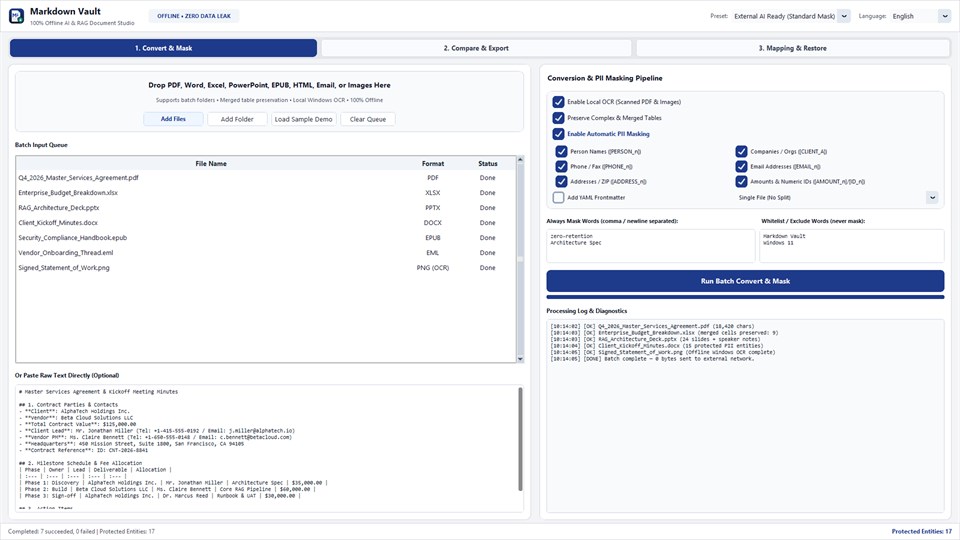
1. Convert & Mask:
- Drag and drop files or folders into the drop area, or click "Add Files" / "Add Folder" (or click "Load Sample Demo" to test immediately).
- Select a preset from "Preset:" ("High-Fidelity Convert", "External AI Ready (Standard Mask)", "Strict Anonymization", or "RAG Chunk Export") and customize PII categories, "Always Mask Words (comma / newline separated):", or "Whitelist / Exclude Words (never mask):".
- Click "Run Batch Convert & Mask" to convert and mask locally.
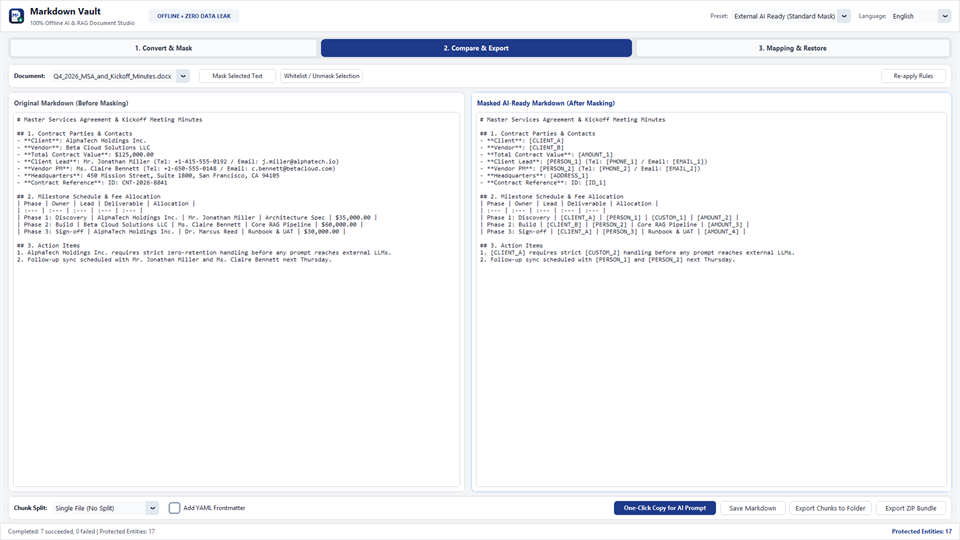
2. Compare & Export:
- Review "Original Markdown (Before Masking)" alongside "Masked AI-Ready Markdown (After Masking)".
- Select any phrase and click "Mask Selected Text" or "Whitelist / Unmask Selection", or right-click to adjust rules interactively.
- Choose "Chunk Split:" and "Add YAML Frontmatter", then click "One-Click Copy for AI Prompt", "Save Markdown", "Export Chunks to Folder", or "Export ZIP Bundle".
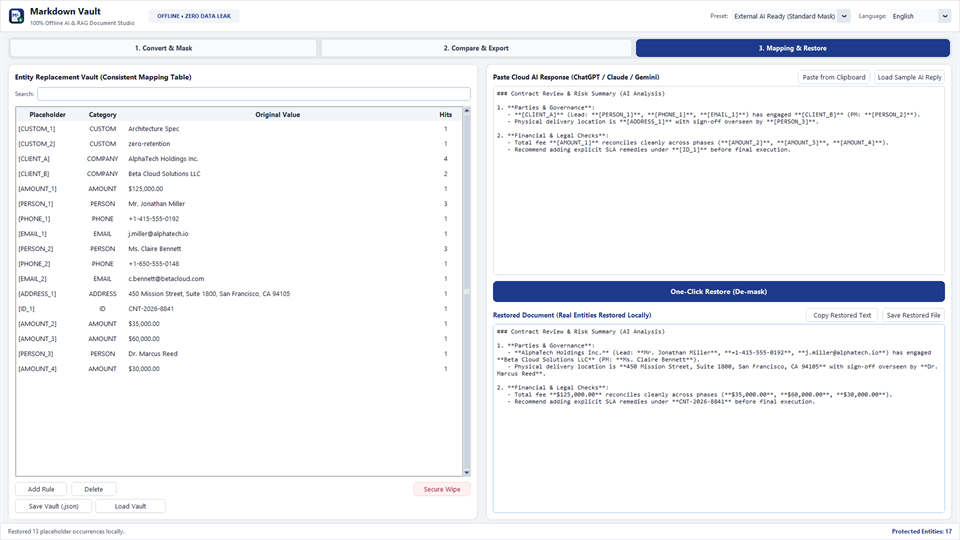
3. Mapping & Restore:
- Manage all masked entities in "Entity Replacement Vault (Consistent Mapping Table)" with search, "Add Rule", "Save Vault (.json)", "Load Vault", and "Secure Wipe".
- Paste your AI reply under "Paste Cloud AI Response (ChatGPT / Claude / Gemini)" and click "One-Click Restore (De-mask)" to recover the final document with real names intact, ready for "Copy Restored Text" or "Save Restored File".
Ideal For:
- Business teams, consultants, and legal professionals sharing contracts, specs, or meeting minutes with ChatGPT, Claude, or Gemini safely.
- Developers and knowledge workers building local RAG pipelines, Obsidian vaults, or clean Markdown archives.
Download Markdown Vault today and turn sensitive documents into AI-ready knowledge with complete peace of mind.
개발자 소식
개발자이신가요?
페이지 맨 위에 소식을 올리면 팔로워에게 이메일로 전달됩니다. YouTube 동영상을 추가하면 “동영상” 블록 맨 앞에 표시됩니다.
목록 0
-
 Markdown Vault
포인트 0
-

- +1 포인트

순위 0
-
- 내 평점
새로운 기능
- 버전: PC
- 마지막 업데이트:
추가 정보
댓글 0 ¡
가장 먼저 댓글을 남겨주세요
AppAgg 점수
600
AppAgg 예상 점수:
Markdown Vault
개발자: Shuhei123
600 실버
점수가 높을수록 대체로 AppAgg의 여러 지표에서 좋은 결과를 보인다는 뜻입니다.
기준: 인기 · 사용자 평점 · 최신성 · 할인 · 스토어 데이터 · 커뮤니티 활동
최신 AppAgg 데이터를 바탕으로 매일 다시 계산됩니다.
웹사이트용 배지:  복사됨!
Markdown Vault 단축 URL: 복사됨!- Windows Store


