
Dấu trang
| Nhà phát triển: | Shuhei123 (8) | ||
| Giá: | $3.99 Mới | ||
| Điểm tổng hợp: | 600 Bạc | ||
| Bảng xếp hạng: | 0 | ||
| Bình luận: | 0 Đăng bình luận | ||
| Danh sách: | 0 0 | ||
| Điểm: | 0 | ||
| +1 Điểm | |||
Tóm tắt
Làm quen với Markdown Vault, ứng dụng thuộc danh mục Công cụ cho nhà phát triển đến từ Shuhei123.
Ra mắt , nên còn trẻ hơn cả hộp sữa trong tủ lạnh nhà bạn.
$3.99, và chưa từng giảm giá lần nào trên AppAgg. Đúng là khó nhằn.
Microsoft Store có sẵn trong Windows, nên cài chỉ mất vài cú nhấp.
Điểm tổng hợp AppAgg là 600. Hạng Bạc, vậy là không tệ chút nào.
Xếp hạng độ tuổi “EVERYONE”, nên trẻ em cũng dùng được.
Biết 9 thứ tiếng, nhưng vẫn chưa có tiếng Việt.
Ở đây vẫn im phăng phắc, chưa có đánh giá, chưa có bình luận. Hãy phá vỡ sự im lặng.
Nhà phát triển còn 7 ứng dụng khác trên AppAgg. Đáng xem đấy.
Muốn biết sớm nhất về giảm giá, cập nhật và ứng dụng mới? Hãy đặt thông báo giá, theo dõi nhà phát triển hoặc đăng ký nguồn RSS. Thông báo đẩy được gửi qua ứng dụng AppAgg Alerts cho Android và iOS.
Ảnh chụp màn hình 3
Nền tảng khác 0
Lịch sử giá 0
- Giá hiện tại: $3.99
- Tối thiểu: $3.99
- Tối đa: $3.99
Bảng tin riêng của bạn trên trang chủ
Mô tả

Why Choose Markdown Vault?
Unlike cloud-based converters or AI wrappers that upload your files to external servers, Markdown Vault performs every conversion, OCR scan, table reconstruction, and PII redaction completely on your local Windows PC. Pay once and own your privacy workflow forever.
Key Features:
- Multi-Format Faithful Conversion: Batch-convert text and scanned PDFs, Word (.docx), Excel (.xlsx), PowerPoint (.pptx), EPUB (.epub), saved web pages (.html/.htm), emails (.eml/.msg), and images (.png/.jpg) into clean Markdown without AI summarization, rewriting, or hallucination.
- Complex Merged Table Preservation: Accurately parses merged cells in Excel, Word, PDF, and HTML tables so financial breakdowns and specification matrices stay aligned in Markdown.
- Built-In Offline Windows OCR: Extract text from scanned PDFs, embedded Word images, and screenshots locally using Windows native OCR with zero external API calls.
- Smart PII Auto-Detection & Entity Consistency: Automatically detects and masks Person Names, Companies/Clients, Phone Numbers, Email Addresses, Physical Addresses, and Amounts/Numeric IDs. The same entity always maps to the exact same placeholder (such as [CLIENT_A] or [PERSON_1]) across an entire project so ChatGPT, Claude, or Gemini can follow context accurately.
- Side-by-Side Comparison & Manual Control: Inspect original vs. masked Markdown side by side. Right-click any text to cut, copy, paste, manually mask sensitive project names, or whitelist false positives.
- One-Click AI Response Restoration: Paste any AI response containing placeholders and restore all original names, companies, and numbers locally in a single click. Save and reload mapping vaults per client or project.
- RAG & LLM Chunk Export: Split long documents by headings (# / ## / ###) or character/token limits (2,000 / 4,000 / 8,000), attach YAML frontmatter metadata, copy everything for AI prompts, or export to folders and ZIP archives.
- Multilingual Interface: Fully localized in English, Japanese, Hindi, Spanish, German, French, Portuguese, Korean, and Chinese, with automatic detection of your Windows system language.
How It Works (3-Step Workflow):
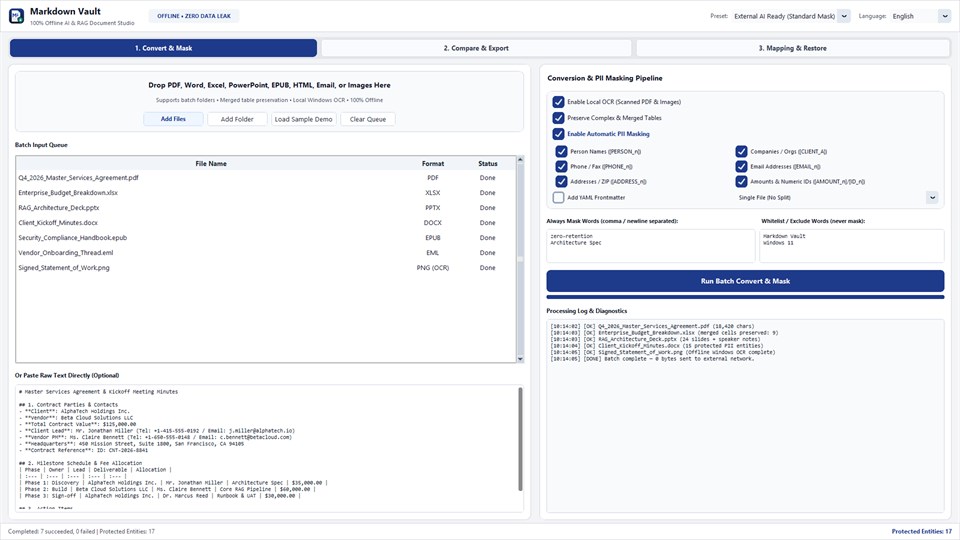
1. Convert & Mask:
- Drag and drop files or folders into the drop area, or click "Add Files" / "Add Folder" (or click "Load Sample Demo" to test immediately).
- Select a preset from "Preset:" ("High-Fidelity Convert", "External AI Ready (Standard Mask)", "Strict Anonymization", or "RAG Chunk Export") and customize PII categories, "Always Mask Words (comma / newline separated):", or "Whitelist / Exclude Words (never mask):".
- Click "Run Batch Convert & Mask" to convert and mask locally.
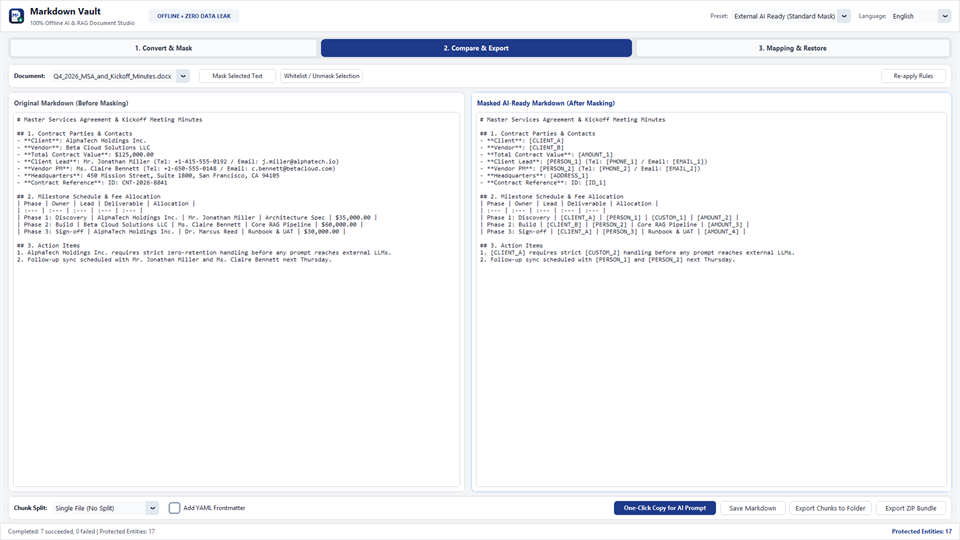
2. Compare & Export:
- Review "Original Markdown (Before Masking)" alongside "Masked AI-Ready Markdown (After Masking)".
- Select any phrase and click "Mask Selected Text" or "Whitelist / Unmask Selection", or right-click to adjust rules interactively.
- Choose "Chunk Split:" and "Add YAML Frontmatter", then click "One-Click Copy for AI Prompt", "Save Markdown", "Export Chunks to Folder", or "Export ZIP Bundle".
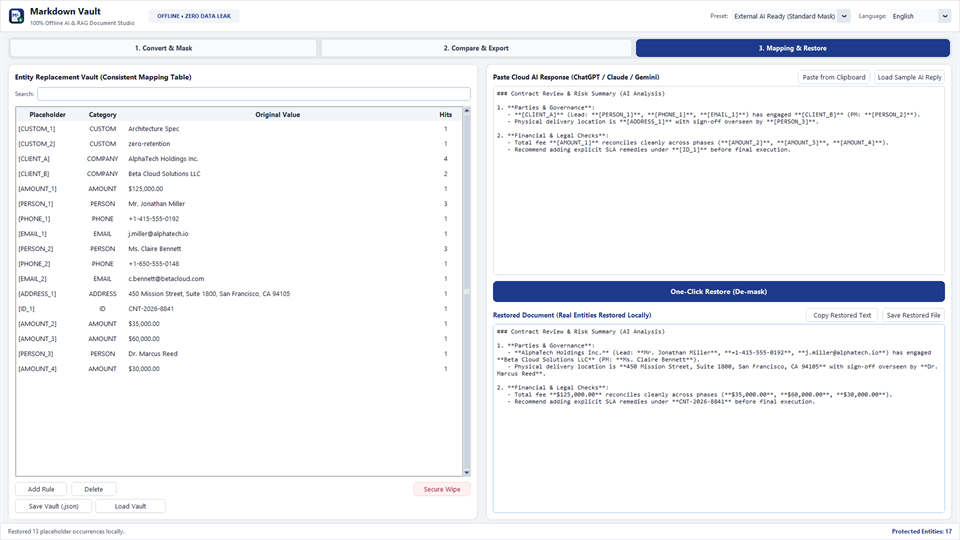
3. Mapping & Restore:
- Manage all masked entities in "Entity Replacement Vault (Consistent Mapping Table)" with search, "Add Rule", "Save Vault (.json)", "Load Vault", and "Secure Wipe".
- Paste your AI reply under "Paste Cloud AI Response (ChatGPT / Claude / Gemini)" and click "One-Click Restore (De-mask)" to recover the final document with real names intact, ready for "Copy Restored Text" or "Save Restored File".
Ideal For:
- Business teams, consultants, and legal professionals sharing contracts, specs, or meeting minutes with ChatGPT, Claude, or Gemini safely.
- Developers and knowledge workers building local RAG pipelines, Obsidian vaults, or clean Markdown archives.
Download Markdown Vault today and turn sensitive documents into AI-ready knowledge with complete peace of mind.
Từ nhà phát triển
Nhà phát triển
- Shuhei123
- Người theo dõi: 0
- Nền tảng: Windows Ứng dụng (8)
- Giảm giá: 0
- Danh sách: 0 0
- Điểm: 0
- Bảng xếp hạng: 0
- Bình luận: 0
- Video: 0
- RSS: Đăng ký
Danh sách 0
-
 Markdown Vault
Điểm 0
-

- +1 Điểm

Bảng xếp hạng 0
-
- Điểm bạn chấm
Tính năng mới
- Phiên bản: PC
- Cập nhật lần cuối:
Thông tin bổ sung
- Ngày phát hành:
- Danh mục:
Ứng dụng cho Windows›Công cụ cho nhà phát triển - HĐH:
PC - Kích thước:
133 Mb - Ngôn ngữ được hỗ trợ:
Tiếng Anh,Tiếng Bồ Đào Nha,Tiếng Hindi,Tiếng Hàn,Tiếng Nhật,Tiếng Pháp,Tiếng Trung,Tiếng Tây Ban Nha,Tiếng Đức - Xếp hạng nội dung:
EVERYONE - Windows Store Điểm đánh giá: ¡
0
Bình luận 0 ¡
Điểm tổng hợp AppAgg
Điểm tổng hợp AppAgg ước tính cho
Markdown Vault
Nhà phát triển: Shuhei123
Điểm cao hơn thường cho thấy các chỉ số trên AppAgg tốt hơn.
Dựa trên: độ phổ biến · đánh giá của người dùng · độ mới · ưu đãi · dữ liệu cửa hàng · hoạt động cộng đồng
Được tính lại hằng ngày từ dữ liệu AppAgg mới nhất.
Markdown Vault URL ngắn: Đã sao chép!- Windows Store

