
Marcadores
| Desarrollador: | Villi Development (3) | ||
| Precio: | $19.99 Nuevo | ||
| Puntuación: | 1100 Plata | ||
| Clasificaciones: | 0 | ||
| Comentarios: | 0 Publicar comentario | ||
| Listas: | 0 0 | ||
| Puntos: | 0 | ||
| +1 Punto | |||
Resumen
Master Toolkit es una app de Villi Development de la categoría «Herramientas de desarrollo».
Recién estrenada, salió . Todavía huele a código nuevo.
$19.99. Nunca ha estado de oferta en AppAgg, ni una sola vez. Crea una alerta de precio. Nosotros no lo olvidaremos, aunque tú sí.
La Microsoft Store viene integrada en Windows, así que se instala en un par de clics.
Su Puntuación de AppAgg es 1100. Nivel Plata, y eso no está nada mal.
Solo 8 megabytes. Cabe hasta en un disco lleno a reventar.
Clasificación «EVERYONE»: sirve también para los más pequeños.
Habla un solo idioma, y no es el español.
¿Ya la has usado? Tu reseña sería la primera aquí.
El desarrollador tiene 2 apps más en AppAgg. Vale la pena echar un vistazo.
¿Quieres enterarte antes que nadie de ofertas, actualizaciones y apps nuevas? Crea una alerta de precio, sigue al desarrollador o suscríbete al canal RSS. Las notificaciones push llegan con la app AppAgg Alerts para Android y iOS.
Otras plataformas 0
 | Master ToolkitWindows Store1K PlataWindows | $19.99 |
Por ahora, solo en esta tienda.
Historial de precios 0
- Precio actual: $19.99
- Mínimo: $19.99
- Máximo: $19.99
Tu propio feed en la página de inicio
Capturas de pantalla 8
Descripción
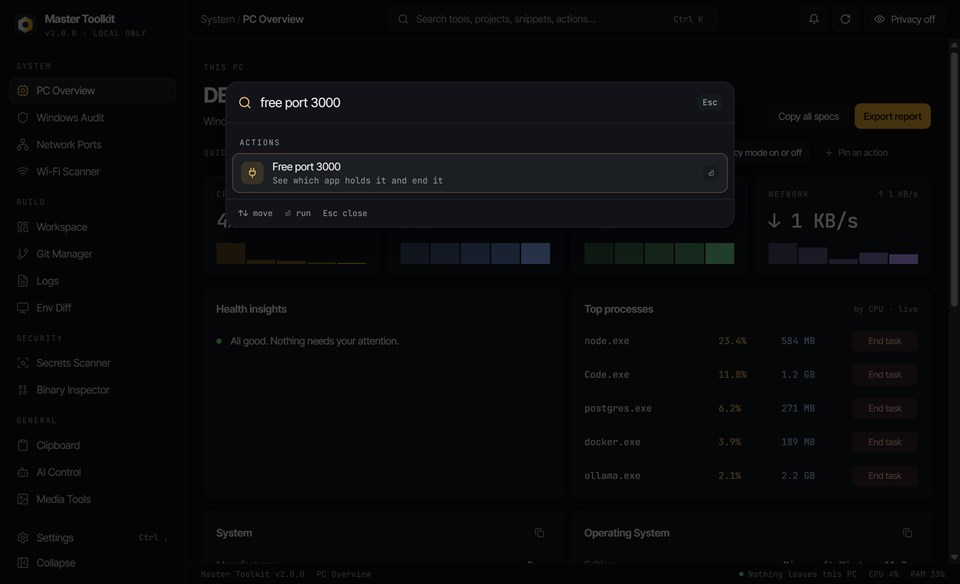
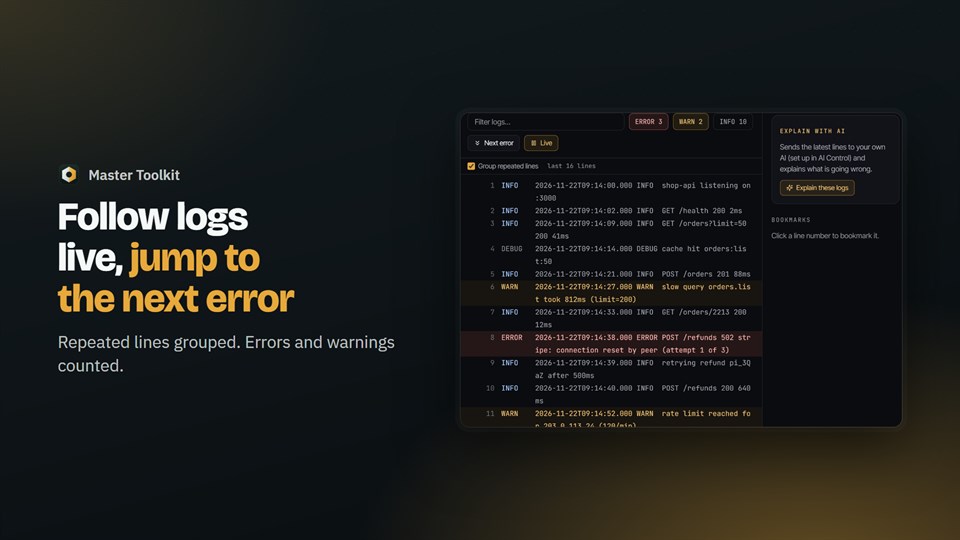
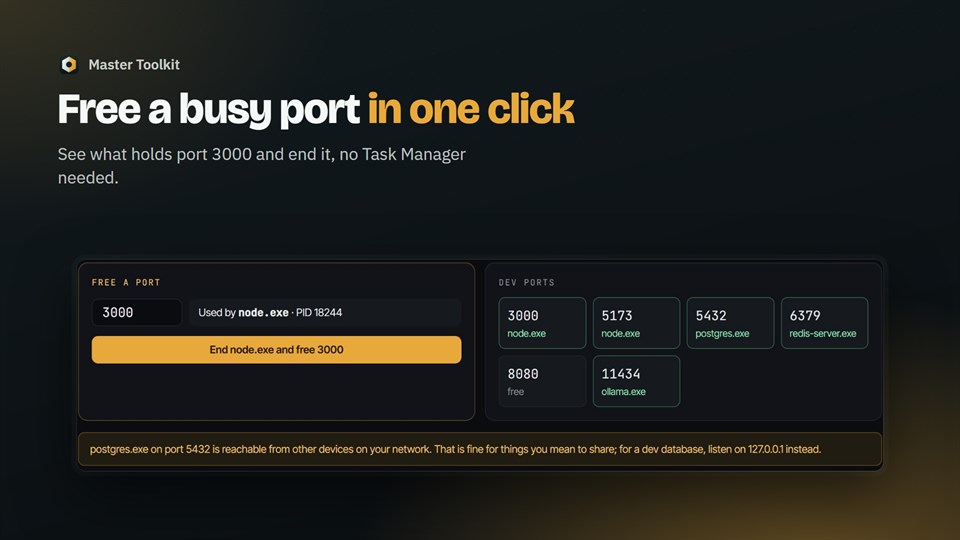
Use it to find what is holding port 3000 and free it, or to catch a key in a commit before you push. It can follow a log file and jump to the next error, and put your PATH back the way it was last week. Press Ctrl+K to open any tool or run an action from the keyboard.
What is inside:
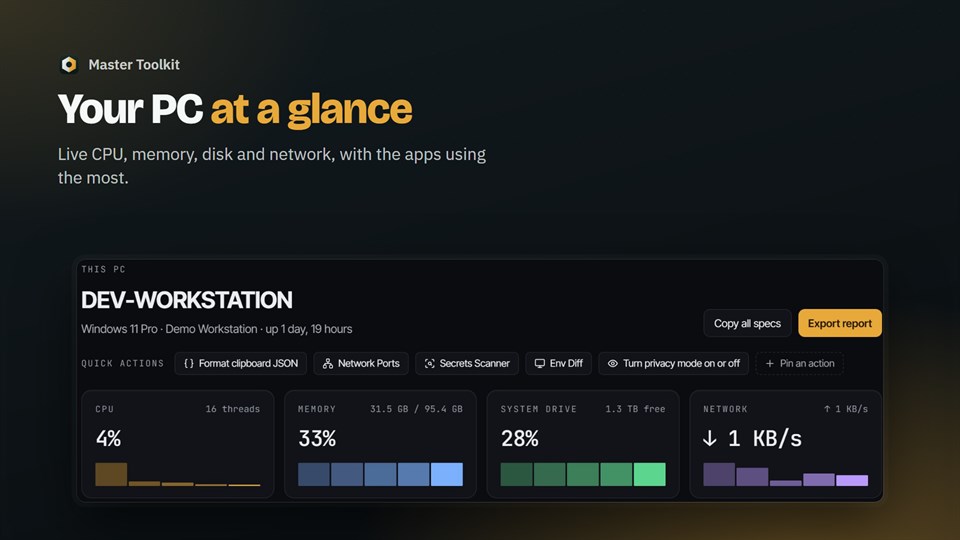
- PC Overview: live CPU, memory, disk and network, the apps using the most, and plain tips when something needs a look.
- Workspace: add a project folder and Master Toolkit detects the stack, runs its scripts with live output and checks its packages.
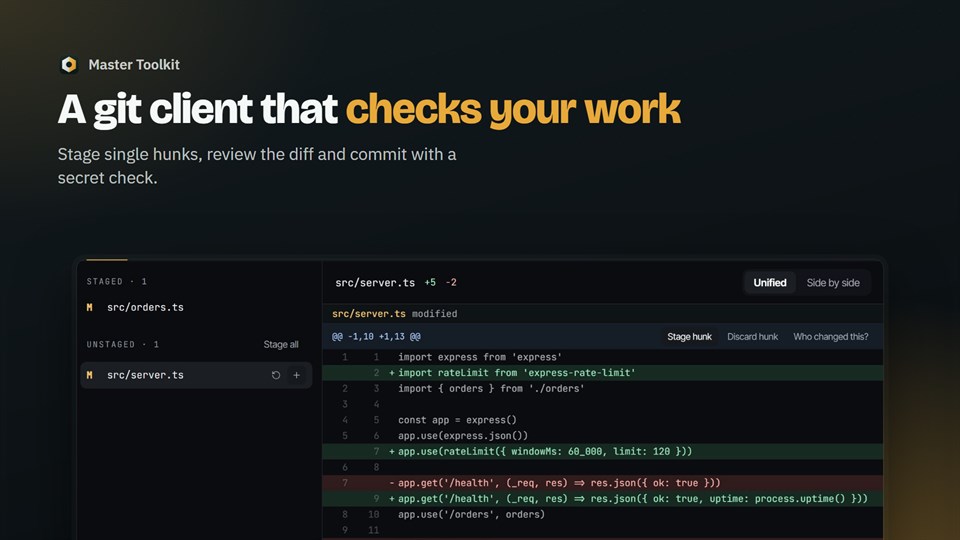
- Git Manager: stage single hunks, read blame and side-by-side diffs, undo the last commit and push. Every commit is checked for keys first.
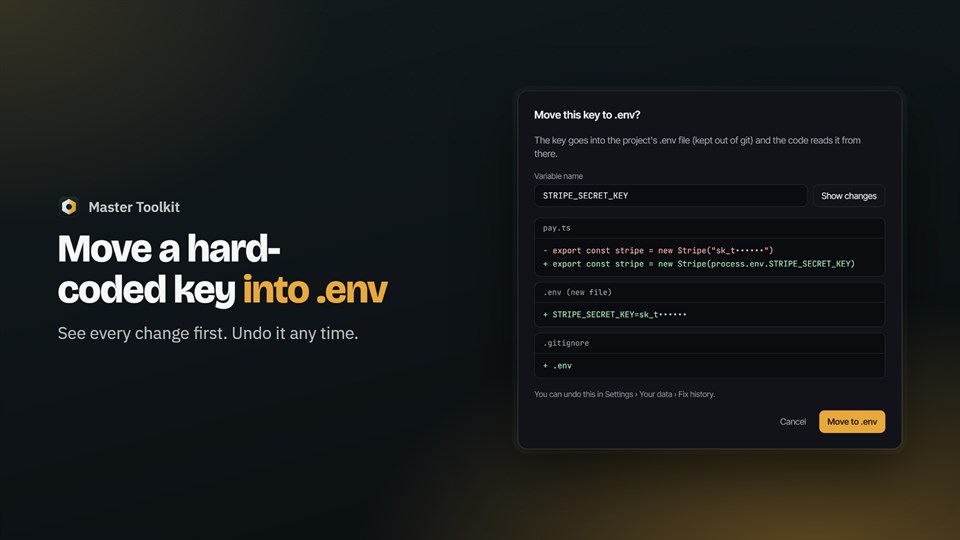
- Secrets Scanner: scan a project and its git history for keys and passwords. Move a hard-coded key into .env with a preview of every change, or block commits that contain secrets.
- Logs: follow files live, filter by level, jump to the next error, bookmark lines and read several files on one timeline.
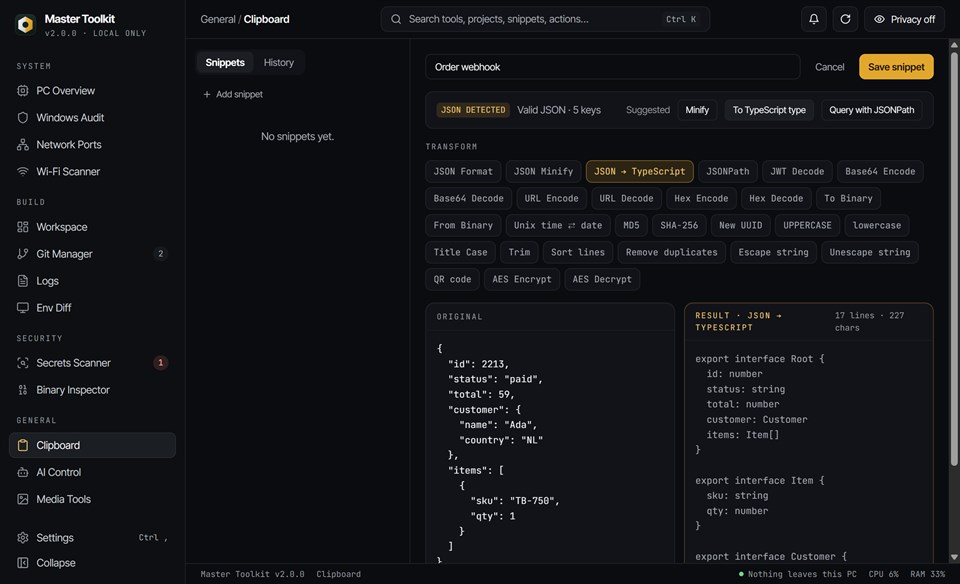
- Clipboard: history and snippets with JSON, JWT, Base64, hashing and QR tools. Quick paste (Ctrl+Shift+Alt+V) works in any app, skips password managers and clears copied keys after 2 minutes.
- Network Ports: see which app holds a port and free it in one click, with a warning when a dev database is open to your network.
- Windows Audit: a score you can track over time, with one-click fixes for simple problems.
- Env Diff: snapshots of PATH, variables and runtimes, and restore PATH from an earlier snapshot.
- AI Control: use a local model with Ollama or your own OpenAI or Anthropic key, with token estimates before you run.
- Binary Inspector: look inside any .exe or .dll and see the hash, architecture, sections, imports, exports and strings. Nothing is uploaded.
- Wi-Fi Scanner: nearby networks with channel crowding, a connection test, and share a network as a QR code.
- Media Tools: batch convert images, build .ico files, read or edit EXIF data and remove location data from photos.
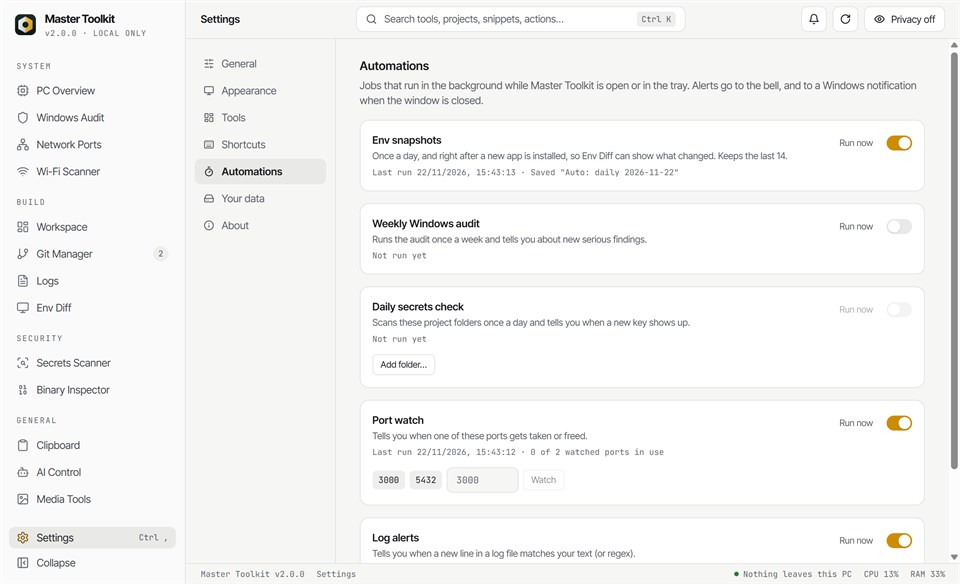
Automations run checks for you: daily env snapshots, port watch, log alerts, a weekly Windows audit and a daily secrets check. Changes Master Toolkit makes to Windows are always shown first and can be undone from Settings.
Your data stays on your PC. There is no account, no analytics and no tracking. Only a few optional features go online: AI with your own key, the outdated packages check and the Wi-Fi connection test. Keys are kept in Windows Credential Manager.
Built for Windows 10 and 11, with light and dark themes that follow Windows, accent colours, a compact mode, custom shortcuts, and a privacy mode that hides your PC name and IP addresses when you share your screen. Back up all your settings and data in one file.
Buy it once. No subscription.
Del desarrollador
Listas 0
-
 Master Toolkit
Puntos 0
-

- +1 Punto

Clasificaciones 0
-
- Tu valoración
Desarrollador 3
- Villi Development
- Seguidores: 0
- Plataformas: Windows Aplicaciones (3)
- Ofertas: 0
- Listas: 0 0
- Puntos: 0
- Clasificaciones: 0
- Comentarios: 0
- Vídeos: 0
- RSS: Suscribirse
Novedades
- Versión: PC
- Última actualización:
- Master Toolkit 2.0 is a free update with a new design and new features in every tool.
- New design: a cleaner sidebar, a status bar, accent colours and a compact mode. It follows the Windows light or dark theme.
- Command palette (Ctrl+K) to jump to any tool or run an action, for example "free port 3000".
- PC Overview shows live CPU, memory, disk and network, the heaviest apps, and plain tips.
- Git Manager can stage single hunks, show blame and side-by-side diffs, undo the last commit, push, and check for keys before you commit.
- Secrets Scanner can scan git history, move a key into .env for you, and stop commits that contain secrets.
- Logs follow files live, with level filters, jump to next error, bookmarks and one timeline for several files.
- Network Ports frees a busy port in one click and warns about ports open to your network.
- Windows Audit gives a score, tracks it over time, and fixes simple problems with one click. Every change can be undone.
- Quick paste (Ctrl+Shift+Alt+V) brings your clipboard history and snippets to any app. Password managers are skipped and copied keys are cleared after 2 minutes.
- Automations: daily env snapshots, port watch, log alerts, a weekly audit and a daily secrets check.
- Back up and restore all your settings and data in one file.
Your data still stays on your PC, and there is still no account or tracking.
Información adicional
- Fecha de lanzamiento:
- Categoría:
Aplicaciones para Windows›Herramientas de desarrollo - Sistemas operativos:
PC - Tamaño:
8 Mb - Idiomas admitidos:
Inglés - Clasificación de contenido:
EVERYONE - Windows Store Valoración: ¡
0 - Sitio web:
 https://villi.dev
Puntuación de AppAgg
Puntuación estimada de AppAgg para
Master Toolkit
Desarrollador: Villi Development
Una puntuación más alta suele reflejar mejores resultados en los indicadores de AppAgg.
Basado en: popularidad · valoraciones de usuarios · actualidad · ofertas · datos de tiendas · actividad de la comunidad
Se recalcula a diario con datos actualizados de AppAgg.
Comentarios 0 ¡
Compartir
Master Toolkit URL corta: Copiado!- Windows Store

