
ブックマーク
このブックマークのタイトルを入力してください。
ブックマークを保存しました
| 開発者: | Villi Development (3) | ||
| 価格: | $19.99 新着 | ||
| スコア: | 1,100 シルバー | ||
| ランキング: | 0 | ||
| コメント: | 0 コメントを投稿する | ||
| リスト: | 0 0 | ||
| ポイント: | 0 | ||
| +1 ポイント | |||
概要
Master Toolkitは、Villi Developmentが手がける「開発者ツール」カテゴリのアプリです。
出たてホヤホヤ、にリリース。まだ新しいコードの香りがします。
$19.99。AppAggでは一度もセールになったことがありません。価格アラートを設定しておけば、あなたが忘れても私たちは忘れません。
Microsoft StoreはWindowsに組み込まれているので、数クリックでインストールできます。
AppAggスコアは1,100。「シルバー」なら、なかなかのものです。
たった8メガバイト。空きの少ないドライブにも収まります。
年齢区分は「EVERYONE」なので、子どもでも安心です。
対応言語はひとつだけ、しかも日本語ではありません。
使ってみましたか?あなたのレビューがここで最初の一件になります。
この開発者のアプリは、AppAggにほかに2個あります。のぞいてみては?
セールやアップデート、新しいアプリを誰よりも早く知りたい?値下げ通知を設定するか、開発者をフォローするか、RSS フィードを購読しましょう。プッシュ通知は Android と iOS 向けの AppAgg Alerts アプリで届きます。
広告
他のプラットフォーム 0
 | Master ToolkitWindows Store1K シルバーWindows | $19.99 |
現在はこのストアでのみ配信中です。
価格履歴 0
- 現在の価格: $19.99
- 最小値: $19.99
- 最大値: $19.99
ホームに自分だけのフィード
「新着・アップデート」のプラットフォームを選ぶと、ホームには必要なアプリとゲームだけが表示されます。
スクリーンショット 8
説明
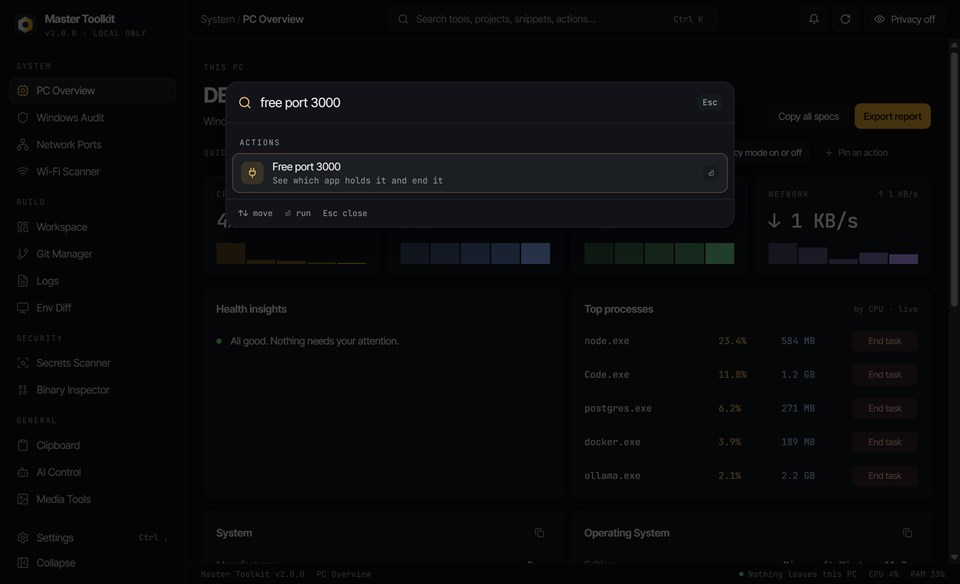
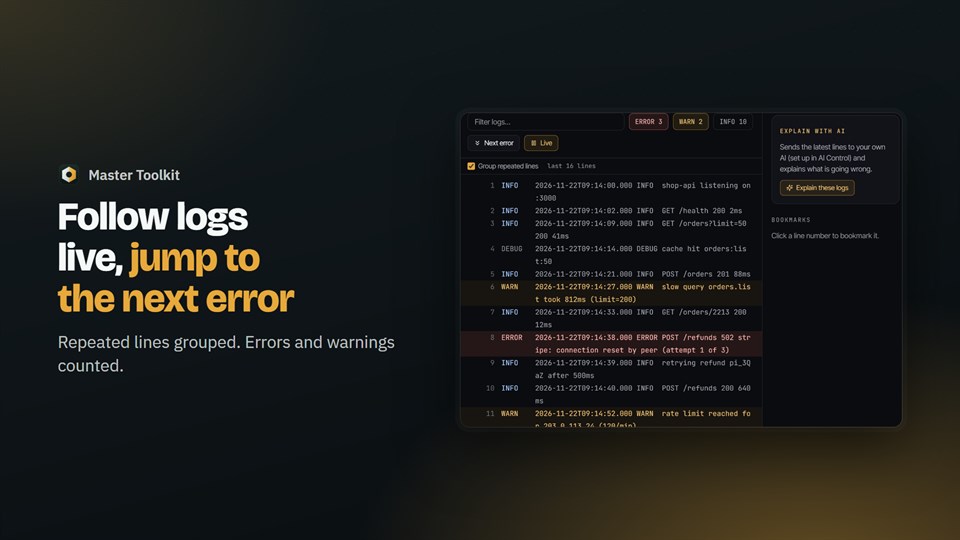
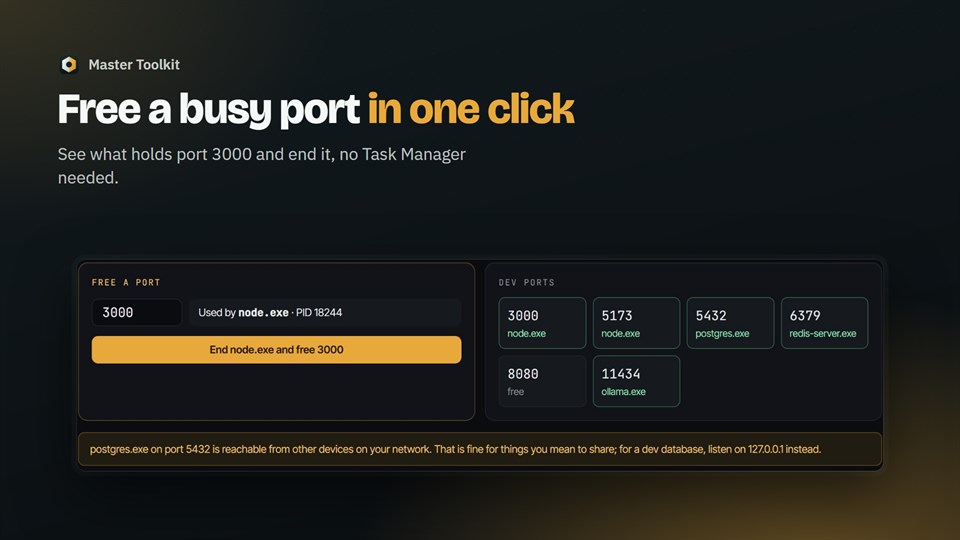
Use it to find what is holding port 3000 and free it, or to catch a key in a commit before you push. It can follow a log file and jump to the next error, and put your PATH back the way it was last week. Press Ctrl+K to open any tool or run an action from the keyboard.
What is inside:
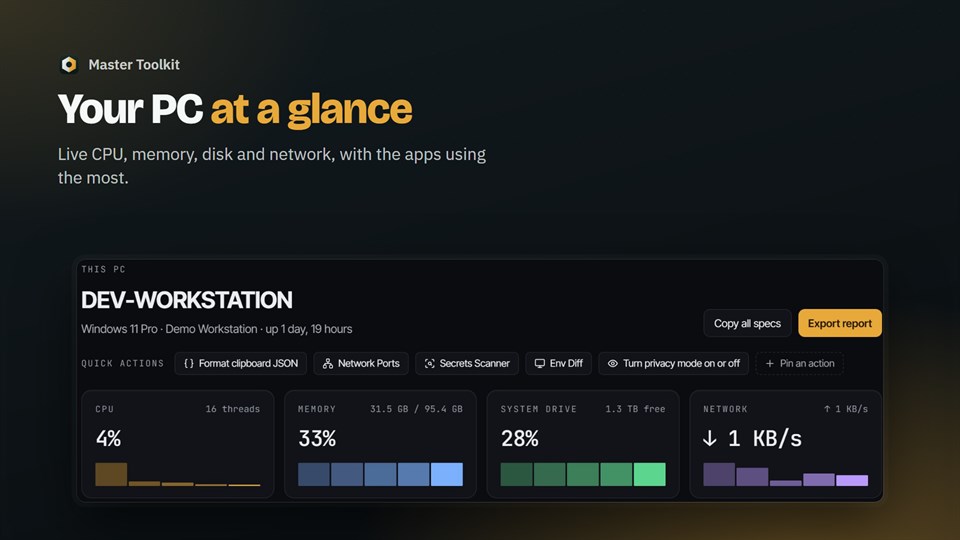
- PC Overview: live CPU, memory, disk and network, the apps using the most, and plain tips when something needs a look.
- Workspace: add a project folder and Master Toolkit detects the stack, runs its scripts with live output and checks its packages.
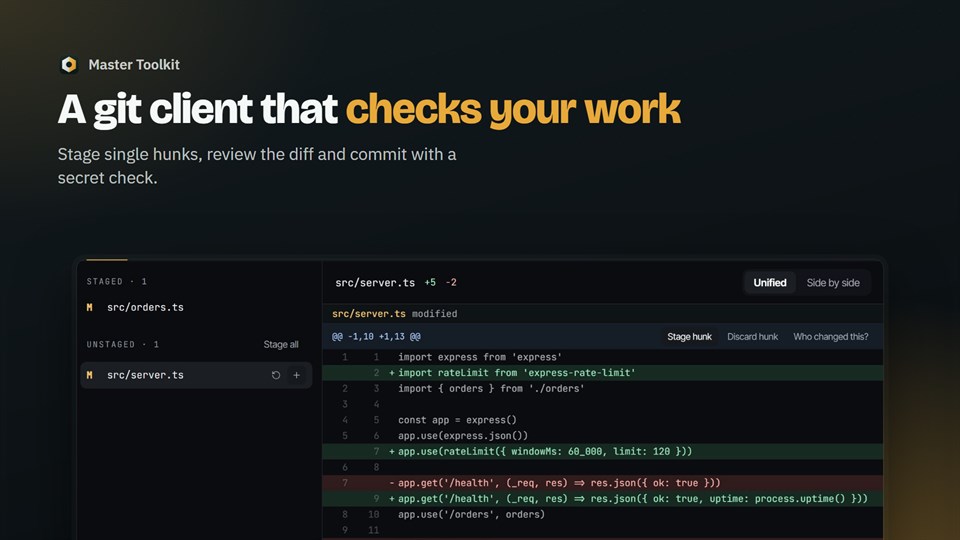
- Git Manager: stage single hunks, read blame and side-by-side diffs, undo the last commit and push. Every commit is checked for keys first.
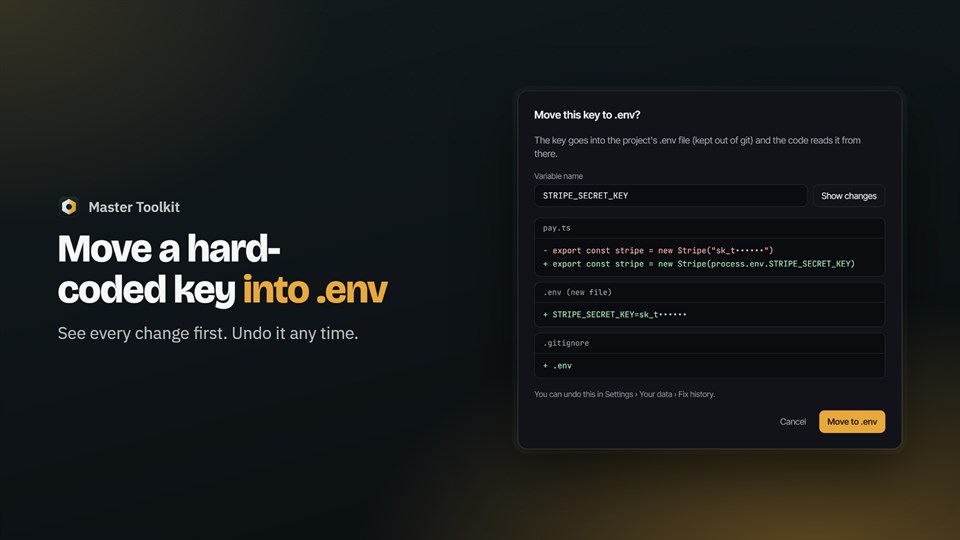
- Secrets Scanner: scan a project and its git history for keys and passwords. Move a hard-coded key into .env with a preview of every change, or block commits that contain secrets.
- Logs: follow files live, filter by level, jump to the next error, bookmark lines and read several files on one timeline.
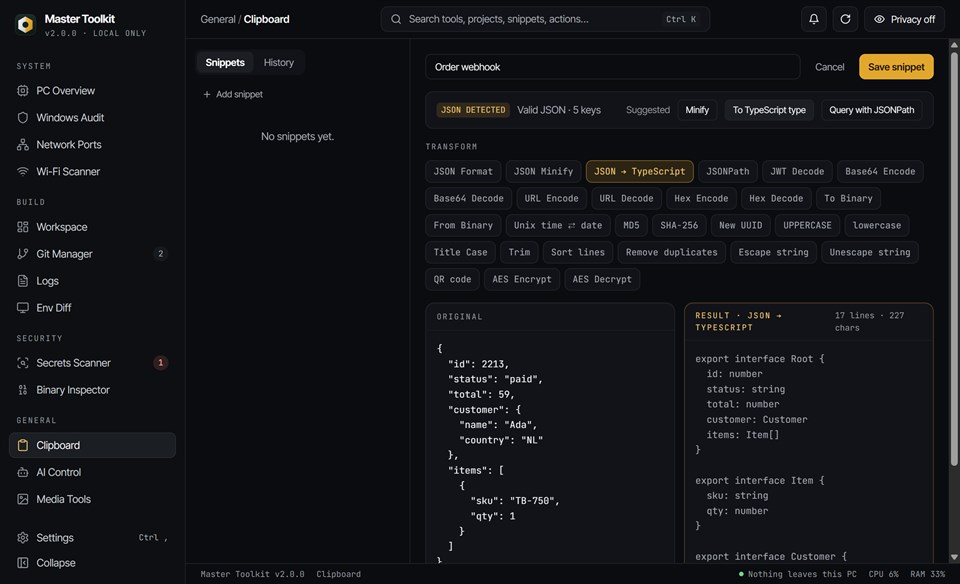
- Clipboard: history and snippets with JSON, JWT, Base64, hashing and QR tools. Quick paste (Ctrl+Shift+Alt+V) works in any app, skips password managers and clears copied keys after 2 minutes.
- Network Ports: see which app holds a port and free it in one click, with a warning when a dev database is open to your network.
- Windows Audit: a score you can track over time, with one-click fixes for simple problems.
- Env Diff: snapshots of PATH, variables and runtimes, and restore PATH from an earlier snapshot.
- AI Control: use a local model with Ollama or your own OpenAI or Anthropic key, with token estimates before you run.
- Binary Inspector: look inside any .exe or .dll and see the hash, architecture, sections, imports, exports and strings. Nothing is uploaded.
- Wi-Fi Scanner: nearby networks with channel crowding, a connection test, and share a network as a QR code.
- Media Tools: batch convert images, build .ico files, read or edit EXIF data and remove location data from photos.
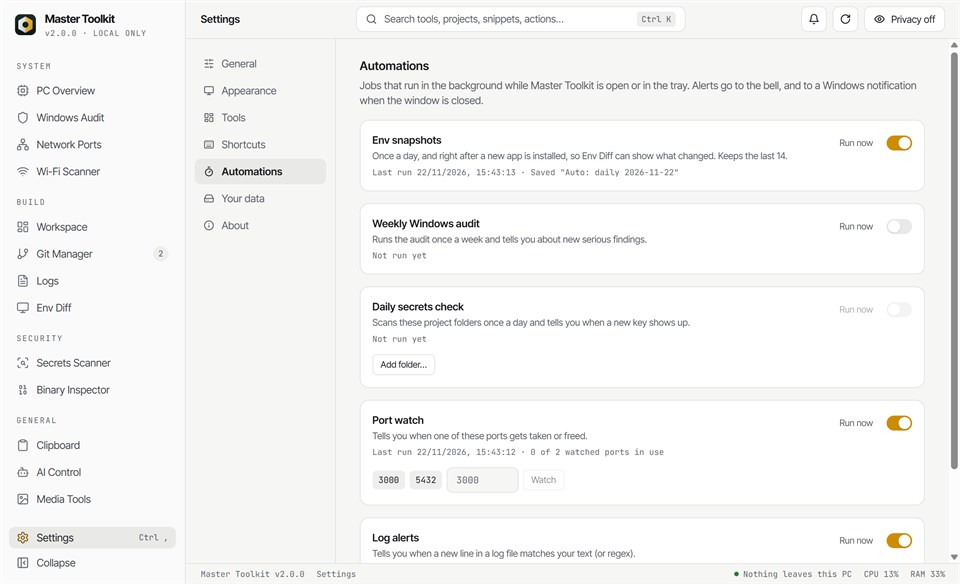
Automations run checks for you: daily env snapshots, port watch, log alerts, a weekly Windows audit and a daily secrets check. Changes Master Toolkit makes to Windows are always shown first and can be undone from Settings.
Your data stays on your PC. There is no account, no analytics and no tracking. Only a few optional features go online: AI with your own key, the outdated packages check and the Wi-Fi connection test. Keys are kept in Windows Credential Manager.
Built for Windows 10 and 11, with light and dark themes that follow Windows, accent colours, a compact mode, custom shortcuts, and a privacy mode that hides your PC name and IP addresses when you share your screen. Back up all your settings and data in one file.
Buy it once. No subscription.
デベロッパーから
デベロッパーの方ですか?
ページの一番上にニュースを投稿すると、フォロワーにメールで届きます。YouTube 動画を追加すると、「動画」の一番上に表示されます。
リスト 0
-
 Master Toolkit
ポイント 0
-

- +1 ポイント

ランキング 0
-
- あなたの評価
開発者 3
- Villi Development
- フォロワー: 0
- プラットフォーム: Windows アプリ (3)
- セール: 0
- リスト: 0 0
- ポイント: 0
- ランキング: 0
- コメント: 0
- 動画: 0
- RSS: 購読する
新機能
- バージョン: PC
- 最終更新:
- Master Toolkit 2.0 is a free update with a new design and new features in every tool.
- New design: a cleaner sidebar, a status bar, accent colours and a compact mode. It follows the Windows light or dark theme.
- Command palette (Ctrl+K) to jump to any tool or run an action, for example "free port 3000".
- PC Overview shows live CPU, memory, disk and network, the heaviest apps, and plain tips.
- Git Manager can stage single hunks, show blame and side-by-side diffs, undo the last commit, push, and check for keys before you commit.
- Secrets Scanner can scan git history, move a key into .env for you, and stop commits that contain secrets.
- Logs follow files live, with level filters, jump to next error, bookmarks and one timeline for several files.
- Network Ports frees a busy port in one click and warns about ports open to your network.
- Windows Audit gives a score, tracks it over time, and fixes simple problems with one click. Every change can be undone.
- Quick paste (Ctrl+Shift+Alt+V) brings your clipboard history and snippets to any app. Password managers are skipped and copied keys are cleared after 2 minutes.
- Automations: daily env snapshots, port watch, log alerts, a weekly audit and a daily secrets check.
- Back up and restore all your settings and data in one file.
Your data still stays on your PC, and there is still no account or tracking.
情報
- リリース日:
- カテゴリ:
Windows向けアプリ›開発者ツール - オペレーティング システム:
PC - サイズ:
8 Mb - サポートされる言語:
英語 - コンテンツのレーティング:
EVERYONE - Windows Store 評価: ¡
0 - ウェブサイト:
 https://villi.dev
AppAggスコア
1,100
AppAgg推定スコア:
Master Toolkit
開発者: Villi Development
1,100 シルバー
スコアが高いほど、AppAgg上の各指標が良好な傾向にあります。
基準: 人気 · ユーザー評価 · 新しさ · セール · ストアデータ · コミュニティ活動
最新のAppAggデータに基づいて毎日再計算されます。
ウェブサイト用バッジ:  コピーしました!
コメント 0 ¡
最初のコメントを書きましょう
シェア
Master Toolkit 短縮 URL: コピーしました!- Windows Store

