
Favoritos
| Desenvolvedor: | Villi Development (3) | ||
| Preço: | $19.99 Novo | ||
| Pontuação: | 1.100 Prata | ||
| Classificações: | 0 | ||
| Comentários: | 0 Postar comentário | ||
| Listas: | 0 0 | ||
| Pontos: | 0 | ||
| +1 Ponto | |||
Resumo
Master Toolkit é um app da categoria “Ferramentas de desenvolvedor”, criado por Villi Development.
Novinho em folha, saiu . Ainda tem aquele cheirinho de código novo.
$19.99. Nunca entrou em promoção no AppAgg, nem uma vez sequer. Crie um alerta de preço. A gente não esquece, mesmo que você esqueça.
A Microsoft Store já vem integrada ao Windows, então instala em dois cliques.
A Pontuação AppAgg é 1.100. Prata, e isso não é nada mal.
Só 8 megabytes, cabe até num disco lotado.
Classificação indicativa “EVERYONE”: serve para crianças também.
Fala só um idioma, e não é português.
Já usou? Sua avaliação seria a primeira aqui.
O desenvolvedor tem mais 2 apps no AppAgg. Vale dar uma olhada.
Quer saber das promoções, atualizações e apps novos antes de todo mundo? Crie um alerta de preço, siga o desenvolvedor ou assine o feed RSS. As notificações push chegam pelo app AppAgg Alerts para Android e iOS.
Outras plataformas 0
 | Master ToolkitWindows Store1K PrataWindows | $19.99 |
Por enquanto, só nesta loja.
Histórico de preços 0
- Preço atual: $19.99
- Mínimo: $19.99
- Máximo: $19.99
Seu próprio feed na página inicial
Capturas de tela 8
Descrição
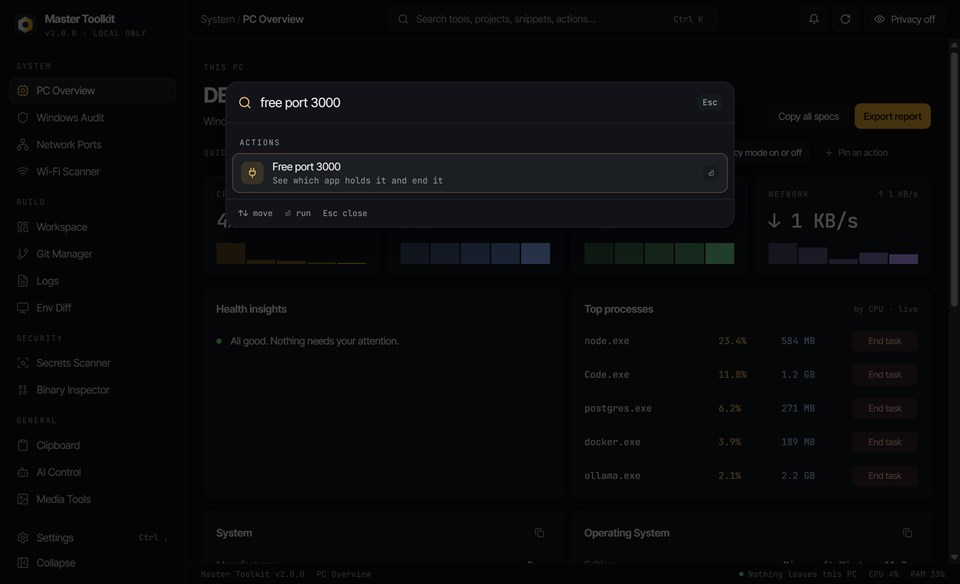
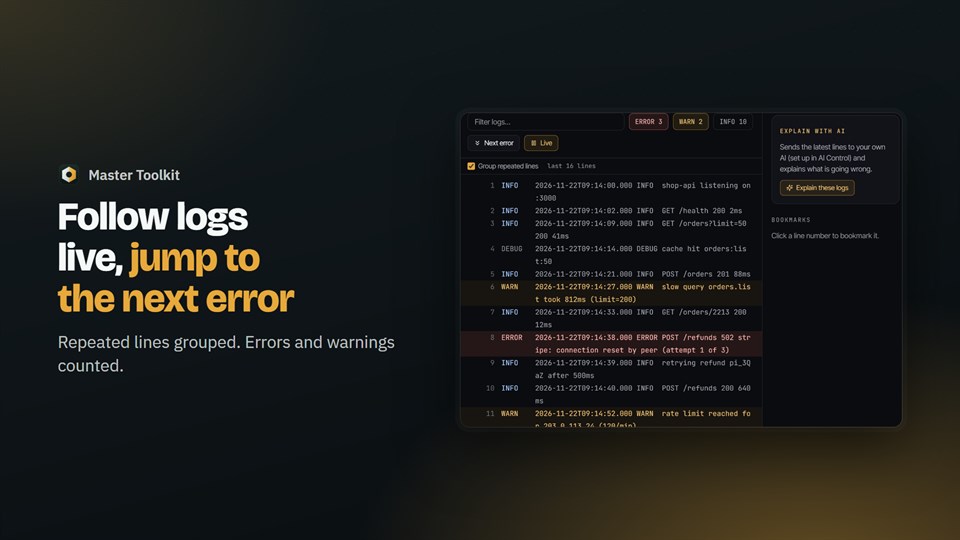
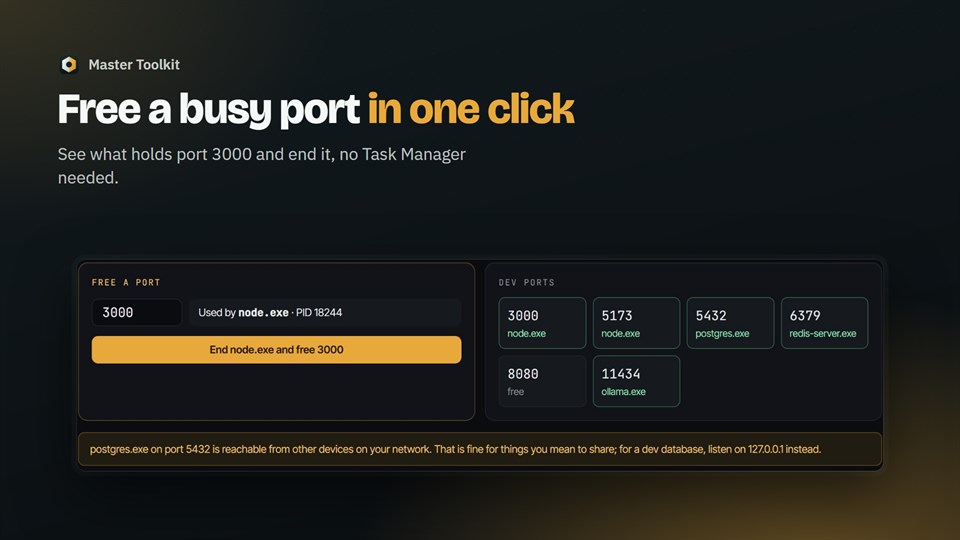
Use it to find what is holding port 3000 and free it, or to catch a key in a commit before you push. It can follow a log file and jump to the next error, and put your PATH back the way it was last week. Press Ctrl+K to open any tool or run an action from the keyboard.
What is inside:
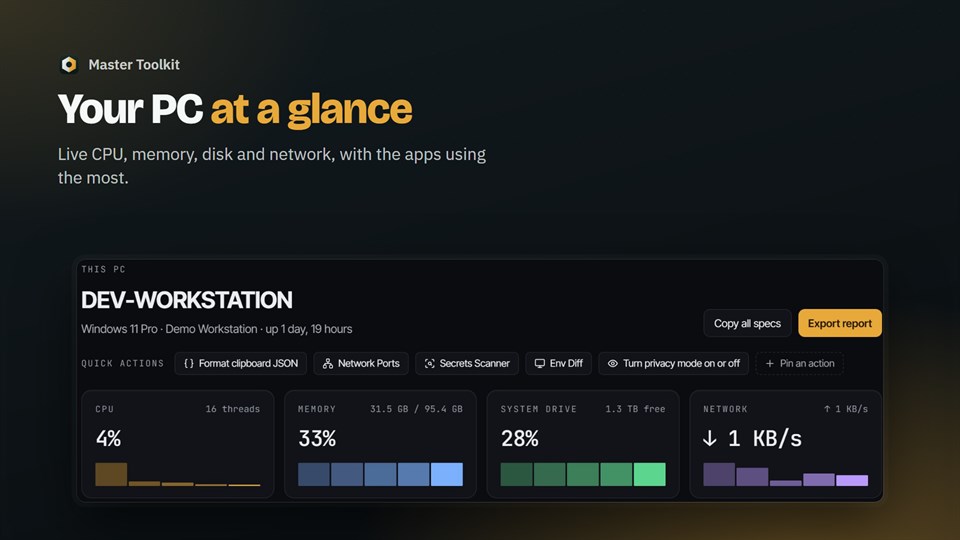
- PC Overview: live CPU, memory, disk and network, the apps using the most, and plain tips when something needs a look.
- Workspace: add a project folder and Master Toolkit detects the stack, runs its scripts with live output and checks its packages.
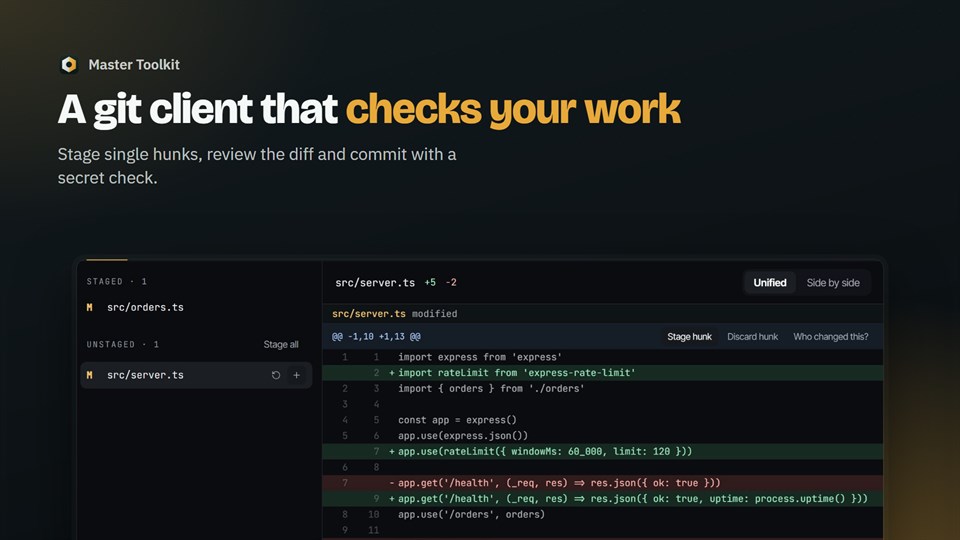
- Git Manager: stage single hunks, read blame and side-by-side diffs, undo the last commit and push. Every commit is checked for keys first.
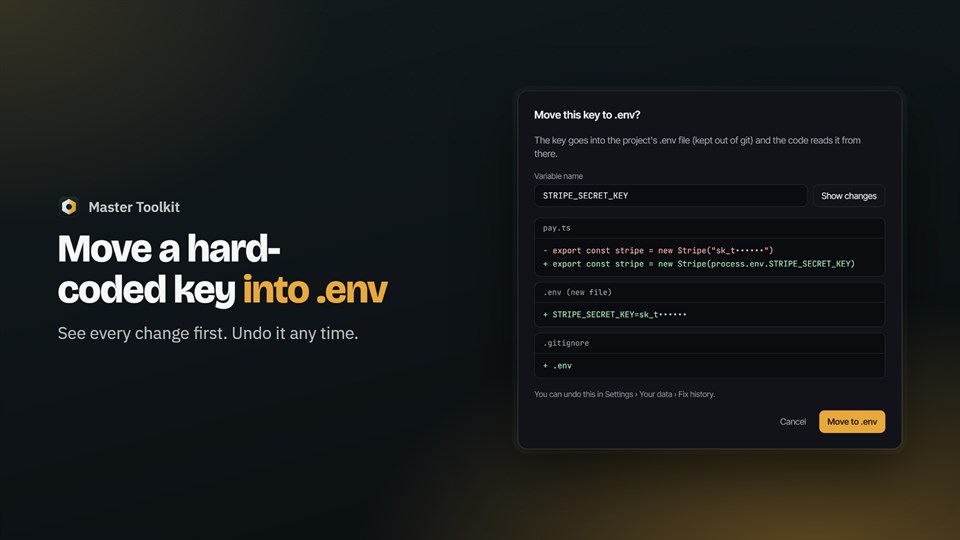
- Secrets Scanner: scan a project and its git history for keys and passwords. Move a hard-coded key into .env with a preview of every change, or block commits that contain secrets.
- Logs: follow files live, filter by level, jump to the next error, bookmark lines and read several files on one timeline.
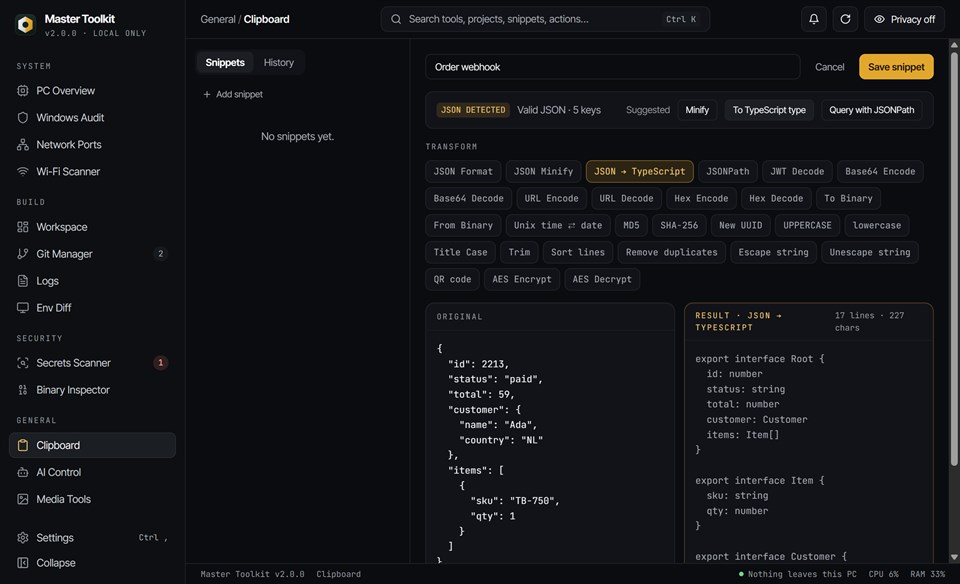
- Clipboard: history and snippets with JSON, JWT, Base64, hashing and QR tools. Quick paste (Ctrl+Shift+Alt+V) works in any app, skips password managers and clears copied keys after 2 minutes.
- Network Ports: see which app holds a port and free it in one click, with a warning when a dev database is open to your network.
- Windows Audit: a score you can track over time, with one-click fixes for simple problems.
- Env Diff: snapshots of PATH, variables and runtimes, and restore PATH from an earlier snapshot.
- AI Control: use a local model with Ollama or your own OpenAI or Anthropic key, with token estimates before you run.
- Binary Inspector: look inside any .exe or .dll and see the hash, architecture, sections, imports, exports and strings. Nothing is uploaded.
- Wi-Fi Scanner: nearby networks with channel crowding, a connection test, and share a network as a QR code.
- Media Tools: batch convert images, build .ico files, read or edit EXIF data and remove location data from photos.
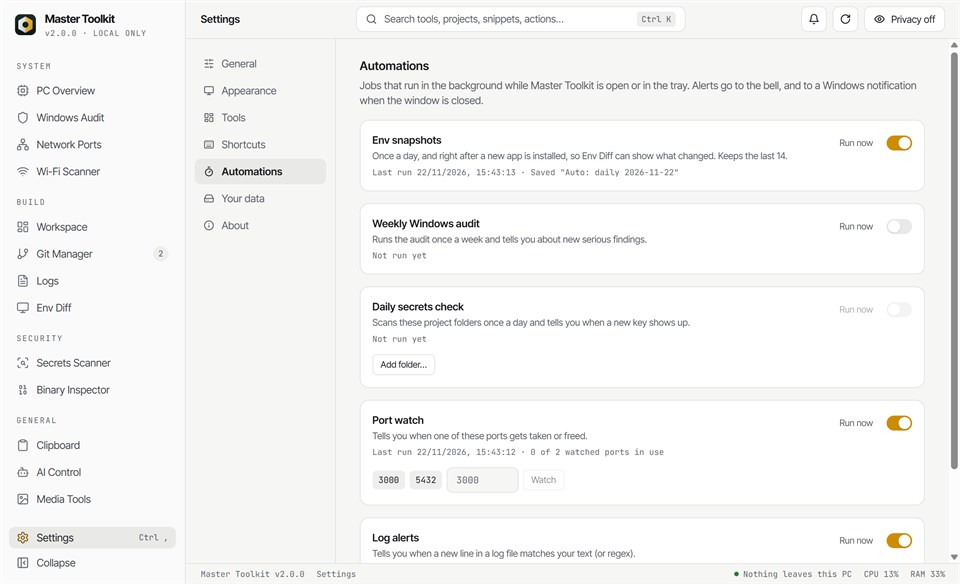
Automations run checks for you: daily env snapshots, port watch, log alerts, a weekly Windows audit and a daily secrets check. Changes Master Toolkit makes to Windows are always shown first and can be undone from Settings.
Your data stays on your PC. There is no account, no analytics and no tracking. Only a few optional features go online: AI with your own key, the outdated packages check and the Wi-Fi connection test. Keys are kept in Windows Credential Manager.
Built for Windows 10 and 11, with light and dark themes that follow Windows, accent colours, a compact mode, custom shortcuts, and a privacy mode that hides your PC name and IP addresses when you share your screen. Back up all your settings and data in one file.
Buy it once. No subscription.
Do desenvolvedor
Listas 0
-
 Master Toolkit
Pontos 0
-

- +1 Ponto

Classificações 0
-
- Sua nota
Desenvolvedor 3
- Villi Development
- Seguidores: 0
- Plataformas: Windows Apps (3)
- Promoções: 0
- Listas: 0 0
- Pontos: 0
- Classificações: 0
- Comentários: 0
- Vídeos: 0
- RSS: Assinar
Novidades
- Versão: PC
- Última atualização:
- Master Toolkit 2.0 is a free update with a new design and new features in every tool.
- New design: a cleaner sidebar, a status bar, accent colours and a compact mode. It follows the Windows light or dark theme.
- Command palette (Ctrl+K) to jump to any tool or run an action, for example "free port 3000".
- PC Overview shows live CPU, memory, disk and network, the heaviest apps, and plain tips.
- Git Manager can stage single hunks, show blame and side-by-side diffs, undo the last commit, push, and check for keys before you commit.
- Secrets Scanner can scan git history, move a key into .env for you, and stop commits that contain secrets.
- Logs follow files live, with level filters, jump to next error, bookmarks and one timeline for several files.
- Network Ports frees a busy port in one click and warns about ports open to your network.
- Windows Audit gives a score, tracks it over time, and fixes simple problems with one click. Every change can be undone.
- Quick paste (Ctrl+Shift+Alt+V) brings your clipboard history and snippets to any app. Password managers are skipped and copied keys are cleared after 2 minutes.
- Automations: daily env snapshots, port watch, log alerts, a weekly audit and a daily secrets check.
- Back up and restore all your settings and data in one file.
Your data still stays on your PC, and there is still no account or tracking.
Informações adicionais
- Data de lançamento:
- Categoria:
Aplicativos para Windows›Ferramentas de desenvolvedor - Sistemas operacionais:
PC - Tamanho:
8 Mb - Idiomas disponíveis:
Inglês - Classificação indicativa:
EVERYONE - Windows Store Nota: ¡
0 - Site:
 https://villi.dev
Pontuação AppAgg
Pontuação AppAgg estimada de
Master Toolkit
Desenvolvedor: Villi Development
Uma pontuação mais alta geralmente reflete resultados melhores nos indicadores do AppAgg.
Com base em: popularidade · avaliações dos usuários · atualidade · ofertas · dados das lojas · atividade da comunidade
Recalculado diariamente com dados AppAgg atualizados.
Comentários 0 ¡
Compartilhar
Master Toolkit URL curta: Copiado!- Windows Store

