
Dấu trang
| Nhà phát triển: | Villi Development (3) | ||
| Giá: | $19.99 Mới | ||
| Điểm tổng hợp: | 1.100 Bạc | ||
| Bảng xếp hạng: | 0 | ||
| Bình luận: | 0 Đăng bình luận | ||
| Danh sách: | 0 0 | ||
| Điểm: | 0 | ||
| +1 Điểm | |||
Tóm tắt
Master Toolkit là ứng dụng thuộc danh mục Công cụ cho nhà phát triển của Villi Development.
Mới toanh, ra mắt . Vẫn còn thơm mùi code mới.
$19.99. Chưa từng giảm giá trên AppAgg, không một lần nào. Đặt thông báo giá. Bạn có quên thì chúng tôi cũng không quên.
Microsoft Store có sẵn trong Windows, nên cài chỉ mất vài cú nhấp.
Điểm tổng hợp AppAgg là 1.100. Hạng Bạc, vậy là không tệ chút nào.
Chỉ 8 megabyte, ổ đĩa đầy vẫn chứa vừa.
Xếp hạng độ tuổi “EVERYONE”, nên trẻ em cũng dùng được.
Chỉ biết một thứ tiếng, và đó không phải tiếng Việt.
Đã dùng rồi? Bài đánh giá của bạn sẽ là bài đầu tiên ở đây.
Nhà phát triển còn 2 ứng dụng khác trên AppAgg. Đáng xem đấy.
Muốn biết sớm nhất về giảm giá, cập nhật và ứng dụng mới? Hãy đặt thông báo giá, theo dõi nhà phát triển hoặc đăng ký nguồn RSS. Thông báo đẩy được gửi qua ứng dụng AppAgg Alerts cho Android và iOS.
Nền tảng khác 0
 | Master ToolkitWindows Store1K BạcWindows | $19.99 |
Hiện chỉ có ở cửa hàng này.
Lịch sử giá 0
- Giá hiện tại: $19.99
- Tối thiểu: $19.99
- Tối đa: $19.99
Bảng tin riêng của bạn trên trang chủ
Ảnh chụp màn hình 8
Mô tả
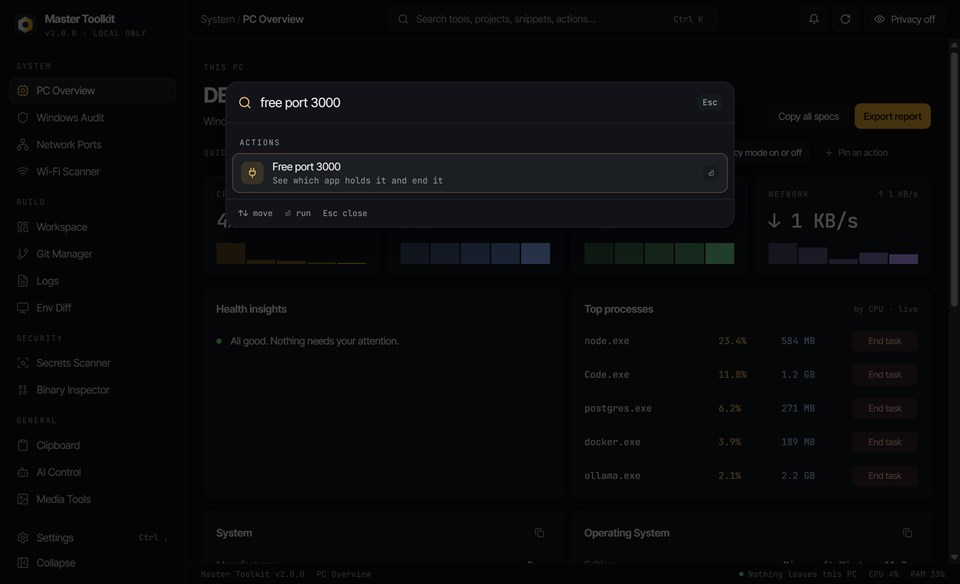
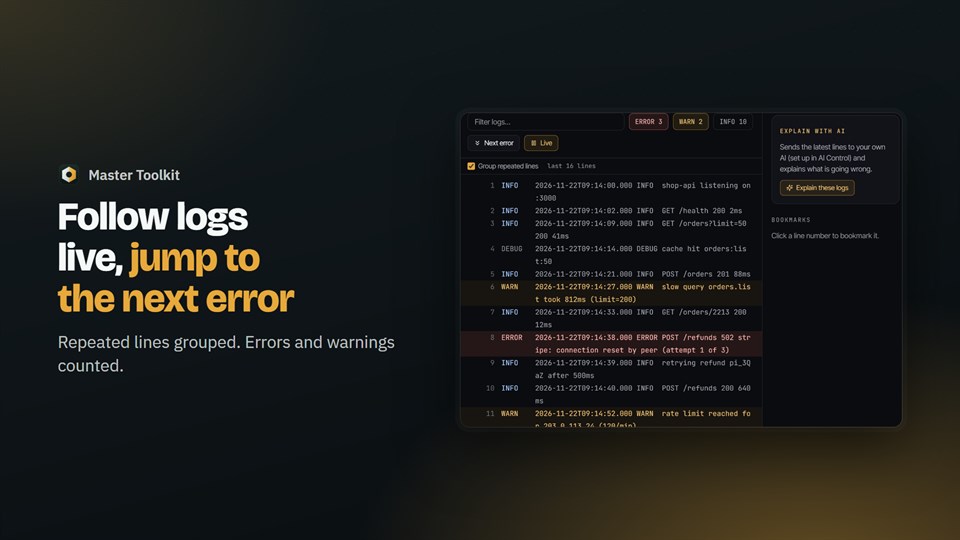
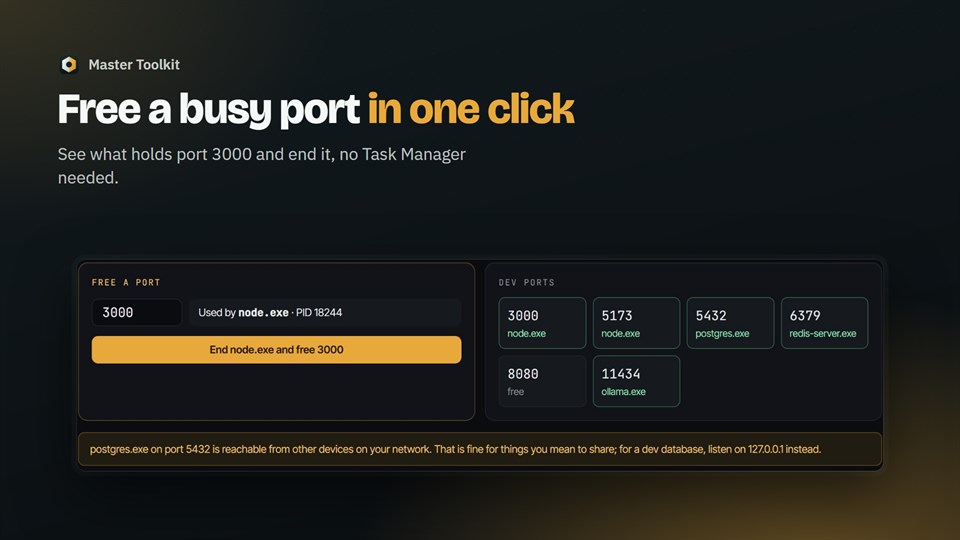
Use it to find what is holding port 3000 and free it, or to catch a key in a commit before you push. It can follow a log file and jump to the next error, and put your PATH back the way it was last week. Press Ctrl+K to open any tool or run an action from the keyboard.
What is inside:
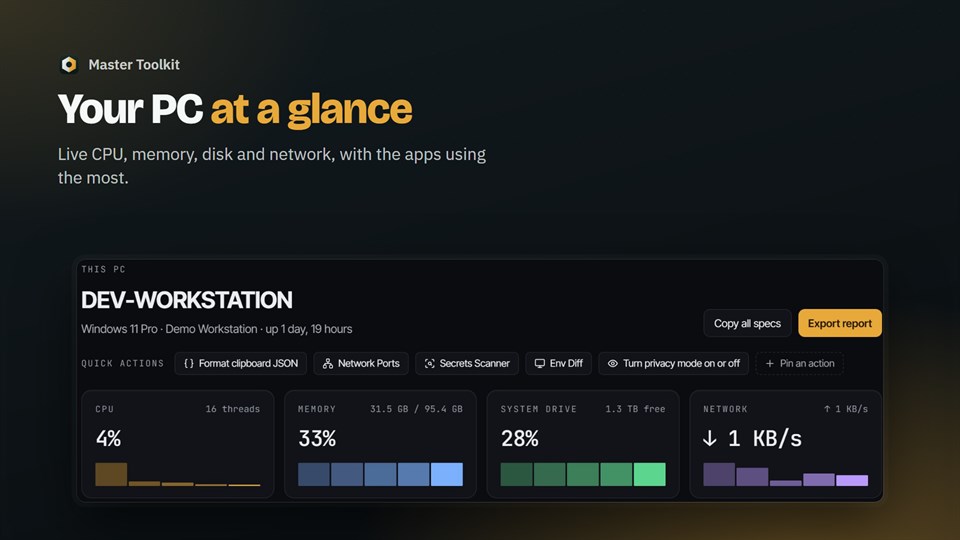
- PC Overview: live CPU, memory, disk and network, the apps using the most, and plain tips when something needs a look.
- Workspace: add a project folder and Master Toolkit detects the stack, runs its scripts with live output and checks its packages.
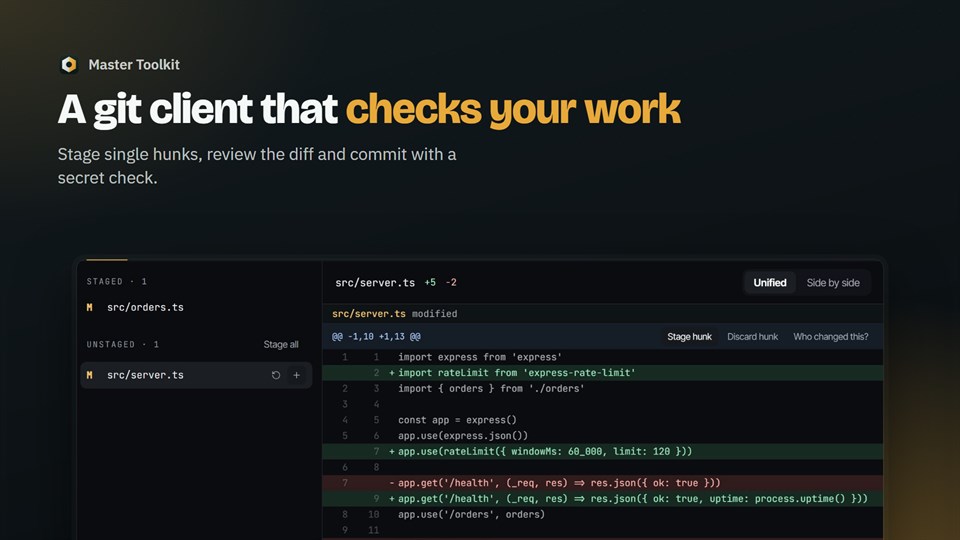
- Git Manager: stage single hunks, read blame and side-by-side diffs, undo the last commit and push. Every commit is checked for keys first.
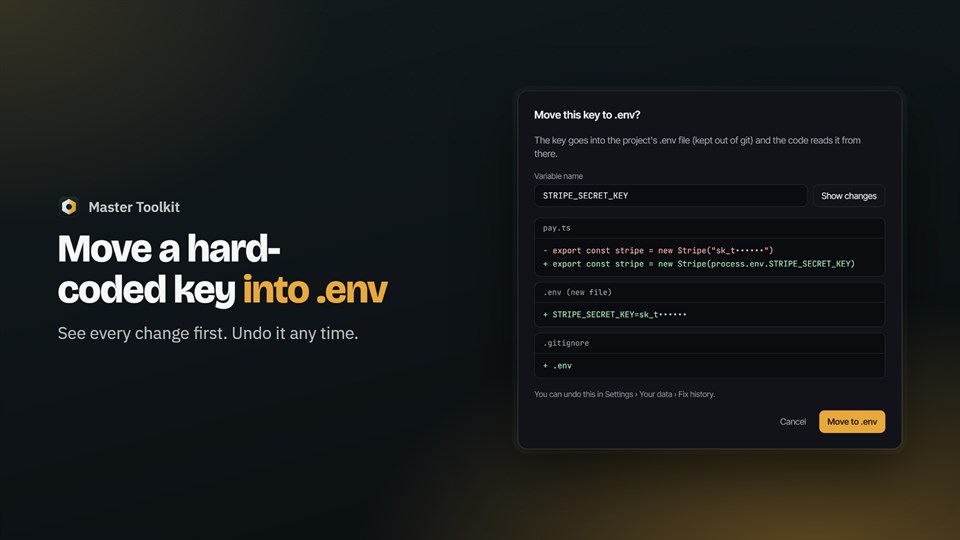
- Secrets Scanner: scan a project and its git history for keys and passwords. Move a hard-coded key into .env with a preview of every change, or block commits that contain secrets.
- Logs: follow files live, filter by level, jump to the next error, bookmark lines and read several files on one timeline.
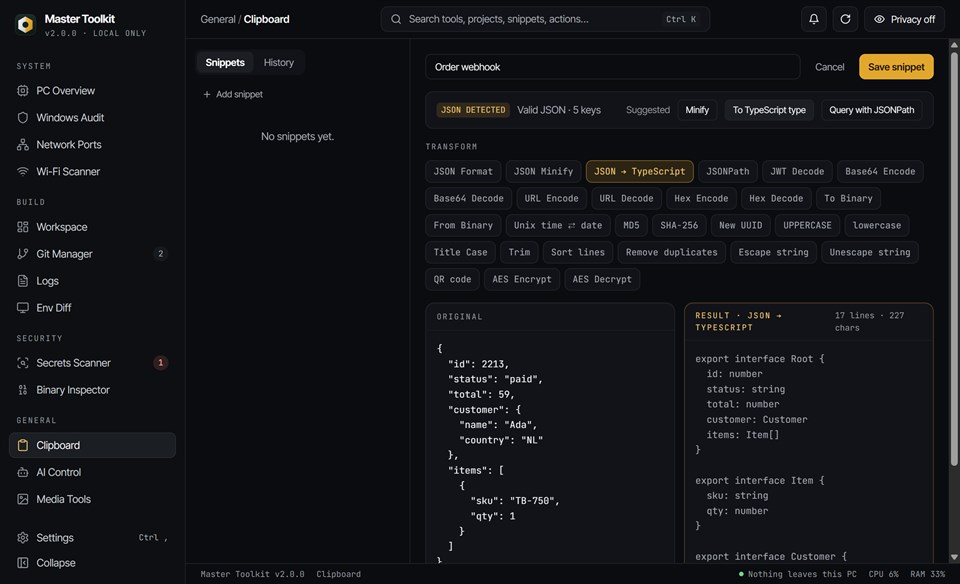
- Clipboard: history and snippets with JSON, JWT, Base64, hashing and QR tools. Quick paste (Ctrl+Shift+Alt+V) works in any app, skips password managers and clears copied keys after 2 minutes.
- Network Ports: see which app holds a port and free it in one click, with a warning when a dev database is open to your network.
- Windows Audit: a score you can track over time, with one-click fixes for simple problems.
- Env Diff: snapshots of PATH, variables and runtimes, and restore PATH from an earlier snapshot.
- AI Control: use a local model with Ollama or your own OpenAI or Anthropic key, with token estimates before you run.
- Binary Inspector: look inside any .exe or .dll and see the hash, architecture, sections, imports, exports and strings. Nothing is uploaded.
- Wi-Fi Scanner: nearby networks with channel crowding, a connection test, and share a network as a QR code.
- Media Tools: batch convert images, build .ico files, read or edit EXIF data and remove location data from photos.
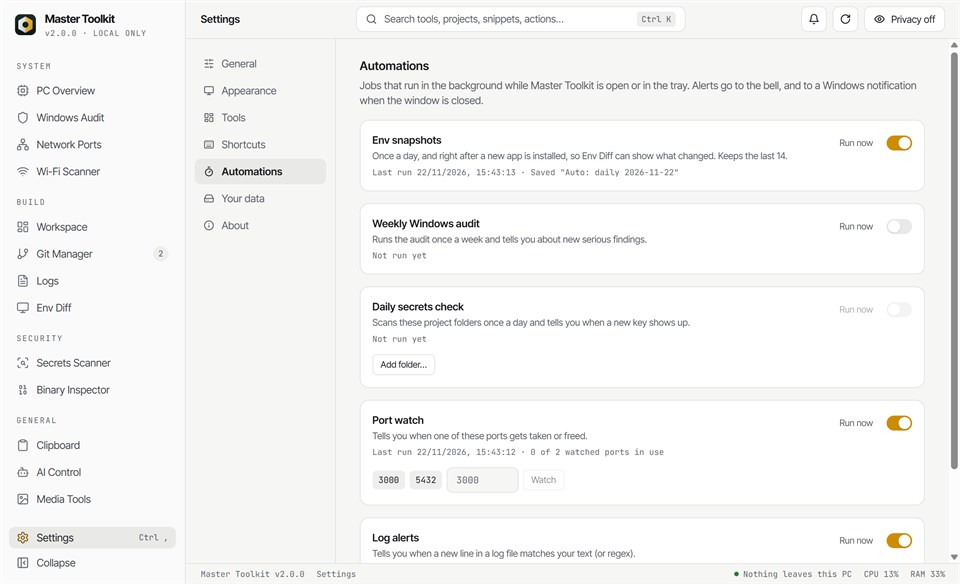
Automations run checks for you: daily env snapshots, port watch, log alerts, a weekly Windows audit and a daily secrets check. Changes Master Toolkit makes to Windows are always shown first and can be undone from Settings.
Your data stays on your PC. There is no account, no analytics and no tracking. Only a few optional features go online: AI with your own key, the outdated packages check and the Wi-Fi connection test. Keys are kept in Windows Credential Manager.
Built for Windows 10 and 11, with light and dark themes that follow Windows, accent colours, a compact mode, custom shortcuts, and a privacy mode that hides your PC name and IP addresses when you share your screen. Back up all your settings and data in one file.
Buy it once. No subscription.
Từ nhà phát triển
Danh sách 0
-
 Master Toolkit
Điểm 0
-

- +1 Điểm

Bảng xếp hạng 0
-
- Điểm bạn chấm
Nhà phát triển 3
- Villi Development
- Người theo dõi: 0
- Nền tảng: Windows Ứng dụng (3)
- Giảm giá: 0
- Danh sách: 0 0
- Điểm: 0
- Bảng xếp hạng: 0
- Bình luận: 0
- Video: 0
- RSS: Đăng ký
Tính năng mới
- Phiên bản: PC
- Cập nhật lần cuối:
- Master Toolkit 2.0 is a free update with a new design and new features in every tool.
- New design: a cleaner sidebar, a status bar, accent colours and a compact mode. It follows the Windows light or dark theme.
- Command palette (Ctrl+K) to jump to any tool or run an action, for example "free port 3000".
- PC Overview shows live CPU, memory, disk and network, the heaviest apps, and plain tips.
- Git Manager can stage single hunks, show blame and side-by-side diffs, undo the last commit, push, and check for keys before you commit.
- Secrets Scanner can scan git history, move a key into .env for you, and stop commits that contain secrets.
- Logs follow files live, with level filters, jump to next error, bookmarks and one timeline for several files.
- Network Ports frees a busy port in one click and warns about ports open to your network.
- Windows Audit gives a score, tracks it over time, and fixes simple problems with one click. Every change can be undone.
- Quick paste (Ctrl+Shift+Alt+V) brings your clipboard history and snippets to any app. Password managers are skipped and copied keys are cleared after 2 minutes.
- Automations: daily env snapshots, port watch, log alerts, a weekly audit and a daily secrets check.
- Back up and restore all your settings and data in one file.
Your data still stays on your PC, and there is still no account or tracking.
Thông tin bổ sung
- Ngày phát hành:
- Danh mục:
Ứng dụng cho Windows›Công cụ cho nhà phát triển - HĐH:
PC - Kích thước:
8 Mb - Ngôn ngữ được hỗ trợ:
Tiếng Anh - Xếp hạng nội dung:
EVERYONE - Windows Store Điểm đánh giá: ¡
0 - Trang web:
 https://villi.dev
Điểm tổng hợp AppAgg
Điểm tổng hợp AppAgg ước tính cho
Master Toolkit
Nhà phát triển: Villi Development
Điểm cao hơn thường cho thấy các chỉ số trên AppAgg tốt hơn.
Dựa trên: độ phổ biến · đánh giá của người dùng · độ mới · ưu đãi · dữ liệu cửa hàng · hoạt động cộng đồng
Được tính lại hằng ngày từ dữ liệu AppAgg mới nhất.
Bình luận 0 ¡
Chia sẻ
Master Toolkit URL ngắn: Đã sao chép!- Windows Store

