
북마크
이 북마크의 제목을 입력하세요.
북마크가 저장되었습니다
| 개발자: | MegaStation Ltd (2) | ||
| 가격: | 무료 | ||
| 종합 점수: | 580 브론즈 | ||
| 순위: | 0 | ||
| 댓글: | 0 댓글 게시 | ||
| 목록: | 0 0 | ||
| 포인트: | 0 | ||
| +1 포인트 | |||
요약
Mega Code: MegaStation Ltd에서 만든 ‘개발자 도구’ 카테고리의 앱이에요.
에 출시됐어요. 아직 꽤 따끈따끈해요.
무료. 광고도 인앱 구매도 없어요. 앱에만 집중하면 돼요.
Microsoft Store는 Windows에 기본으로 들어 있어서 클릭 몇 번이면 설치돼요.
AppAgg 점수는 580. 지금은 브론즈 등급이지만, 성장할 여지가 충분해요.
연령 등급은 ‘TEEN’, 청소년 이상용이에요.
2개 언어를 지원하지만, 한국어는 아직 없어요.
사용해 보셨나요? 여기서 첫 리뷰의 주인공이 되어 주세요.
이 개발자의 앱이 AppAgg에 1개 더 있어요. 한번 둘러보세요.
업데이트와 새 앱 소식을 가장 먼저 받고 싶나요? 개발자를 팔로우하거나 RSS 피드를 구독하세요. 푸시 알림은 Android와 iOS용 AppAgg Alerts 앱으로 받을 수 있어요.
광고
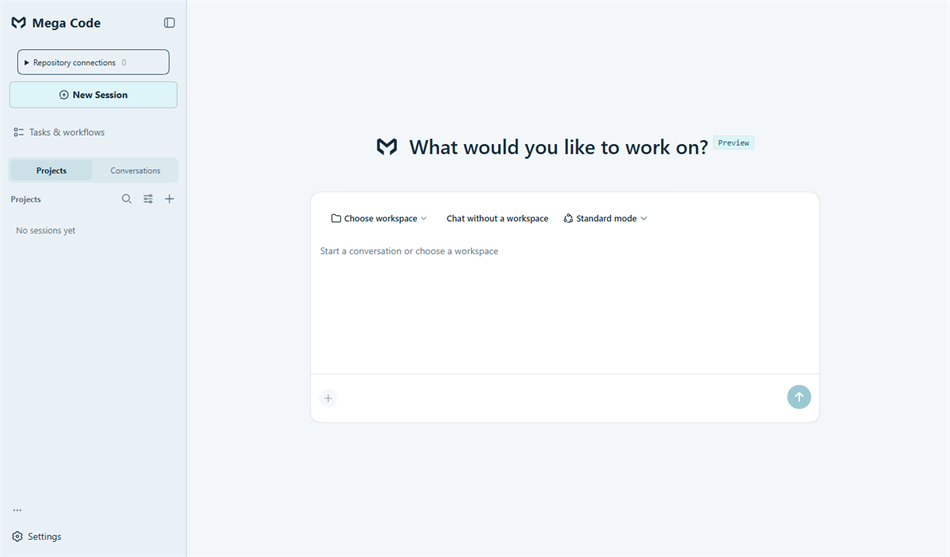
스크린샷 1
다른 플랫폼 0
가격 기록 0
- 현재 가격: 무료
- 최소: 무료
- 최대: 무료
홈 화면의 나만의 피드
“신규 및 업데이트” 피드의 플랫폼을 선택하면 홈 화면에 필요한 앱과 게임만 표시됩니다.
설명

Mega Code is a desktop AI coding workspace from MegaStation Ltd. Start a conversation without a project, or open a local workspace to explore code, edit files and run development tasks.
Choose and configure your own model providers. Supported connections include OpenAI Codex, Claude through the official Claude Code tool, Google, NVIDIA, Z.ai and local or remote Ollama servers. Availability depends on the provider, your account and installed tools. Provider subscriptions, API charges and usage limits are separate from the Microsoft Store download.
Organize work with standard and delegation modes, model routes and subagents. Connect supported GitHub, Azure DevOps and MegaGit repositories to retrieve projects and synchronize changes. Optional Google Drive and device synchronization require your own connected accounts and configuration.
The interface supports Arabic with right-to-left layouts and English. The installer starts with a fresh profile: it contains no developer accounts, provider API keys, personal conversations or private projects. Sign in to Mega Code, then connect only the optional services you choose to use.
AI responses and generated changes can be incorrect. Review code and terminal actions before using them. Local tools may read and modify files in your workspace or run commands with your permission. Internet access and a configured model connection are needed for hosted AI features; Ollama requires a running, compatible server and available model.
Mega Code is a customized desktop build based on DeepSeek Harness. This is an early release; some integrations depend on external services.
개발자 소식
개발자이신가요?
페이지 맨 위에 소식을 올리면 팔로워에게 이메일로 전달됩니다. YouTube 동영상을 추가하면 “동영상” 블록 맨 앞에 표시됩니다.
개발자
- MegaStation Ltd
- 팔로워: 0
- 플랫폼: Windows 앱 (2)
- 할인: 0
- 목록: 0 0
- 포인트: 0
- 순위: 0
- 댓글: 0
- 동영상: 0
- RSS: 구독
목록 0
-
 Mega Code
포인트 0
-

- +1 포인트

순위 0
-
- 내 평점
새로운 기능
- 버전: PC
- 마지막 업데이트:
- 3.0.3: Secure account sign-in and device approval, OS-protected remembered application login, administrator-authorized local offline-owner access, and device management. Includes conversation synchronization and project/service/session folders. Existing local account and project data is retained when updating; no saved customer accounts, provider keys or personal projects are included in the package.
추가 정보
 https://megastation.uk/
댓글 0 ¡
가장 먼저 댓글을 남겨주세요
AppAgg 점수
580
AppAgg 예상 점수:
Mega Code
개발자: MegaStation Ltd
580 브론즈
점수가 높을수록 대체로 AppAgg의 여러 지표에서 좋은 결과를 보인다는 뜻입니다.
기준: 인기 · 사용자 평점 · 최신성 · 할인 · 스토어 데이터 · 커뮤니티 활동
최신 AppAgg 데이터를 바탕으로 매일 다시 계산됩니다.
웹사이트용 배지:  복사됨!
Mega Code 단축 URL: 복사됨!- Windows Store


