
บุ๊กมาร์ก
| ผู้พัฒนา: | MegaStation Ltd (2) | ||
| ราคา: | ฟรี | ||
| คะแนน: | 580 บรอนซ์ | ||
| การจัดอันดับ: | 0 | ||
| ความคิดเห็น: | 0 โพสต์ความคิดเห็น | ||
| รายการ: | 0 0 | ||
| แต้ม: | 0 | ||
| +1 แต้ม | |||
สรุป
Mega Code เป็นแอปในหมวด “เครื่องมือสำหรับนักพัฒนา” จาก MegaStation Ltd
ออกเมื่อ ยังสดใหม่อยู่เลย
ฟรี ไม่มีโฆษณา ไม่มีการซื้อภายในแอป มีแค่คุณกับแอป
Microsoft Store มีมาในตัว Windows อยู่แล้ว ติดตั้งได้ในไม่กี่คลิก
คะแนน AppAgg คือ 580 ตอนนี้อยู่ระดับ “บรอนซ์” ยังไปได้อีกไกล
จัดเรต “TEEN” สำหรับวัยรุ่นขึ้นไป
รองรับ 2 ภาษา แต่ยังไม่มีภาษาไทย
เคยใช้แล้วเหรอ? รีวิวของคุณจะเป็นรีวิวแรกที่นี่
ผู้พัฒนารายนี้มีแอปอื่นบน AppAgg อีก 1 แอป ลองไปดูกัน
อยากรู้เรื่องอัปเดตและแอปใหม่ก่อนใครไหม? ติดตาม ผู้พัฒนา หรือกดติดตาม ฟีด RSS ได้เลย การแจ้งเตือนแบบพุชส่งผ่านแอป AppAgg Alerts สำหรับ Android และ iOS
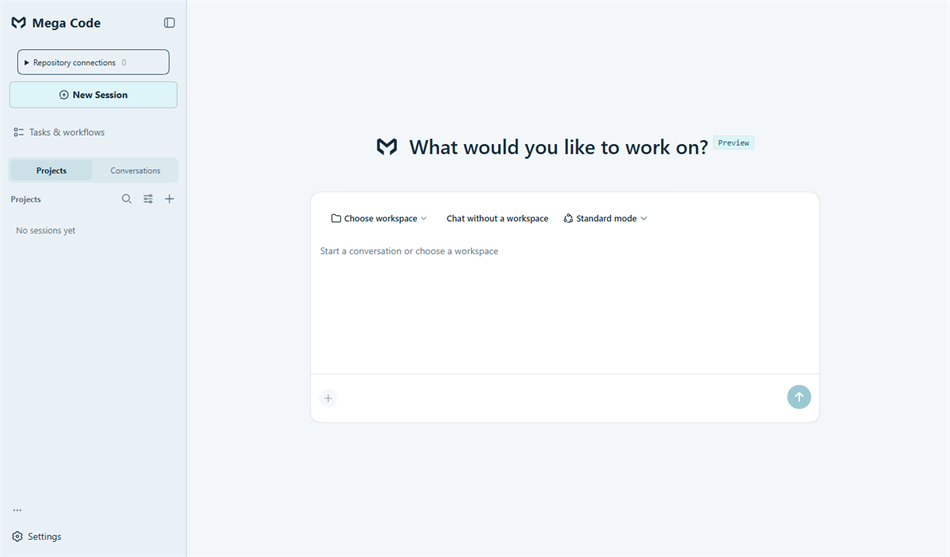
ภาพหน้าจอ 1
แพลตฟอร์มอื่น 0
ประวัติราคา 0
- ราคาปัจจุบัน: ฟรี
- ต่ำสุด: ฟรี
- สูงสุด: ฟรี
ฟีดของคุณเองบนหน้าแรก
คำอธิบาย

Mega Code is a desktop AI coding workspace from MegaStation Ltd. Start a conversation without a project, or open a local workspace to explore code, edit files and run development tasks.
Choose and configure your own model providers. Supported connections include OpenAI Codex, Claude through the official Claude Code tool, Google, NVIDIA, Z.ai and local or remote Ollama servers. Availability depends on the provider, your account and installed tools. Provider subscriptions, API charges and usage limits are separate from the Microsoft Store download.
Organize work with standard and delegation modes, model routes and subagents. Connect supported GitHub, Azure DevOps and MegaGit repositories to retrieve projects and synchronize changes. Optional Google Drive and device synchronization require your own connected accounts and configuration.
The interface supports Arabic with right-to-left layouts and English. The installer starts with a fresh profile: it contains no developer accounts, provider API keys, personal conversations or private projects. Sign in to Mega Code, then connect only the optional services you choose to use.
AI responses and generated changes can be incorrect. Review code and terminal actions before using them. Local tools may read and modify files in your workspace or run commands with your permission. Internet access and a configured model connection are needed for hosted AI features; Ollama requires a running, compatible server and available model.
Mega Code is a customized desktop build based on DeepSeek Harness. This is an early release; some integrations depend on external services.
จากนักพัฒนา
ผู้พัฒนา
- MegaStation Ltd
- ผู้ติดตาม: 0
- แพลตฟอร์ม: Windows แอป (2)
- ลดราคา: 0
- รายการ: 0 0
- แต้ม: 0
- การจัดอันดับ: 0
- ความคิดเห็น: 0
- วิดีโอ: 0
- RSS: ติดตาม
รายการ 0
-
 Mega Code
แต้ม 0
-

- +1 แต้ม

การจัดอันดับ 0
-
- คะแนนของคุณ
มีอะไรใหม่
- เวอร์ชัน: PC
- อัปเดตล่าสุด:
- 3.0.3: Secure account sign-in and device approval, OS-protected remembered application login, administrator-authorized local offline-owner access, and device management. Includes conversation synchronization and project/service/session folders. Existing local account and project data is retained when updating; no saved customer accounts, provider keys or personal projects are included in the package.
ข้อมูลเพิ่มเติม
- วันที่วางจำหน่าย:
- หมวดหมู่:
แอปสำหรับ Windows›เครื่องมือสำหรับนักพัฒนา - ระบบปฏิบัติการ:
PC - ขนาด:
356 Mb - ภาษาที่รองรับ:
อังกฤษ,อาหรับ - การจัดประเภทเนื้อหา:
TEEN - Windows Store คะแนน: ¡
0 - เว็บไซต์:
 https://megastation.uk/
ความคิดเห็น 0 ¡
คะแนน AppAgg
คะแนน AppAgg โดยประมาณของ
Mega Code
ผู้พัฒนา: MegaStation Ltd
คะแนนที่สูงขึ้นมักสะท้อนตัวชี้วัดที่ดีกว่าบน AppAgg
อิงจาก: ความนิยม · คะแนนจากผู้ใช้ · ความสดใหม่ · ดีล · ข้อมูลร้านค้า · กิจกรรมชุมชน
คำนวณใหม่ทุกวันจากข้อมูล AppAgg ล่าสุด
Mega Code URL แบบสั้น: คัดลอกแล้ว!- Windows Store

