
북마크
이 북마크의 제목을 입력하세요.
북마크가 저장되었습니다
| 개발자: | PRATHEESH JOHNSON (3) | ||
| 가격: | 무료 신규 | ||
| 종합 점수: | 990 실버 | ||
| 순위: | 0 | ||
| 댓글: | 0 댓글 게시 | ||
| 목록: | 0 0 | ||
| 포인트: | 0 | ||
| +1 포인트 | |||
요약
소개합니다. PRATHEESH JOHNSON에서 만든 ‘개발자 도구’ 카테고리 앱, MockForge.
에 나왔으니, 냉장고 속 우유보다 어려요.
무료. 광고도 인앱 구매도 없어요. 앱에만 집중하면 돼요.
Microsoft Store는 Windows에 기본으로 들어 있어서 클릭 몇 번이면 설치돼요.
AppAgg 점수는 990. 실버 등급, 이 정도면 꽤 괜찮아요.
연령 등급은 ‘EVERYONE’, 아이들에게도 괜찮아요.
지원 언어는 딱 하나, 그런데 한국어는 아니에요.
AppAgg에서는 아직 아무도 평가하지 않았어요. 첫 번째가 될 기회는 바로 지금이에요.
이 개발자의 앱이 AppAgg에 2개 더 있어요. 한번 둘러보세요.
업데이트와 새 앱 소식을 가장 먼저 받고 싶나요? 개발자를 팔로우하거나 RSS 피드를 구독하세요. 푸시 알림은 Android와 iOS용 AppAgg Alerts 앱으로 받을 수 있어요.
광고
다른 플랫폼 0
가격 기록 0
- 현재 가격: 무료
- 최소: 무료
- 최대: 무료
홈 화면의 나만의 피드
“신규 및 업데이트” 피드의 플랫폼을 선택하면 홈 화면에 필요한 앱과 게임만 표시됩니다.
스크린샷 6
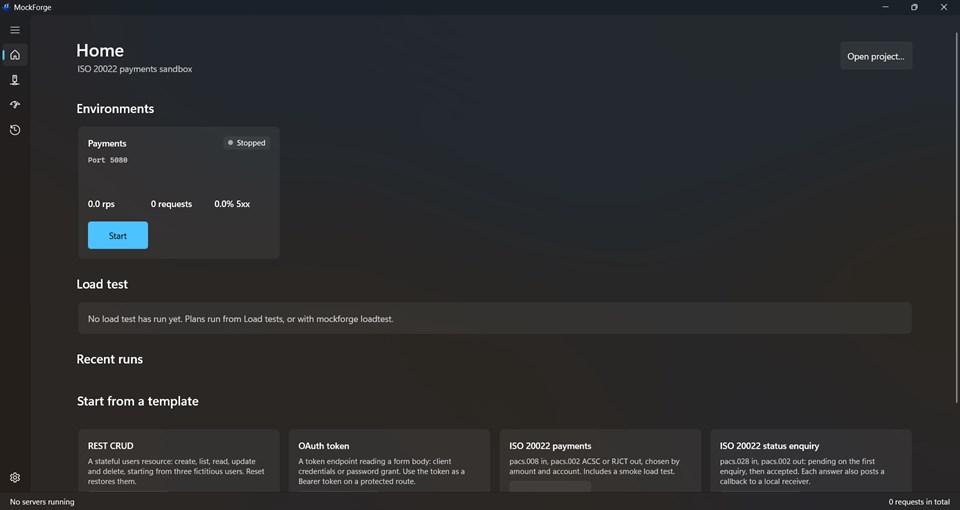
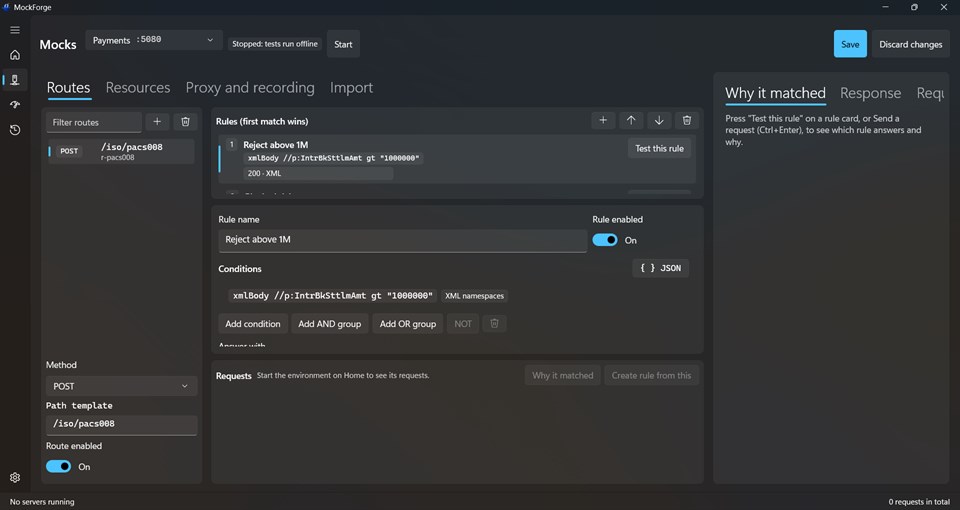
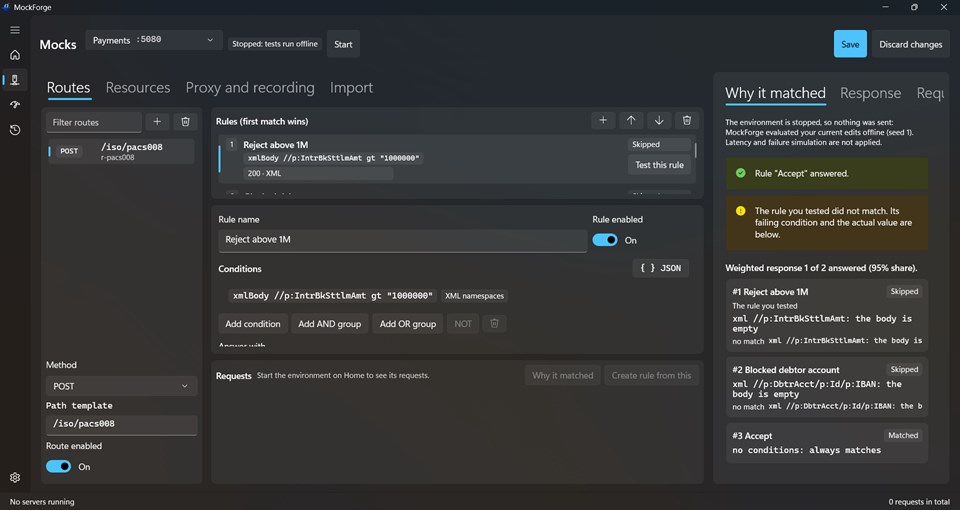
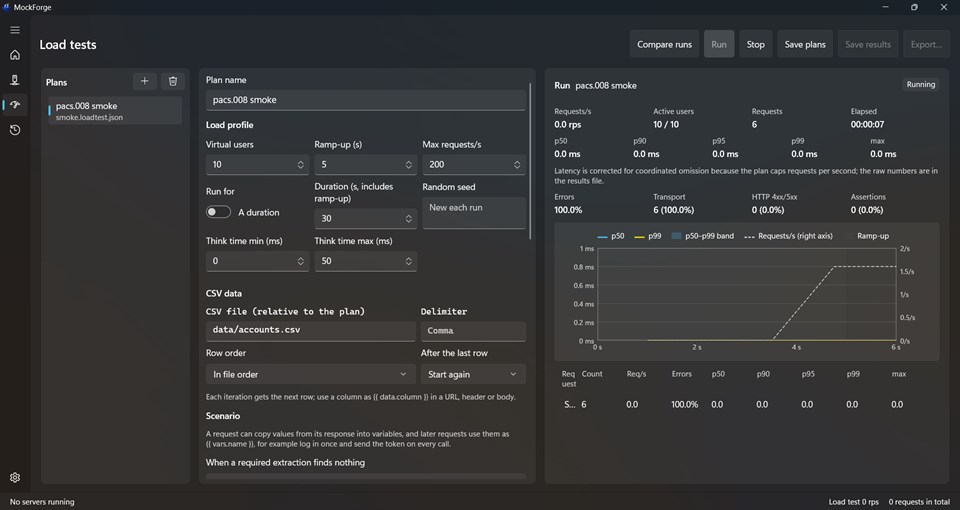
설명

Mock API servers
Start one or more mock environments, each on its own port. Define routes by method and path template (/api/users/{id}, wildcards, a catch-all fallback) and rules that are checked top to bottom, first match wins. Rules can look at path and query parameters, headers, cookies, a JSON body (JSONPath) or an XML body (XPath with namespaces, so ISO 20022 messages such as pacs.008 work), combined with AND and OR.
Responses set the status code, headers and a JSON, XML, text or file body, with templates: echo request values, generate fake names, e-mails, GUIDs, IBANs and amounts, random numbers and dates, or pick a weighted random response (for example 80% 200, 15% 400, 5% 500). Simulate latency, random failures and dropped connections per route.
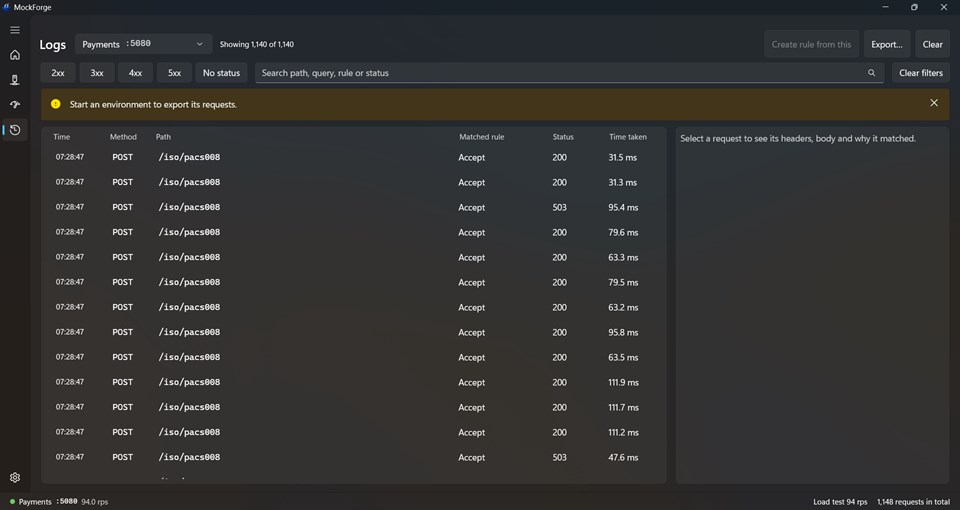
The live request log shows method, path, matched rule, status and duration for every call. Open any request to see the full request and response and why that rule matched. Filter, search and export (sensitive headers, query keys and configured fields are masked in exports). "Test this rule" sends a sample request to the running mock and shows what matched.
Stateful mocks and sequences
Turn a path into an in-memory REST resource with automatic create, read, update and delete, seed data and paging, and reset it with one click. Return answer A on the first call, B on the second and so on, optionally counted per key read from the request (for example a message id), for polling and status-enquiry flows.
Proxy, record and import
Forward requests that no rule answers to a real API, record the exchanges (off by default, with tokens and credentials masked) and turn the recording into mock rules. Import an OpenAPI 2.0 or 3.x file (JSON or YAML) or a Postman collection into routes with example responses, or into a load-test plan. Imports read local files only: nothing is downloaded.
Callbacks and webhooks
After a rule answers, send an HTTP request to a configured URL after a delay, with retries, for asynchronous notification flows.
Templates
Start from built-in projects: a REST CRUD API, an OAuth token endpoint, an ISO 20022 payments sandbox (pacs.008 in, pacs.002 ACSC or RJCT out, chosen by amount or account) and an ISO 20022 status enquiry (pacs.028 answered PDNG, then ACSC).
Load testing
Build a test plan with one or more requests, using the same templating. Set virtual users, ramp-up, duration or iteration count, an optional requests-per-second cap and think time. Feed values per iteration from a CSV file. Assert on status code, response time, body text, or a JSONPath or XPath value. Build multi-step scenarios: extract a value from a response (JSONPath, XPath, regex or header), for example a login token, and use it in the next request.
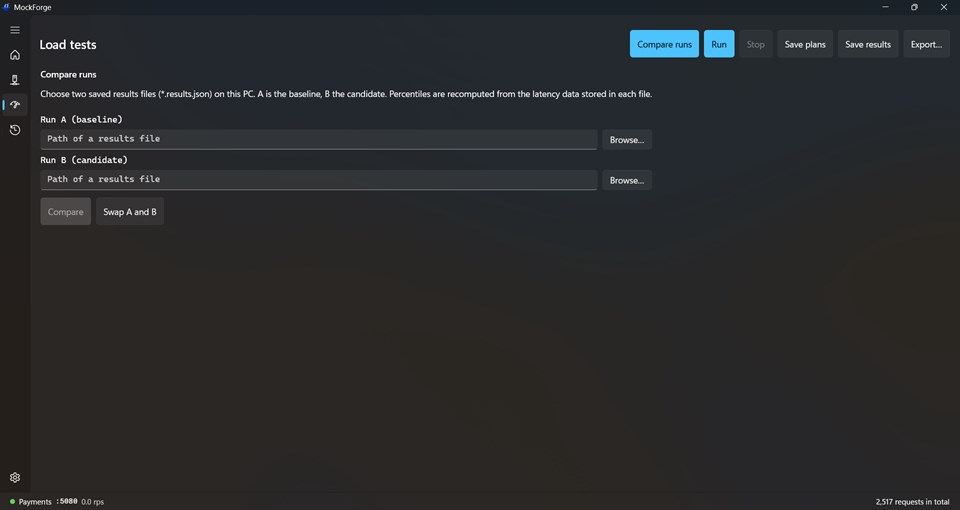
The live dashboard shows requests per second, active users, error rate by class, latency percentiles (p50, p90, p95, p99, max), a chart over time and a per-request breakdown. Stop at any time. Save results as JSON and export an HTML report and CSV files. Compare two saved runs side by side to spot regressions.
Load tests run in a separate worker process by default, so a heavy test does not slow the app or a mock server running in it.
Safe by default
Mock servers listen on localhost only unless you turn on LAN access and confirm it. Load tests, the proxy and callbacks may reach your own computer and private networks; a public host needs your one-time declaration, saved in the project. MockForge records your declaration; it does not verify it. Cloud metadata and link-local addresses are always blocked.
Built for CI as well
The app installs the mockforge command, so you can type mockforge in any terminal. Everything the app does also runs headless from it (serve, loadtest, validate, report, compare, import, record convert, new) with exit codes for pipelines.
개발자 소식
개발자이신가요?
페이지 맨 위에 소식을 올리면 팔로워에게 이메일로 전달됩니다. YouTube 동영상을 추가하면 “동영상” 블록 맨 앞에 표시됩니다.
목록 0
-
 MockForge
포인트 0
-

- +1 포인트

순위 0
-
- 내 평점
개발자 3
- PRATHEESH JOHNSON
- 팔로워: 0
- 플랫폼: Windows 앱 (3)
- 할인: 0
- 목록: 0 0
- 포인트: 0
- 순위: 0
- 댓글: 0
- 동영상: 0
- RSS: 구독
새로운 기능
- 버전: PC
- 마지막 업데이트:
추가 정보
AppAgg 점수
990
AppAgg 예상 점수:
MockForge
개발자: PRATHEESH JOHNSON
990 실버
점수가 높을수록 대체로 AppAgg의 여러 지표에서 좋은 결과를 보인다는 뜻입니다.
기준: 인기 · 사용자 평점 · 최신성 · 할인 · 스토어 데이터 · 커뮤니티 활동
최신 AppAgg 데이터를 바탕으로 매일 다시 계산됩니다.
웹사이트용 배지:  복사됨!
댓글 0 ¡
가장 먼저 댓글을 남겨주세요
공유하기
MockForge 단축 URL: 복사됨!- Windows Store


