
Marcadores
| Desarrollador: | moreih29 (2) | ||
| Precio: | Gratis Nuevo | ||
| Puntuación: | 580 Bronce | ||
| Clasificaciones: | 0 | ||
| Comentarios: | 0 Publicar comentario | ||
| Listas: | 0 0 | ||
| Puntos: | 0 | ||
| +1 Punto | |||
Resumen
Te presentamos NexusCode, una app de moreih29 de la categoría «Herramientas de desarrollo».
Novedad: salió , así que estás entre los primeros.
Gratis: sin anuncios ni compras integradas. Solo tú y la app.
La Microsoft Store viene integrada en Windows, así que se instala en un par de clics.
Su Puntuación de AppAgg es 580. De momento, nivel Bronce, con mucho margen para crecer.
Clasificación «EVERYONE»: sirve también para los más pequeños.
Sabe 2 idiomas, pero el español todavía no.
Nadie en AppAgg la ha valorado todavía. Ahora te toca a ti romper el hielo.
El desarrollador tiene 1 app más en AppAgg. Vale la pena echar un vistazo.
¿Quieres enterarte antes que nadie de actualizaciones y apps nuevas? Sigue al desarrollador o suscríbete al canal RSS. Las notificaciones push llegan con la app AppAgg Alerts para Android y iOS.
Capturas de pantalla 1
Otras plataformas 0
Historial de precios 0
- Precio actual: Gratis
- Mínimo: Gratis
- Máximo: Gratis
Tu propio feed en la página de inicio
Descripción

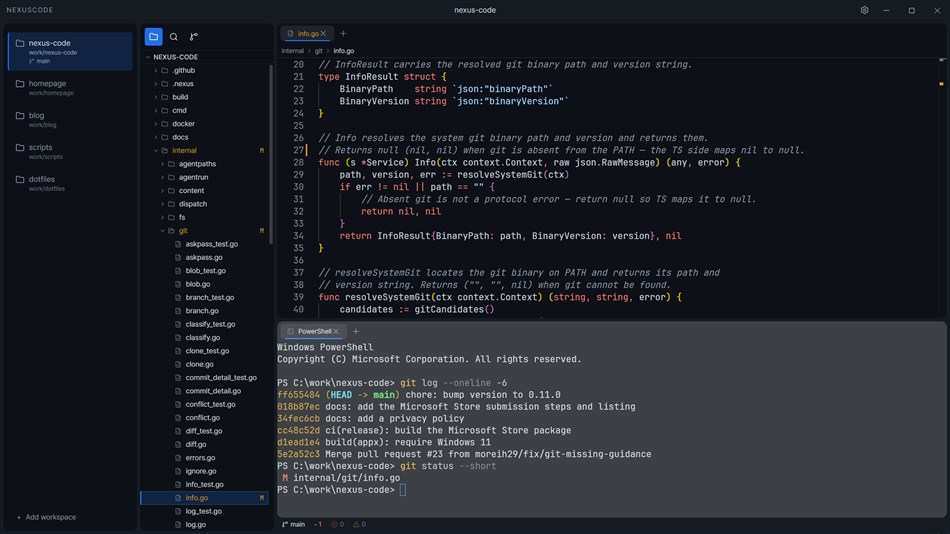
NexusCode is a code editor that holds many workspaces in one window. Instead of one window per project, each workspace keeps its own file tree, editor tabs and terminals, and one shortcut switches between them. Local folders and folders on SSH hosts work the same way.
It puts the Monaco editor, the editor of VS Code, and an integrated terminal on one screen, with VS Code's keyboard shortcuts.
Del desarrollador
Desarrollador
- moreih29
- Seguidores: 0
- Plataformas: Windows Aplicaciones (2)
- Ofertas: 0
- Listas: 0 0
- Puntos: 0
- Clasificaciones: 0
- Comentarios: 0
- Vídeos: 0
- RSS: Suscribirse
Listas 0
-
 NexusCode
Puntos 0
-

- +1 Punto

Clasificaciones 0
-
- Tu valoración
Novedades
- Versión: PC
- Última actualización:
- • Connect a profile to an API key or another model API (a gateway or a local server) instead of a sign-in, with model discovery, a connection test and keys encrypted on this computer.
• Set instructions for the Claude and Codex agents NexusCode starts, in layers: all agents, Claude or Codex, profile, workspace and session.
• Edit settings.json and config.toml behavior settings from the profile dialog. Only changed keys are written; comments and order stay.
• Voice notes: pick the participant count before recording, regroup a recording to a speaker count, and merge speakers. Named voices, including other people in the meeting, are remembered with consent asked once and suggested in other recordings. Voices not heard for a year are deleted.
• Move files opened in the agent view to a side panel, including up-to-date files from another computer. Right-click a workspace header to pin, rename, color it or pick its profile.
• Agents can do more through the nexus command (notes, instructions, profiles), and can give the tabs they open up to their own permission mode without asking you.
• Built-in commands such as /compact come first in a Claude tab's / list, and a reopened compacted chat shows only a marker. Fixed long chats losing their model, effort and permission menus, remote drops on unstable links, preview issues and, on Windows, lowercase drive links, tabs not starting with long instructions and garbled error text.
- • The agent view's list groups agents by status (needs you, running, new result, idle, ended) or by workspace. The grouping and folded groups outlast a restart. The list has a search box and moves with the arrow keys. The title bar's Agents button shows how many agents are waiting on you.
• The "New result" group header marks them all read. nexus view group status|workspace switches the grouping.
• The model and reasoning effort picked in a Claude or Codex tab outlast a restart, and a fork of the tab starts with them.
• Each workspace's files panel view (files, search, source control, agents) outlasts a restart. An unfolded task lists each changed file by its name first, with its folder dimmed after it.
• Settings, shortcuts, the agent list and commit history share one search box. A settings search that matches nothing says so, and in settings, shortcuts and the agent view, Down or Enter goes to the first result. In a dialog, Escape clears the search first.
• Fixed: the composer's / command list never opened again after Escape closed it once; Escape on the "No matching commands" box stopped a running turn; on macOS, the Enter that ends a Korean word made a search box jump to its first result. Terminals, the Git panel and the conversation lists do less work. - • Previews in a tab: PDF, Word, PowerPoint, Excel, CSV and TSV, Jupyter notebooks and font files. Audio and video files play.
• The Markdown preview draws Mermaid diagrams, and JSON and YAML files show as a tree.
• Ctrl+F finds in a preview; Enter, Shift+Enter and F3 go to the next and previous match.
• Settings › Editor chooses the view, source or preview, that each format opens in. The view a tab is switched to stays after a restart.
• Files in encodings other than UTF-8, such as EUC-KR (CP949) and UTF-16, open intact and save in the same encoding. Reopen or save in another one from the status bar.
• nexus commands: terminal new --shell opens a terminal in PowerShell, cmd or Git Bash. New: tab list --unsaved, tab save and tab revert, nexus show to open a commit, workspace add and remove, and nexus settings.
• nexus browser: inspect names an element and the React, Vue or Svelte component that draws it. New: upload, dialog, network, hover, drag and scroll.
• Fixed: the change marks of a file committed outside the app stayed; disk changes of a file with mixed line endings were missed; a command in a terminal running ssh renamed its tab. - • Sessions waiting on you: a title bar button lists the sessions in every workspace that wait on a permission or a question, then the finished turns you haven't seen. Ctrl+Shift+U goes to the next one.
• The Sessions tab shows a Claude session's running tool, its todo list, its subagents and the claude -p runs it starts.
• Answer Claude's permission requests from the Sessions tab: Allow, Allow always, Deny, or Deny and stop.
• Worktrees Claude Code makes (claude --worktree and the like) become the app's tasks, in the sidebar and the tabs.
• The ports your dev servers listen on show in the status bar; a click opens one in a browser tab.
• Pick an element in a browser tab with a click and hand it to an agent.
• Codex and other agents show their estimated state in the tabs and the sidebar too.
• Fixed Claude's state going wrong during auto-compaction, after an interrupted or failed turn, behind a subagent's permission dialog, and with a claude run inside a Claude session.
• Fixed: a Claude started by a script in Git Bash lost its state at once; claude -p in PowerShell and cmd hung on a permission request; removing a worktree Claude made left an empty folder; claude --continue and --resume exited at once. - • Fixed: with several windows open, adding a shell in one window removed the shells added in another.
• Fixed: a terminal tab that reconnected to its running shell went by the shell in the settings instead, so it could warn that the shell was removed, or change how Ctrl+V pastes.
• Fixed: a shell argument with a quote partway in (such as --init-file="C:\a b\rc") was split in two.
• Fixed: after a shortcut was changed or removed, its old key (Ctrl+K chords included) kept working in the editor.
• Fixed: a shortcut such as Ctrl+S pressed more than 5 seconds after Ctrl+K in the editor was ignored.
• Fixed: the scrollbar in Manage shells was light on a dark theme.
Información adicional
- Fecha de lanzamiento:
- Categoría:
Aplicaciones para Windows›Herramientas de desarrollo - Sistemas operativos:
PC - Tamaño:
620 Mb - Idiomas admitidos:
Coreano,Inglés - Clasificación de contenido:
EVERYONE - Windows Store Valoración: ¡
0 - Sitio web:
 https://github.com/moreih29/nexus-code
Comentarios 0 ¡
Puntuación de AppAgg
Puntuación estimada de AppAgg para
NexusCode
Desarrollador: moreih29
Una puntuación más alta suele reflejar mejores resultados en los indicadores de AppAgg.
Basado en: popularidad · valoraciones de usuarios · actualidad · ofertas · datos de tiendas · actividad de la comunidad
Se recalcula a diario con datos actualizados de AppAgg.
NexusCode URL corta: Copiado!- Windows Store

