
북마크
이 북마크의 제목을 입력하세요.
북마크가 저장되었습니다
스크린샷
광고
설명

EDITOR
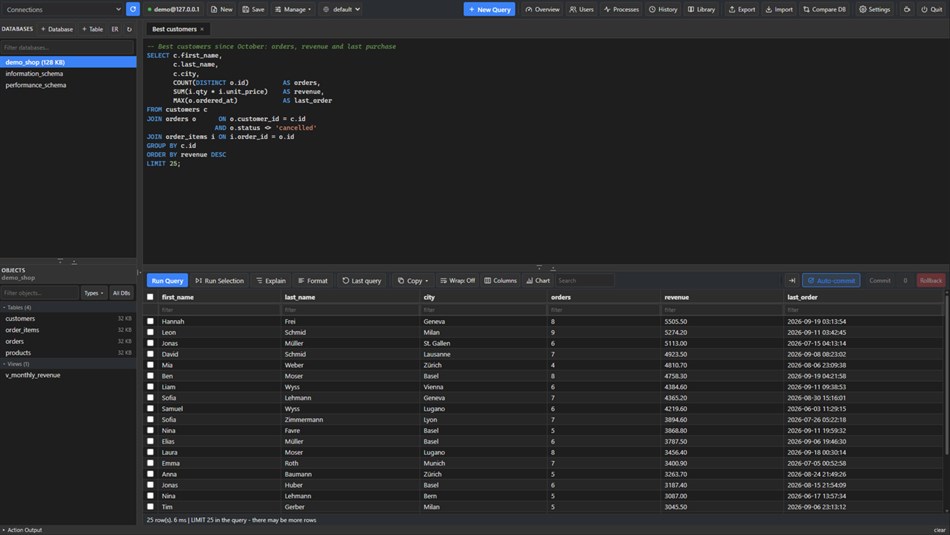
• Tabbed SQL editor with syntax highlighting and autocomplete that knows your tables and aliases.
• Run the whole script, the selection, or the statement at the cursor. Procedures and multi-result scripts show each result in its own tab.
• Explain draws the query plan: full scans in red, index lookups in green.
• Find and replace, formatting, query history and a reusable query library.
RESULTS AND EDITING
• Fast result grids with filtering, sorting, and large results that load as you scroll.
• Edit inline or row by row. Changes are staged, shown as SQL, and applied in one transaction - each checked to match exactly one row.
• Follow a foreign key to the row it points to.
• Manual transactions with Commit and Rollback when auto-commit is off.
• Charts from any result.
SEE WHAT IS REALLY STORED
• Hidden characters are marked: NUL, control characters, non-breaking and zero-width spaces, BOMs, line breaks and tabs, and spaces at the start or end of a value.
• Binary values are shown as hex, with an offset/hex/ASCII view when editing.
• Read the same rows in another character set to tell text stored wrong from text read wrong.
DATABASES
• Browse tables, views, procedures, functions, triggers and events.
• Table designer, DDL editing, and routines recreated in place.
• ER diagrams with crow's-foot lines to the exact columns, exported as PNG or SVG.
• Server overview and process list.
COMPARE AND SYNC
• Compare two databases - on one server or two - and sync columns, indexes, foreign keys and CHECK constraints.
• Compare rows and copy the missing or different ones.
IMPORT AND EXPORT
• Export tables or results to CSV, SQL INSERT statements, Excel, JSON or Markdown.
• Strict CSV import in a single transaction.
• Full database export and import through the official MySQL/MariaDB command-line tools. The app uses an existing installation, or on request downloads MariaDB's official client tools and verifies them by SHA-256 before use.
USERS AND PRIVILEGES
• See each account's sign-in method, privileges and roles at a glance.
• Edit privileges as a checklist, with the GRANT and REVOKE shown before they run.
SECURE BY DEFAULT
• Read-only mode for production servers, enforced by the app for every statement, not just in the interface.
• SSH tunnels through Windows' OpenSSH client.
• TLS up to full certificate verification.
• Passwords are kept in Windows Credential Manager, never in a file.
Tested against MySQL 5.7, 8.0, 8.4 and 9.4, and MariaDB 10.2, 10.6, 10.11 and 12.3.
Free and open source (GPL-2.0-or-later).
다른 플랫폼
| NOBS SQL EditorWindows Store현재 페이지 | 무료 |
현재 이 스토어에서만 이용할 수 있습니다.
가격 내역
- 현재 가격: 무료
- 최소: 무료
- 최대: 무료
목록 (0)
0
- NOBS SQL Editor
포인트 (0)
0
순위 (0)
-

- 내 평점

댓글 (0) ¡
가장 먼저 댓글을 남겨주세요
새로운 기능
- 버전: PC
- 마지막 업데이트:
추가 정보
 https://monsama.ch
AppAgg 점수
560
AppAgg 예상 점수:
NOBS SQL Editor
개발자: monsama
560 브론즈
점수가 높을수록 대체로 AppAgg의 여러 지표에서 좋은 결과를 보인다는 뜻입니다.
기준: 인기 · 사용자 평점 · 최신성 · 할인 · 스토어 데이터 · 커뮤니티 활동
최신 AppAgg 데이터를 바탕으로 매일 다시 계산됩니다.
웹사이트용 배지:  복사됨!
복사됨!
요약
NOBS SQL Editor 단축 URL: 복사됨!- Windows Store
AppAgg에서 앱 ‘NOBS SQL Editor’의 정보를 확인할 수 있습니다. 개발자: monsama. 플랫폼: Windows. 카테고리: 개발자 도구. AppAgg 점수: 560 (브론즈). 이 앱의 AppAgg 포인트: 확인된 포인트 0, 간접 포인트 0. 이 앱이 포함된 공개 목록: 0개. 비공개 목록에 저장한 사용자: 0명. AppAgg 사용자가 아직 이 앱에 별점을 남기지 않았습니다. 확인된 포인트는 로그인한 AppAgg 사용자가 스토어로 이동한 기록을 반영합니다. 간접 포인트는 스토어 데이터를 바탕으로 합니다. 두 숫자는 공개 목록 수와 비공개 목록에 저장한 사용자 수를 나타냅니다. 이 앱의 최초 출시일은 입니다. 이 앱의 마지막 업데이트 날짜는 입니다. 이 앱은 현재 무료로 이용할 수 있습니다. 이 앱은 다음 언어를 지원합니다: English. 가격 기록을 확인하거나 앱을 목록에 추가하고 개발자를 팔로우할 수 있습니다. 이 앱의 향후 할인과 업데이트는 RSS 피드에서 확인할 수 있습니다. AppAgg는 이 앱을 호스팅하거나 배포하지 않습니다. 이 앱과 관련된 모든 상표, 로고 및 스크린샷은 각 소유자에게 귀속됩니다.
이런 앱은 어떠세요?
최근 대화
 앱LocalDub – Real-Time Game Dubbing Hello Kırtay Interactive, I am using LocalDub - Real-Time Game Dubbing. I would like to know if Hind...
  rashid game5
  앱NauticPlayer This app is absolute cinema. Honestly, it’s one of the best media players I’ve ever tried, and I’m s...
  Manuel16
  앱Screen Beings - Desktop Pet & Study Companion This is my app so I’m a little bias but as someone from the ADHD community that teaches ADHD and neu...
  Tarelle Irwin6
  앱Aadi vault good it ia a encrypter and good you my work on office
  Aditya Rai5
  앱Typing 365 | Daily Typing Trainer The best typing app ever. With Typing 365 you don’t have to force yourself for couple minutes traini...
  Ahmad Mozaffar5
  앱Zefir Calendar — Calendar in the Taskbar excelente app! Superando todas as espectativas!
  Diógenes Magnus5
  앱LockinRa LockinRa 리뷰 LockinRa는 작업 관리, 집중력 도구, AI 코칭을 하나의 데스크톱 앱으로 통합한 무료 Windows 생산성 프로그램입니다. 클라우드 동기화 없이 로컬 ...
  abhilok reddy6
  앱CN Vault I Love this app CN Vault is a user-friendly app that helps keep your passwords safe and secure. If y...
  Marjuk Amin5
