
บุ๊กมาร์ก
| ผู้พัฒนา: | jaidev gilla (12) | ||
| ราคา: | ฟรี | ||
| คะแนน: | 1,250 ทอง | ||
| การจัดอันดับ: | 0 | ||
| ความคิดเห็น: | 0 โพสต์ความคิดเห็น | ||
| รายการ: | 0 0 | ||
| แต้ม: | 0 | ||
| +1 แต้ม | |||
สรุป
มาทำความรู้จัก Oracle Linux 9 แอปในหมวด “เครื่องมือสำหรับนักพัฒนา” จาก jaidev gilla
ออกเมื่อ ไม่ใช่ของใหม่แล้ว แต่ก็ยังไม่ถึงขั้นตัวเก๋า
ฟรี ไม่มีโฆษณา ไม่มีการซื้อภายในแอป มีแค่คุณกับแอป
Microsoft Store มีมาในตัว Windows อยู่แล้ว ติดตั้งได้ในไม่กี่คลิก
ผู้ใช้ 7 คนบน Windows Store ให้ 3.3 จาก 5
คะแนน AppAgg คือ 1,250 อยู่ระดับ “ทอง”
จัดเรต “EVERYONE” เหมาะกับเด็ก ๆ ด้วย
รองรับแค่ภาษาเดียว และไม่ใช่ภาษาไทย
ยังไม่มีใครบน AppAgg ให้คะแนนเลย โอกาสเป็นคนแรกอยู่ตรงนี้แล้ว
ผู้พัฒนารายนี้มีแอปอื่นบน AppAgg อีก 11 แอป ลองไปดูกัน
อยากรู้เรื่องอัปเดตและแอปใหม่ก่อนใครไหม? ติดตาม ผู้พัฒนา หรือกดติดตาม ฟีด RSS ได้เลย การแจ้งเตือนแบบพุชส่งผ่านแอป AppAgg Alerts สำหรับ Android และ iOS
แพลตฟอร์มอื่น 0
ประวัติราคา 0
- ราคาปัจจุบัน: ฟรี
- ต่ำสุด: ฟรี
- สูงสุด: ฟรี
ฟีดของคุณเองบนหน้าแรก
ภาพหน้าจอ 2
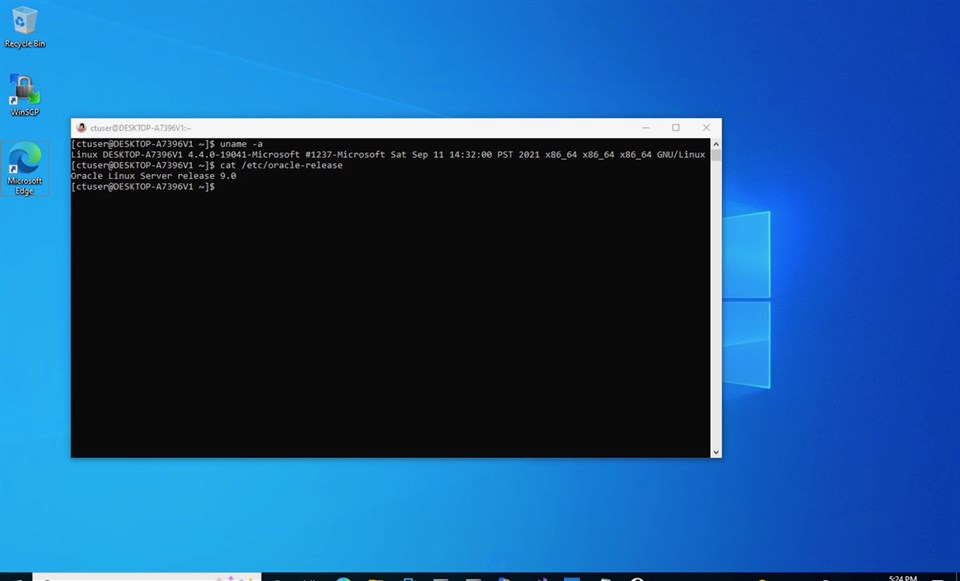
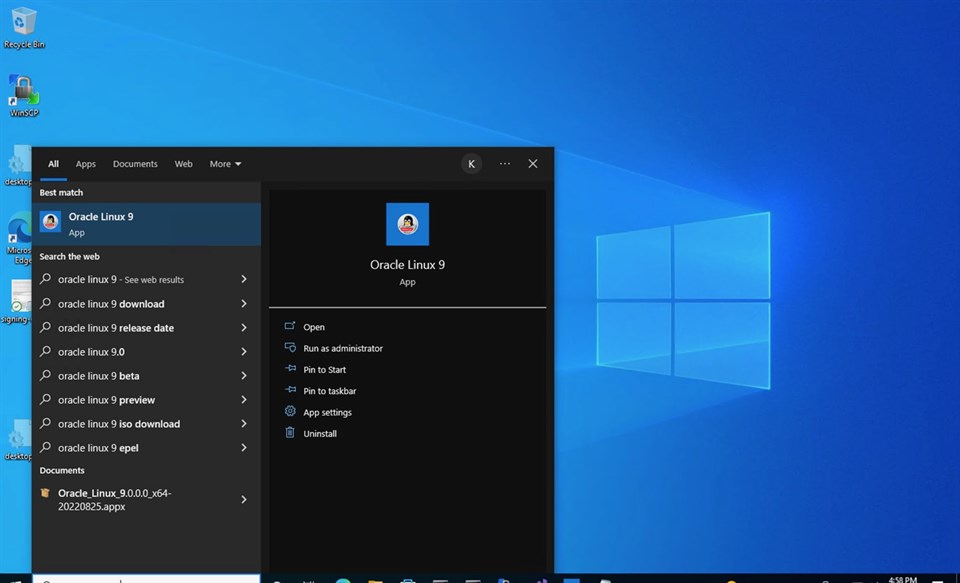
คำอธิบาย

For application developers who want to run Linux software on a Windows environment, and use Windows apps and Linux tools on the same set of files, Oracle Linux is an ideal choice. Oracle Linux is easy to download and completely free to use, distribute, and update.
With Oracle Linux you can standardize on an open, hardware-neutral infrastructure with nonrestrictive contracts and flexible enterprise-class support options. Oracle Linux Support offers access to award-winning Oracle support resources and Linux support specialists, at a low cost.
This app installs Oracle Linux 9 for the Windows Subsystem for Linux (WSL) on Windows. Launch this app by typing “oraclelinux9” on the command prompt, or by clicking the Oracle Linux 9 tile in the Windows 10 Start Menu. To install Oracle Linux updates, please run a yum update in the Oracle Linux Terminal.
Windows System Installation Prerequisites
Please note: WSL is not supported by Windows 10 in "S Mode."
Windows 10 - Build 19041.0 or higher
To find the version and build number, right-click Start and select Settings > System > About. Your OS build is under Windows Specification.
WSL must be enabled as a Windows Feature:
1. In the Search box on the Windows 10 task bar, type “Turn Windows features on or off”
2. Select the "Windows Subsystem for Linux" checkbox in the newly opened Windows Features window.
3. Reboot
Alternatively:
1. Run Windows PowerShell as an administrator and enter the following as a single command:
Enable-WindowsOptionalFeature -Online -FeatureName Microsoft-Windows-Subsystem-Linux
2. Reboot
Download Oracle Linux 9 for the Windows Subsystem for Linux (WSL) on Windows from the Windows App Store.
• Follow the directions to set up Oracle Linux.
To run Oracle Linux 9
Launch the app by typing “oraclelinux9” on the command prompt, or by clicking Oracle Linux 9 in the Windows 10 Start Menu.
To Update Oracle Linux 9
To install Oracle Linux updates, run a yum update in the Oracle Linux Terminal.
• sudo yum update
จากนักพัฒนา
รายการ 0
-
 Oracle Linux 9
แต้ม 0
-

- +1 แต้ม

การจัดอันดับ 0
-
- คะแนนของคุณ
ผู้พัฒนา 12
- jaidev gilla
- ผู้ติดตาม: 0
- แพลตฟอร์ม: Windows แอป (12)
- ลดราคา: 0
- รายการ: 0 0
- แต้ม: 0
- การจัดอันดับ: 0
- ความคิดเห็น: 0
- วิดีโอ: 0
- RSS: ติดตาม
มีอะไรใหม่
- เวอร์ชัน: PC
- อัปเดตล่าสุด:
ข้อมูลเพิ่มเติม
- วันที่วางจำหน่าย:
- หมวดหมู่:
แอปสำหรับ Windows›เครื่องมือสำหรับนักพัฒนา - ระบบปฏิบัติการ:
PC - ขนาด:
109 Mb - ภาษาที่รองรับ:
อังกฤษ - การจัดประเภทเนื้อหา:
EVERYONE - Windows Store คะแนน: ¡
3.3(7) - เว็บไซต์:
 https://www.oracle.com/linux/index.html
คะแนน AppAgg
คะแนน AppAgg โดยประมาณของ
Oracle Linux 9
ผู้พัฒนา: jaidev gilla
คะแนนที่สูงขึ้นมักสะท้อนตัวชี้วัดที่ดีกว่าบน AppAgg
อิงจาก: ความนิยม · คะแนนจากผู้ใช้ · ความสดใหม่ · ดีล · ข้อมูลร้านค้า · กิจกรรมชุมชน
คำนวณใหม่ทุกวันจากข้อมูล AppAgg ล่าสุด
ความคิดเห็น 0 ¡
แชร์
Oracle Linux 9 URL แบบสั้น: คัดลอกแล้ว!- Windows Store

