
Favoritos
| Desenvolvedor: | Harmanpreet singh (3) | ||
| Preço: | Grátis | ||
| Pontuação: | 590 Bronze | ||
| Classificações: | 0 | ||
| Comentários: | 0 Postar comentário | ||
| Listas: | 0 0 | ||
| Pontos: | 0 | ||
| +1 Ponto | |||
Resumo
Conheça PingRoute, um app da categoria “Ferramentas de desenvolvedor” feito por Harmanpreet singh.
Lançado . Já não é novidade, mas ainda não é veterano.
Grátis, sem anúncios, sem compras no app. Só você e o app.
A Microsoft Store já vem integrada ao Windows, então instala em dois cliques.
A Pontuação AppAgg é 590. Por enquanto Bronze, mas com muito espaço para crescer.
Só 14 megabytes, cabe até num disco lotado.
Classificação indicativa “EVERYONE”: serve para crianças também.
Fala só um idioma, e não é português.
Já usou? Sua avaliação seria a primeira aqui.
O desenvolvedor tem mais 2 apps no AppAgg. Vale dar uma olhada.
Quer saber das atualizações e dos apps novos antes de todo mundo? Siga o desenvolvedor ou assine o feed RSS. As notificações push chegam pelo app AppAgg Alerts para Android e iOS.
Capturas de tela 3
Outras plataformas 0
Histórico de preços 0
- Preço atual: Grátis
- Mínimo: Grátis
- Máximo: Grátis
Seu próprio feed na página inicial
Descrição

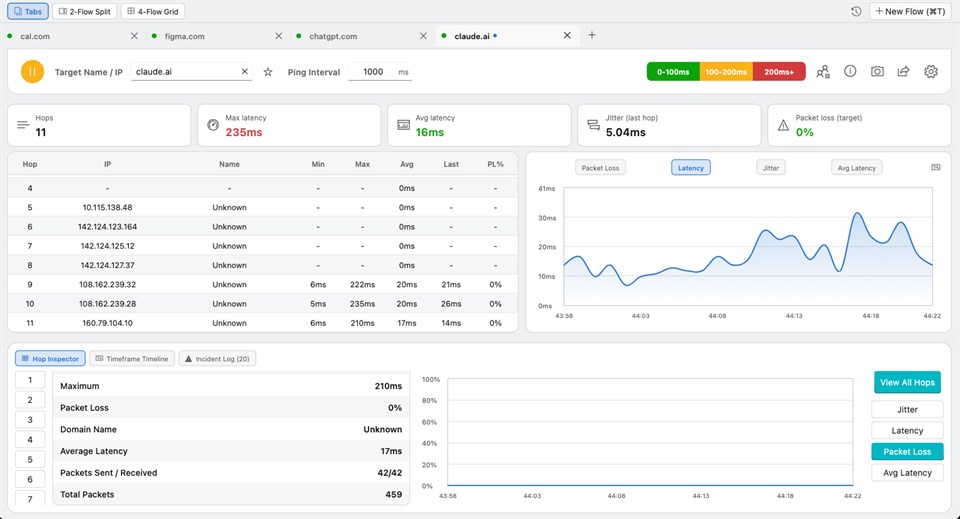
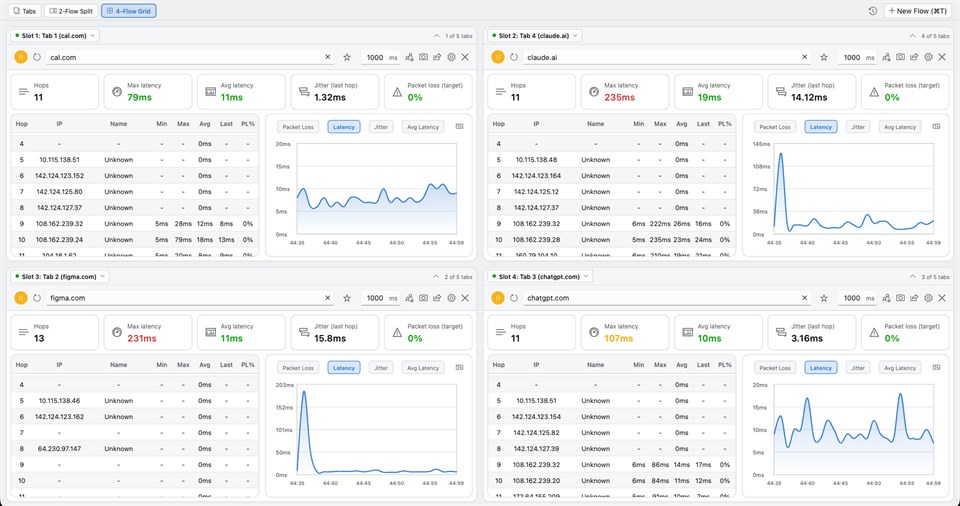
Unlike traditional command-line traceroute or single-target ping utilities, PingRoute combines continuous MTR-style route tracing with a modern, multi-flow visual interface. Probe multiple destinations simultaneously across dedicated flow tabs, analyze comparative latency side-by-side in 2-Flow Split or 4-Flow Grid matrices, and pinpoint intermittent latency spikes, route flapping, and packet loss with per-hop precision.
PingRoute features a comprehensive telemetry toolkit: an interactive hop data table with smart IPv4 octet sorting and context menus, animated real-time graphs (latency, jitter, packet loss %, and moving averages), an interactive Timeframe Timeline with historical scrubber, and an anomaly incident log that flags packet drops and latency spikes automatically.
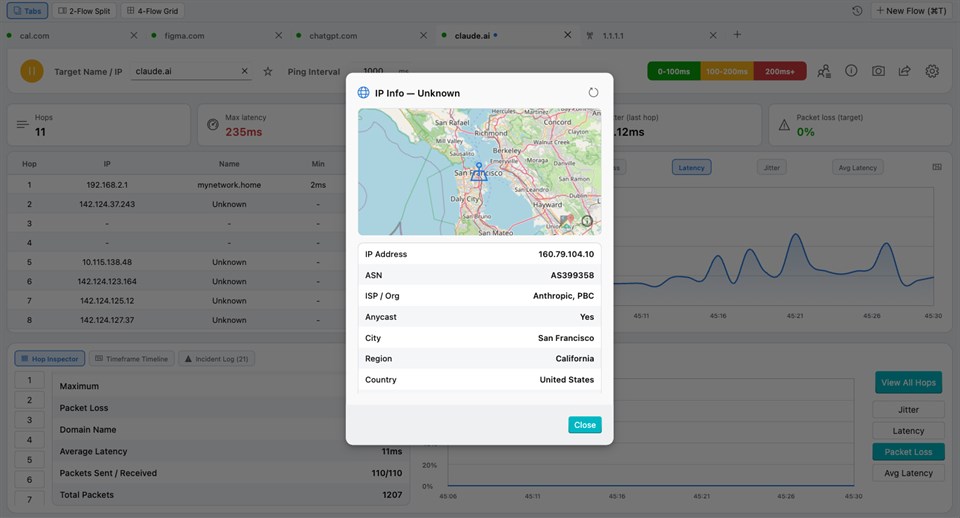
With integrated IP Geolocation and interactive OpenStreetMap route visualization, you can track the physical path of your packets across ASNs and global networks. Save point-in-time Session Snapshots to inspect historical network states, run one-click System Network Diagnostics, and export telemetry seamlessly to MTR ASCII, CSV, JSON, or Markdown.
Whether troubleshooting home Wi-Fi bottlenecks, analyzing enterprise WAN paths, or diagnosing CDN routing, PingRoute delivers total network transparency in an elegant, responsive Fluent UI desktop and mobile experience.
🚀 Updated Product Features
🔀 Multi-Flow & Multi-Pane Monitoring
Concurrent Multi-Target Probing: Run multiple independent traceroute and ping telemetry sessions simultaneously across tabs.
Multi-Pane Split & Grid Views: Compare routes side-by-side in Single Tab, 2-Flow Split View, or a 4-Flow Grid Matrix (2x2) with arbitrary flow-to-slot assignment.
Flow Management: Quickly open (Ctrl/Cmd+T), switch (Ctrl/Cmd+1–9), duplicate, rename, or pause flows on demand.
📊 Continuous MTR Route Tracing & Deep Hop Telemetry
Per-Hop Real-Time Metrics: Live tracking of Min, Max, Avg, Last latency, Packet Loss % (PL%), and Cumulative Jitter for every intermediate hop.
Smart Octet Sorting: Sort tables naturally by IPv4 address octets, hop number, DNS hostname, or any latency/loss metric.
Actionable Hop Context Menus: Right-click any hop to copy IPs, save to Target Directory, or spawn a dedicated child probe directly targeting that intermediate node.
📈 Interactive Visualizations & Timeline Time-Travel
Real-Time Telemetry Graphs: Animated live charts for Latency (ms), Packet Loss (%), Jitter (ms), and Moving Averages.
Historical Timeframe Timeline: Scrub through past telemetry with time presets (30s, 1m, 2m, 5m, All) to inspect historical dips and spikes.
Automated Anomaly Incident Log: Automatic detection and chronological logging of packet loss events, latency spikes, and route changes with exact timestamps.
🗺️ IP Geolocation & Interactive Route Map
ASN & Geolocation Intelligence: Automatic lookup of City, Region, Country, Autonomous System Number (ASN), and ISP Organization for all public hops.
Interactive Map Visualization: Visualize the geographic path of your network route hop-by-hop on an OpenStreetMap canvas.
📁 Target Directory & Session Snapshots
Target Directory & Favorites: Bookmark frequently diagnosed servers, gateways, and domains with custom labels, favorite pins, ping counters, and last-tested timestamps.
LIFO Recent History: Quick-access dropdown for instant re-testing of recent targets.
Session Snapshots: Save, name, and reload full telemetry snapshots (including hop metrics, anomaly logs, and timeline buffers) for retrospective root-cause analysis.
🛠️ System Network Diagnostics & Multi-Format Export
One-Click System Audit: Instant inspection of local network interfaces (IPv4/IPv6), default gateway, DNS servers, public IP, ISP/ASN, and geographic egress.
Universal Telemetry Exporting: Export reports in MTR ASCII Table, CSV, Structured JSON, or Markdown formats for reports, spreadsheets, and automated CI/CD pipelines.
🎨 Modern, Fluent & Responsive Experience
Adaptive Multi-Platform Layout: Seamless responsive scaling from 4K multi-monitor desktop setups to tablets and mobile layouts (MobileShell with bottom navigation).
Fluent Design & Customization: Light, Dark, and System theme modes with custom accent colors, UI scaling adjustments, and full keyboard shortcut navigation.
100% Local & Private: All probing and analysis runs locally on your machine with zero cloud telemetry or tracking.
Do desenvolvedor
Desenvolvedor
- Harmanpreet Singh
- Seguidores: 0
- Plataformas: iOS Apps (2) Windows Apps (1)
- Promoções: 0
- Listas: 0 0
- Pontos: 0
- Classificações: 0
- Comentários: 0
- Vídeos: 0
- RSS: Assinar
Listas 0
-
 PingRoute
Pontos 0
-

- +1 Ponto

Classificações 0
-
- Sua nota
Novidades
- Versão: PC
- Última atualização:
Informações adicionais
- Data de lançamento:
- Categoria:
Aplicativos para Windows›Ferramentas de desenvolvedor - Sistemas operacionais:
PC - Tamanho:
14 Mb - Idiomas disponíveis:
Inglês - Classificação indicativa:
EVERYONE - Windows Store Nota: ¡
0
 https://harman.vercel.app/
Comentários 0 ¡
Pontuação AppAgg
Pontuação AppAgg estimada de
PingRoute
Desenvolvedor: Harmanpreet singh
Uma pontuação mais alta geralmente reflete resultados melhores nos indicadores do AppAgg.
Com base em: popularidade · avaliações dos usuários · atualidade · ofertas · dados das lojas · atividade da comunidade
Recalculado diariamente com dados AppAgg atualizados.
PingRoute URL curta: Copiado!- Windows Store

