
Yer imleri
| Geliştirici: | PocketCmd (2) | ||
| Fiyat: | * Ücretsiz Yeni | ||
| Skor: | 1.480 Altın | ||
| Sıralamalar: | 0 | ||
| Yorumlar: | 0 Yorum gönder | ||
| Listeler: | 0 0 | ||
| Puanlar: | 0 | ||
| +1 Puan | |||
Özet
PocketCmd: SSH Client & SFTP, PocketCmd imzalı, Geliştirici araçları kategorisinde bir uygulama.
Yeni çıktı. yayınlandı, yani ilk deneyenlerden birisin.
Google Play üzerinde de var. Hangisi sana uygunsa onu seç.
Giriş bedava, ama içerideki dükkân açık.
Microsoft Store, Windows’a yerleşik. Birkaç tıkla kuruluyor.
AppAgg skoru 1.480. Bu, Altın seviyesi.
Sadece 26 megabayt, dolu bir diske bile sığar.
Yaş sınırı “EVERYONE”, yani çocuklar için de uygun.
Tek bir dil konuşuyor, o da Türkçe değil.
Kullandın mı? Buradaki ilk değerlendirme senden gelebilir.
Geliştiricinin AppAgg’de 1 uygulaması daha var. Bir göz at.
Güncellemeleri ve yeni uygulamaları ilk sen mi duymak istiyorsun? Hemen geliştiriciyi takip et ya da RSS akışı ile haberdar ol. Push bildirimleri Android ve iOS için AppAgg Alerts uygulamasıyla gelir.
Diğer platformlar 1
 | PocketCmd: SSH Client & SFTPWindows Store1K AltınWindowsUygulama içi satın almalar | Ücretsiz |
 | PocketCmd: SSH Client & SFTPGoogle Play3K GümüşAndroidUygulama içi satın almalar $4.99 – $99.99 | Ücretsiz |
Fiyat Geçmişi 0
- Güncel fiyat: Ücretsiz
- En az: Ücretsiz
- En fazla: Ücretsiz
Ana sayfada kendi akışınız
Ekran görüntüleri 8
Video 1
Açıklama
Free for one server, with no time limit. Pro removes the limits.
BUILT FOR THE DESKTOP
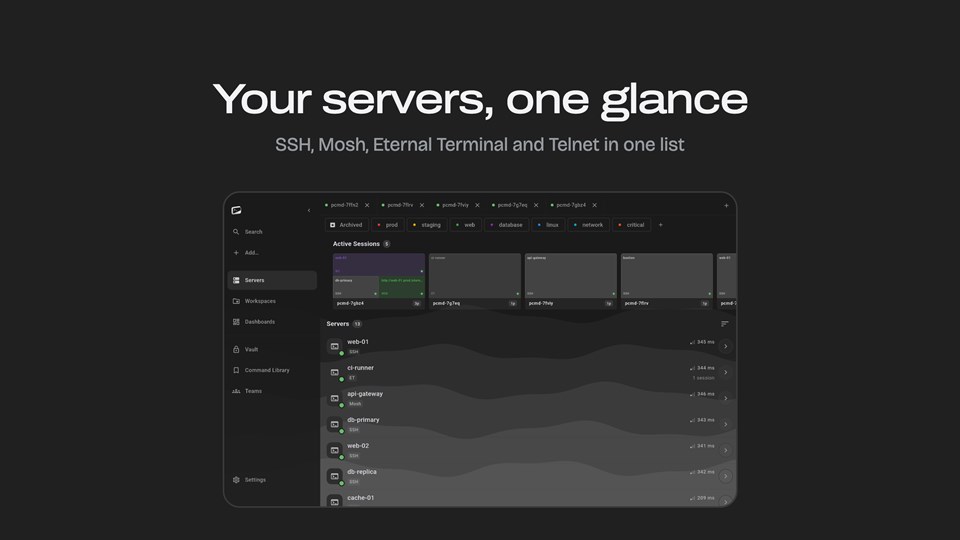
• A sidebar for your servers, session tabs, a command palette, right-click menus and drag-and-drop
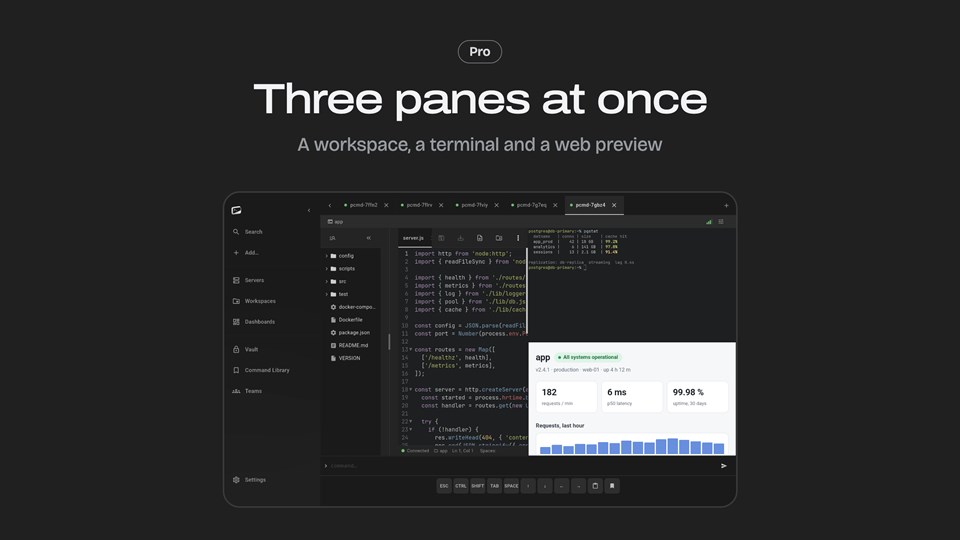
• Split the window into up to four panes, with terminals, a workspace and a web preview side by side (Pro)
• Your servers appear in File Explorer, so remote files open like local ones
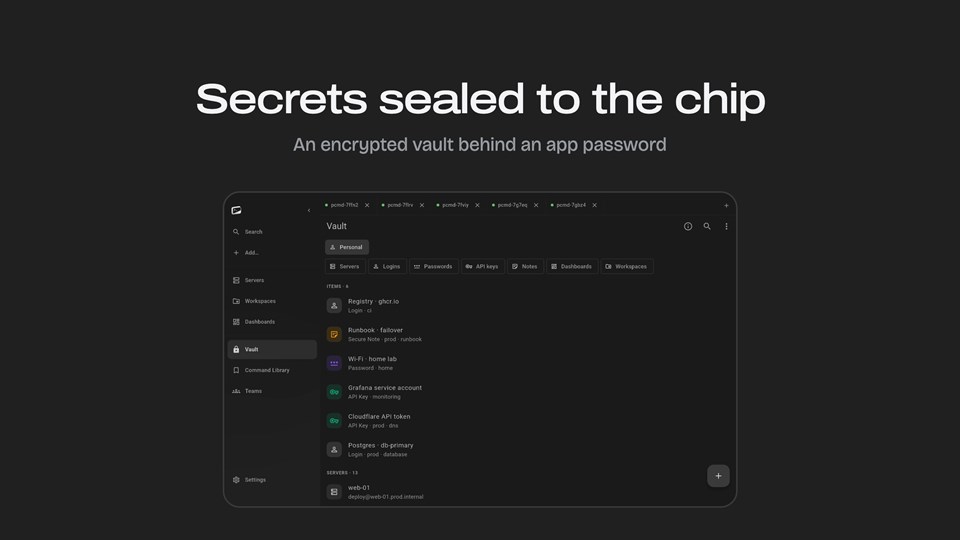
• Your vault key is sealed to the TPM 2.0 chip where your PC has one
A REAL TERMINAL
• Our own terminal renderer, written in C: libvterm parsing, FreeType and HarfBuzz, 24-bit color, 60 fps, no web view
• SSH on native libssh2 and OpenSSL, with every key format, two-factor and keyboard-interactive logins, and agent forwarding
• Mosh and Eternal Terminal: sessions survive network changes, sleep and even an app restart
• Telnet for the legacy gear that still needs it, with a warning before anything goes out unencrypted
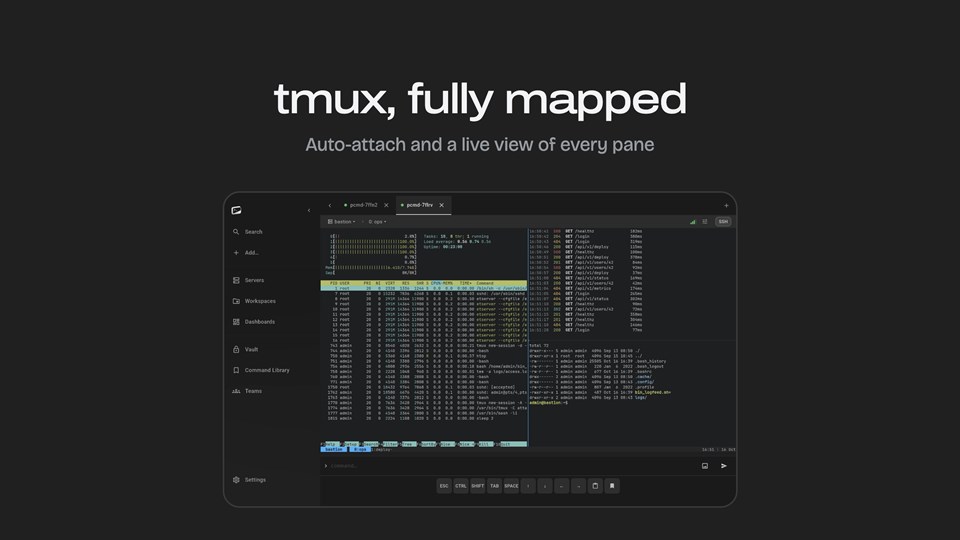
• tmux auto-attach, with a live view of every window and pane
FILES AND WORKSPACES
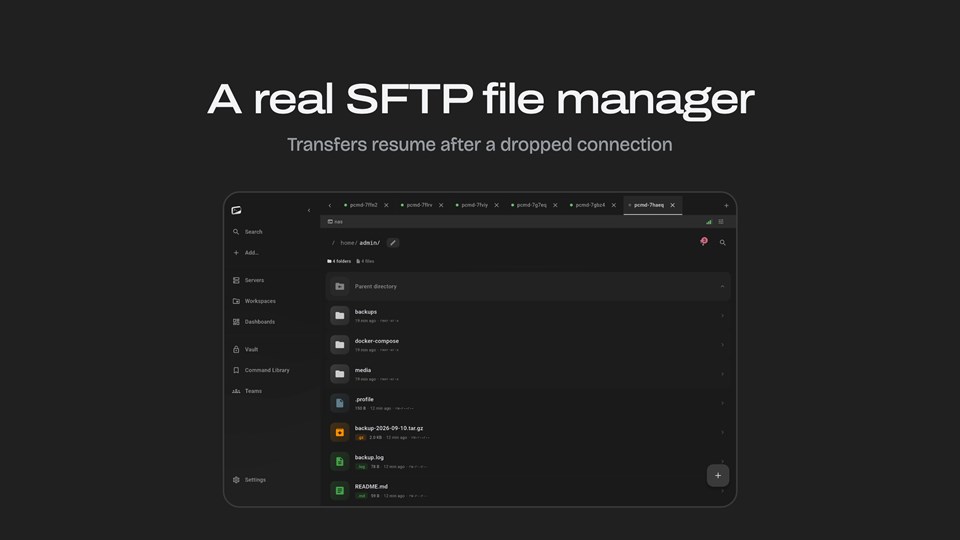
• A full SFTP file manager with permissions, symlinks, search and bookmarks
• Background transfers that resume after a dropped connection, verified with SHA-256
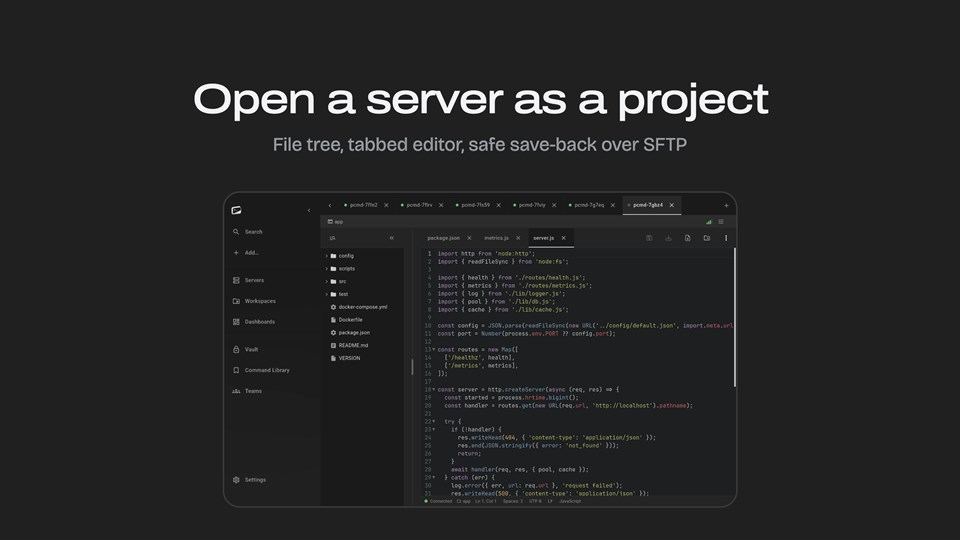
• Open a server folder as a workspace: file tree, tabbed code editor with syntax highlighting, folding, find and replace, a diff viewer, quick-open and search that runs on the server
• Saving checks for remote changes first, and unsaved edits are kept encrypted, never as plain text on disk
MONITORING WITHOUT AN AGENT
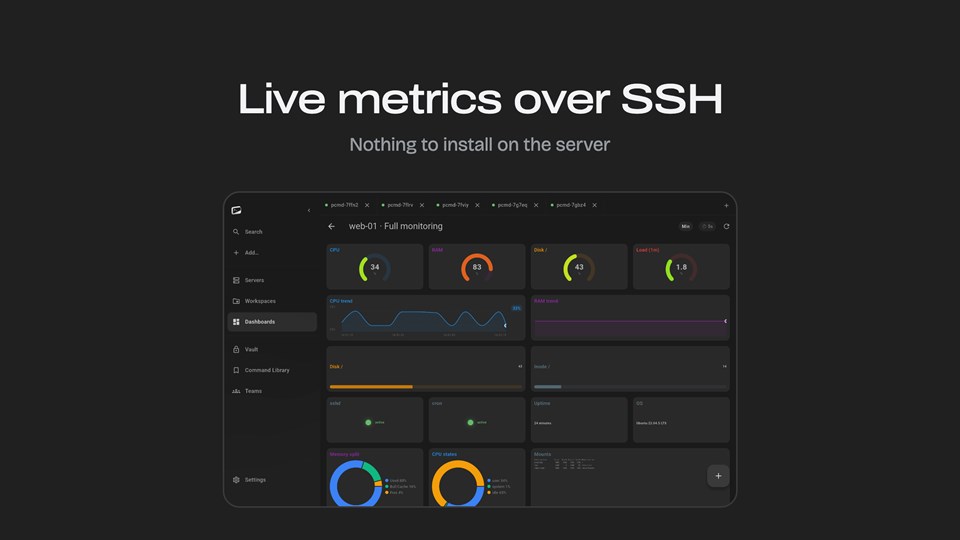
• Dashboards of live metrics over the SSH connection you already have: gauges, sparklines, bars, donuts and status cards
• Nothing to install on the server
• Threshold alerts pushed to your phone by your own self-hosted server (Pro)
SECURITY THAT IS NOT OPTIONAL
• An app password is always required, stretched with Argon2id
• Host keys are pinned on first connect and checked every time after
• An encrypted vault for passwords, key passphrases, API tokens and notes
• Generate SSH keys in the app, or import your SSH config and keys from files
ALSO IN THE BOX
• Port forwarding: local, remote and SOCKS5
• Snippets, command templates and a curated command library
• A web preview with developer tools for what your server is serving
• Encrypted backup and restore
OPTIONAL: YOUR OWN SERVER
PocketCmd connects to any SSH server as it is. If you want more, pair the optional companion server, a single open-source Go binary you host yourself, for zero-knowledge sync between your devices, teams with roles and shared vaults, and always-on alerts (Pro). Everything is encrypted on your PC before it leaves, so the server stores data it cannot read.
FREE AND PRO
Free: one saved server, one group, one dashboard and one workspace, with all four protocols, SFTP, tmux, port forwarding, the vault and every security feature. No account, no time limit.
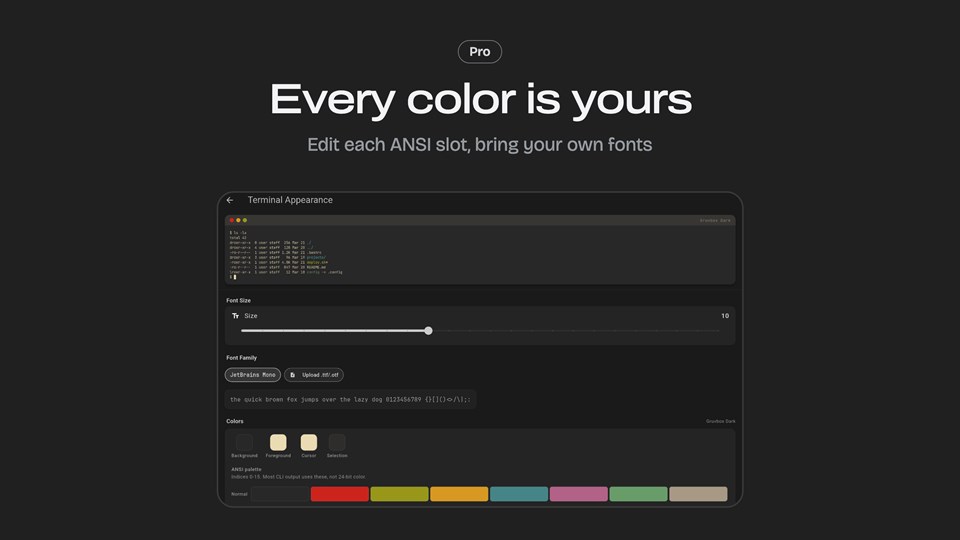
Pro: unlimited servers, groups, dashboards and workspaces, split panes, multi-hop SSH through jump hosts, every theme with the theme editors and custom fonts, protocol switching mid-session, sync, alerts and teams. Pro is an in-app purchase through Paddle: a monthly or yearly subscription, or a one-time lifetime license while those are available, from US$5 to US$149 depending on the plan (local prices vary). One license covers up to three of your devices, on Windows, Mac, Linux, iPhone, iPad and Android. If a subscription ends, nothing is deleted.
PRIVACY
Your PC connects directly to your servers. There is no PocketCmd account, no relay in between, no analytics and no ads.
Geliştiriciden
Listeler 0
-
 PocketCmd: SSH Client & SFTP
Puanlar 0
-

- +1 Puan

Sıralamalar 0
-
- Puanınız
Geliştirici 2
- PocketCmd
- Takipçiler: 0
- Platformlar: Android Uygulamalar (1) Windows Uygulamalar (1)
- İndirimler: 0
- Listeler: 0 0
- Puanlar: 0
- Sıralamalar: 0
- Yorumlar: 0
- Video: 1
- RSS: Abone ol
Yenilikler
- Sürüm: PC
- Son güncelleme:
Ek Bilgi
- Çıkış tarihi:
- Kategori:
Windows uygulamaları›Geliştirici araçları - İşletim Sistemleri:
PC - Boyut:
26 Mb - Desteklenen diller:
İngilizce - İçerik Derecelendirmesi:
EVERYONE - Windows Store Puan: ¡
0 - Web sitesi:
 https://pocketcmd.com
AppAgg Skoru
Tahmini AppAgg skoru:
PocketCmd: SSH Client & SFTP
Geliştirici: PocketCmd
Daha yüksek skorlar genellikle AppAgg’deki göstergelerin daha güçlü olduğunu belirtir.
Şunlara göre: popülerlik · kullanıcı puanları · güncellik · fırsatlar · mağaza verileri · topluluk etkinliği
Güncel AppAgg verileriyle her gün yeniden hesaplanır.
Yorumlar 0 ¡
Paylaş
PocketCmd: SSH Client & SFTP Kısa URL: Kopyalandı!- Windows Store

