
บุ๊กมาร์ก
| ผู้พัฒนา: | TriptoAfsin (5) | ||
| ราคา: | ฟรี ใหม่ | ||
| คะแนน: | 570 บรอนซ์ | ||
| การจัดอันดับ: | 0 | ||
| ความคิดเห็น: | 0 โพสต์ความคิดเห็น | ||
| รายการ: | 0 0 | ||
| แต้ม: | 0 | ||
| +1 แต้ม | |||
สรุป
Porter App เป็นแอปในหมวด “เครื่องมือสำหรับนักพัฒนา” จาก TriptoAfsin
มาใหม่ ออกเมื่อ คุณได้เป็นหนึ่งในคนกลุ่มแรก
ฟรี ไม่มีโฆษณา ไม่มีการซื้อภายในแอป มีแค่คุณกับแอป
Microsoft Store มีมาในตัว Windows อยู่แล้ว ติดตั้งได้ในไม่กี่คลิก
คะแนน AppAgg คือ 570 ตอนนี้อยู่ระดับ “บรอนซ์” ยังไปได้อีกไกล
แค่ 4 เมกะไบต์ ต่อให้ไดรฟ์เต็มก็ยังลงได้
จัดเรต “EVERYONE” เหมาะกับเด็ก ๆ ด้วย
รองรับแค่ภาษาเดียว และไม่ใช่ภาษาไทย
ตอนนี้ที่นี่ยังเงียบกริบ ไม่มีคะแนน ไม่มีความคิดเห็น มาทำลายความเงียบกันเถอะ
ผู้พัฒนารายนี้มีแอปอื่นบน AppAgg อีก 4 แอป ลองไปดูกัน
อยากรู้เรื่องอัปเดตและแอปใหม่ก่อนใครไหม? ติดตาม ผู้พัฒนา หรือกดติดตาม ฟีด RSS ได้เลย การแจ้งเตือนแบบพุชส่งผ่านแอป AppAgg Alerts สำหรับ Android และ iOS
ภาพหน้าจอ 2
แพลตฟอร์มอื่น 0
ประวัติราคา 0
- ราคาปัจจุบัน: ฟรี
- ต่ำสุด: ฟรี
- สูงสุด: ฟรี
ฟีดของคุณเองบนหน้าแรก
คำอธิบาย

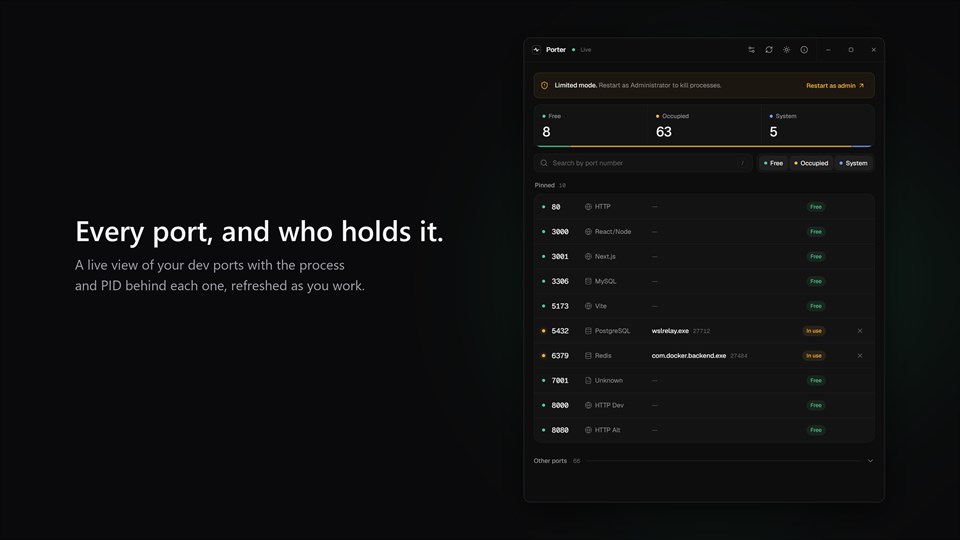
Built for developers who keep hitting "port 3000 is already in use".
WHAT YOU SEE
• Your pinned ports at the top, such as 3000, 5173, 5432 and 8080, with Free, In use or System beside each one
• The process name and PID behind every port that's taken
• Every other listening port on the machine, sorted by port, process or status
• A By app view that groups ports under the program that opened them
• Totals for free, occupied and system ports, updated live
WHAT YOU CAN DO
• End the process holding a port, straight from its row
• Pin the ports you care about. They stay on top, running or not
• Press / to search by port number or process name
• Filter to Free, In use or System ports
• Optionally list outgoing connections as well as listening ports
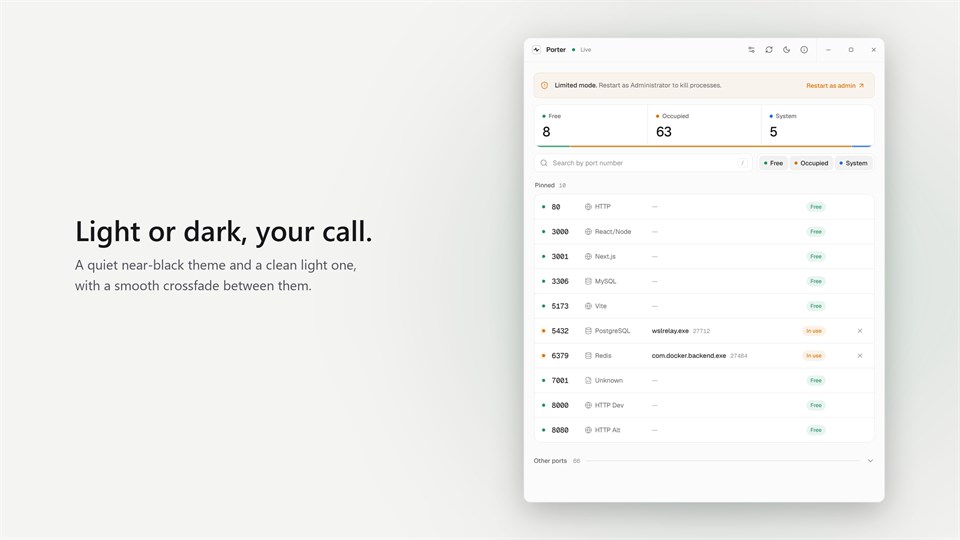
• Pick one of four interface sizes (Ctrl + / Ctrl −), and a light or dark theme
ADMIN RIGHTS
Porter runs without admin rights and shows every port. Ending a process that belongs to Windows or another user needs administrator rights. Click "Restart as admin" in the app, or right-click Porter in the Start menu and choose "Run as administrator".
PRIVATE BY DESIGN
No account, no ads, no analytics, no telemetry. Porter reads your port table on your PC and nothing leaves it. The Store version makes no network requests at all, since the Store handles its updates.
Free and open source under the MIT licence: github.com/t21dev/porter-app
จากนักพัฒนา
รายการ 0
-
 Porter App
แต้ม 0
-

- +1 แต้ม

การจัดอันดับ 0
-
- คะแนนของคุณ
ผู้พัฒนา 5
- TriptoAfsin
- ผู้ติดตาม: 0
- แพลตฟอร์ม: Windows แอป (5)
- ลดราคา: 0
- รายการ: 0 0
- แต้ม: 0
- การจัดอันดับ: 0
- ความคิดเห็น: 0
- วิดีโอ: 0
- RSS: ติดตาม
มีอะไรใหม่
- เวอร์ชัน: PC
- อัปเดตล่าสุด:
- First release on the Microsoft Store.
• Updates now arrive through the Store
• Starts on PCs without the Visual C++ runtime installed
ข้อมูลเพิ่มเติม
- วันที่วางจำหน่าย:
- หมวดหมู่:
แอปสำหรับ Windows›เครื่องมือสำหรับนักพัฒนา - ระบบปฏิบัติการ:
PC - ขนาด:
4 Mb - ภาษาที่รองรับ:
อังกฤษ - การจัดประเภทเนื้อหา:
EVERYONE - Windows Store คะแนน: ¡
0 - เว็บไซต์:
 https://porter.t21.dev
คะแนน AppAgg
คะแนน AppAgg โดยประมาณของ
Porter App
ผู้พัฒนา: TriptoAfsin
คะแนนที่สูงขึ้นมักสะท้อนตัวชี้วัดที่ดีกว่าบน AppAgg
อิงจาก: ความนิยม · คะแนนจากผู้ใช้ · ความสดใหม่ · ดีล · ข้อมูลร้านค้า · กิจกรรมชุมชน
คำนวณใหม่ทุกวันจากข้อมูล AppAgg ล่าสุด
ความคิดเห็น 0 ¡
แชร์
Porter App URL แบบสั้น: คัดลอกแล้ว!- Windows Store

