
書籤
為此書籤設定標題。
書籤已儲存
摘要
來認識一下 Posemark,whyun 打造的應用程式,歸在「開發人員工具」分類。
新上架:推出,你是第一批使用者。
免費,沒有廣告,也沒有內購。只有你和這個 App。
Microsoft Store 內建在 Windows 裡,點幾下就裝好了。
AppAgg 評分 1,010。白銀級,已經相當不錯了。
年齡分級為「EVERYONE」,小朋友也適合。
支援 2 種語言,中文也在其中。
用過嗎?你的評價會是這裡的頭香。
這位開發者在 AppAgg 上還有 2 款 App,值得逛逛。
想搶先知道更新和新應用程式?追蹤開發者或訂閱RSS 訂閱來源。推播通知會透過 AppAgg Alerts App 傳送,支援 Android 和 iOS。
廣告
其他平台 0
價格紀錄 0
- 目前價格: 免費
- 最小值: 免費
- 最大值: 免費
首頁專屬動態
為「最新與更新」選擇平台,首頁就只會顯示你需要的 App 和遊戲。
螢幕擷取畫面 6
描述

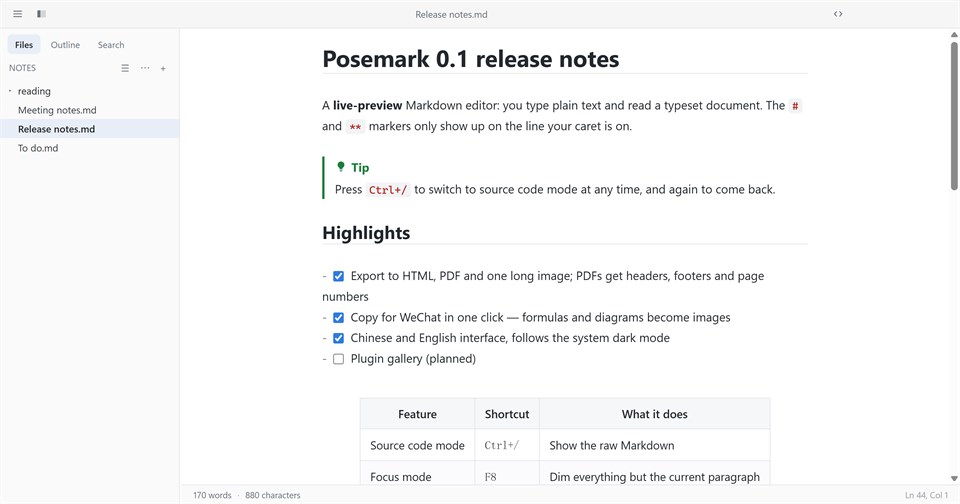
Live preview editing
- Headings, lists, quotes, task lists with clickable checkboxes, horizontal rules, bold, italic, strikethrough, highlight, subscript and superscript.
- GFM tables open as an editable grid when you click into them. Tab and Shift+Tab walk the cells, Enter moves down a row, and a right-click menu inserts or deletes rows and columns and sets alignment. Every keystroke is written back to the Markdown source.
- Fenced code blocks are syntax-highlighted, with optional line numbers and soft wrap, and stay highlighted while you edit them.
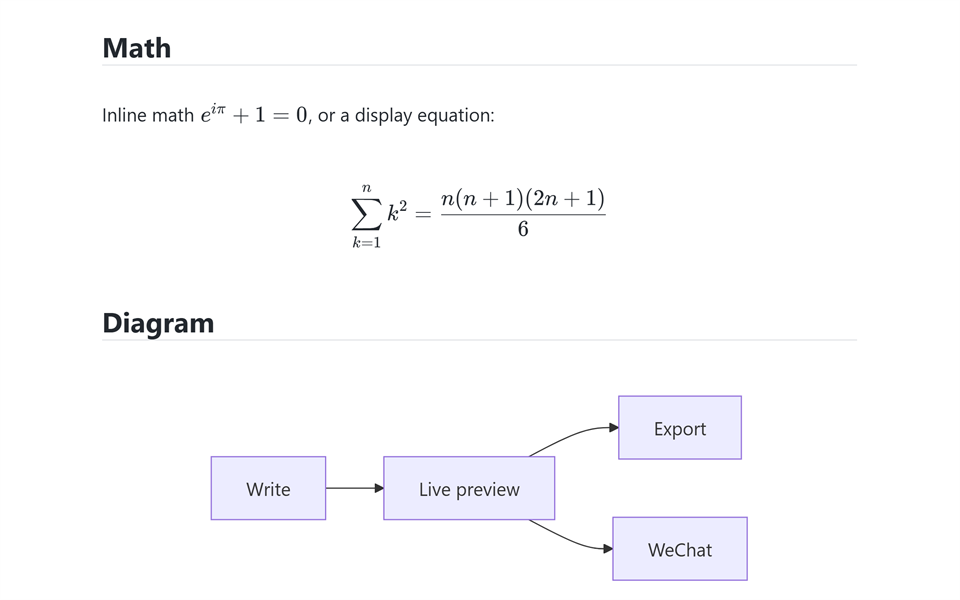
- Inline and block math with KaTeX, including mhchem chemistry, a subset of the physics package, equation numbering and \label / \ref cross-references. A math block opens as a field with the rendered formula updating underneath.
- Mermaid diagrams, plus sequence and flow diagram syntaxes, render in place and follow the editor theme. Right-click a diagram to save it as SVG or PNG.
- GitHub-style alerts, footnotes, a clickable [TOC] block, emoji shortcodes with autocomplete, reference-style links and YAML front matter.
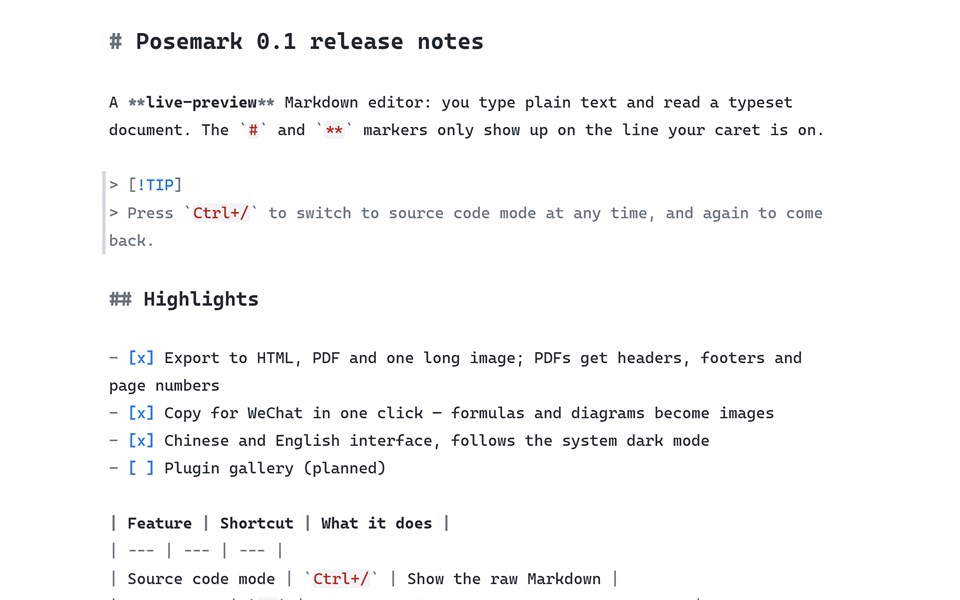
- Source code mode shows the raw Markdown with syntax highlighting.
Images
- Drop or paste an image and it is copied into the document's image folder (assets/ by default) and linked for you. Video and audio files become players.
- Click an image to resize it with a drag handle; the size is written into the Markdown.
- A right-click menu opens, reveals, copies, zooms, moves or deletes images, and can download a remote image into the image folder.
- Optional uploading through PicGo-Core, PicList or your own command, if you set one up.
Writing comfort
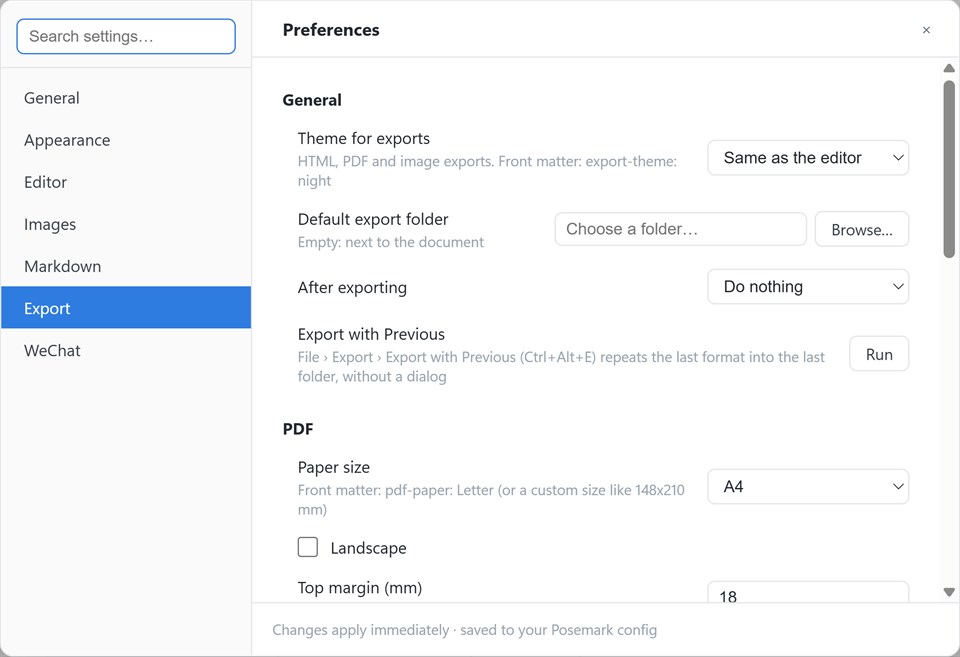
- Smart typography, auto-pairing of brackets and Markdown markers, and smart paste that turns rich text from web pages or Word into Markdown.
- Find and replace with regular expressions, jump to line, focus mode, typewriter mode, zoom and full screen.
- Word count with characters, lines, paragraphs and reading time.
Workspace
- Open a folder and work from a file tree: new file, new folder, rename, duplicate, drag-and-drop move, move to the Recycle Bin, and undo of the last file operation.
- Quick open, recent files, pinned folders, a flat file list view and search across the whole folder.
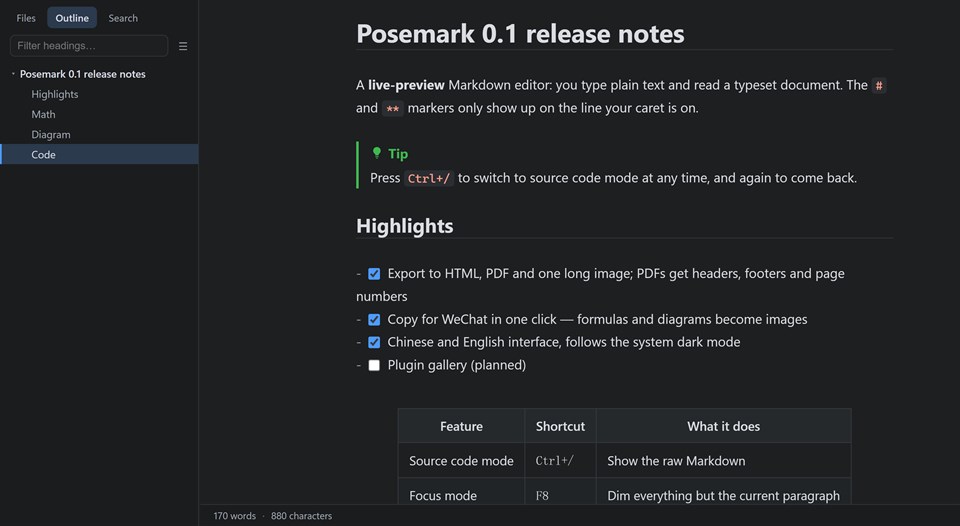
- An outline panel with folding and filtering.
- Changes made to the folder by other programs show up automatically.
- Multiple windows, one document per window, and automatic save if you want it.
- Unsaved edits are backed up as drafts so a crash or a forced shutdown loses nothing; recover them from the File menu.
- Command line: after installation the posemark command opens files or folders from a terminal and exports Markdown to HTML, PDF or PNG in batch.
Output
- Export to self-contained HTML or to PDF, with headers, footers and page numbers for PDF.
- Copy as HTML or as Markdown.
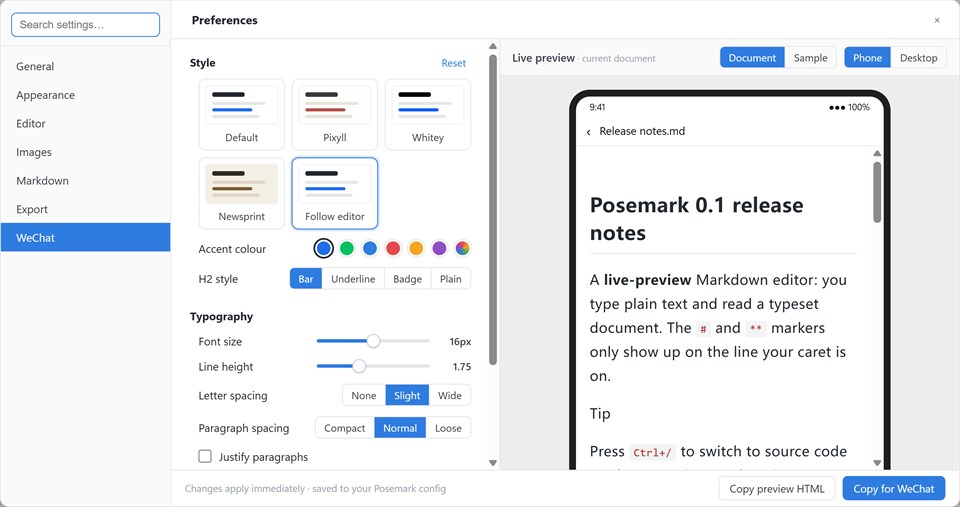
- Copy for WeChat Official Accounts: the document is rebuilt with inline styles only, with formulas and diagrams turned into images, and a live preview lets you tune the look.
Themes
- Five built-in themes (Default, Night, Pixyll, Whitey, Newsprint), automatic switching with the Windows light or dark mode, and your own CSS overrides or complete themes.
- The interface is available in English and Simplified Chinese.
Privacy
Posemark works on local files. It has no account, no ads and no telemetry. It only goes online when your document references a remote image, when you ask it to download an image, or when you use an image uploader you configured yourself.
Posemark is free and open source under the MIT license.
來自開發者
你是開發者嗎?
在頁面頂部發布消息,追蹤者會透過電子郵件收到。新增你的 YouTube 影片,它們會排在「影片」區塊最前面。
清單 0
-
 Posemark
點數 0
-

- +1 點

排名 0
-
- 您的評分
開發者 3
- whyun
- 追蹤者: 0
- 平台: Windows 應用程式 (3)
- 折扣: 0
- 清單: 0 0
- 點數: 0
- 排名: 0
- 留言: 0
- 影片: 0
- RSS: 訂閱
新功能
- 版本: PC
- 最後更新:
- Posemark 0.2.1 is a bug-fix update:
- Lists in live preview: bullets render as disc, circle and square by nesting depth, ordered lists keep their numbers, and items plus their continuation lines get a hanging indent so wrapped text lines up under the item text. The text no longer shifts when the caret line shows the raw marker.
- Bold and italic around CJK punctuation: wrapping a selection such as 「她」 in bold, italic, strikethrough or highlight now moves the markers inside the punctuation so the formatting renders correctly.
其他資訊
 https://posemark.pages.dev/
AppAgg 評分
1,010
AppAgg 預估評分:
Posemark
開發者: whyun
1,010 白銀
評分越高,通常代表其在 AppAgg 上的各項指標表現越好。
基於: 人氣 · 使用者評分 · 新鮮度 · 優惠 · 商店資料 · 社群活躍度
根據最新 AppAgg 資料每日重新計算。
網站徽章:  已複製!
留言 0 ¡
搶先留下第一則留言
分享
Posemark 短網址: 已複製!- Windows Store

