
已儲存
選擇要顯示在你的已儲存選單中的名稱。
完成!
描述

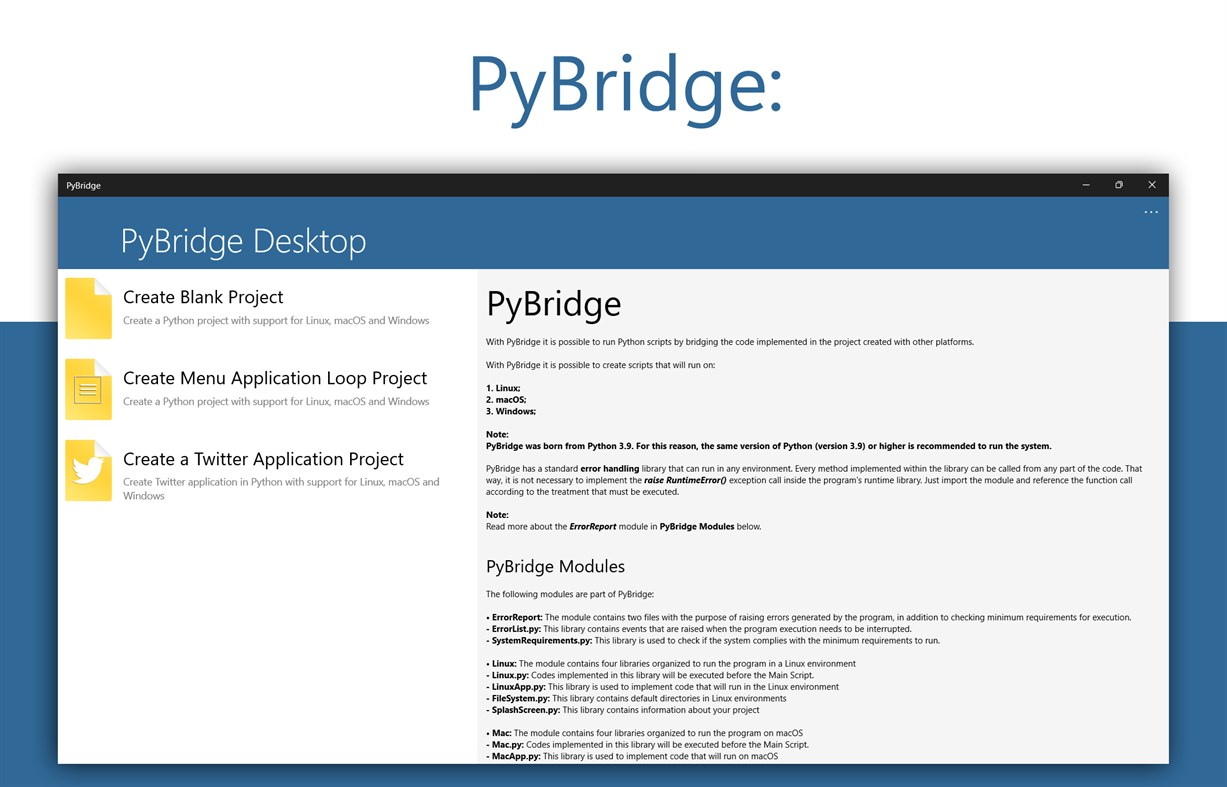
With PyBridge it is possible to create scripts that will run on:
1. Linux;
2. macOS;
3. Windows;
Note: PyBridge was born from Python 3.9. For this reason, the same version of Python (version 3.9) or higher is recommended to run the system.
PyBridge has a standard error handling library that can run in any environment. Every method implemented within the library can be called from any part of the code. That way, it is not necessary to implement the raise RuntimeError() exception call inside the program's runtime library. Just import the module and reference the function call according to the treatment that must be executed.
Note: Read more about the ErrorReport module in PyBridge Modules below.
• PyBridge Modules
The following modules are part of PyBridge:
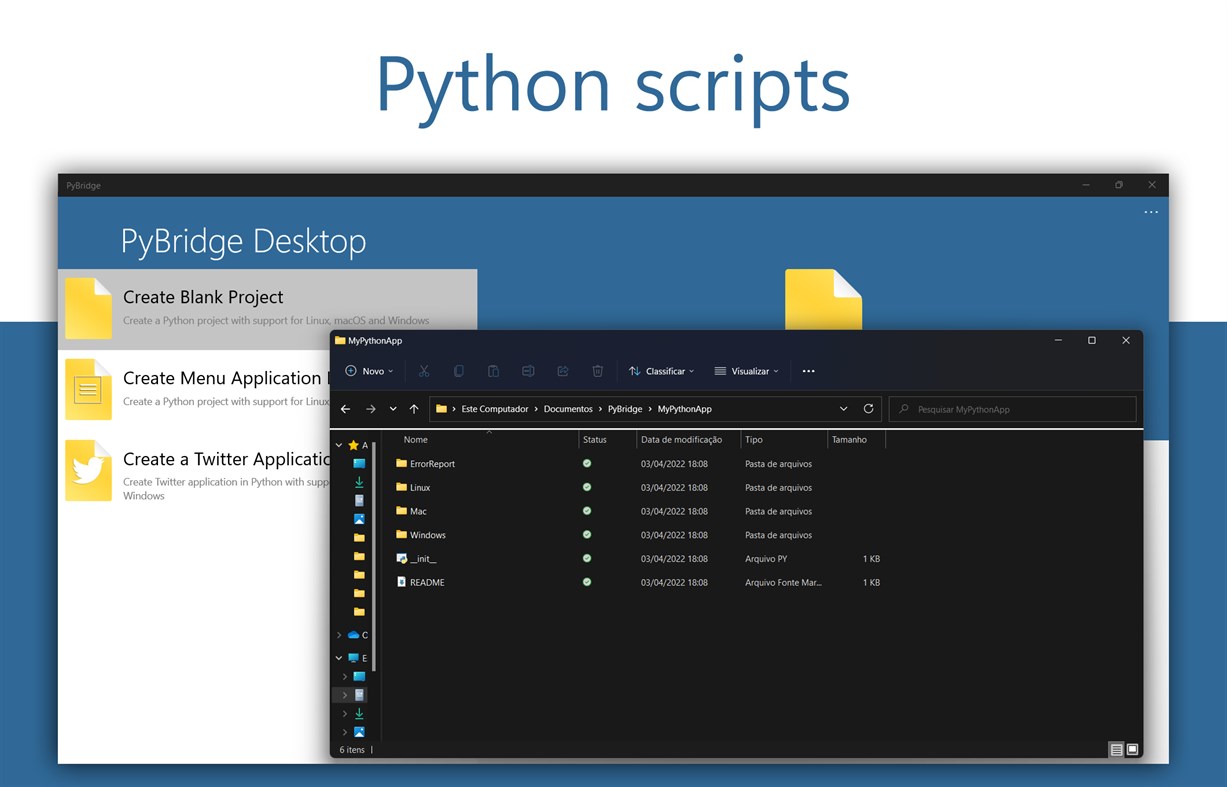
• ErrorReport: The module contains two files with the purpose of raising errors generated by the program, in addition to checking minimum requirements for execution.
- ErrorList.py: This library contains events that are raised when the program execution needs to be interrupted.
- SystemRequirements.py: This library is used to check if the system complies with the minimum requirements to run.
• Linux: The module contains four libraries organized to run the program in a Linux environment
- Linux.py: Codes implemented in this library will be executed before the Main Script.
- LinuxApp.py: This library is used to implement code that will run in the Linux environment
- FileSystem.py: This library contains default directories in Linux environments
- SplashScreen.py: This library contains information about your project
• Mac: The module contains four libraries organized to run the program on macOS
- Mac.py: Codes implemented in this library will be executed before the Main Script.
- MacApp.py: This library is used to implement code that will run on macOS
- FileSystem.py: This library contains standard macOS directories
- SplashScreen.py: This library contains information about your project
• Windows: The module contains four libraries organized to run the program on Windows
- Windows.py: Codes implemented in this library will be executed before the Main Script.
- WindowsApp.py: This library is used to implement code that will run on Windows
- FileSystem.py: This library contains standard Windows directories
- SplashScreen.py: This library contains information about your project
螢幕擷取畫面
Ad
價格歷史
- 目前價格: 免費
- 最小值: 免費
- 最大值: 免費
追蹤票價
AppAgg 評價
860
AppAgg 預估評價:
PyBridge
860 白銀
評價越高,通常代表在 AppAgg 上的信號越強。
基於: 人氣 · 使用者評分 · 新鮮度 · 優惠 · 商店資料 · 社群活躍度
根據最新 AppAgg 資料每日重新計算。
縮短網址: 已複製!
新功能
- 版本: PC
- 最後更新:
其他資訊
- 發行日期:
- 類別 :
Windows 應用程式›開發人員工具 - OS:
HoloLens,Mobile,PC,Surface Hub - 大小:
1 Mb - 支援的語言 :
Portuguese - 內容分級:
EVERYONE - Windows Store 評分:
0
 https://hbisneto.github.io/pybridge
開發人員
- Bisneto
- 平台: Windows 應用程式 (2)
- 清單: 0 + 1
- 點數: 2 + 0 ¡
- 排名: 0
- 註釋: 0
- 折扣: 0
- 影片: 0
- RSS: 訂閱
清單 (0)
0
- PyBridge
點數 (0)
0
排名 (0)
0
註釋 (0)
成為第一個發表評論的人
簡要
PyBridge 縮短網址: 已複製!- 分享
- Windows Store
«PyBridge». 平台: Windows. 類別: 開發人員工具. 開發商: «Bisneto». 首次發布: . 最後更新: . 目前價格: 免費. 此項目尚未在 AppAgg 上獲得評分或評論。 可用語言: Portuguese. AppAgg 會追蹤 «PyBridge»的價格歷史、評分和用戶回饋。 AppAgg 不託管應用程式或分發軟體。 所有商標、標誌和螢幕截圖均屬於其各自所有者。 關注未來折扣和更新: RSS
類似
-
- TCP2COM Bridge & Monitor PRO
- Windows 應用程式: 開發人員工具 由: Audiosdroid
- $4.99
- 清單: 0 0 0
- 點數: 0 + 0 1K · 白銀 版本: PC TCP2COM Bridge and Monitor is a specialized software for Windows Desktop that helps connect TCP/IP (Internet) and COM ports (serial communication). It can work as a bridge between ...
-
- Remote Terminal Bridge
- Windows 應用程式: 開發人員工具 由: Space-Kube
- * 免費
- 清單: 0 0 0
- 點數: 0 + 0 590 · 青銅 版本: PC Remote Terminal Bridge is the companion agent for the Remote Terminal service - a secure cloud platform that gives you a full terminal session on your own machine from any browser. ...
-
- App Installer (Mobile) - WinUI 3
- Windows 應用程式: 開發人員工具 由: wherewhere
- 免費
- 清單: 3 + 2 0 0
- 點數: 20 + 3,251 8K · 黃金 版本: PC Android™ App Installer for Windows 10/11 makes sideloading Android applications easy for WSA, Anbox, etc.: Just double-click the app package, and you won't have to run Android Debug ...
-
- Python Install Manager
- Windows 應用程式: 開發人員工具 由: Python Software Foundation
- 免費
- 清單: 0 + 1 0 0
- 點數: 3 + 21 3K · 白銀 版本: PC The Python install manager helps you to install, manage, and launch Python on Windows. After install, the "py" command is your tool of choice - try "py help" to see what it can do! ...
-
- Notepad Editor
- Windows 應用程式: 開發人員工具 由: CSTRSK
- * 免費
- 清單: 0 0 0
- 點數: 0 + 33 570 · 青銅 版本: PC Notepad Editor is a multifunctional text editor with which you can easily edit Batch | .bat , C-Sharp | .cs , Cascading Style Sheets | .css , Hypertext Markup Language | .html , ...
-
- ADB Extension for Command Palette
- Windows 應用程式: 開發人員工具 由: Costa Fotiadis
- 免費
- 清單: 0 0 0
- 點數: 0 + 0 580 · 青銅 版本: PC Requirements ADB (Android Debug Bridge) to be installed on your machine and available in your system PATH PowerToys 0.98.1 or later, with Command Palette enabled ADB Extension for ...