
Opgeslagen
Kies de naam die in je menu Opgeslagen moet worden weergegeven.
Klaar!
| Ontwikkelaar: | Dr. Chuck (1) | ||
| Prijs: | Gratis | ||
| Beoordeling: | 580 Brons | ||
| Ranglijsten: | 0 | ||
| Reacties: | 0 Plaats reactie | ||
| Lijsten: | 0 + 0 | ||
| Punten: | 0 + 0 ¡ | ||
| +1 Punten | |||
Beschrijving

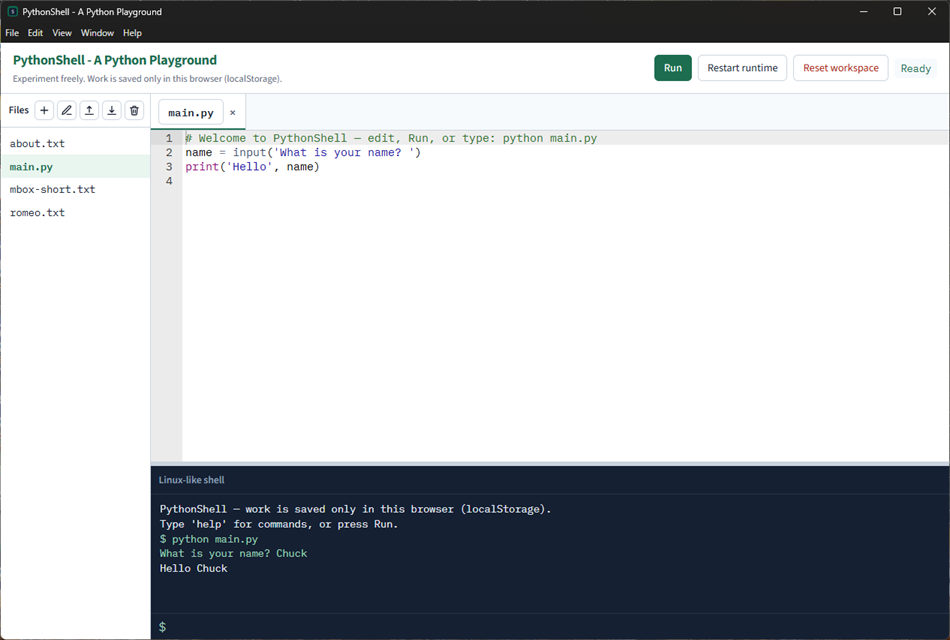
Write Python in a multi-file editor, press Run, and see the result in a small Linux-like shell. The same shell understands commands such as `python main.py`, `ls`, `rm`, `help`, `upload`, and `download`. When a program calls `input()`, type the answer at the shell prompt.
Python 3.12 runs locally in the app (Pyodide). Your code is not sent to a server to be executed. Work is saved only on this device (localStorage in the app). Clearing app data, resetting the workspace, or using another PC will lose it — that is intentional. This is a place to experiment, not an assignment drop-box.
First launch needs an internet connection so the Python runtime can download. Later launches reuse the cached runtime.
The web version is at https://shell.py4e.com/
What you can do
• Edit several files in tabs (create, rename, delete, upload, download)
• Run the current file, or type `python file.py` in the shell
• See print output, errors, and tracebacks
• Answer `input()` prompts in the shell
• Stop a runaway program (the runtime times out and restarts)
• Reset the workspace to the starter files (`main.py`, `about.txt`, `romeo.txt`, `mbox-short.txt`)
What it is not
• Not a full Linux terminal (no pipes, redirects, or globs)
• Not an interactive Python REPL (`>>>`); run a file instead
• Not a grader and not connected to a learning-management system
• Not a place to install extra native Python packages beyond the bundled standard library
PythonShell is part of Python for Everybody (https://www.py4e.com/).
Advertentie
Screenshots
Prijsgeschiedenis
- Huidige prijs: Gratis
- Minimum: Gratis
- Maximum: Gratis
Prijzen volgen Voeg toe aan een lijst voor kortingsmeldingen via e-mail of push
AppAgg-score
580
Geschatte AppAgg-beoordeling voor
PythonShell
Ontwikkelaar: Dr. Chuck
580 Brons
Hogere beoordelingen betekenen meestal sterkere signalen op AppAgg.
Gebaseerd op: populariteit · gebruikersbeoordelingen · actualiteit · deals · winkelgegevens · community-activiteit
Wordt dagelijks opnieuw berekend met actuele AppAgg-gegevens.
Korte URL: Gekopieerd!
Wat is er nieuw?
- Versie: PC
- Laatst bijgewerkt:
Aanvullende informatie
- Releasedatum:
- Categorie:
Windows-apps›Ontwikkelhulpprogramma's - Besturingssystemen:
PC - Grootte:
132 Mb - Ondersteunde talen:
English - Beoordeling van content:
EVERYONE - Windows Store Beoordeling: ¡
0 - Website:
 https://www.py4e.com/
Ontwikkelaar
- Dr. Chuck
- Volgers: 0
- Platforms: Windows Apps (1)
- Kortingen: 0
- Lijsten: 0 + 0
- Punten: 0 + 0 ¡
- Ranglijsten: 0
- Reacties: 0
- Videos: 0
- RSS: Abonneren
Lijsten (0)
0
- PythonShell
Punten (0)
0
Ranglijsten (0)
0
Reacties (0)
Reageer als eerste
Samenvatting
PythonShell Korte URL: Gekopieerd!- Windows Store
Op AppAgg kun je ‘PythonShell’ volgen, een app van Dr. Chuck voor Windows in de categorie Ontwikkelhulpprogramma's. AppAgg-beoordeling: 580 (Brons). AppAgg-punten van de app — bevestigd: 0; indirect: 0. Openbare lijsten met deze app: 0. Gebruikers die de app in privélijsten hebben opgeslagen: 0. AppAgg-gebruikers hebben de app nog niet beoordeeld. Bevestigde punten registreren winkelbezoeken van ingelogde AppAgg-gebruikers; indirecte punten zijn gebaseerd op winkelgegevens. AppAgg telt openbare lijsten met een app of game en gebruikers die de app of game in privélijsten hebben opgeslagen. De app is voor het eerst uitgebracht op . De app is voor het laatst bijgewerkt op . De app is momenteel gratis beschikbaar. De app is beschikbaar in de volgende talen: English. Bekijk de prijsgeschiedenis, voeg de app toe aan een lijst of volg de ontwikkelaar. Volg toekomstige aanbiedingen en updates voor de app via de RSS-feed. AppAgg host of distribueert deze app niet. Alle handelsmerken, logo’s en schermafbeeldingen die bij de app horen, zijn eigendom van hun respectieve eigenaren.

