
บุ๊กมาร์ก
| ผู้พัฒนา: | PhoenixSoft (4) | ||
| ราคา: | ฟรี | ||
| คะแนน: | 600 เงิน | ||
| การจัดอันดับ: | 0 | ||
| ความคิดเห็น: | 0 โพสต์ความคิดเห็น | ||
| รายการ: | 0 0 | ||
| แต้ม: | 0 | ||
| +1 แต้ม | |||
สรุป
มาทำความรู้จัก QoolTester แอปในหมวด “เครื่องมือสำหรับนักพัฒนา” จาก PhoenixSoft
ออกเมื่อ ยังสดใหม่อยู่เลย
ฟรี ไม่มีโฆษณา ไม่มีการซื้อภายในแอป มีแค่คุณกับแอป
Microsoft Store มีมาในตัว Windows อยู่แล้ว ติดตั้งได้ในไม่กี่คลิก
คะแนน AppAgg คือ 600 ระดับ “เงิน” ถือว่าไม่เลวเลย
แค่ 28 เมกะไบต์ ต่อให้ไดรฟ์เต็มก็ยังลงได้
จัดเรต “EVERYONE” เหมาะกับเด็ก ๆ ด้วย
รองรับแค่ภาษาเดียว และไม่ใช่ภาษาไทย
เคยใช้แล้วเหรอ? รีวิวของคุณจะเป็นรีวิวแรกที่นี่
ผู้พัฒนารายนี้มีแอปอื่นบน AppAgg อีก 3 แอป ลองไปดูกัน
อยากรู้เรื่องอัปเดตและแอปใหม่ก่อนใครไหม? ติดตาม ผู้พัฒนา หรือกดติดตาม ฟีด RSS ได้เลย การแจ้งเตือนแบบพุชส่งผ่านแอป AppAgg Alerts สำหรับ Android และ iOS
ภาพหน้าจอ 4
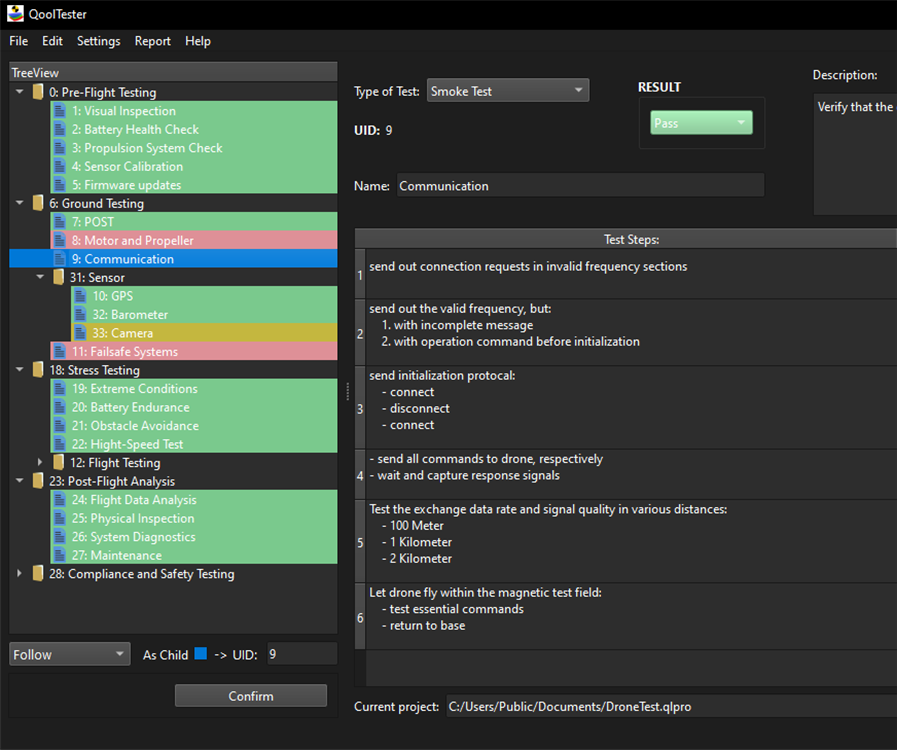
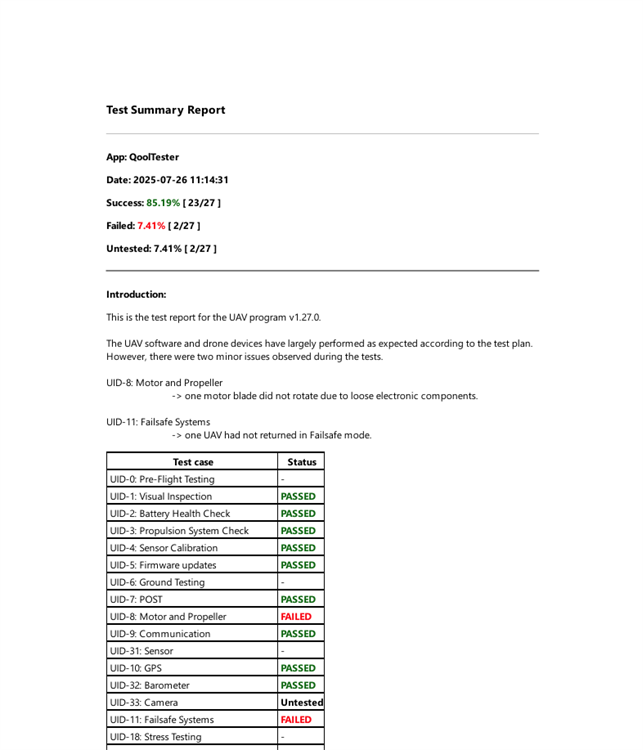
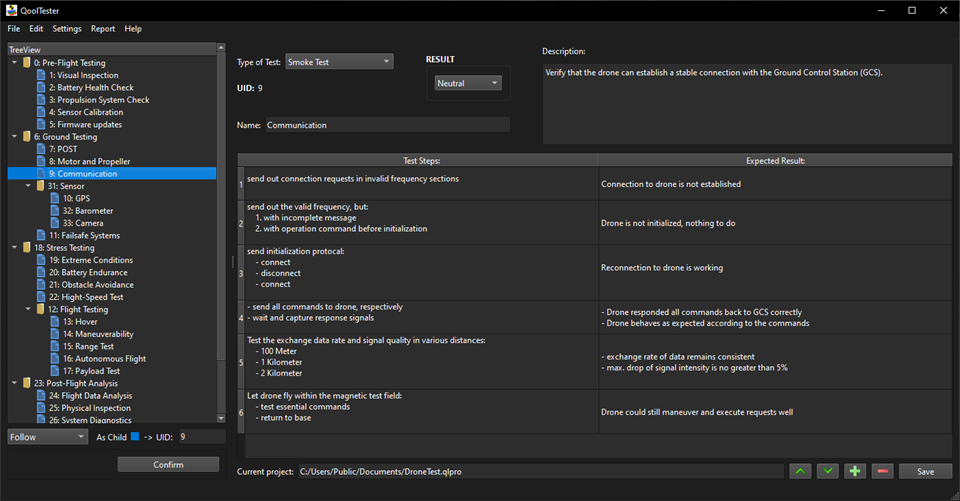
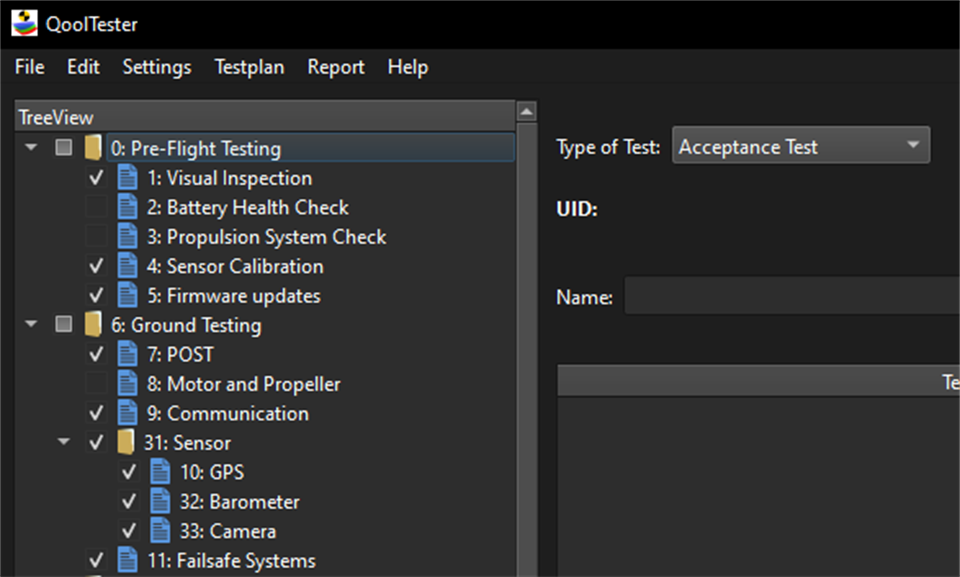
แพลตฟอร์มอื่น 0
ประวัติราคา 0
- ราคาปัจจุบัน: ฟรี
- ต่ำสุด: ฟรี
- สูงสุด: ฟรี
ฟีดของคุณเองบนหน้าแรก
คำอธิบาย

Select the desired testcases and export as test plan if we are to customize the project and not all tests are needed.
Utilize project as test run, by labeling the tests with pass fail criteria.
Finally create a PDF report with test summary.
Notice: the project file is in XML format, this allows the tester to create customized project files automatically, via e.g. Python scripting.
For more detailed information please refer to the instruction manual in the installation folder.
จากนักพัฒนา
รายการ 0
-
 QoolTester
แต้ม 0
-

- +1 แต้ม

การจัดอันดับ 0
-
- คะแนนของคุณ
ผู้พัฒนา 4
- Phoenixsoft
- ผู้ติดตาม: 0
- แพลตฟอร์ม: Android แอป (3) Windows แอป (1)
- ลดราคา: 0
- รายการ: 0 0
- แต้ม: 0
- การจัดอันดับ: 0
- ความคิดเห็น: 0
- วิดีโอ: 0
- RSS: ติดตาม
มีอะไรใหม่
- เวอร์ชัน: PC
- อัปเดตล่าสุด:
- # v2.8.0
- show individual test cases immediately through arrow key navigation.
- introduce Shortcuts to mark and store test results in test runs automatically, mouse is no longer required during testing :)
[Ctrl+Q]: Mark Test as Pass
[Ctrl+F]: Mark Test as Fail
[Ctrl+R]: Mark Test as Retest
# v2.7.2
- App with its icon can be accessed on the taskbar, for minimizing and maximizing window as common windows applications do.
# v2.7.1
- Implemented the "auto tri-state" feature, when exporting test run the checkbox selections should now work automatically (selection, unselection and partially selection get updated as expected.)
# Editing Tests
---
Select one test case, then use the utilities at the buttom right corner. Test steps can be added, deleted or moved around. `Save` button or the shortcut `Ctrl+S` stores changes to the project.
# Managing Tests
- `Follow`: click on an existing test case or folder under tree view and input the UID to follow; choose `as Child` if a deeper layer is desired. Beyond `Confirm` the highlighted test case is moved behind the UID.
- `Add Subfolder`: enter an existing UID, `Confirm`, then a new test folder with a new UID is appended behind the target UID.
- `Add Testcase`: same as `Add Subfolder`, but as test case.
- `Delete`: the selected test case or folder including its subdirectories is going to be removed.
ข้อมูลเพิ่มเติม
- วันที่วางจำหน่าย:
- หมวดหมู่:
แอปสำหรับ Windows›เครื่องมือสำหรับนักพัฒนา - ระบบปฏิบัติการ:
PC - ขนาด:
28 Mb - ภาษาที่รองรับ:
อังกฤษ - การจัดประเภทเนื้อหา:
EVERYONE - Windows Store คะแนน: ¡
0
คะแนน AppAgg
คะแนน AppAgg โดยประมาณของ
QoolTester
ผู้พัฒนา: PhoenixSoft
คะแนนที่สูงขึ้นมักสะท้อนตัวชี้วัดที่ดีกว่าบน AppAgg
อิงจาก: ความนิยม · คะแนนจากผู้ใช้ · ความสดใหม่ · ดีล · ข้อมูลร้านค้า · กิจกรรมชุมชน
คำนวณใหม่ทุกวันจากข้อมูล AppAgg ล่าสุด
ความคิดเห็น 0 ¡
แชร์
QoolTester URL แบบสั้น: คัดลอกแล้ว!- Windows Store

