
บุ๊กมาร์ก
| ผู้พัฒนา: | Akhil Vithanala (14) | ||
| ราคา: | ฟรี ใหม่ | ||
| คะแนน: | 860 เงิน | ||
| การจัดอันดับ: | 0 | ||
| ความคิดเห็น: | 0 โพสต์ความคิดเห็น | ||
| รายการ: | 0 0 | ||
| แต้ม: | 0 | ||
| +1 แต้ม | |||
สรุป
Quick Tools for Excel เป็นแอปในหมวด “เครื่องมือสำหรับนักพัฒนา” จาก Akhil Vithanala
มาใหม่ ออกเมื่อ คุณได้เป็นหนึ่งในคนกลุ่มแรก
ฟรี ไม่มีโฆษณา ไม่มีการซื้อภายในแอป มีแค่คุณกับแอป
Microsoft Store มีมาในตัว Windows อยู่แล้ว ติดตั้งได้ในไม่กี่คลิก
คะแนน AppAgg คือ 860 ระดับ “เงิน” ถือว่าไม่เลวเลย
แค่ 14 เมกะไบต์ ต่อให้ไดรฟ์เต็มก็ยังลงได้
จัดเรต “EVERYONE” เหมาะกับเด็ก ๆ ด้วย
รองรับแค่ภาษาเดียว และไม่ใช่ภาษาไทย
เคยใช้แล้วเหรอ? รีวิวของคุณจะเป็นรีวิวแรกที่นี่
ผู้พัฒนารายนี้มีแอปอื่นบน AppAgg อีก 13 แอป ลองไปดูกัน
อยากรู้เรื่องอัปเดตและแอปใหม่ก่อนใครไหม? ติดตาม ผู้พัฒนา หรือกดติดตาม ฟีด RSS ได้เลย การแจ้งเตือนแบบพุชส่งผ่านแอป AppAgg Alerts สำหรับ Android และ iOS
แพลตฟอร์มอื่น 0
ประวัติราคา 0
- ราคาปัจจุบัน: ฟรี
- ต่ำสุด: ฟรี
- สูงสุด: ฟรี
ฟีดของคุณเองบนหน้าแรก
ภาพหน้าจอ 6


คำอธิบาย

Working with spreadsheets often means navigating multiple menus, remembering keyboard shortcuts, and repeatedly performing the same operations. Quick Excel Tools simplifies this workflow by bringing frequently used Excel commands into one convenient floating interface.
YOUR EXCEL TOOLS, JUST ONE CLICK AWAY
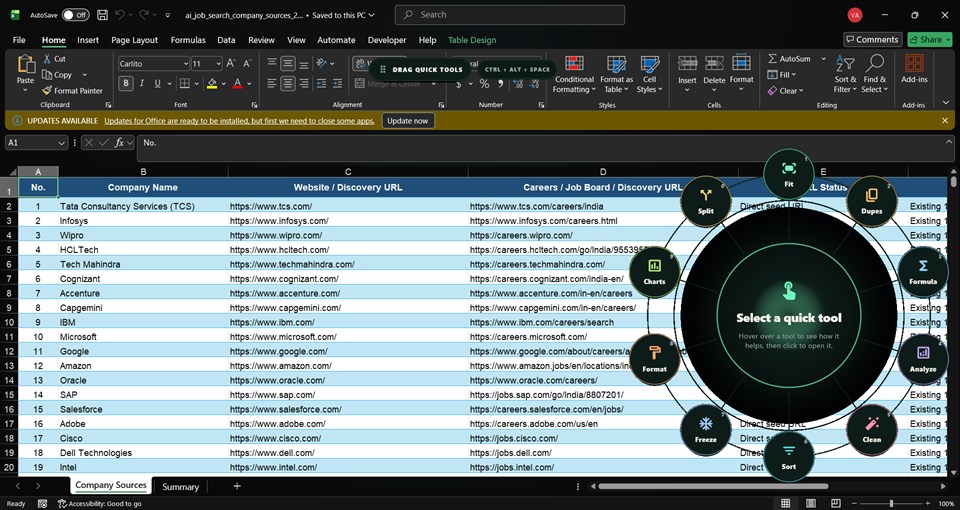
Launch the floating Quick Tools wheel over Microsoft Excel to access useful spreadsheet commands without repeatedly navigating the Excel ribbon.
Its circular interface organizes tools into ten categories, helping you quickly locate the operation you need.
WORK DIRECTLY WITH YOUR EXCEL WORKBOOKS
Quick Excel Tools connects to the Microsoft Excel desktop application and works with your active workbook, worksheet, and selected cells.
The app automatically identifies populated worksheet boundaries and provides an editable range selection, allowing you to review where an action will be applied.
POWERFUL EVERYDAY EXCEL TOOLS
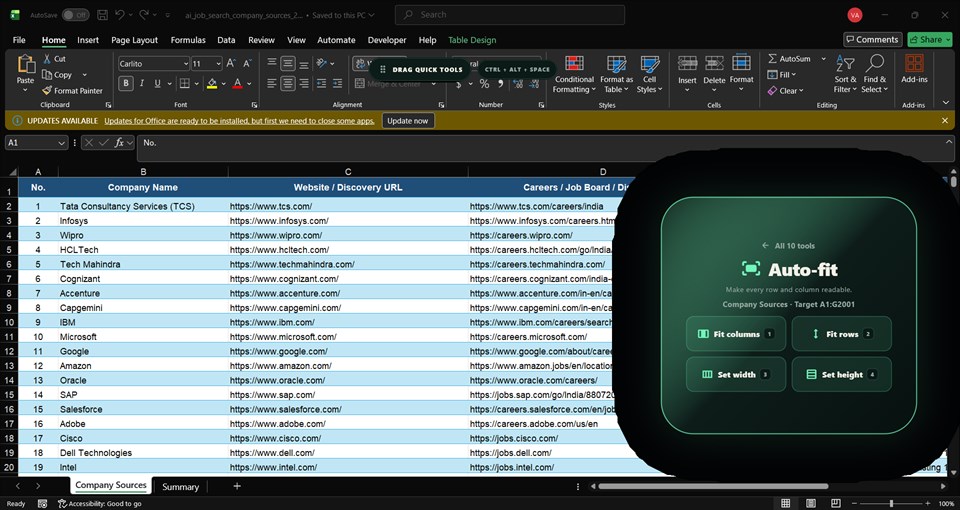
Auto-Fit Rows and Columns
Quickly adjust column widths and row heights to fit spreadsheet contents. Improve readability without manually resizing individual cells.
Find and Manage Duplicates
Identify repeated values, highlight duplicates, review duplicate counts, and remove duplicate records using selected key columns. Duplicate removal includes a backup worksheet for additional protection.
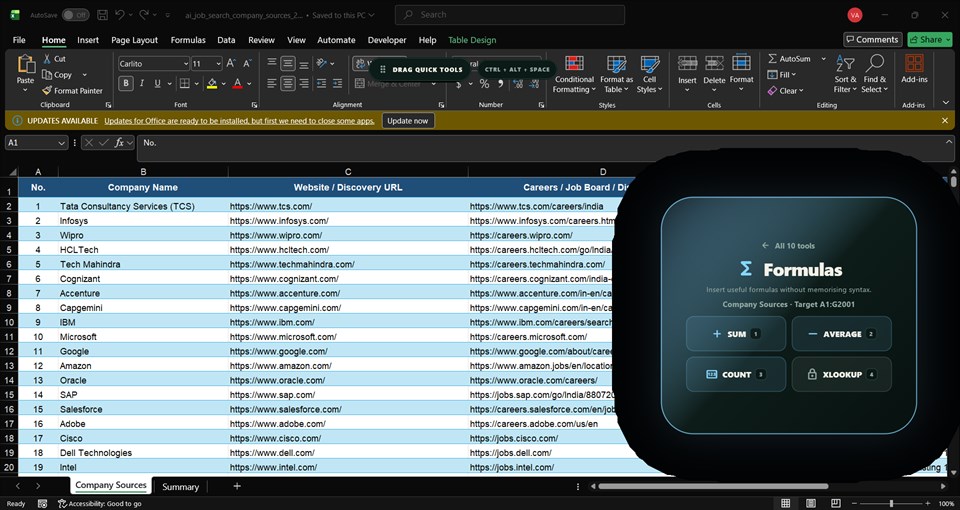
Quick Excel Formulas
Insert commonly used SUM, AVERAGE, and COUNT formulas to calculate spreadsheet values without manually typing formula expressions.
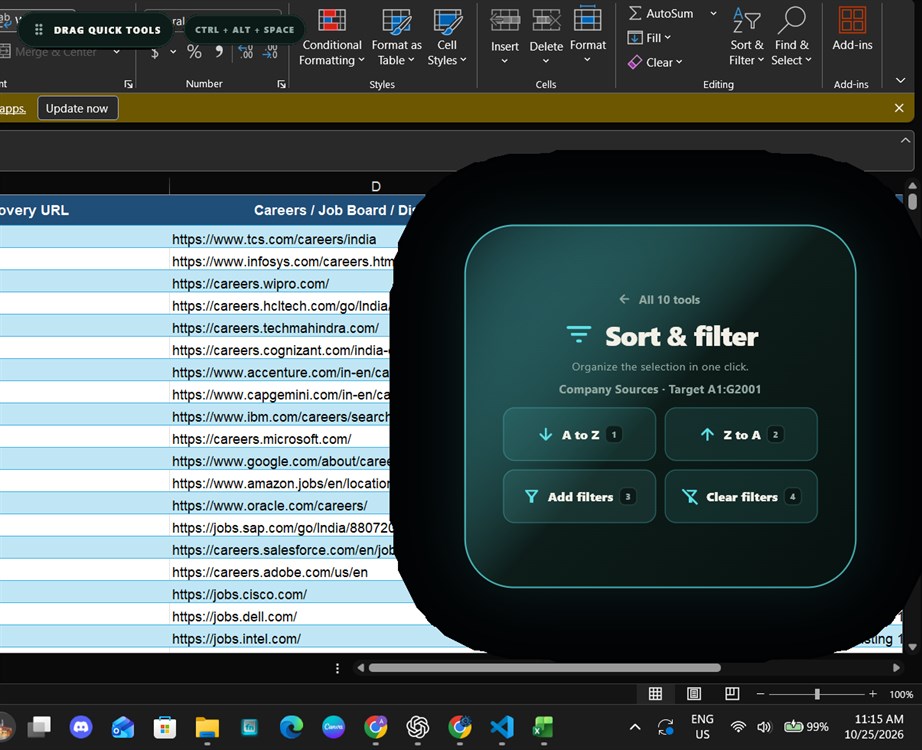
Sort and Filter Utilities
Access tools for applying and clearing worksheet filters, making it easier to work with large datasets.
Freeze Rows and Columns
Keep important information visible while scrolling. Freeze the top row, first column, or rows and columns above the current selection.
Quick Formatting
Apply cell borders, date formats, and numeric formatting to make spreadsheets cleaner, more organized, and easier to read.
Create Charts
Generate column, line, and pie charts directly from selected spreadsheet data to visualize information more clearly.
Spreadsheet Data Checks
Inspect supported data ranges for potential issues, including blank cells, repeated values, Excel errors, and numbers stored as text.
PREVIEW BEFORE MAKING CHANGES
Quick Excel Tools provides an operation preview showing:
Active workbook and worksheet
Current Excel selection
Automatically identified data range
Editable start and end cells
Expected action and supported status
This helps you understand the operation before applying it to your workbook.
DESIGNED FOR CONVENIENCE
The transparent, floating interface stays accessible while working in Excel.
Organized tool categories, contextual descriptions, and clear action dialogs help reduce repetitive navigation and make common spreadsheet operations easier to discover.
BUILT FOR EVERYDAY EXCEL USERS
Quick Excel Tools is suitable for:
Students working with assignments and datasets
Office employees managing spreadsheets
Accountants organizing financial records
Professionals preparing Excel reports
Small businesses managing tabular information
Anyone who regularly works with Microsoft Excel
WORKS WITH MICROSOFT EXCEL DESKTOP
Quick Excel Tools operates with the Microsoft Excel desktop application installed on Windows.
Microsoft Excel must be installed separately.
The application does not support Excel for the web, Google Sheets, or other browser-based spreadsheet applications.
Quick Excel Tools is an independent third-party productivity application and is not affiliated with or endorsed by Microsoft Corporation.
Make everyday spreadsheet work easier with Quick Excel Tools — your convenient companion for Microsoft Excel.
จากนักพัฒนา
รายการ 0
-
 Quick Tools for Excel
แต้ม 0
-

- +1 แต้ม

การจัดอันดับ 0
-
- คะแนนของคุณ
ผู้พัฒนา 14
- Akhil Vithanala
- ผู้ติดตาม: 0
- แพลตฟอร์ม: Windows แอป (14)
- ลดราคา: 0
- รายการ: 0 0
- แต้ม: 2
- การจัดอันดับ: 0
- ความคิดเห็น: 0
- วิดีโอ: 2
- RSS: ติดตาม
มีอะไรใหม่
- เวอร์ชัน: PC
- อัปเดตล่าสุด:
ข้อมูลเพิ่มเติม
- วันที่วางจำหน่าย:
- หมวดหมู่:
แอปสำหรับ Windows›เครื่องมือสำหรับนักพัฒนา - ระบบปฏิบัติการ:
PC - ขนาด:
14 Mb - ภาษาที่รองรับ:
อังกฤษ - การจัดประเภทเนื้อหา:
EVERYONE - Windows Store คะแนน: ¡
0 - เว็บไซต์:
 https://vcrtechnology.in/
คะแนน AppAgg
คะแนน AppAgg โดยประมาณของ
Quick Tools for Excel
ผู้พัฒนา: Akhil Vithanala
คะแนนที่สูงขึ้นมักสะท้อนตัวชี้วัดที่ดีกว่าบน AppAgg
อิงจาก: ความนิยม · คะแนนจากผู้ใช้ · ความสดใหม่ · ดีล · ข้อมูลร้านค้า · กิจกรรมชุมชน
คำนวณใหม่ทุกวันจากข้อมูล AppAgg ล่าสุด
ความคิดเห็น 0 ¡
แชร์
Quick Tools for Excel URL แบบสั้น: คัดลอกแล้ว!- Windows Store

