
Yer imleri
| Geliştirici: | Akhil Vithanala (14) | ||
| Fiyat: | Ücretsiz Yeni | ||
| Skor: | 860 Gümüş | ||
| Sıralamalar: | 0 | ||
| Yorumlar: | 0 Yorum gönder | ||
| Listeler: | 0 0 | ||
| Puanlar: | 0 | ||
| +1 Puan | |||
Özet
Quick Tools for Excel, Akhil Vithanala imzalı, Geliştirici araçları kategorisinde bir uygulama.
Yeni çıktı. yayınlandı, yani ilk deneyenlerden birisin.
Ücretsiz, reklam yok, uygulama içi satın alma yok. Sadece sen ve uygulama.
Microsoft Store, Windows’a yerleşik. Birkaç tıkla kuruluyor.
AppAgg skoru 860. Gümüş, hiç de fena değil.
Sadece 14 megabayt, dolu bir diske bile sığar.
Yaş sınırı “EVERYONE”, yani çocuklar için de uygun.
Tek bir dil konuşuyor, o da Türkçe değil.
Kullandın mı? Buradaki ilk değerlendirme senden gelebilir.
Geliştiricinin AppAgg’de 13 uygulaması daha var. Bir göz at.
Güncellemeleri ve yeni uygulamaları ilk sen mi duymak istiyorsun? Hemen geliştiriciyi takip et ya da RSS akışı ile haberdar ol. Push bildirimleri Android ve iOS için AppAgg Alerts uygulamasıyla gelir.
Diğer platformlar 0
Fiyat Geçmişi 0
- Güncel fiyat: Ücretsiz
- En az: Ücretsiz
- En fazla: Ücretsiz
Ana sayfada kendi akışınız
Ekran görüntüleri 6


Açıklama

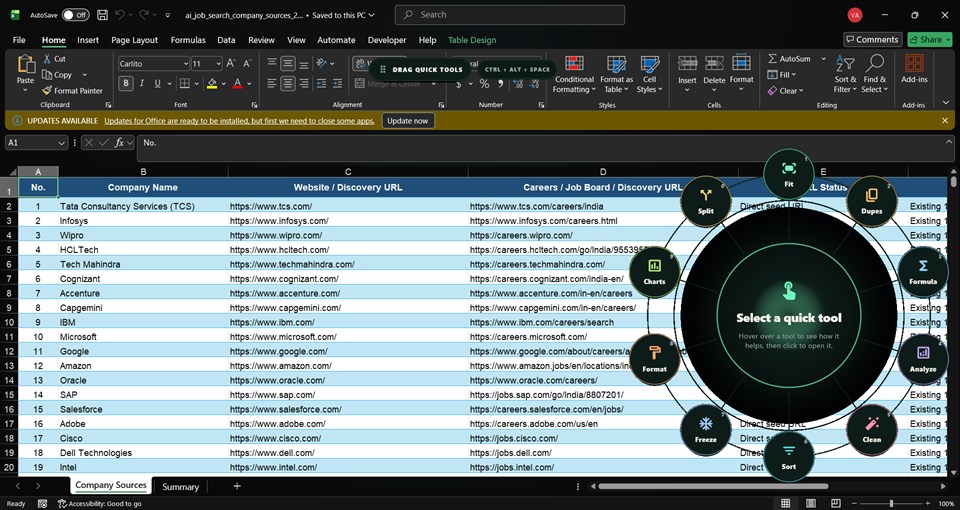
Working with spreadsheets often means navigating multiple menus, remembering keyboard shortcuts, and repeatedly performing the same operations. Quick Excel Tools simplifies this workflow by bringing frequently used Excel commands into one convenient floating interface.
YOUR EXCEL TOOLS, JUST ONE CLICK AWAY
Launch the floating Quick Tools wheel over Microsoft Excel to access useful spreadsheet commands without repeatedly navigating the Excel ribbon.
Its circular interface organizes tools into ten categories, helping you quickly locate the operation you need.
WORK DIRECTLY WITH YOUR EXCEL WORKBOOKS
Quick Excel Tools connects to the Microsoft Excel desktop application and works with your active workbook, worksheet, and selected cells.
The app automatically identifies populated worksheet boundaries and provides an editable range selection, allowing you to review where an action will be applied.
POWERFUL EVERYDAY EXCEL TOOLS
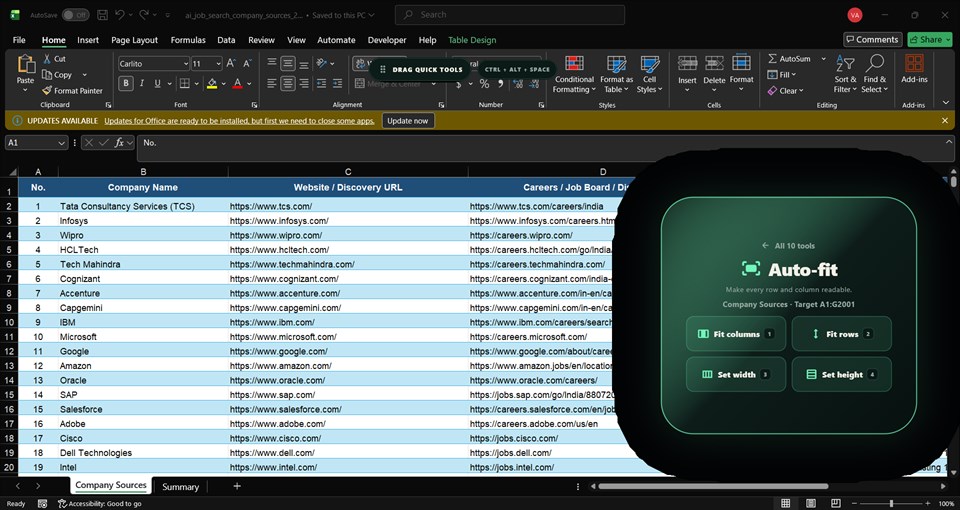
Auto-Fit Rows and Columns
Quickly adjust column widths and row heights to fit spreadsheet contents. Improve readability without manually resizing individual cells.
Find and Manage Duplicates
Identify repeated values, highlight duplicates, review duplicate counts, and remove duplicate records using selected key columns. Duplicate removal includes a backup worksheet for additional protection.
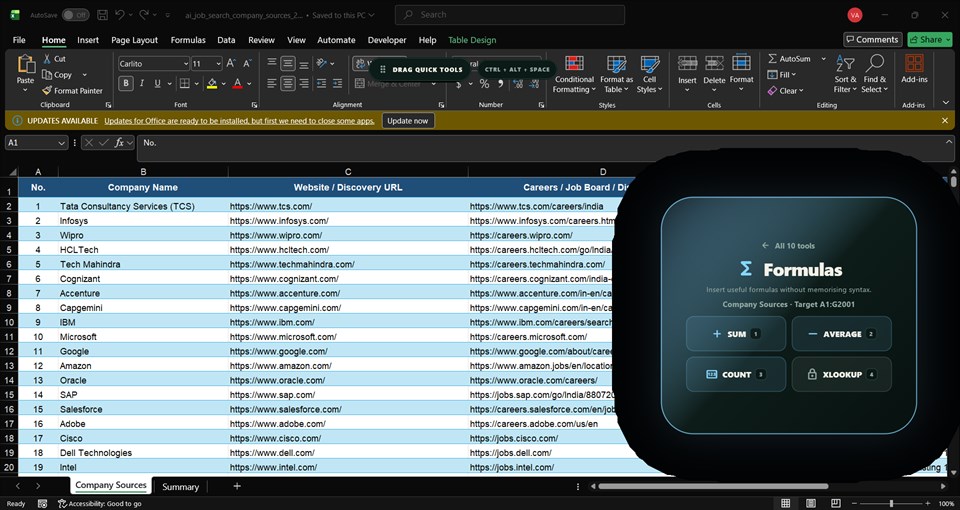
Quick Excel Formulas
Insert commonly used SUM, AVERAGE, and COUNT formulas to calculate spreadsheet values without manually typing formula expressions.
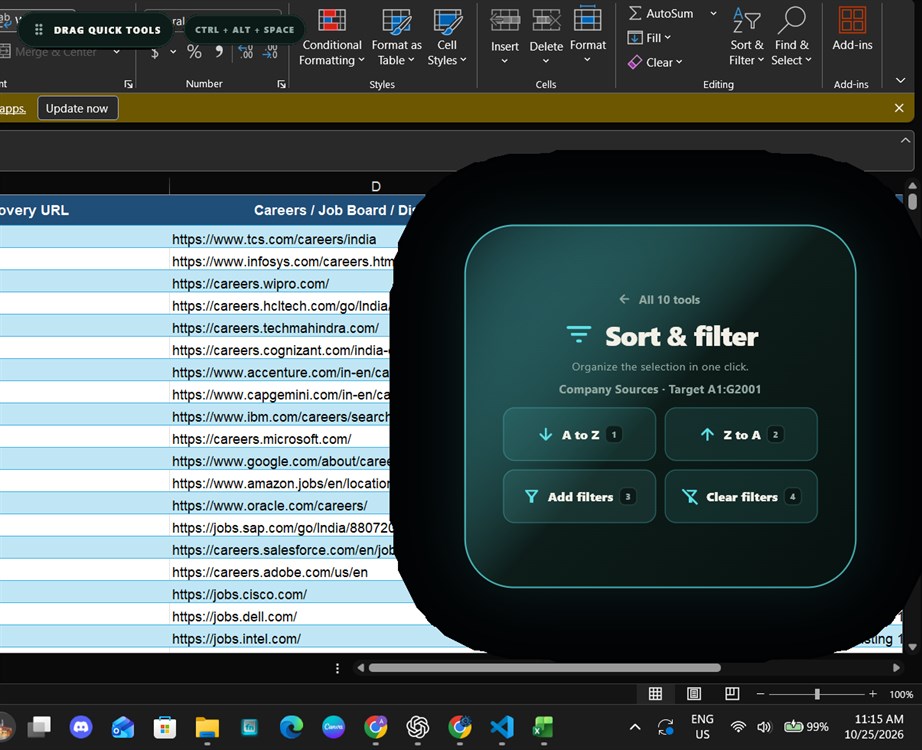
Sort and Filter Utilities
Access tools for applying and clearing worksheet filters, making it easier to work with large datasets.
Freeze Rows and Columns
Keep important information visible while scrolling. Freeze the top row, first column, or rows and columns above the current selection.
Quick Formatting
Apply cell borders, date formats, and numeric formatting to make spreadsheets cleaner, more organized, and easier to read.
Create Charts
Generate column, line, and pie charts directly from selected spreadsheet data to visualize information more clearly.
Spreadsheet Data Checks
Inspect supported data ranges for potential issues, including blank cells, repeated values, Excel errors, and numbers stored as text.
PREVIEW BEFORE MAKING CHANGES
Quick Excel Tools provides an operation preview showing:
Active workbook and worksheet
Current Excel selection
Automatically identified data range
Editable start and end cells
Expected action and supported status
This helps you understand the operation before applying it to your workbook.
DESIGNED FOR CONVENIENCE
The transparent, floating interface stays accessible while working in Excel.
Organized tool categories, contextual descriptions, and clear action dialogs help reduce repetitive navigation and make common spreadsheet operations easier to discover.
BUILT FOR EVERYDAY EXCEL USERS
Quick Excel Tools is suitable for:
Students working with assignments and datasets
Office employees managing spreadsheets
Accountants organizing financial records
Professionals preparing Excel reports
Small businesses managing tabular information
Anyone who regularly works with Microsoft Excel
WORKS WITH MICROSOFT EXCEL DESKTOP
Quick Excel Tools operates with the Microsoft Excel desktop application installed on Windows.
Microsoft Excel must be installed separately.
The application does not support Excel for the web, Google Sheets, or other browser-based spreadsheet applications.
Quick Excel Tools is an independent third-party productivity application and is not affiliated with or endorsed by Microsoft Corporation.
Make everyday spreadsheet work easier with Quick Excel Tools — your convenient companion for Microsoft Excel.
Geliştiriciden
Listeler 0
-
 Quick Tools for Excel
Puanlar 0
-

- +1 Puan

Sıralamalar 0
-
- Puanınız
Geliştirici 14
- Akhil Vithanala
- Takipçiler: 0
- Platformlar: Windows Uygulamalar (14)
- İndirimler: 0
- Listeler: 0 0
- Puanlar: 2
- Sıralamalar: 0
- Yorumlar: 0
- Video: 2
- RSS: Abone ol
Yenilikler
- Sürüm: PC
- Son güncelleme:
Ek Bilgi
- Çıkış tarihi:
- Kategori:
Windows uygulamaları›Geliştirici araçları - İşletim Sistemleri:
PC - Boyut:
14 Mb - Desteklenen diller:
İngilizce - İçerik Derecelendirmesi:
EVERYONE - Windows Store Puan: ¡
0 - Web sitesi:
 https://vcrtechnology.in/
AppAgg Skoru
Tahmini AppAgg skoru:
Quick Tools for Excel
Geliştirici: Akhil Vithanala
Daha yüksek skorlar genellikle AppAgg’deki göstergelerin daha güçlü olduğunu belirtir.
Şunlara göre: popülerlik · kullanıcı puanları · güncellik · fırsatlar · mağaza verileri · topluluk etkinliği
Güncel AppAgg verileriyle her gün yeniden hesaplanır.
Yorumlar 0 ¡
Paylaş
Quick Tools for Excel Kısa URL: Kopyalandı!- Windows Store

