
บุ๊กมาร์ก
| ผู้พัฒนา: | 6arshid (46) | ||
| ราคา: | ฟรี ใหม่ | ||
| คะแนน: | 1,220 ทอง | ||
| การจัดอันดับ: | 0 | ||
| ความคิดเห็น: | 0 โพสต์ความคิดเห็น | ||
| รายการ: | 0 0 | ||
| แต้ม: | 0 | ||
| +1 แต้ม | |||
สรุป
มาทำความรู้จัก Rastchin – RTL Client for OpenCode แอปในหมวด “เครื่องมือสำหรับนักพัฒนา” จาก 6arshid
มาใหม่ ออกเมื่อ คุณได้เป็นหนึ่งในคนกลุ่มแรก
ฟรี ไม่มีโฆษณา ไม่มีการซื้อภายในแอป มีแค่คุณกับแอป
Microsoft Store มีมาในตัว Windows อยู่แล้ว ติดตั้งได้ในไม่กี่คลิก
คะแนน AppAgg คือ 1,220 อยู่ระดับ “ทอง”
แค่ 14 เมกะไบต์ ต่อให้ไดรฟ์เต็มก็ยังลงได้
จัดเรต “EVERYONE” เหมาะกับเด็ก ๆ ด้วย
รองรับ 4 ภาษา แต่ยังไม่มีภาษาไทย
ยังไม่มีใครบน AppAgg ให้คะแนนเลย โอกาสเป็นคนแรกอยู่ตรงนี้แล้ว
ผู้พัฒนารายนี้มีเกมอื่นอีก 12 เกม และแอปอีก 33 แอปบน AppAgg ลองไปดูกัน
อยากรู้เรื่องอัปเดตและแอปใหม่ก่อนใครไหม? ติดตาม ผู้พัฒนา หรือกดติดตาม ฟีด RSS ได้เลย การแจ้งเตือนแบบพุชส่งผ่านแอป AppAgg Alerts สำหรับ Android และ iOS
แพลตฟอร์มอื่น 0
ประวัติราคา 0
- ราคาปัจจุบัน: ฟรี
- ต่ำสุด: ฟรี
- สูงสุด: ฟรี
ฟีดของคุณเองบนหน้าแรก
ภาพหน้าจอ 10
คำอธิบาย

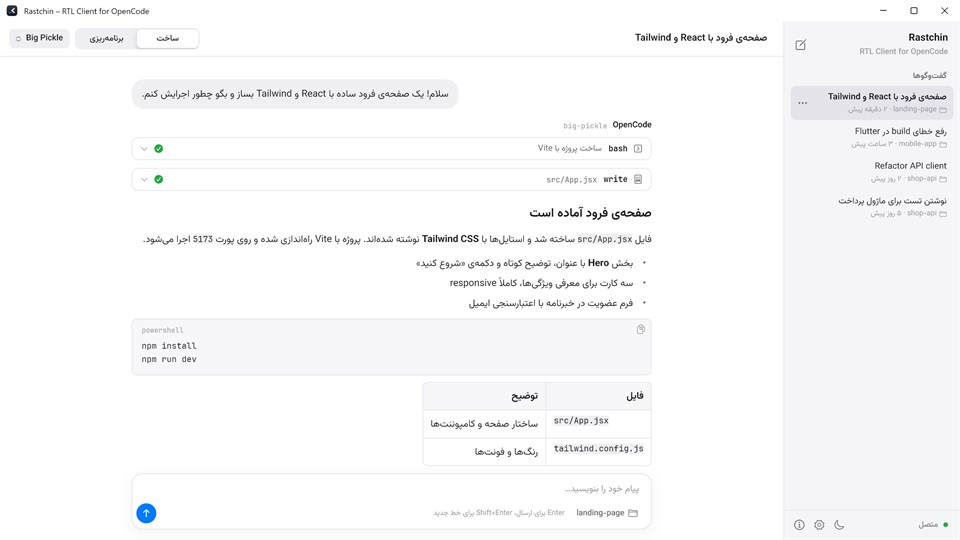
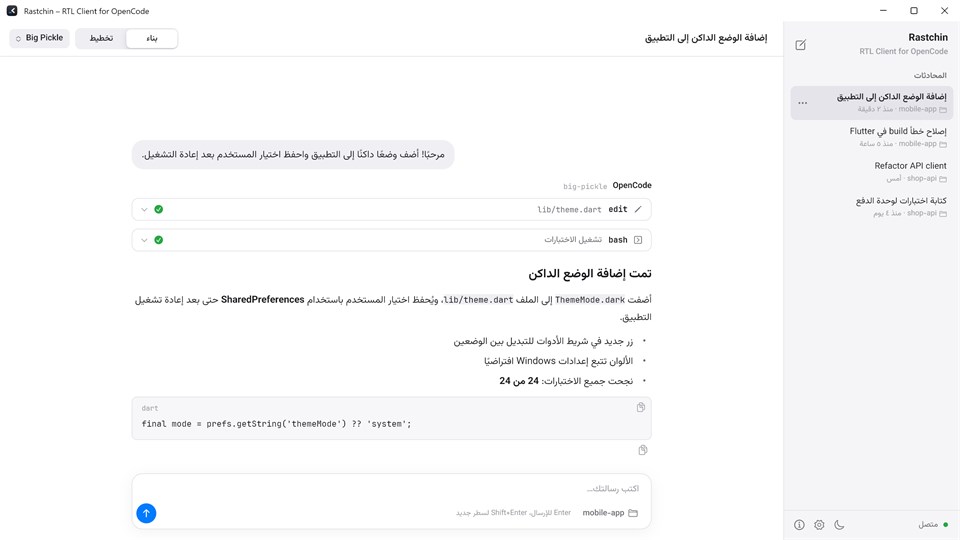
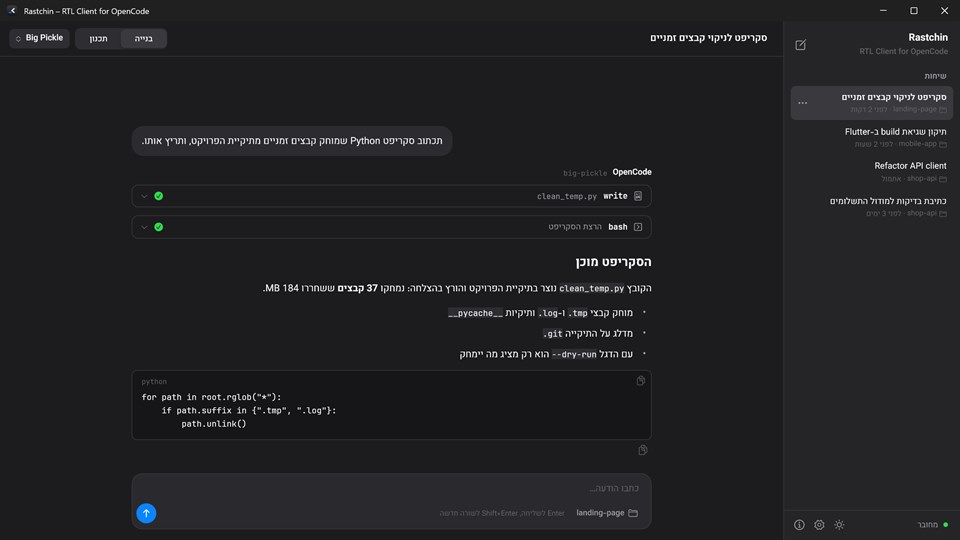
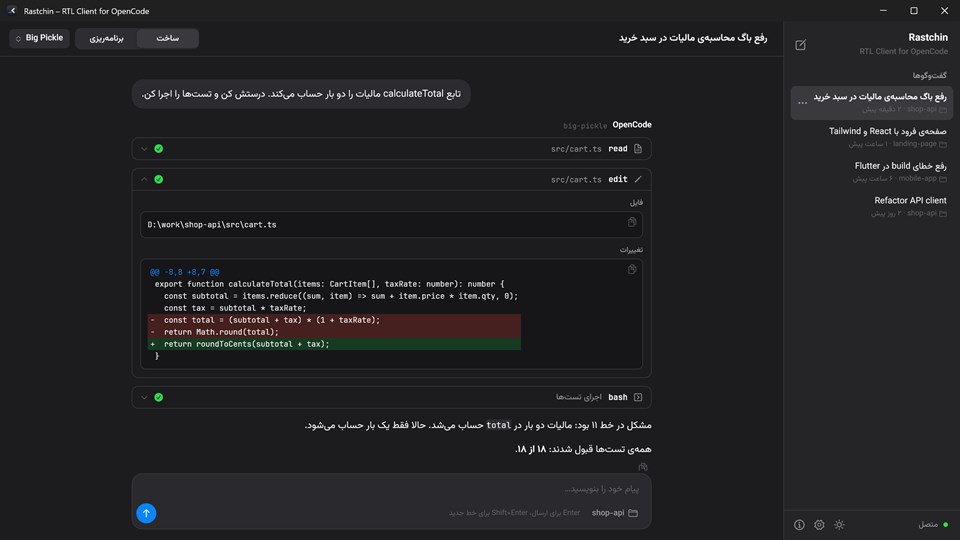
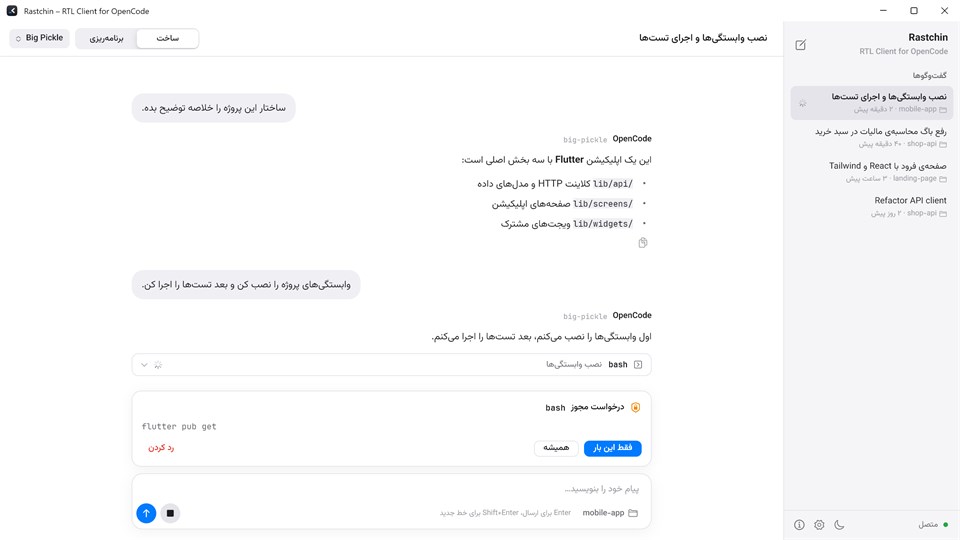
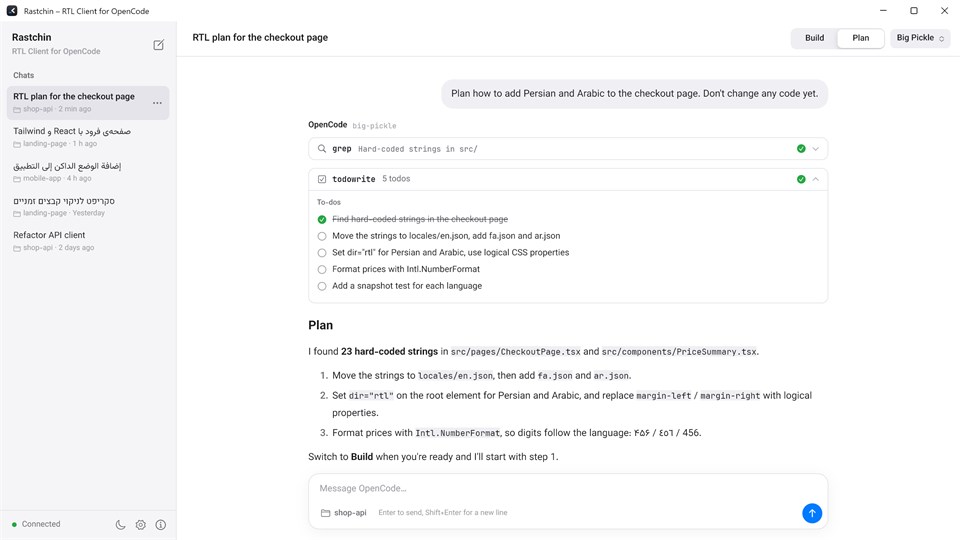
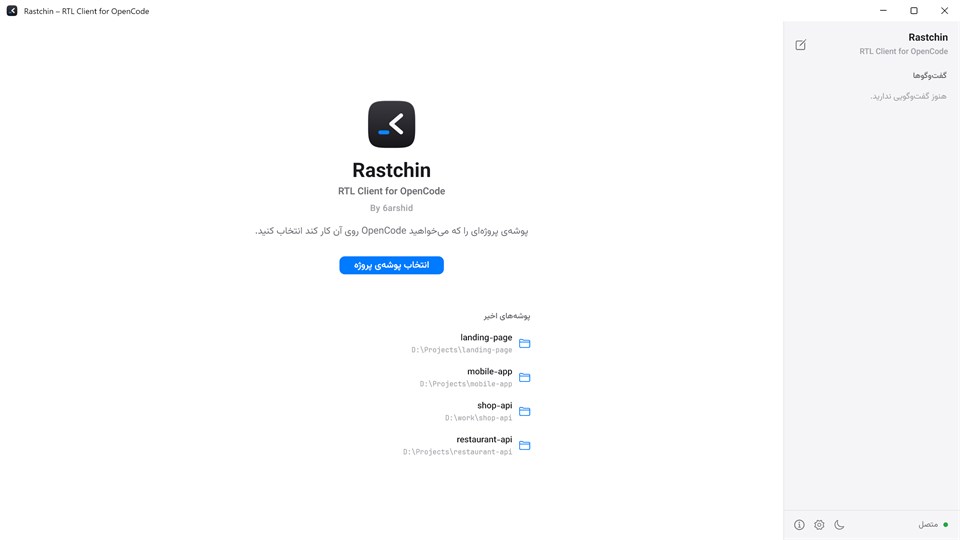
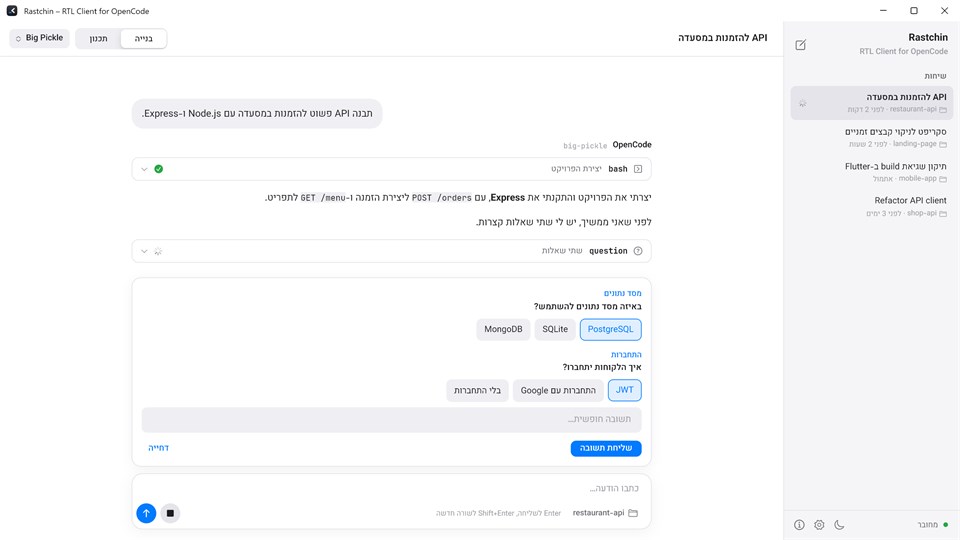
A terminal can't do this. In a terminal, right-to-left text comes out reversed or with its letters broken apart, and mixed sentences like "the file HelloWorld.mp4 was created" end up in the wrong order. Rastchin detects the direction of every paragraph, heading, list item, table cell and even every line, so mixed Persian and English, Arabic and English, or Hebrew and English reads naturally.
EVERYTHING OPENCODE DOES, IN ONE WINDOW
• Live replies: the model's answer appears while it is being written.
• Tool cards: every tool call (bash, read, write, edit, grep and more) gets a card you can open to see its input and output. File edits are shown as a colored diff.
• Permissions and questions: when OpenCode asks for permission to run a command, or asks you a question, you answer with one click.
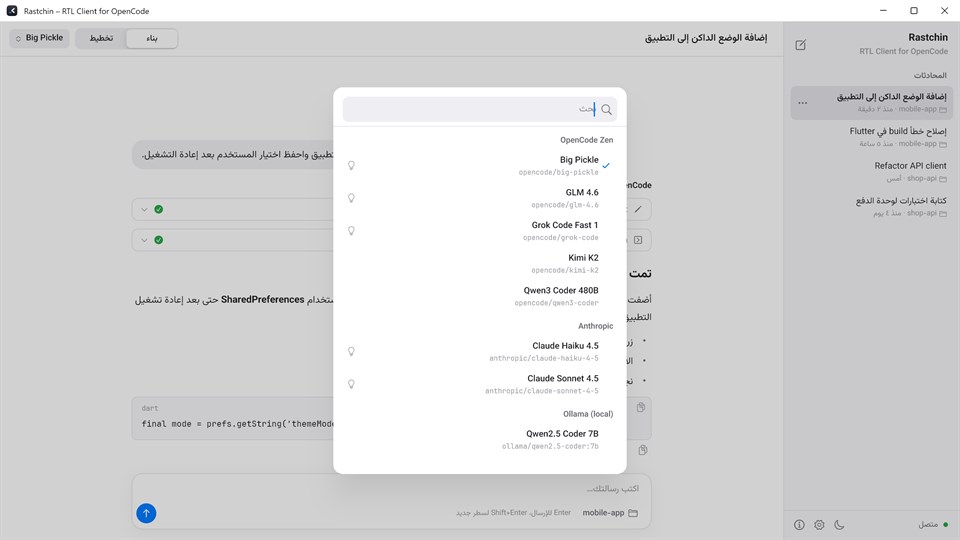
• Models and modes: pick any model from your OpenCode providers, with search, and switch between Build and Plan.
• Every chat has its own project folder, and chats from all folders are listed together in the sidebar.
• Stop a reply at any time.
• Optionally show the model's thinking.
MADE FOR RIGHT-TO-LEFT LANGUAGES
• Accurate direction for every paragraph, even when a sentence starts with an English word.
• Inline code, commands and paths stay left to right, even in the middle of a Persian sentence. When you copy, the invisible direction marks are removed, so commands work in a terminal.
• Letters stay joined across bold and normal text.
• The message box switches direction as you type.
• Bundled fonts: Vazirmatn (Persian and Arabic), Heebo (Hebrew) and JetBrains Mono (code).
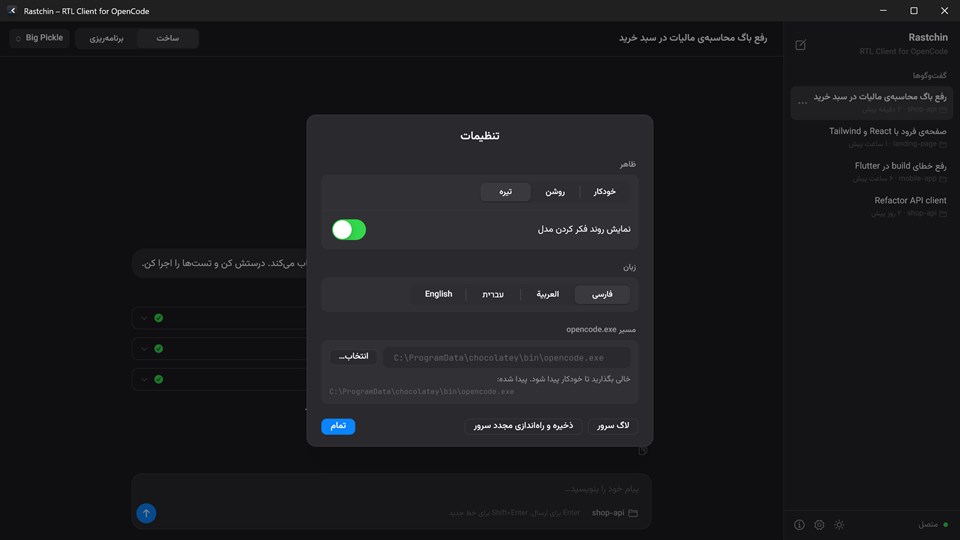
• Interface in Persian, Arabic, Hebrew and English, with digits that follow the language.
SIMPLE AND PRIVATE
• The app starts the OpenCode server on your own computer, with a random password, and stops it when you close the window.
• Works with OpenCode 1.x and 2.x and finds opencode.exe automatically.
• Light and dark mode, with a Windows title bar that matches.
• No account, no ads, no tracking. The app itself sends no data to us.
REQUIREMENTS
• Windows 10 or 11 (64-bit).
• OpenCode, installed for example with Node.js: npm install -g @opencode/cli
• At least one model provider set up in OpenCode. The free OpenCode Zen models work without extra setup; add API keys for other providers with: opencode auth login
Rastchin is an unofficial app made by 6arshid. It is not made by or affiliated with the OpenCode team. OpenCode is open-source software, and the AI providers you choose in OpenCode process your messages under their own terms.
จากนักพัฒนา
รายการ 0
-
 Rastchin – RTL Client for OpenCode
แต้ม 0
-

- +1 แต้ม

การจัดอันดับ 0
-
- คะแนนของคุณ
ผู้พัฒนา 46
- 6arshid
- ผู้ติดตาม: 0
- แพลตฟอร์ม: Android แอป (17) Android เกม (9) Windows แอป (17) Windows เกม (3)
- ลดราคา: 0
- รายการ: 1 0
- แต้ม: 1
- การจัดอันดับ: 0
- ความคิดเห็น: 0
- วิดีโอ: 0
- RSS: ติดตาม
มีอะไรใหม่
- เวอร์ชัน: PC
- อัปเดตล่าสุด:
- First release on the Microsoft Store.
• Works with OpenCode 1.x and 2.x; the app detects which one you have.
• Every chat works in its own project folder, and chats from all folders appear in one list.
• New About window with contact and support links.
ข้อมูลเพิ่มเติม
- วันที่วางจำหน่าย:
- หมวดหมู่:
แอปสำหรับ Windows›เครื่องมือสำหรับนักพัฒนา - ระบบปฏิบัติการ:
PC - ขนาด:
14 Mb - ภาษาที่รองรับ:
อังกฤษ,อาหรับ,ฮิบรู,เปอร์เซีย - การจัดประเภทเนื้อหา:
EVERYONE - Windows Store คะแนน: ¡
0 - เว็บไซต์:
 https://6arshid.com
คะแนน AppAgg
คะแนน AppAgg โดยประมาณของ
Rastchin – RTL Client for OpenCode
ผู้พัฒนา: 6arshid
คะแนนที่สูงขึ้นมักสะท้อนตัวชี้วัดที่ดีกว่าบน AppAgg
อิงจาก: ความนิยม · คะแนนจากผู้ใช้ · ความสดใหม่ · ดีล · ข้อมูลร้านค้า · กิจกรรมชุมชน
คำนวณใหม่ทุกวันจากข้อมูล AppAgg ล่าสุด
ความคิดเห็น 0 ¡
แชร์
Rastchin – RTL Client for OpenCode URL แบบสั้น: คัดลอกแล้ว!- Windows Store

