
ブックマーク
このブックマークのタイトルを入力してください。
ブックマークを保存しました
| 開発者: | ReqFlow (1) | ||
| 価格: | 無料 | ||
| スコア: | 1,050 シルバー | ||
| ランキング: | 0 | ||
| コメント: | 0 コメントを投稿する | ||
| リスト: | 0 0 | ||
| ポイント: | 0 | ||
| +1 ポイント | |||
概要
ReqFlowは、ReqFlowが手がける「開発者ツール」カテゴリのアプリです。
にリリース。まだまだフレッシュです。
無料。広告なし、アプリ内課金なし。あなたとアプリだけです。
Microsoft StoreはWindowsに組み込まれているので、数クリックでインストールできます。
AppAggスコアは1,050。「シルバー」なら、なかなかのものです。
年齢区分は「EVERYONE」なので、子どもでも安心です。
対応言語はひとつだけ、しかも日本語ではありません。
使ってみましたか?あなたのレビューがここで最初の一件になります。
AppAggにあるこの開発者のアプリはこれだけ。今のところは。
アップデートや新しいアプリを誰よりも早く知りたい?開発者をフォローするか、RSS フィードを購読しましょう。プッシュ通知は Android と iOS 向けの AppAgg Alerts アプリで届きます。
広告
他のプラットフォーム 0
価格履歴 0
- 現在の価格: 無料
- 最小値: 無料
- 最大値: 無料
ホームに自分だけのフィード
「新着・アップデート」のプラットフォームを選ぶと、ホームには必要なアプリとゲームだけが表示されます。
スクリーンショット 6
動画 1
説明

Most API tools are built around a single request and a single response. Real debugging rarely works that way. A login issues a token, the token authorizes a checkout, the checkout fires a webhook — and when something breaks three steps in, you need to know which field changed and when it started changing.
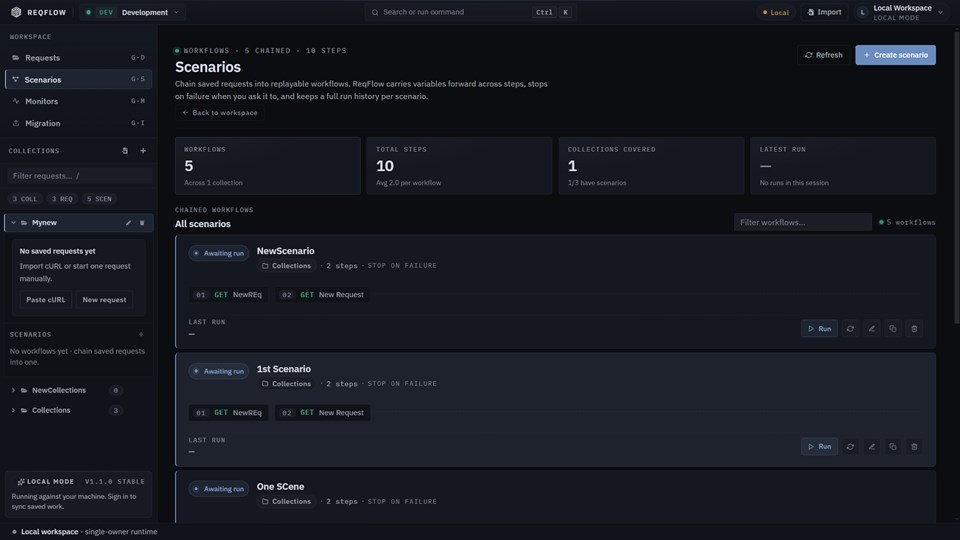
ReqFlow is a desktop workspace built for that problem. Chain requests into a scenario that runs in order, pin a known-good response as a baseline, and compare every later run against it with a structural JSON diff. Run history keeps the record, so you can find the exact run where behaviour shifted.
Requests execute from your PC. That means localhost endpoints, services on your internal network, and remote APIs are all reachable without routing traffic through a third-party proxy.
WHAT'S INSIDE
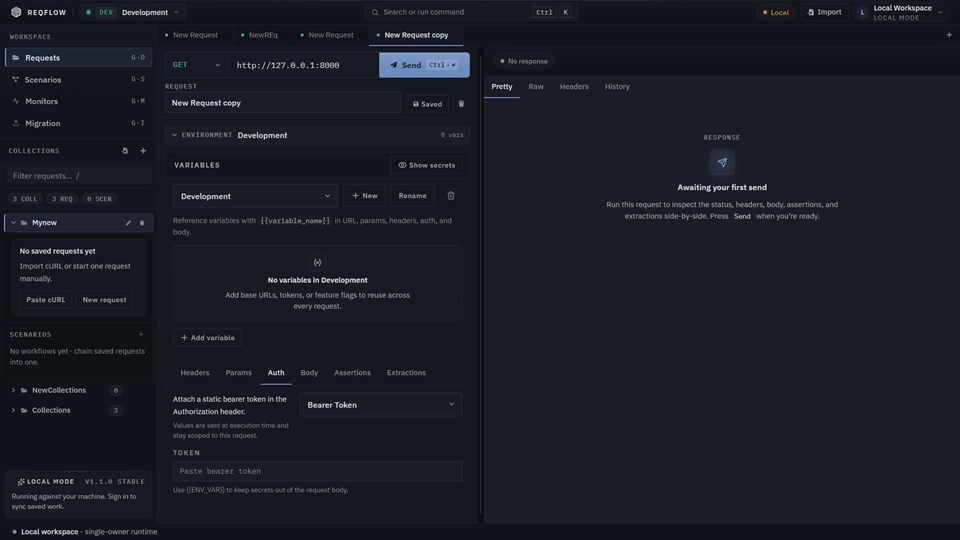
- Request editor — Full control over method, URL, headers, query parameters, and body. JSON, form data, and raw payloads, with syntax highlighting and formatting.
- Response viewer — Status codes, headers, timing, and body output. JSON is highlighted and collapsible.
- Scenarios — Chain requests into a workflow that runs in order. Extract values from one response into the next, assert on results, and halt the run on failure. Built for login flows, checkout paths, token refresh, and webhook confirmation.
- Baselines and diffing — Pin a known-good response, then compare later runs against it. A structural JSON diff shows which fields were added, removed, or changed, with a text diff as fallback for non-JSON payloads.
- Run history — Every run is recorded with its response, timing, and assertion results.
- Collections and environments — Group requests into named collections. Define variables per environment (development, staging, production) and switch context without editing individual URLs or headers.
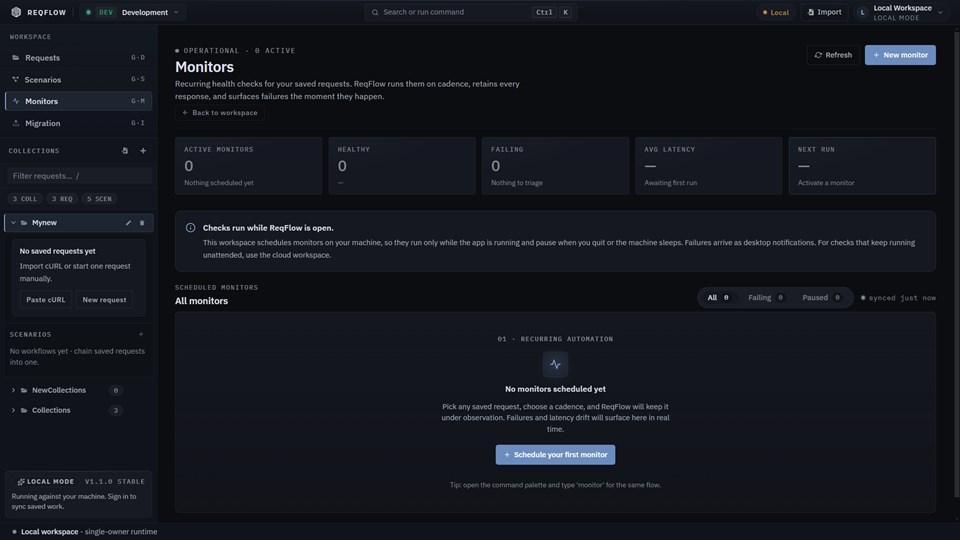
- Scheduled monitors — Promote a saved request or a full scenario into a monitor that runs on a schedule and reports failures, with incident history and one-click replay of a failed run in its original context.
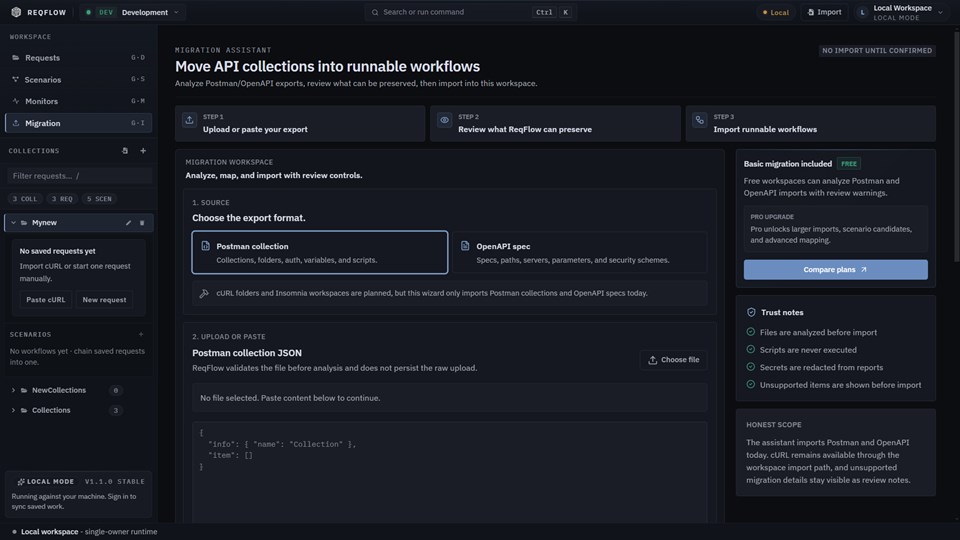
- Imports — Bring in existing work from Postman collections, OpenAPI and Swagger specs, and cURL commands.
- Keyboard-driven — A global command palette (Ctrl+K) and a shortcut catalog (?) for working without the mouse.
- Themes — Light, dark, and brand.
THREE WAYS TO RUN IT
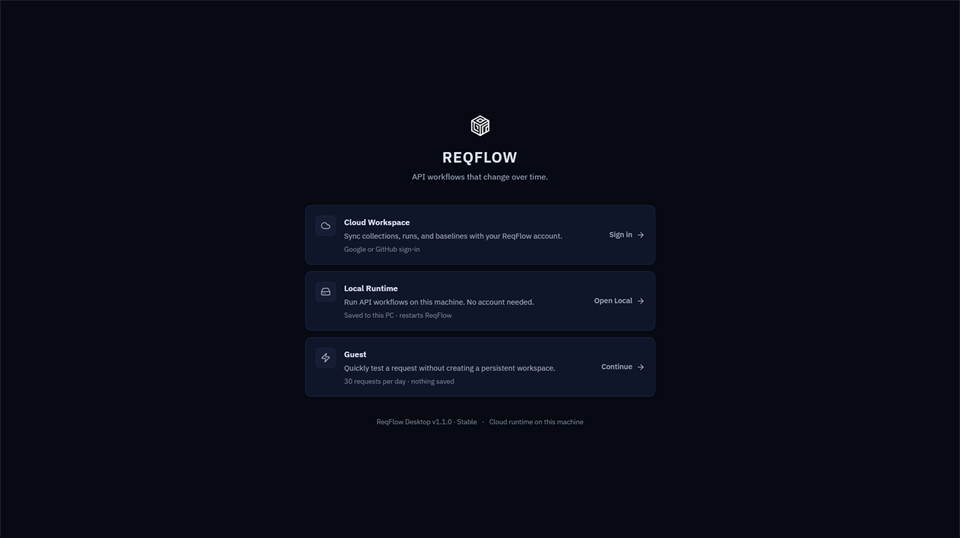
ReqFlow offers a choice on startup.
Local Mode — Runs entirely on this PC with no account and no sign-in. Work is saved to this machine. No daily request limit. Monitors run locally while ReqFlow is open, and failures raise a Windows notification.
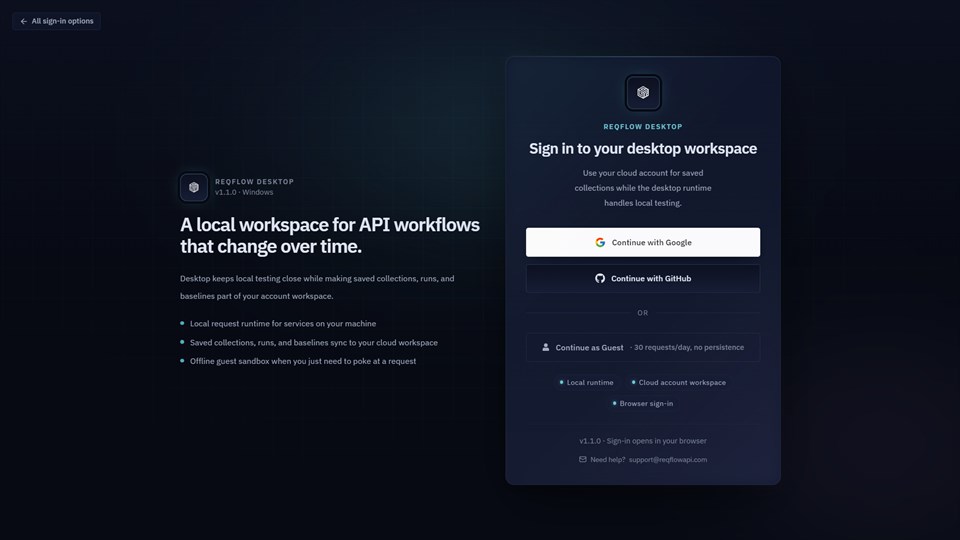
Cloud Workspace — Sign in with Google or GitHub to sync collections, runs, and baselines across devices. Monitors run on ReqFlow's servers on schedule whether or not the app is open, with email, Slack, and Discord alerts. Requires an internet connection.
Guest Trial Mode — Send a request immediately without creating a workspace. Intended for evaluation. Limitations are listed below.
You can switch between Local Mode and the Cloud Workspace from the account menu at any time.
GUEST TRIAL MODE — LIMITATION DISCLOSURE
Guest trial mode allows use of the application without creating an account or signing in. It is intended for evaluation and quick one-off requests only.
- Guest trial mode is limited to 30 API requests per day. Once this limit is reached, no further requests can be sent until the following day.
- Guest sessions are not persistent. Work is not retained as a saved workspace.
- Cloud-connected features — cross-device sync, cloud workspace storage, server-side scheduled monitors, and email, Slack, and Discord alerts — are not available in guest trial mode. These require signing in with a Google or GitHub account and an active internet connection.
Guest trial mode is not the only way to use ReqFlow without an account. Local Mode provides the full local workspace — request editor, response viewer, collections, environments, scenarios, baselines, diffing, and run history — with no account, no sign-in, and no daily request limit. Work in Local Mode is saved to this PC.
BUILT AS A TOOL, NOT A SHOWCASE
The interface is minimal and keyboard-friendly. No built-in browser, no embedded ads, no social features. It is a workspace for running API workflows, reading responses, and finding out what changed.
REQUIREMENTS
- Windows 10 version 1809 or later
- No internet connection required for Local Mode or local API testing
- Internet connection required for sign-in, cross-device sync, server-side monitors, and alerts
デベロッパーから
デベロッパーの方ですか?
ページの一番上にニュースを投稿すると、フォロワーにメールで届きます。YouTube 動画を追加すると、「動画」の一番上に表示されます。
リスト 0
-
 ReqFlow
ポイント 0
-

- +1 ポイント

ランキング 0
-
- あなたの評価
開発者 1
- ReqFlow
- フォロワー: 0
- プラットフォーム: Windows アプリ (1)
- セール: 0
- リスト: 0 0
- ポイント: 0
- ランキング: 0
- コメント: 0
- 動画: 1
- RSS: 購読する
新機能
- バージョン: PC
- 最終更新:
- Local Runtime now has a real Free tier — and a Pro tier worth paying for.
FREE, on your machine, forever
- Unlimited requests, collections, environments, and scenarios
- Baselines, deep response diffs, run history, and one-click replay
- Postman, OpenAPI, and cURL imports
- Fully offline — no account required, ever
- 1 scheduled monitor, checked every 30 minutes
PRO
- 20 local monitors with 1-minute checks
- Advanced Postman / OpenAPI migration
- One subscription also covers your ReqFlow cloud workspace, where
always-on monitoring and email alerts keep running even when your
machine is off
Existing users: Free now includes 1 scheduled monitor at 30-minute
checks. Monitors you already created keep running exactly as they are.
情報
- リリース日:
- カテゴリ:
Windows向けアプリ›開発者ツール - オペレーティング システム:
PC - サイズ:
119 Mb - サポートされる言語:
英語 - コンテンツのレーティング:
EVERYONE - Windows Store 評価: ¡
0 - ウェブサイト:
 https://www.reqflowapi.com
AppAggスコア
1,050
AppAgg推定スコア:
ReqFlow
開発者: ReqFlow
1,050 シルバー
スコアが高いほど、AppAgg上の各指標が良好な傾向にあります。
基準: 人気 · ユーザー評価 · 新しさ · セール · ストアデータ · コミュニティ活動
最新のAppAggデータに基づいて毎日再計算されます。
ウェブサイト用バッジ:  コピーしました!
コメント 0 ¡
最初のコメントを書きましょう
シェア
ReqFlow 短縮 URL: コピーしました!- Windows Store

