
บุ๊กมาร์ก
| ผู้พัฒนา: | sumalab studio (1) | ||
| ราคา: | $9.99 ใหม่ | ||
| คะแนน: | 600 เงิน | ||
| การจัดอันดับ: | 0 | ||
| ความคิดเห็น: | 0 โพสต์ความคิดเห็น | ||
| รายการ: | 0 0 | ||
| แต้ม: | 0 | ||
| +1 แต้ม | |||
สรุป
RsyncZilla เป็นแอปในหมวด “เครื่องมือสำหรับนักพัฒนา” จาก sumalab studio
ใหม่เอี่ยม เพิ่งออกเมื่อ ยังหอมกลิ่นโค้ดใหม่อยู่เลย
$9.99 ไม่เคยลดราคาบน AppAgg เลยสักครั้ง ตั้งการแจ้งเตือนราคาไว้ ต่อให้คุณลืม เราก็ไม่ลืม
Microsoft Store มีมาในตัว Windows อยู่แล้ว ติดตั้งได้ในไม่กี่คลิก
คะแนน AppAgg คือ 600 ระดับ “เงิน” ถือว่าไม่เลวเลย
จัดเรต “EVERYONE” เหมาะกับเด็ก ๆ ด้วย
รองรับ 2 ภาษา แต่ยังไม่มีภาษาไทย
ตอนนี้ที่นี่ยังเงียบกริบ ไม่มีคะแนน ไม่มีความคิดเห็น มาทำลายความเงียบกันเถอะ
เป็นแอปเดียวของผู้พัฒนารายนี้บน AppAgg อย่างน้อยก็ตอนนี้
อยากรู้เรื่องลดราคา อัปเดต และแอปใหม่ก่อนใครไหม? ตั้งการแจ้งเตือนราคา ติดตาม ผู้พัฒนา หรือกดติดตาม ฟีด RSS ได้เลย การแจ้งเตือนแบบพุชส่งผ่านแอป AppAgg Alerts สำหรับ Android และ iOS
ภาพหน้าจอ 3
แพลตฟอร์มอื่น 0
ประวัติราคา 0
- ราคาปัจจุบัน: $9.99
- ต่ำสุด: $9.99
- สูงสุด: $9.99
ฟีดของคุณเองบนหน้าแรก
คำอธิบาย

Connect Claude, ChatGPT, Cursor, Antigravity, or your own local AI model directly to your live SSH terminal sessions without ever sharing your server passwords. Let your AI inspect logs, run commands, read or edit remote files, and upload/download data while you watch everything happen live on screen with strict per-tab permissions (AI: Off, AI: Confirm with one-click Allow/Deny, or AI: Auto).
Instead of re-uploading entire folders or leaving broken half-transferred files on your server, RsyncZilla uses bundled rsync over SSH so only changed blocks are transferred with automatic resume, real error reporting, and atomic file updates.
Key highlights:
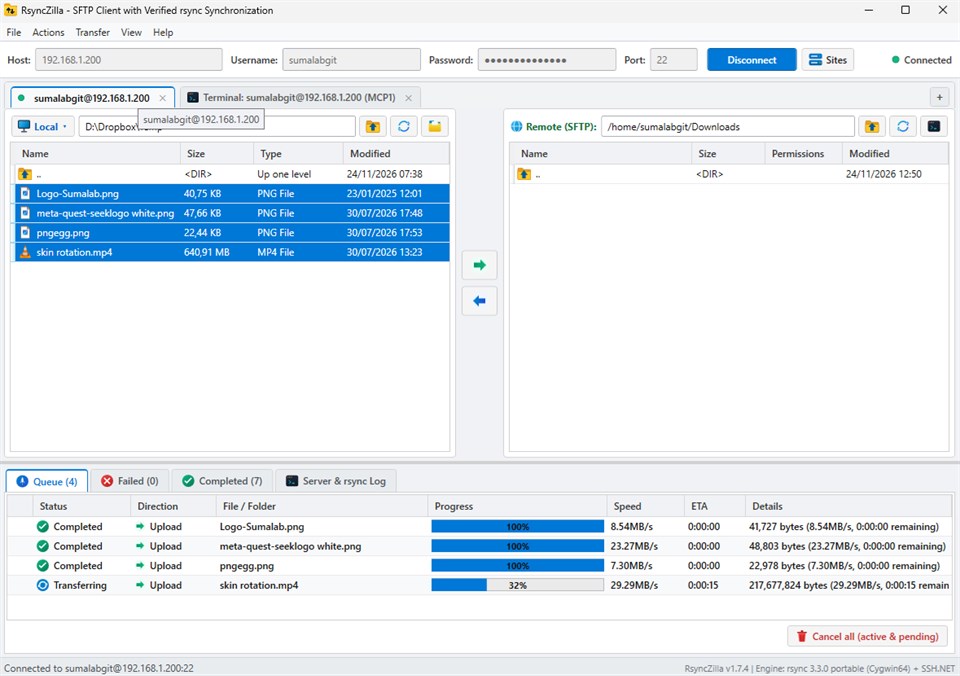
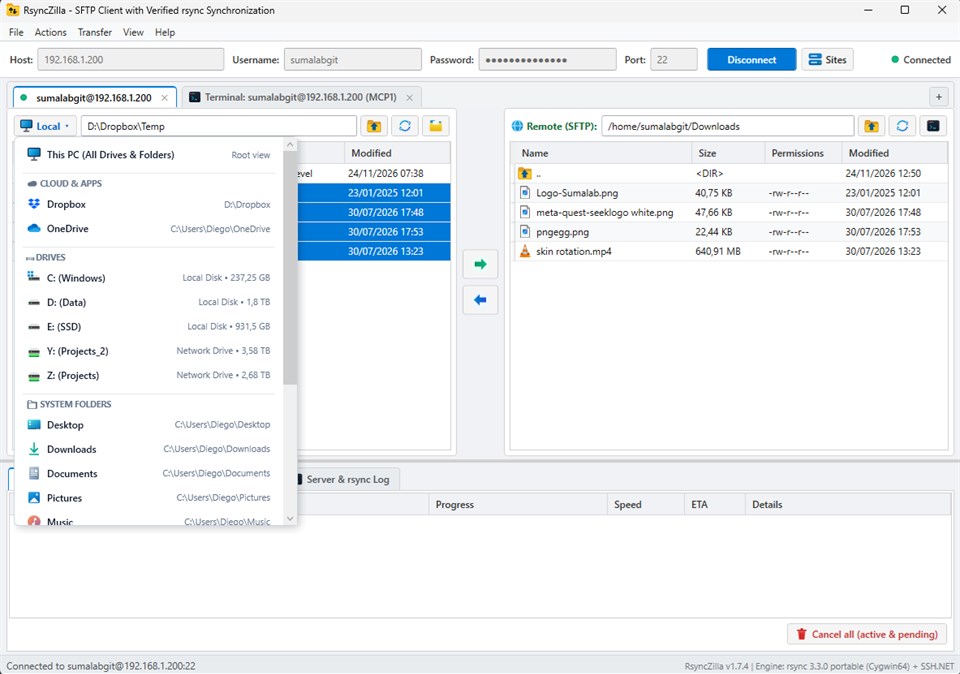
• Dual-pane Local & Remote SFTP Explorer with drag-and-drop (including dragging directly to Windows Explorer / Desktop), Windows 11 native icons, and quick navigation to Drives, Cloud folders (Dropbox, OneDrive...), and Quick Access.
• Resumable rsync over SSH Transfer Queue with live progress, speed stats, overwrite rules (--update, --checksum, --ignore-times), and automatic retry.
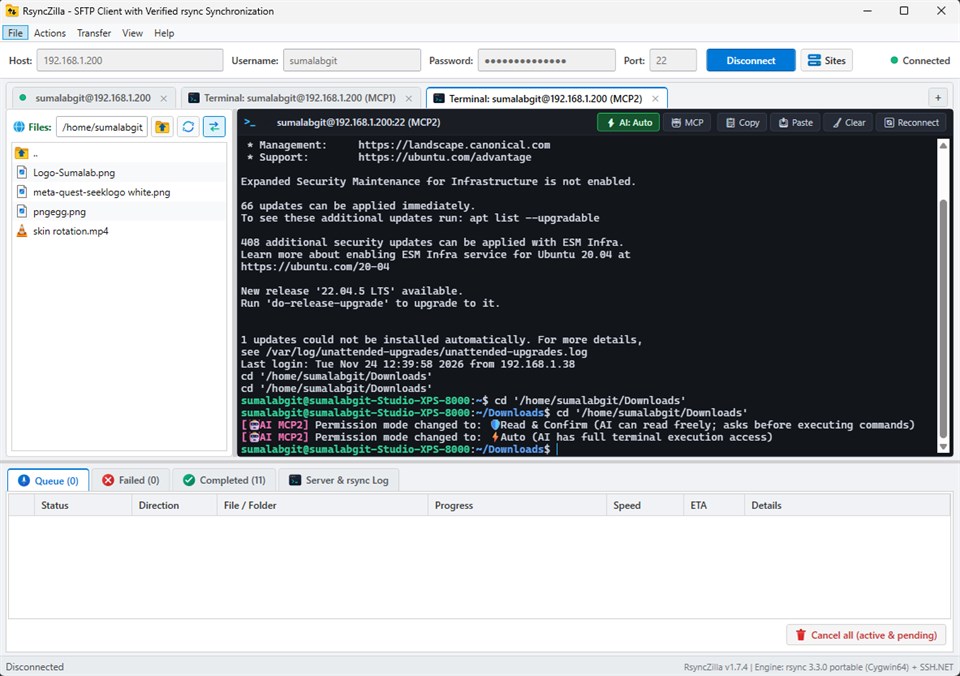
• Integrated Interactive SSH Terminal (xterm.js) with a synchronized remote file tree that tracks your `cd` commands in real time.
• Optional Local AI MCP Server (Model Context Protocol): disabled by default per tab (AI: Off / AI: Confirm / AI: Auto), letting AI assistants like Claude, ChatGPT, Cursor, or Antigravity assist with your live terminal sessions under your explicit control.
• Site Manager with FileZilla XML Import & Optional AES-256-GCM Encrypted Password Vault (PBKDF2 key derivation, zero plaintext storage).
• Remote File Editing ("View/Edit" & "Open with...") with automatic upload sync on save.
RsyncZilla is free and open source (MIT license) on GitHub. Purchasing it on the Microsoft Store provides a Microsoft-signed package with automatic updates and directly supports ongoing development by Sumalab.
จากนักพัฒนา
ผู้พัฒนา
- sumalab studio
- ผู้ติดตาม: 0
- แพลตฟอร์ม: Windows แอป (1)
- ลดราคา: 0
- รายการ: 0 0
- แต้ม: 0
- การจัดอันดับ: 0
- ความคิดเห็น: 0
- วิดีโอ: 0
- RSS: ติดตาม
รายการ 0
-
 RsyncZilla
แต้ม 0
-

- +1 แต้ม

การจัดอันดับ 0
-
- คะแนนของคุณ
มีอะไรใหม่
- เวอร์ชัน: PC
- อัปเดตล่าสุด:
- Version 1.7.4:
- Formatted Markdown release notes viewer and new Help -> Release Notes menu.
- Terminal toolbar buttons now immediately return keyboard focus to the live terminal.
- Shell prompt is automatically preserved and restored after MCP commands and notices.
- Local Quick Navigation panel (This PC, Cloud folders like Dropbox/OneDrive, Drives, and Explorer Quick Access).
- Integrated AI MCP server (per-tab Off / Confirm / Auto permissions) with multi-tab support (MCP1, MCP2...).
ข้อมูลเพิ่มเติม
- วันที่วางจำหน่าย:
- หมวดหมู่:
แอปสำหรับ Windows›เครื่องมือสำหรับนักพัฒนา - ระบบปฏิบัติการ:
PC - ขนาด:
79 Mb - ภาษาที่รองรับ:
สเปน,อังกฤษ - การจัดประเภทเนื้อหา:
EVERYONE - Windows Store คะแนน: ¡
0 - เว็บไซต์:
 https://www.sumalab.com/
ความคิดเห็น 0 ¡
คะแนน AppAgg
คะแนน AppAgg โดยประมาณของ
RsyncZilla
ผู้พัฒนา: sumalab studio
คะแนนที่สูงขึ้นมักสะท้อนตัวชี้วัดที่ดีกว่าบน AppAgg
อิงจาก: ความนิยม · คะแนนจากผู้ใช้ · ความสดใหม่ · ดีล · ข้อมูลร้านค้า · กิจกรรมชุมชน
คำนวณใหม่ทุกวันจากข้อมูล AppAgg ล่าสุด
RsyncZilla URL แบบสั้น: คัดลอกแล้ว!- Windows Store

